'%3e%3cg%20clip-path='url(%23roundHexB)'%3e%3cpath%20fill='%236D5DFC'%20d='M256%2040%20443%20148%20443%20364%20256%20472%2069%20364%2069%20148Z'/%3e%3cpath%20fill='%239C93FB'%20d='M69%20148%20256%2040%20443%20148%20256%20256Z'/%3e%3cpath%20fill='%234A3FD1'%20d='M256%20256%20443%20148%20443%20364%20256%20472Z'/%3e%3c/g%3e%3c!--%20top%20face:%20filled%20round%20magnifier%20--%3e%3cg%20transform='matrix(0.8660254,-0.5,0.8660254,0.5,69,148)'%3e%3cg%20transform='matrix(0.935,0,0,0.935,7.02,7.02)'%3e%3ccircle%20cx='88'%20cy='88'%20r='52'%20fill='%23FFFFFF'/%3e%3ccircle%20cx='88'%20cy='88'%20r='28'%20fill='%239C93FB'/%3e%3cpath%20d='M124%20124%20164%20164'%20stroke='%23FFFFFF'%20stroke-width='26'%20stroke-linecap='round'/%3e%3c/g%3e%3c/g%3e%3cg%20transform='matrix(0.8660254,0.5,0,1,69,148)'%3e%3cpath%20d='M96.1,61.08%20L45.9,128.92%20Q34,145%2054,145%20L162,145%20Q182,145%20170.1,128.92%20L119.9,61.08%20Q108,45%2096.1,61.08%20Z'%20fill='%23FFFFFF'/%3e%3c/g%3e%3c!--%20right%20face:%20filled%20bubble%20--%3e%3cg%20transform='matrix(0.8660254,-0.5,0,1,256,256)'%3e%3cg%20transform='matrix(0.855,0,0,0.855,15.66,15.66)'%3e%3cpath%20d='M60%2042H156a28%2028%200%200%201%2028%2028V158Q184%20168%20174.47%20164.96L124.53%20149.04Q115%20146%20105%20146H60a28%2028%200%200%201-28-28V70a28%2028%200%200%201%2028-28Z'%20fill='%23FFFFFF'/%3e%3c/g%3e%3c/g%3e%3c/g%3e%3c/svg%3e)
 hemati
상품 설명
HETIMA DESK 1.0.1
リリース記念セール:10月7日まで
1,000円 → 500円
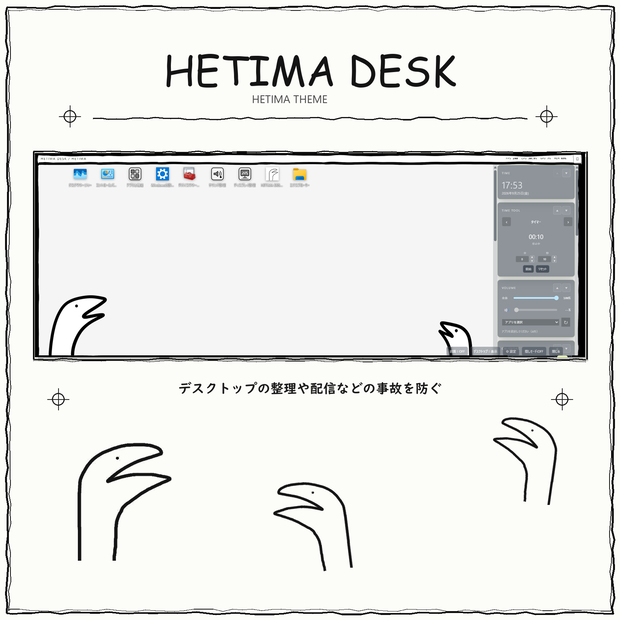
Windowsデスクトップをすっきり整えるランチャーです。アプリやファイルを登録し、時計・カレンダー・Todo・音楽・電卓などを一画面にまとめて表示できます。
作業中は必要な項目だけを表示し、配信や録画のときは「隠しモード」でHETIMA DESK上の登録アプリアイコンを一時的に非表示にできます。
🦀 主な機能
・アプリ、ファイル、フォルダー、ショートカットの登録
・登録アイコンの配置変更とグループ整理
・登録した項目をHETIMA DESKから開く
・時計、カレンダー、Todoの表示
・予定とタイマーのHETIMA DESK内通知
・アプリごとの音量調整
・通知音の設定
・Windowsで再生中の音楽情報を表示する音楽ウィジェット
・四則演算などの基本的な計算とキーボード入力に対応した電卓
・テーマ、背景画像、透明度、表示順、ウィジェット位置の調整
・Windowsデスクトップ上のアイコンの表示/非表示切り替え
・3言語(日本語、English、한국어)に対応
🥷 隠しモード
隠しモードでは、HETIMA DESK上の登録アプリアイコンを一時的に非表示にできます。隠しモード中は、通知ウィジェットと音楽情報も非表示になります。
この機能はHETIMA DESK内の表示を切り替えるものです。元のアプリ、ファイル、フォルダー、ショートカット自体を削除・移動・コピーするものではありません。
🖥️ Windowsデスクトップアイコンの表示切り替え
設定画面からWindowsデスクトップ上のアイコンを一時的に非表示にできます。終了すると元の表示状態へ戻ります。元の項目は変更しません。
🎵 音楽ウィジェット
Windowsのメディア情報に対応したソフトやサービスから、曲名・アーティスト名・再生状態などを表示できます。音声の録音・解析は行いません。サービスによっては曲情報を取得できない場合があります。
⏰ 通知音
通知音はWindows標準音または指定WAVから選択できます。保存するのは音源のパスだけで、WAV自体は変更しません。音量設定はHETIMA DESKだけに適用されます。
📈 データとプライバシー
・登録情報と設定値は基本的に利用端末内で管理
・元のアプリ、ファイル、フォルダー、ショートカットを無断で変更・移動・コピー・削除しない設計
・APIキー、トークン、パスワードなどの認証情報を保存しない
・通知本文、メッセージ本文、個人情報を恒久保存しない
・音楽同期のために音声を録音・解析しない
📖利用規約
https://drive.google.com/drive/folders/10_UKnSLHm8zyvS1Lhb9vBckQcpKMYCTy?usp=drive_link
購入前にご確認ください。
🌍 対応環境
・Windows 10
・Windows 11
📦 配布内容
・NSISインストーラー(一般利用向け)
・README-ja.txt
・EULA-ja.txt(利用規約)
・THIRD-PARTY-NOTICES.txt(第三者ライセンス通知)
※インストーラーの表示言語は英語と日本語に対応しています。アプリ本体は日本語・English・한국어に対応しています。
🎥 配信・実況などでの利用
HETIMA DESKを使用した画面は、動画配信、録画、動画投稿、ライブ配信、実況などのコンテンツ制作に利用できます。第三者のアプリ、ロゴ、画像、音楽などについて必要な許諾を得ていること、および各権利者の利用条件を確認することは、利用者の責任です。
✖ 禁止事項
・インストーラー、実行ファイル、構成ファイル、ライセンスまたは複製物の再配布、転売、譲渡、貸与、公開
・インストーラー、実行ファイルまたは構成ファイルの改変・再パッケージ化
・HETIMA DESKのロゴ、アイコン、画像、画面素材、文章などを抜き出して別の作品・製品・サービスへ利用すること
・著作権表示、商標表示、ライセンス表示または利用規約の削除・改変
・不正な解析、逆コンパイル、逆アセンブルまたは技術的保護の回避
購入前にREADME、EULA-ja.txt、THIRD-PARTY-NOTICES.txtをご確認ください。
■ サポート
不明点や不具合はBOOTHのメッセージからお問い合わせください。個人対応のため返信に時間がかかる場合があります。
■ 注意事項
※本製品は現時点では電子署名を付けていません。Windowsでダウンロードやインストールを行う際にセキュリティ警告が表示される場合があります。警告の内容とファイル名をご確認のうえ、問題がないことを確認してから実行してください。
※Windowsの環境、再生中のソフトやサービスによって、一部の情報を表示できない場合があります。
※重要なファイルや設定は、利用者自身でバックアップを作成してください。
※アップデートがある場合は基本無料で提供します。
====================
English Version
====================
HETIMA DESK 1.0.1
Release sale: 50% off until October 6
1,000 JPY → 500 JPY
A Windows desktop launcher that keeps apps, files, shortcuts, clock, calendar, Todo, music, and a calculator in one place. Hidden Mode can temporarily hide registered app icons.
Main Features
- Register, organize, and open apps, files, folders, and shortcuts
- Rearrange icons and create groups
- Clock, calendar, Todo list, schedules, and timer notifications
- Per-app volume and notification sound settings
- Music widget using media information from Windows
- Calculator for basic arithmetic with keyboard input support
- Adjustable themes, background image, opacity, display order, and widget positions
- Show or hide Windows desktop icons
- App languages: Japanese, English, and Korean
Hidden Mode
Temporarily hides registered app icons, the notification widget, and music information inside HETIMA DESK. It does not delete, move, copy, or modify the original apps, files, folders, or shortcuts.
Windows Desktop Icons
Temporarily hide Windows desktop icons. Their previous display state returns when HETIMA DESK exits. Original items are not modified, moved, copied, or deleted.
Music and Notification Sounds
The music widget displays track titles, artists, and playback status from compatible Windows software and services. It does not record or analyze audio.
Notification sounds can use a Windows system sound or a selected WAV file. Only the file path is stored; the WAV file is not copied, moved, or modified. Volume changes apply only to HETIMA DESK audio.
Data and Privacy
- Registration data and settings are generally stored locally
- Original registered items are not changed without permission
- API keys, tokens, passwords, and other authentication information are not stored
- Notification text, messages, and personal information are not permanently stored
- Audio is not recorded or analyzed
Terms of Use
https://drive.google.com/drive/folders/10_UKnSLHm8zyvS1Lhb9vBckQcpKMYCTy?usp=drive_link
Review before purchase.
System Requirements
- Windows 10
- Windows 11
Included Files
- NSIS installer for general use
- README-ja.txt
- EULA-ja.txt (Terms of Use)
- THIRD-PARTY-NOTICES.txt (Third-Party License Notices)
Note: The installer interface supports English and Japanese. The app supports Japanese, English, and Korean.
Use in Streams and Videos
HETIMA DESK may be shown in streams, recordings, videos, live broadcasts, and other content. Users are responsible for obtaining required permissions and following rights holders’ terms for third-party apps, logos, images, music, and other content.
Prohibited Activities
- Redistributing, reselling, transferring, lending, or publicly sharing the installer, executables, configuration files, license, or copies
- Modifying or repackaging the installer, executables, or configuration files
- Using extracted HETIMA DESK logos, icons, images, screen assets, or text in another work, product, or service
- Removing or modifying copyright, trademark, license, or terms-of-use notices
- Unauthorized analysis, decompilation, disassembly, or circumvention of technical protection measures
Before purchase, review the README, EULA-ja.txt, and THIRD-PARTY-NOTICES.txt.
Support
Questions? Contact BOOTH.
Important Notes
- This product is unsigned. Windows may display a security warning during download or installation. Check the warning and filename before running the file.
- Some information may be unavailable depending on your Windows environment or media software/service.
- HETIMA DESK does not change Windows notification banners, notification sounds, or notification settings.
- Users are responsible for backing up important files and settings.
- If an update is released, it will generally be provided free of charge.
모든 리뷰
더보기리뷰 등록
리뷰를 작성하려면 로그인이 필요합니다.
로그인하고 리뷰 쓰기