'%3e%3cg%20clip-path='url(%23roundHexB)'%3e%3cpath%20fill='%236D5DFC'%20d='M256%2040%20443%20148%20443%20364%20256%20472%2069%20364%2069%20148Z'/%3e%3cpath%20fill='%239C93FB'%20d='M69%20148%20256%2040%20443%20148%20256%20256Z'/%3e%3cpath%20fill='%234A3FD1'%20d='M256%20256%20443%20148%20443%20364%20256%20472Z'/%3e%3c/g%3e%3c!--%20top%20face:%20filled%20round%20magnifier%20--%3e%3cg%20transform='matrix(0.8660254,-0.5,0.8660254,0.5,69,148)'%3e%3cg%20transform='matrix(0.935,0,0,0.935,7.02,7.02)'%3e%3ccircle%20cx='88'%20cy='88'%20r='52'%20fill='%23FFFFFF'/%3e%3ccircle%20cx='88'%20cy='88'%20r='28'%20fill='%239C93FB'/%3e%3cpath%20d='M124%20124%20164%20164'%20stroke='%23FFFFFF'%20stroke-width='26'%20stroke-linecap='round'/%3e%3c/g%3e%3c/g%3e%3cg%20transform='matrix(0.8660254,0.5,0,1,69,148)'%3e%3cpath%20d='M96.1,61.08%20L45.9,128.92%20Q34,145%2054,145%20L162,145%20Q182,145%20170.1,128.92%20L119.9,61.08%20Q108,45%2096.1,61.08%20Z'%20fill='%23FFFFFF'/%3e%3c/g%3e%3c!--%20right%20face:%20filled%20bubble%20--%3e%3cg%20transform='matrix(0.8660254,-0.5,0,1,256,256)'%3e%3cg%20transform='matrix(0.855,0,0,0.855,15.66,15.66)'%3e%3cpath%20d='M60%2042H156a28%2028%200%200%201%2028%2028V158Q184%20168%20174.47%20164.96L124.53%20149.04Q115%20146%20105%20146H60a28%2028%200%200%201-28-28V70a28%2028%200%200%201%2028-28Z'%20fill='%23FFFFFF'/%3e%3c/g%3e%3c/g%3e%3c/g%3e%3c/svg%3e)
 infinity-studio
 【VRChatワールド向け】Atmosphere System - リアルタイム空・昼夜サイクル・ボリュメトリック雲【Udon】
상품 설명
【VRChatワールド向け】Atmosphere System
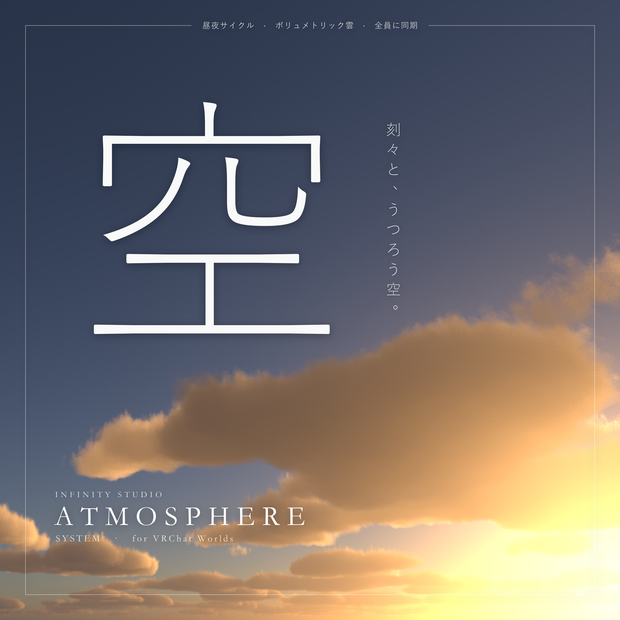
物理ベースの空とボリュメトリック雲を、ひとつのプレハブで導入できる VRChat ワールド向けの空システムです。
日付・時刻・緯度経度から太陽と月の位置を計算し、空・雲・ディレクショナルライト・環境光を連動して更新します。
━━━━━━━━━━━━━━━━━━━━━━
■ 特徴
━━━━━━━━━━━━━━━━━━━━━━
・物理ベースの大気散乱(レイリー散乱・ミー散乱・オゾン吸収・多重散乱)
・日付・時刻・緯度経度に基づく太陽と月の実位置(月相・地球照を含む)。初期設定は東京
・夜間の星空・天の川・大気光
・ボリュメトリック雲:雲量・雲の種類・風速をリアルタイムに変更可能。変更は指定した秒数でなだらかに遷移
・3つの時間モード:固定時刻 / 昼夜サイクル(1日の長さを分単位で指定)/ リアルタイム(ネットワーク時計・全員同一)
・ディレクショナルライトの色と強さ、環境光(Trilight)を空に合わせて自動更新。雲が太陽を覆うと光が弱まります
・時刻・天気・風は Udon で全プレイヤーに同期
・インスペクターでの変更は Edit Mode / Play Mode ともに即時反映
・プレハブをシーンに置くと、スカイボックス・太陽・環境光を自動で設定。「Remove From Scene」で元の設定に戻せます
・インスペクターは日本語 / 英語の切り替えに対応
・他の Udon スクリプトから時刻や天気を操作できる公開メソッド(SetTimeOfDay / SetWeather など)
━━━━━━━━━━━━━━━━━━━━━━
■ 内容物
━━━━━━━━━━━━━━━━━━━━━━
・AtmosphereSystem プレハブ
・AtmosphereController(UdonSharp)
・シェーダー 6種(スカイボックス、大気 LUT、雲、ライティングプローブ)
・マテリアル、レンダーテクスチャ、ノイズテクスチャ、月テクスチャ
・エディター拡張(インスペクター、シーン設定、プレビュー)
・利用規約(日本語 / 英語)
━━━━━━━━━━━━━━━━━━━━━━
■ 動作環境
━━━━━━━━━━━━━━━━━━━━━━
・Unity 2022.3.22f1
・VRChat SDK - Worlds 3.2.0 以降(UdonSharp を使用)
・PC 専用(Quest / Android 非対応)
・動作確認:VRChat SDK 3.10.5
━━━━━━━━━━━━━━━━━━━━━━
■ 導入方法
━━━━━━━━━━━━━━━━━━━━━━
1. unitypackage をプロジェクトにインポート
2. メニュー「Infinity Studio > Add Atmosphere System To Scene」を実行、または AtmosphereSystem プレハブをシーンにドラッグ
3. スカイボックス・太陽・環境光は自動で設定されます。Hierarchy で AtmosphereSystem を選択し、時刻・場所・天気を調整してください
━━━━━━━━━━━━━━━━━━━━━━
■ 注意事項
━━━━━━━━━━━━━━━━━━━━━━
・シーン内の他のディレクショナルライトは導入時に無効化されます(「Remove From Scene」で元に戻ります)
・太陽が動くため、ディレクショナルライトはリアルタイムライトとしての使用を想定しています
・雲の描画は複数フレームに分けて計算されるため、設定変更の直後は数フレームで収束します
・シェーダーは Shader Model 5.0 を使用します
━━━━━━━━━━━━━━━━━━━━━━
■ 更新履歴
━━━━━━━━━━━━━━━━━━━━━━
v1.0.0 初回リリース
━━━━━━━━━━━━━━━━━━━━━━
■ 利用規約(要約)
━━━━━━━━━━━━━━━━━━━━━━
・購入者本人による VRChat ワールドおよび Unity 制作物での利用(商用可)、自身の利用のための改変を許可します
・本製品のファイルおよび改変物の再配布・譲渡・販売、販売または配布する Unity プロジェクト・アセットへの同梱を禁止します(アップロード済みワールドの公開は除く)
・生成 AI の学習データとしての利用を禁止します
・ライセンスは購入者本人(1名)に付与されます
・本製品は現状有姿で提供され、利用により生じた損害について当方は責任を負いません
・ダウンロード商品のため、購入後のキャンセル・返金には応じられません
正式な規約は同梱の TermsOfUse_JP.txt をご確認ください。
━━━━━━━━━━━━━━━━━━━━━━
■ お問い合わせ
━━━━━━━━━━━━━━━━━━━━━━
不具合のご報告は BOOTH メッセージまたは [email protected] まで。
商品名、Unity / SDK のバージョン、発生状況を添えていただけると対応が早くなります。
━━━━━━━━━━━━━━━━━━━━━━
English
━━━━━━━━━━━━━━━━━━━━━━
Atmosphere System for VRChat Worlds
A physically based sky and volumetric clouds in one prefab.
Sun and moon positions are computed from date, time and location; sky, clouds, directional light and ambient lighting update together.
■ Features
- Physically based atmospheric scattering (Rayleigh, Mie, ozone absorption, multiple scattering)
- Real sun and moon positions from date, time, latitude and longitude, including moon phase and earthshine. Default location is Tokyo
- Stars, Milky Way and airglow at night
- Volumetric clouds: coverage, cloud type and wind speed can be changed at runtime; changes blend over a configurable number of seconds
- Three time modes: fixed time / day-night cycle (day length in real minutes) / real time (network clock, identical for everyone)
- Directional light colour and intensity and ambient lighting (Trilight) follow the sky; clouds covering the sun dim the light
- Time, weather and wind are synced to all players via Udon
- Inspector changes apply immediately in Edit Mode and Play Mode
- Dropping the prefab into a scene configures skybox, sun and ambient lighting automatically; "Remove From Scene" restores the previous settings
- Inspector in English and Japanese
- Public methods for other Udon scripts (SetTimeOfDay, SetWeather, ...)
■ Contents
- AtmosphereSystem prefab
- AtmosphereController (UdonSharp)
- 6 shaders (skybox, atmosphere LUTs, clouds, lighting probe)
- Materials, render textures, noise and moon textures
- Editor extension (inspector, scene setup, preview)
- Terms of Use (Japanese / English)
■ Requirements
- Unity 2022.3.22f1
- VRChat SDK - Worlds 3.2.0 or later (uses UdonSharp)
- PC only (not compatible with Quest / Android)
- Tested with VRChat SDK 3.10.5
■ Setup
1. Import the unitypackage into your project
2. Run "Infinity Studio > Add Atmosphere System To Scene" from the menu, or drag the AtmosphereSystem prefab into the scene
3. Skybox, sun and ambient lighting are configured automatically. Select AtmosphereSystem in the Hierarchy to set time, location and weather
■ Notes
- Other directional lights in the scene are disabled on setup ("Remove From Scene" turns them back on)
- Since the sun moves, the directional light is meant to be used as a realtime light
- Cloud rendering is spread over several frames; the image settles within a few frames after a change
- Shaders use Shader Model 5.0
■ Changelog
v1.0.0 Initial release
■ Terms of Use (summary)
- Use by the purchaser in VRChat worlds and Unity projects (commercial use allowed) and modification for your own use are permitted
- Redistributing, transferring or selling the files or modified versions, and bundling them in Unity projects or assets that are sold or distributed, are prohibited (publishing an uploaded world is fine)
- Use as training data for generative AI is prohibited
- The licence is granted to the purchaser as one person
- Provided as is; we accept no liability for damage arising from its use
- As a digital download, orders cannot be cancelled or refunded after purchase
See the included TermsOfUse_EN.txt for the full terms.
■ Contact
For bug reports, use BOOTH messages or [email protected].
Please include the product name, your Unity / SDK version and what happened.
Terms of Service
・購入者本人による VRChat ワールドおよび Unity 制作物での利用(商用可)、自身の利用のための改変を許可します
・本製品のファイルおよび改変物の再配布・譲渡・販売、販売または配布する Unity プロジェクト・アセットへの同梱を禁止します(アップロード済みワールドの公開は除く)
・生成 AI の学習データとしての利用を禁止します
・ライセンスは購入者本人(1名)に付与されます
・本製品は現状有姿で提供され、利用により生じた損害について当方は責任を負いません
・ダウンロード商品のため、購入後のキャンセル・返金には応じられません
正式な規約は同梱の TermsOfUse_JP.txt / TermsOfUse_EN.txt をご確認ください。
- Use by the purchaser in VRChat worlds and Unity projects (commercial use allowed) and modification for your own use are permitted
- Redistributing, transferring or selling the files or modified versions, and bundling them in Unity projects or assets that are sold or distributed, are prohibited (publishing an uploaded world is fine)
- Use as training data for generative AI is prohibited
- The licence is granted to the purchaser as one person
- Provided as is; we accept no liability for damage arising from its use
- As a digital download, orders cannot be cancelled or refunded after purchase
See the included TermsOfUse_JP.txt / TermsOfUse_EN.txt for the full terms.
Update information
v1.0.0 初回リリース / Initial release
모든 리뷰
더보기리뷰 등록
리뷰를 작성하려면 로그인이 필요합니다.
로그인하고 리뷰 쓰기