'%3e%3cg%20clip-path='url(%23roundHexB)'%3e%3cpath%20fill='%236D5DFC'%20d='M256%2040%20443%20148%20443%20364%20256%20472%2069%20364%2069%20148Z'/%3e%3cpath%20fill='%239C93FB'%20d='M69%20148%20256%2040%20443%20148%20256%20256Z'/%3e%3cpath%20fill='%234A3FD1'%20d='M256%20256%20443%20148%20443%20364%20256%20472Z'/%3e%3c/g%3e%3c!--%20top%20face:%20filled%20round%20magnifier%20--%3e%3cg%20transform='matrix(0.8660254,-0.5,0.8660254,0.5,69,148)'%3e%3cg%20transform='matrix(0.935,0,0,0.935,7.02,7.02)'%3e%3ccircle%20cx='88'%20cy='88'%20r='52'%20fill='%23FFFFFF'/%3e%3ccircle%20cx='88'%20cy='88'%20r='28'%20fill='%239C93FB'/%3e%3cpath%20d='M124%20124%20164%20164'%20stroke='%23FFFFFF'%20stroke-width='26'%20stroke-linecap='round'/%3e%3c/g%3e%3c/g%3e%3cg%20transform='matrix(0.8660254,0.5,0,1,69,148)'%3e%3cpath%20d='M96.1,61.08%20L45.9,128.92%20Q34,145%2054,145%20L162,145%20Q182,145%20170.1,128.92%20L119.9,61.08%20Q108,45%2096.1,61.08%20Z'%20fill='%23FFFFFF'/%3e%3c/g%3e%3c!--%20right%20face:%20filled%20bubble%20--%3e%3cg%20transform='matrix(0.8660254,-0.5,0,1,256,256)'%3e%3cg%20transform='matrix(0.855,0,0,0.855,15.66,15.66)'%3e%3cpath%20d='M60%2042H156a28%2028%200%200%201%2028%2028V158Q184%20168%20174.47%20164.96L124.53%20149.04Q115%20146%20105%20146H60a28%2028%200%200%201-28-28V70a28%2028%200%200%201%2028-28Z'%20fill='%23FFFFFF'/%3e%3c/g%3e%3c/g%3e%3c/g%3e%3c/svg%3e)
 lme
lme상품 설명
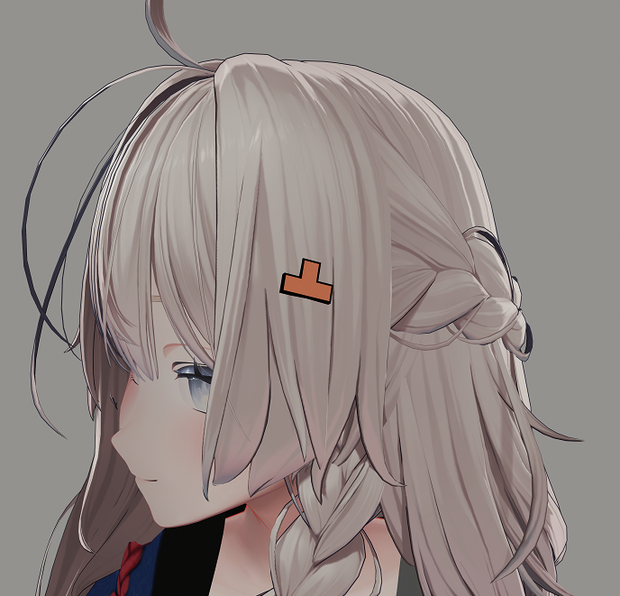
凸 HairPin (MA) / 凸ヘアピン (MA)
A simple hair pin in the form of "凸".
Features:
- Offers three different materials: normal, transparent and audio link
- Offers several different colors to pick from
- Offers two different styles: flat, outline with raised edges
- HairPin toggle already set up
- Prefab is already configured for Modular Avatar
Requirements:
- Modular Avatar (for out of the box experience)
- liltoon shader
Installation:
1. Install the requirements
2. Import the unitypackage
3. Drag and drop "凸HairPin" from the prefab folder onto your avatar base
4. Position and resize the Hairpin
5. Enable one of the Hairpins and delte the rest
6. Choose a material and the color
7. Drag and drop your choosen Hairpin into the Toggle of the Modular Avatar Menu in the "Menu" object
8. Upload
Terms of Use:
- You are not allowed to resell or redistribute this work
(自動生成された翻訳)
凸ヘアピン (MA)
「凸」の形をしたシンプルなヘアピンです。
特徴
- 3種類のマテリアルを収録:通常、透明、AudioLink対応
- 複数のカラーバリエーションを収録
- 2種類のスタイルを収録:フラット、縁が立体的なアウトライン
- HairPinのON/OFFトグル設定済み
- Modular Avatar対応Prefabを設定済み
必要なもの
- Modular Avatar(簡単に導入する場合)
- lilToon Shader
導入方法
1. 必要なものをインストールします
2. unitypackageをインポートします
3. Prefabフォルダ内の「凸HairPin」をアバターのルートにドラッグ&ドロップします
4. HairPinの位置とサイズを調整します
5. 使用したいHairPinを1つ有効にし、不要なものを削除します
6. 使用したいマテリアルとカラーを選択します
7. 選択したHairPinを「Menu」オブジェクト内にあるModular Avatar MenuのToggleへドラッグ&ドロップします
8. アバターをアップロードします
利用規約
- 本商品を再販売・再配布することは禁止されています
모든 리뷰
더보기리뷰 등록
리뷰를 작성하려면 로그인이 필요합니다.
로그인하고 리뷰 쓰기