'%3e%3cg%20clip-path='url(%23roundHexB)'%3e%3cpath%20fill='%236D5DFC'%20d='M256%2040%20443%20148%20443%20364%20256%20472%2069%20364%2069%20148Z'/%3e%3cpath%20fill='%239C93FB'%20d='M69%20148%20256%2040%20443%20148%20256%20256Z'/%3e%3cpath%20fill='%234A3FD1'%20d='M256%20256%20443%20148%20443%20364%20256%20472Z'/%3e%3c/g%3e%3c!--%20top%20face:%20filled%20round%20magnifier%20--%3e%3cg%20transform='matrix(0.8660254,-0.5,0.8660254,0.5,69,148)'%3e%3cg%20transform='matrix(0.935,0,0,0.935,7.02,7.02)'%3e%3ccircle%20cx='88'%20cy='88'%20r='52'%20fill='%23FFFFFF'/%3e%3ccircle%20cx='88'%20cy='88'%20r='28'%20fill='%239C93FB'/%3e%3cpath%20d='M124%20124%20164%20164'%20stroke='%23FFFFFF'%20stroke-width='26'%20stroke-linecap='round'/%3e%3c/g%3e%3c/g%3e%3cg%20transform='matrix(0.8660254,0.5,0,1,69,148)'%3e%3cpath%20d='M96.1,61.08%20L45.9,128.92%20Q34,145%2054,145%20L162,145%20Q182,145%20170.1,128.92%20L119.9,61.08%20Q108,45%2096.1,61.08%20Z'%20fill='%23FFFFFF'/%3e%3c/g%3e%3c!--%20right%20face:%20filled%20bubble%20--%3e%3cg%20transform='matrix(0.8660254,-0.5,0,1,256,256)'%3e%3cg%20transform='matrix(0.855,0,0,0.855,15.66,15.66)'%3e%3cpath%20d='M60%2042H156a28%2028%200%200%201%2028%2028V158Q184%20168%20174.47%20164.96L124.53%20149.04Q115%20146%20105%20146H60a28%2028%200%200%201-28-28V70a28%2028%200%200%201%2028-28Z'%20fill='%23FFFFFF'/%3e%3c/g%3e%3c/g%3e%3c/g%3e%3c/svg%3e)
 ぎゃらくし〜しっくすせんす!Y
상품 설명
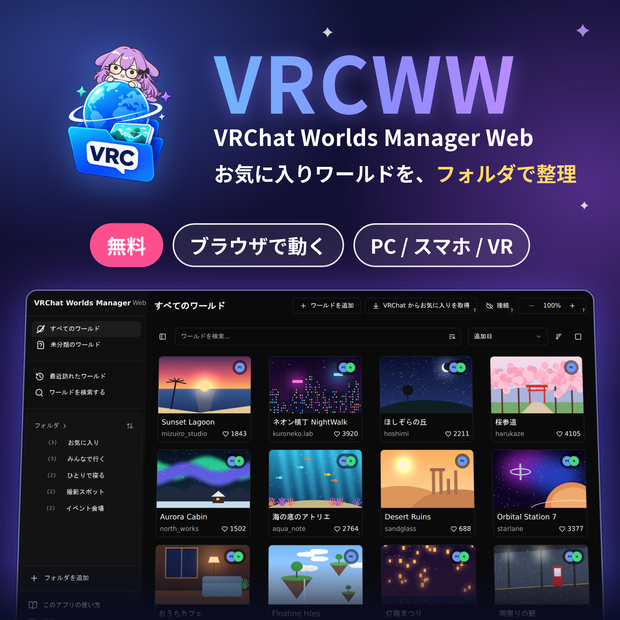
VRChat のお気に入りワールドを、フォルダで整理できる Web アプリです!
ブラウザで開くだけで
PC でも
スマートフォンでも
VR のオーバーレイからでも…!!
どこからでも使えます!
▼ アプリはこちら(無料)
▼ はじめての方へ(使い方)
※
このアプリはブラウザで動く Web アプリです。ダウンロードするファイルは導入手順の PDF です。
アプリ本体ではありません。
迷う方用にPDFを作成しておりますが、案内が必要なければすぐに https://vrcww.com にアクセスしていただけます。
【ご利用の前に】
・このアプリは、有志が個人で開発している非公式のツールです。VRChat Inc. とは関係ありません。
・お気に入りワールドを読み込むために、VRChat のアカウントでログインします。
ユーザー名、パスワード、認証コードは VRChat の公式 API との通信にだけ使い、保存はしません。
くわしくはプライバシーポリシーをご覧ください: https://vrcww.com/privacy
・ワールドやフォルダのデータは、お使いのブラウザの中に保存されます。
・ソースコードは GitHub で公開しています: https://github.com/aiya000/VRChat-Worlds-Manager-Web
【できること】
・VRChat のお気に入りワールドを取り込んで、VRChat 側の枠に縛られずに残せます
・自分で作ったフォルダに整理できます(1 つのワールドを複数のフォルダに入れられます)
・名前、作者、タグ、フォルダで、手元のワールドをすぐに探せます
・VRChat のワールドを検索して、見つけたものをそのままフォルダに入れられます
・アプリからインスタンスを作って、届いた招待からそのワールドへ入れます
・ホーム画面やデスクトップに追加して、ふつうのアプリのように開けます
・Google Drive に接続すると、複数の端末で同じデータを使えます(任意)
【VR の中で使う】
PC のブラウザでこのアプリを開き、そのウィンドウを XSOverlay などで VR 空間に映す使い方がおすすめです。
ヘッドセットを外さずに、フォルダを見て、次のワールドへそのまま移動できます。
【AndroidのVRChatアプリと使う】
Androidのフローティングウィンドウ(Galaxy端末では「ポップアップ表示」)を使うことで、デスクトップ環境のVRChatアプリと同じように、自己招待でのワールド遷移をすることができます。
【困ったときは】
不具合の報告や質問は、GitHub の Issues か Discord で受け付けています。
・GitHub Issues: https://github.com/aiya000/VRChat-Worlds-Manager-Web/issues
・Discord: https://discord.gg/g5nq5GuGPJ
【Special Thanks】
・オリジナルアプリ: VRC Worlds Manager v2(https://github.com/Raifa21/VRC-Worlds-Manager-v2) by Raifa & siloneco
・VRChat および VRChat API コミュニティの皆様、API ドキュメントの提供に感謝します。
・旧サイドバーアイコンは、黒音キト様より CC-BY-NC-4.0 ライセンスで提供されていました。現在は未使用です。
・旧アプリケーションアイコンは Ciel-chan を使用していました。ArmoireLepus 様の許可を得ています。現在は未使用です。
皆様、ありがとうございます。
【English】
―――――――――――――――――――――
VRChat Worlds Manager Web (VRCWW) is a web app for organising your VRChat favorite worlds into folders.
It runs in your browser, on a PC, on a phone, or in a VR overlay.
▼ Open the app (free)
▼ Getting started
* This is a web app that runs in your browser. The downloadable files are getting-started PDFs, not the app itself.
[What it does]
- Keeps your VRChat favorite worlds, beyond the limits of VRChat's own favorite slots
- Sorts them into your own folders (a world can be in more than one)
- Finds worlds quickly by name, author, tag, or folder
- Searches VRChat's worlds and adds what you find straight into a folder
- Creates an instance from the app, and takes you there through the invite you receive
- Can be added to your home screen or desktop and opened like any other app
- Syncs the same data across devices through Google Drive (optional)
[Using it in VR]
We recommend opening the app in a desktop browser and showing that window in VR with XSOverlay or a similar overlay.
[Before you start]
- This is an unofficial tool built by an independent developer, and is not affiliated with VRChat Inc.
- It signs in with your VRChat account to read your favorite worlds.
Your username, password and authentication codes are used only to talk to VRChat's official API, and are never stored.
Privacy policy: https://vrcww.com/privacy
- Your worlds and folders are kept inside the browser you use.
- Source code: https://github.com/aiya000/VRChat-Worlds-Manager-Web
[Need help?]
- GitHub Issues: https://github.com/aiya000/VRChat-Worlds-Manager-Web/issues
- Discord: https://discord.gg/g5nq5GuGPJ
[Special Thanks]
- Original app: VRC Worlds Manager v2 (https://github.com/Raifa21/VRC-Worlds-Manager-v2) by Raifa & siloneco
- The VRChat and VRChat API community, for the API documentation
- The former sidebar icon was provided by 黒音キト under CC-BY-NC-4.0. It is no longer used.
- The former application icon was Ciel-chan, used with permission from ArmoireLepus. It is no longer used.
Thank you all.
모든 리뷰
더보기리뷰 등록
리뷰를 작성하려면 로그인이 필요합니다.
로그인하고 리뷰 쓰기