'%3e%3cg%20clip-path='url(%23roundHexB)'%3e%3cpath%20fill='%236D5DFC'%20d='M256%2040%20443%20148%20443%20364%20256%20472%2069%20364%2069%20148Z'/%3e%3cpath%20fill='%239C93FB'%20d='M69%20148%20256%2040%20443%20148%20256%20256Z'/%3e%3cpath%20fill='%234A3FD1'%20d='M256%20256%20443%20148%20443%20364%20256%20472Z'/%3e%3c/g%3e%3c!--%20top%20face:%20filled%20round%20magnifier%20--%3e%3cg%20transform='matrix(0.8660254,-0.5,0.8660254,0.5,69,148)'%3e%3cg%20transform='matrix(0.935,0,0,0.935,7.02,7.02)'%3e%3ccircle%20cx='88'%20cy='88'%20r='52'%20fill='%23FFFFFF'/%3e%3ccircle%20cx='88'%20cy='88'%20r='28'%20fill='%239C93FB'/%3e%3cpath%20d='M124%20124%20164%20164'%20stroke='%23FFFFFF'%20stroke-width='26'%20stroke-linecap='round'/%3e%3c/g%3e%3c/g%3e%3cg%20transform='matrix(0.8660254,0.5,0,1,69,148)'%3e%3cpath%20d='M96.1,61.08%20L45.9,128.92%20Q34,145%2054,145%20L162,145%20Q182,145%20170.1,128.92%20L119.9,61.08%20Q108,45%2096.1,61.08%20Z'%20fill='%23FFFFFF'/%3e%3c/g%3e%3c!--%20right%20face:%20filled%20bubble%20--%3e%3cg%20transform='matrix(0.8660254,-0.5,0,1,256,256)'%3e%3cg%20transform='matrix(0.855,0,0,0.855,15.66,15.66)'%3e%3cpath%20d='M60%2042H156a28%2028%200%200%201%2028%2028V158Q184%20168%20174.47%20164.96L124.53%20149.04Q115%20146%20105%20146H60a28%2028%200%200%201-28-28V70a28%2028%200%200%201%2028-28Z'%20fill='%23FFFFFF'/%3e%3c/g%3e%3c/g%3e%3c/g%3e%3c/svg%3e)
 hagakuregensui
상품 설명
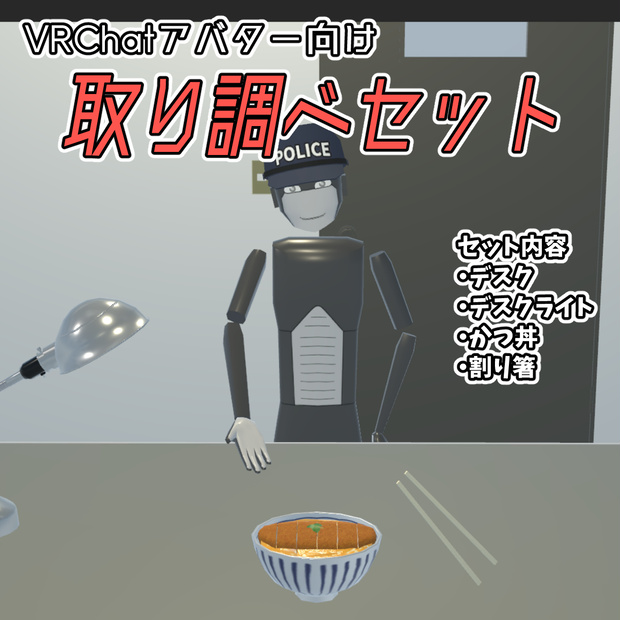
VRChatでアバターに取り付け可能な取り調べセットです。
セット内容は以下の通りです。
・机
・デスクライト
・かつ丼
・割り箸
<かつ丼>
かつ丼のどんぶりを手に取り、割り箸を使って食べますが、自分のアバターだけでなく他のアバターもかつ丼を食べる事ができます。
また、箸に取ったかつ丼は相手に食べさせる事もできます。
かつ丼は3回に分けて食べる事ができ、Expressions Menuからいつでもリセットできます。
Expressions Menuにより、以下の変更ができます。
・かつ丼からの湯気の有無
・三つ葉とグリーンピースの切り替え
<デスクライト>
スイッチ(電球下の黒い部分)を手で触るたびに点灯/消灯を繰り返します。
またデスクライトの先端を手で触ると向きを机の向こう側へ変更します。もう一度触ると元の向きに戻ります。
<取り調べセットの表示/非表示>
「机とデスクライト」、「かつ丼と割り箸」はそれぞれまとめてExpressions Menuから表示/非表示を切り替える事ができます。非表示にして再度表示する度にアバターの目の前に表示され、表示している間はワールドに固定されます。
<お試しをしたい方へ>
本製品を付けたアバターが以下のワールドに置いてあります。
このワールドへ寄っていただければ動作などを試す事ができます。
・ワールド名
HagakureExhibitionHall
・URL
https://vrchat.com/home/launch?worldId=wrld_84d4ee8c-cc93-4d19-a2b4-ef316b9b7dd5
注意事項
・かつ丼のどんぶり、割り箸は手に取ることができますが、向きを変える事はできません。
・かつ丼と割り箸は一つのオブジェクトのため、割り箸を持ったままかつ丼から視点を逸らすと割り箸が非表示になる可能性があります。
内容物
・InterrogationSetForAvatar_v1.0.unitypackage
(※Unity 2022.3.22f1にてパッケージしています。 )
・FBXファイル
・マテリアル
・テクスチャ
三角ポリゴン数:5232
前提条件
本製品のUnitypackageをUnityへインポートする前に、以下のパッケージをUnityへ追加してください。
・VRChat SDK – Avatars 3.10.2以降
・Modular Avatar 1.15.1以降 (アバター配布補助ツール)
導入手順
(1) InterrogationSetForAvatar_v1.0.unitypackageをUnityへインポートします。
(2) Project パネルの Assets/Items/InterrogationSet/PrefabsフォルダにあるInterrogationSetをHierarchyパネルのアバターであるオブジェクトの直下に配置します。
(3) VRChat SDKのコントロールパネルからアバターをVRChatへアップロードしてください。
利用規約
・本データを購入・ダウンロードした時点で本利用規約に同意したものとします。
・本データ、またはその改変データを使用することによって生じた不都合やトラブル、損失に対し当方は一切責任を負いません。ご了承ください。
・本データの著作権は作者に帰属します。
・この規約は予告なく変更、追加が行われる場合がございます。ご了承ください。
禁止事項
・購入者間以外での再配布を禁止します。
許可
以下の利用を許可します。
・個人利用
・商用利用
・本データの改変利用
Introduction
This is an interrogation set designed to be attached to avatars in VRChat.
The set includes the following items:
・Desk
・Desk lamp
・Katsudon (pork cutlet bowl)
・Disposable chopsticks
<Katsudon>
You can pick up the katsudon bowl and eat using the disposable chopsticks; not only your own avatar but others can eat it as well.
You can also feed the katsudon held on the chopsticks to another person.
The katsudon is consumed in three portions and can be reset at any time via the Expressions Menu.
The following settings can be adjusted via the Expressions Menu:
・Toggle steam rising from the katsudon
・Switch between mitsuba (Japanese parsley) and green peas toppings
<Desk lamp>
Touching the switch (the black part beneath the bulb) toggles the light on and off.
Touching the head of the lamp changes its direction to face the far side of the desk; touching it again returns it to the original position.
<Show/Hide Interrogation Set>
You can toggle the visibility of the "Desk and Desk Lamp" and the "Katsudon and Chopsticks" as groups via the Expressions Menu. Each time you toggle them from hidden to visible, they appear directly in front of your avatar and remain fixed in the world while displayed.
<For those who wish to try it out>
An avatar equipped with this product is available in the following world.
Please visit this world to test its functionality and features.
・World Name
HagakureExhibitionHall
・URL
https://vrchat.com/home/launch?worldId=wrld_84d4ee8c-cc93-4d19-a2b4-ef316b9b7dd5
Precautions
・You can pick up the katsudon bowl and the disposable chopsticks, but you cannot change their orientation.
・Since the katsudon and the chopsticks are treated as a single object, the chopsticks may disappear from view if you look away from the katsudon while holding them.
Contents
・InterrogationSetForAvatar_v1.0.unitypackage
(*Packaged using Unity 2022.3.22f1.)
・FBX file
・Materials
・Textures
・利用規約.txt
Triangle polygon count: 5,232
Prerequisites
Before importing this product's Unitypackage into Unity, please add the following packages to your project:
・VRChat SDK – Avatars 3.10.2 or later
・Modular Avatar 1.15.1 or later (Avatar distribution support tool)
Installation procedure
(1) Import InterrogationSetForAvatar_v1.0.unitypackage into Unity.
(2) Locate the "InterrogationSet" prefab in the `Assets/Items/InterrogationSet/Prefabs` folder within the Project panel, and place it directly under your avatar object in the Hierarchy panel.
(3) Upload the avatar to VRChat using the VRChat SDK Control Panel.
terms of service
・By purchasing or downloading this data, you agree to these Terms of Use.
・Please note that the creator assumes no responsibility for any issues, troubles, or losses arising from the use of this data or any modified versions thereof.
・The copyright of this data belongs to the creator.
・Please note that these terms are subject to change or addition without prior notice.
Prohibitions
・Redistribution outside of the purchasers is prohibited.
permission
The following uses are permitted:
・Personal use
・Commercial use
・Use of modified versions of this data
모든 리뷰
더보기리뷰 등록
리뷰를 작성하려면 로그인이 필요합니다.
로그인하고 리뷰 쓰기