'%3e%3cg%20clip-path='url(%23roundHexB)'%3e%3cpath%20fill='%236D5DFC'%20d='M256%2040%20443%20148%20443%20364%20256%20472%2069%20364%2069%20148Z'/%3e%3cpath%20fill='%239C93FB'%20d='M69%20148%20256%2040%20443%20148%20256%20256Z'/%3e%3cpath%20fill='%234A3FD1'%20d='M256%20256%20443%20148%20443%20364%20256%20472Z'/%3e%3c/g%3e%3c!--%20top%20face:%20filled%20round%20magnifier%20--%3e%3cg%20transform='matrix(0.8660254,-0.5,0.8660254,0.5,69,148)'%3e%3cg%20transform='matrix(0.935,0,0,0.935,7.02,7.02)'%3e%3ccircle%20cx='88'%20cy='88'%20r='52'%20fill='%23FFFFFF'/%3e%3ccircle%20cx='88'%20cy='88'%20r='28'%20fill='%239C93FB'/%3e%3cpath%20d='M124%20124%20164%20164'%20stroke='%23FFFFFF'%20stroke-width='26'%20stroke-linecap='round'/%3e%3c/g%3e%3c/g%3e%3cg%20transform='matrix(0.8660254,0.5,0,1,69,148)'%3e%3cpath%20d='M96.1,61.08%20L45.9,128.92%20Q34,145%2054,145%20L162,145%20Q182,145%20170.1,128.92%20L119.9,61.08%20Q108,45%2096.1,61.08%20Z'%20fill='%23FFFFFF'/%3e%3c/g%3e%3c!--%20right%20face:%20filled%20bubble%20--%3e%3cg%20transform='matrix(0.8660254,-0.5,0,1,256,256)'%3e%3cg%20transform='matrix(0.855,0,0,0.855,15.66,15.66)'%3e%3cpath%20d='M60%2042H156a28%2028%200%200%201%2028%2028V158Q184%20168%20174.47%20164.96L124.53%20149.04Q115%20146%20105%20146H60a28%2028%200%200%201-28-28V70a28%2028%200%200%201%2028-28Z'%20fill='%23FFFFFF'/%3e%3c/g%3e%3c/g%3e%3c/g%3e%3c/svg%3e)
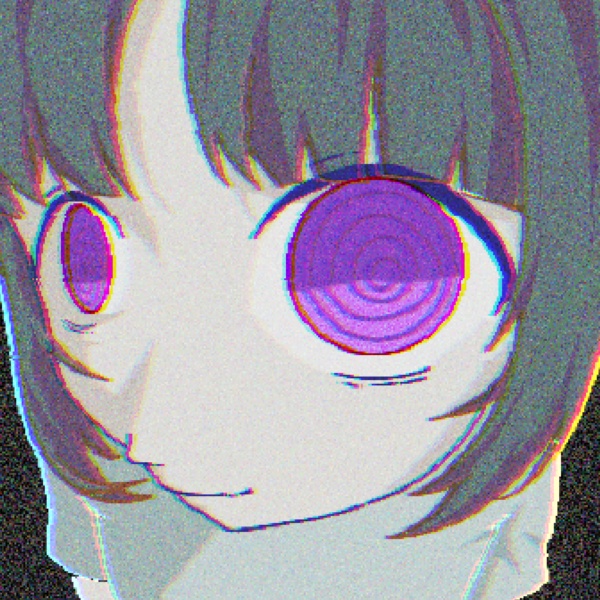
![Original 3d character [ ENNS ] VRChat](https://booth.pximg.net/c/620x620/e03e8644-ab66-417a-ae91-6b235379dfd9/i/8881233/f5318e0d-00c8-4d39-b0b0-a813925efb67.png)
 Vanitas Lab
상품 설명
[ ENNS ]
### A custom VRChat avatar, created from scratch by Vanitas Robotomy.
---
✦ FEATURES
VRChat Avatar 3.0
Custom Standing & Crouching Poses
Custom Expression Menu
Eye Look & Blinking
Lip Sync / Visemes
PhysBones
GoGoLoco
Hat Toggle
Poiyomi Toon Shader
Toon Outline
---
✦ PLATFORM
### PC ONLY
ENNS is made for only the PC version of VRChat.
Quest / Android compatibility is not included.
---
✦ REQUIREMENTS
The following software and packages are required:
VRChat Creator Companion (VCC)
Unity 2022.3.22f1
VRChat SDK – Avatars
VRCFury
Poiyomi Toon Shader
### Important
GoGoc Loco IS included with ENNS package because the avatar uses a custom poses.
---
✦ PACKAGE CONTENTS
_ENNS Unity Package_
ENNS Avatar Prefab (main)
FBX Model
Textures
Materials
Animations
GoGo Loco controller
-Avatar Thumbnail
-Quick Setup Guide
-GoGoLoco
---
✦ UPLOAD GUIDE
• 01 — Install VCC
Download and install the VRChat Creator Companion (VCC).
VCC is the recommended way to set up a VRChat avatar project.
• 02 — Create an Avatar Project
Open VCC and create a new:
Avatar Project
VCC will set up the project with the required VRChat SDK.
• 03 — Check Unity Version
Use:
Unity 2022.3.22f1
This is the current Unity version supported by VRChat.
• 04 — Install Required Packages
Make sure your project has:
VRChat SDK – Avatars
VRCFury
Poiyomi Toon Shader
• 05 — Import ENNS
Drag the ENNS Unity Package into your Unity project's Assets window.
Allow Unity to finish importing everything.
• 06 — Add ENNS to the Scene
Navigate to:
ENNS → ENNS Unity Package → ENNS Prefab
Drag the ENNS Prefab into your scene.
• 07 — Log In
Open:
VRChat SDK → Show Control Panel
Log in to your VRChat account.
• 08 — Check the Avatar
Open the Builder tab.
Make sure there are no errors before uploading.
• 09 — Upload
Enter your avatar information and upload ENNS to VRChat.
You can use the included image as avatar thumbnail
• 10— Enjoy
Your avatar is ready to use!
---
✦ TECHNICAL INFORMATION
| Specification | Details |
| --------------—— | ------------------: |
| Platform | PC |
| Triangles | 27,700 |
| Texture Resolution | 2048 × 2048 |
| Texture Memory | 10.67 MB |
| Skinned Mesh Renderers | 2 |
| Unity Package Size | 20 MB |
| Avatar Height | 1.68 m |
| PhysBone Components | 3 |
| PhysBone Transforms | 58 |
| Shader | Poiyomi Toon Shader |
### Software Used
Blender 4.5 LTS
Unity
VRChat Creator Companion
---
✦ LICENSE & USAGE
ENNS is provided free of charge for personal use.
The original avatar and its original assets remain the property of the creator. Downloading or using ENNS does not transfer ownership or copyright.
✓ ALLOWED
Personal use in VRChat
Uploading ENNS to your own VRChat account privately
✕ NOT ALLOWED
Modifying or editing ENNS
Redistributing the avatar files
Sharing the Unity package
Re-uploading the avatar for others to download
Selling the avatar or any modified version
Selling or distributing individual assets
Using the assets in another downloadable model
Uploading the avatar or its assets to another marketplace
Claiming ENNS or its original assets as your own
Using the avatar or its original assets for AI training or dataset creation
Extracting and redistributing individual assets
### PUBLIC USE
You may use ENNS publicly in VRChat.
You may take screenshots, videos, livestreams, and artwork with credit to avatar creator
Public use does not grant permission to distribute the avatar files.
### THIRD-PARTY ASSETS
Some components used by ENNS are created by third-party authors.
Third-party components remain subject to their respective licenses and terms.
This license only applies to the original content created by Vanitas Robotomy.
For permissions not covered by these terms, please contact the creator.
---
✦ ABOUT ENNS
ENNS is my first original VRChat character, created completely from scratch.
The project took approximately 100 hours to complete.
### Development Time
70 hours
Modeling, texturing, rigging, and other Blender work.
30 hours
Unity setup, avatar configuration, animations, and other Unity work.
(Approximately 20 hours of the Unity work were spent setting up the custom standing and prone poses)
---
✦ INSPIRATION
I started this project after being inspired by:
@shonzo
@close2animation
I also did my best to optimize ENNS while maintaining the visual details and features I wanted.
---
✦ CREATION TOOLS
### Software
Blender 4.5 LTS
Unity
VRChat Creator Companion
### Credits
UCU Paint
UV Squares - Radivarig
VRCFury - Senky
GoGoLoco - Franada
Poyomi Toon Shader - Poyomi
---
### Thank you for checking out ENNS.
This is my first original VRChat character, and I put a lot of time and effort into it.
I hope you enjoy my first model!
모든 리뷰
더보기리뷰 등록
리뷰를 작성하려면 로그인이 필요합니다.
로그인하고 리뷰 쓰기