'%3e%3cg%20clip-path='url(%23roundHexB)'%3e%3cpath%20fill='%236D5DFC'%20d='M256%2040%20443%20148%20443%20364%20256%20472%2069%20364%2069%20148Z'/%3e%3cpath%20fill='%239C93FB'%20d='M69%20148%20256%2040%20443%20148%20256%20256Z'/%3e%3cpath%20fill='%234A3FD1'%20d='M256%20256%20443%20148%20443%20364%20256%20472Z'/%3e%3c/g%3e%3c!--%20top%20face:%20filled%20round%20magnifier%20--%3e%3cg%20transform='matrix(0.8660254,-0.5,0.8660254,0.5,69,148)'%3e%3cg%20transform='matrix(0.935,0,0,0.935,7.02,7.02)'%3e%3ccircle%20cx='88'%20cy='88'%20r='52'%20fill='%23FFFFFF'/%3e%3ccircle%20cx='88'%20cy='88'%20r='28'%20fill='%239C93FB'/%3e%3cpath%20d='M124%20124%20164%20164'%20stroke='%23FFFFFF'%20stroke-width='26'%20stroke-linecap='round'/%3e%3c/g%3e%3c/g%3e%3cg%20transform='matrix(0.8660254,0.5,0,1,69,148)'%3e%3cpath%20d='M96.1,61.08%20L45.9,128.92%20Q34,145%2054,145%20L162,145%20Q182,145%20170.1,128.92%20L119.9,61.08%20Q108,45%2096.1,61.08%20Z'%20fill='%23FFFFFF'/%3e%3c/g%3e%3c!--%20right%20face:%20filled%20bubble%20--%3e%3cg%20transform='matrix(0.8660254,-0.5,0,1,256,256)'%3e%3cg%20transform='matrix(0.855,0,0,0.855,15.66,15.66)'%3e%3cpath%20d='M60%2042H156a28%2028%200%200%201%2028%2028V158Q184%20168%20174.47%20164.96L124.53%20149.04Q115%20146%20105%20146H60a28%2028%200%200%201-28-28V70a28%2028%200%200%201%2028-28Z'%20fill='%23FFFFFF'/%3e%3c/g%3e%3c/g%3e%3c/g%3e%3c/svg%3e)
 blackash
상품 설명
サブモニターを、自分好みの計器盤に。
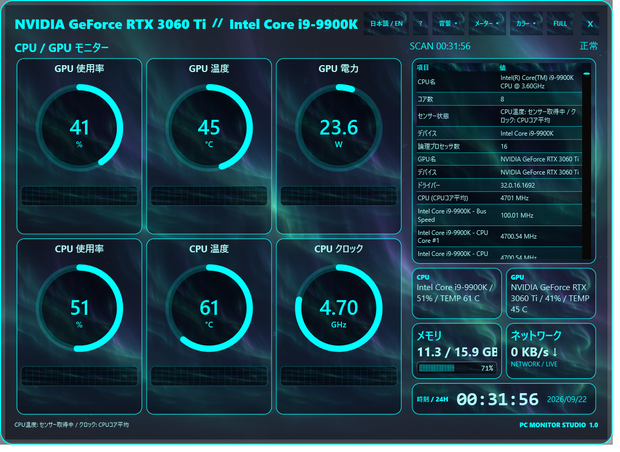
CPU・GPUの温度や使用率を、見やすいメーターで表示するWindows用モニターです。
デスクトップの雰囲気やサブモニターに合わせて、背景・カラー・形を自由に組み合わせられます。
■ サブモニターで楽しむPCモニター
ゲームや作業はメイン画面で、PCの状態はサブモニターに。
接続したサブモニターへウィンドウを移動し、F11で全画面表示にできます。
背景・カラー・メーターを組み合わせて、デスクに合う自分だけの計器盤を楽しめます。
※ サブモニターは別途必要です。メイン画面のウィンドウ表示でも利用できます。
■ 好みに合わせて着せ替え
・12種類の背景プリセット:金属、カーボン、オーロラ、星空など
・お好きなPNG/JPEG/BMP画像も背景に設定可能
・20種類の配色:シアン、ピンク、ミント、桜、ローズゴールドなど
・6種類のメーター:標準/自動車/リング/六角形/バー/半円
・日本語/Englishの切り替えと設定の自動保存
■ 表示内容
CPU使用率・温度・クロック、GPU使用率・温度・電力、メモリ使用状況、ネットワーク、時刻。
詳細なセンサー一覧と履歴グラフを表示。全画面表示にも対応しています。
CPUまたはGPUが90°C以上になると画面上に高温警告を表示します。
■ 使い方
ZIPを「すべて展開」して、PCMonitorStudio.exeを起動してください。
「Create Desktop Shortcut.cmd」で、専用アイコンのショートカットをデスクトップに作成できます。
F11で全画面表示、Escで解除。背景・色・メーター・言語の設定は自動保存されます。
■ 動作環境・購入前の確認
Windows 11 x64(Intel/AMDの64ビットPC)、管理者権限が必要です。
.NETランタイムは同梱しています。
CPU温度などは、別途PawnIOドライバーが必要になる場合があります。
公式配布元:https://pawnio.eu/
センサーの対応は機器・ドライバー・権限によって異なり、すべての温度や電力が取得できるとは限りません。
取得できない値はN/Aなどで表示されます。複数GPUの場合は最初に検出されたGPUを表示します。
macOS・Linux・Windows ARMは対象外です。
本版はコード署名がないため、Windowsから警告が表示される場合があります。
高温警告は目安であり、機器を保護する自動停止機能はありません。
■ 同梱内容
アプリ本体、専用アイコン、ショートカット作成ファイル、日英説明書、利用条件、更新履歴、第三者ライブラリのライセンスと対応ソース。
Version 1.0.0 / ZIP形式・約67MB
■ 利用について
購入者自身が所有・管理するPCで利用できます。
配信・動画・スクリーンショットでの画面利用は、個人・商用ともに可能です。
商品パッケージの再配布・再販売は禁止します。第三者ライブラリは各ライセンスに従います。
お問い合わせは、このショップのBOOTHメッセージへお願いします。
※ 掲載画像のPC構成・数値は撮影時の一例です。お使いのPCによって表示内容は異なります。
────────── English ──────────
PC Monitor Studio — Customizable Hardware Dashboard
Turn your second monitor into a personalized instrument panel.
Keep your game or work on the main screen and monitor your PC on a second display. Move the app window to the connected display and press F11 for full-screen mode.
A second monitor is optional and sold separately; windowed use on your main display is also supported.
Keep an eye on CPU/GPU temperatures and usage in your own style.
12 background presets plus image import, 20 colors and 6 meter shapes: Classic, Automotive, Ring, Hexagon, Bar and Semi-circle.
Japanese and English UI, automatic preference saving and full-screen display.
Displays CPU load/temperature/clock, GPU load/temperature/power, memory usage, network rates, clock, history graphs and a detailed sensor list.
On-screen thermal warning at CPU or GPU temperature of 90°C or higher.
Requirements: Windows 11 x64 on Intel/AMD, administrator access.
.NET runtime included. Extract the ZIP and launch PCMonitorStudio.exe.
Run “Create Desktop Shortcut.cmd” to create a shortcut with the included icon.
Some temperatures require the separate PawnIO driver from https://pawnio.eu/.
Sensor availability depends on hardware, drivers and permissions. Unavailable readings display N/A.
The first detected GPU is used when multiple GPUs are present.
macOS, Linux and Windows ARM are not supported.
This release is not code-signed and may trigger a Windows warning.
Thermal alerts are indications only; there is no automatic protective shutdown.
Includes application, icon, shortcut creator, Japanese/English manuals, terms, changelog and third-party license notices with corresponding library sources.
Use on computers you own or manage. Application screenshots may be used in personal or commercial videos and streams.
Product resale/redistribution is prohibited; third-party components retain their own license permissions.
Support: contact this BOOTH shop by message.
Screenshots show example readings; your hardware and readings may differ.
모든 리뷰
더보기리뷰 등록
리뷰를 작성하려면 로그인이 필요합니다.
로그인하고 리뷰 쓰기