'%3e%3cg%20clip-path='url(%23roundHexB)'%3e%3cpath%20fill='%236D5DFC'%20d='M256%2040%20443%20148%20443%20364%20256%20472%2069%20364%2069%20148Z'/%3e%3cpath%20fill='%239C93FB'%20d='M69%20148%20256%2040%20443%20148%20256%20256Z'/%3e%3cpath%20fill='%234A3FD1'%20d='M256%20256%20443%20148%20443%20364%20256%20472Z'/%3e%3c/g%3e%3c!--%20top%20face:%20filled%20round%20magnifier%20--%3e%3cg%20transform='matrix(0.8660254,-0.5,0.8660254,0.5,69,148)'%3e%3cg%20transform='matrix(0.935,0,0,0.935,7.02,7.02)'%3e%3ccircle%20cx='88'%20cy='88'%20r='52'%20fill='%23FFFFFF'/%3e%3ccircle%20cx='88'%20cy='88'%20r='28'%20fill='%239C93FB'/%3e%3cpath%20d='M124%20124%20164%20164'%20stroke='%23FFFFFF'%20stroke-width='26'%20stroke-linecap='round'/%3e%3c/g%3e%3c/g%3e%3cg%20transform='matrix(0.8660254,0.5,0,1,69,148)'%3e%3cpath%20d='M96.1,61.08%20L45.9,128.92%20Q34,145%2054,145%20L162,145%20Q182,145%20170.1,128.92%20L119.9,61.08%20Q108,45%2096.1,61.08%20Z'%20fill='%23FFFFFF'/%3e%3c/g%3e%3c!--%20right%20face:%20filled%20bubble%20--%3e%3cg%20transform='matrix(0.8660254,-0.5,0,1,256,256)'%3e%3cg%20transform='matrix(0.855,0,0,0.855,15.66,15.66)'%3e%3cpath%20d='M60%2042H156a28%2028%200%200%201%2028%2028V158Q184%20168%20174.47%20164.96L124.53%20149.04Q115%20146%20105%20146H60a28%2028%200%200%201-28-28V70a28%2028%200%200%201%2028-28Z'%20fill='%23FFFFFF'/%3e%3c/g%3e%3c/g%3e%3c/g%3e%3c/svg%3e)
 rawsy
rawsy상품 설명
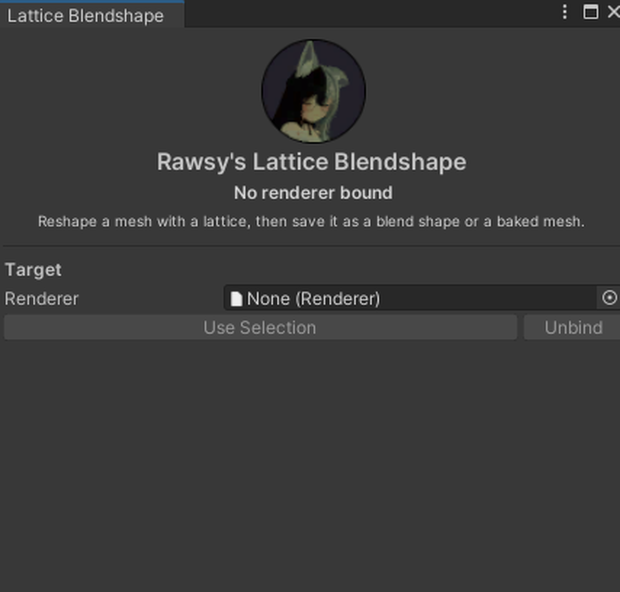
ラティス(格子)でメッシュを自由に変形して、ブレンドシェイプとして保存できる Unity エディタ拡張です。
レンダラーを選ぶとラティスが自動で作られます。ノードをドラッグすると、シーンビュー上でメッシュがリアルタイムに変形します。形が決まったらボタン一つでブレンドシェイプとして保存できます。
ポーズの付いたアバターにそのまま使えます。シーン上の見たままの状態で形を作れば、バインドポーズで正しいブレンドシェイプとして保存されます。
■ できること
・ノードを動かしてメッシュを引っ張る
・ノードを拡大縮小して、メッシュを引き寄せる/押し出す
・ノードを回転して、メッシュをねじる(ノードの近くほど強く、遠くはほとんど動きません)
・ラティスを小さくして、手・耳・胸など一部分だけを変形
・保存する前に、0〜100 のウェイトを動かして仕上がりを確認
■ 出力は2種類
・ブレンドシェイプ … アニメーションできる新しいシェイプとして追加。0 が元の形です
・ベイクドメッシュ … 頂点に直接焼き込み。MeshRenderer でも使えます
■ 既存のブレンドシェイプと併用できます
・元のメッシュは書き換えません。結果は必ず新しいアセットとして保存されます
・既存のブレンドシェイプはそのまま残ります。順番もインデックスも変わりません
・新しいシェイプは末尾に追加されます
・すでに入れているシェイプの状態を基準に形を作れます
■ 動作環境
・Unity 2022.3
・他に必要なものはありません(SDK、NDMF、Modular Avatar すべて不要)
・対象メッシュの Read/Write Enabled を有効にしてください
■ 導入
.unitypackage をインポートしてください。
Tools → Rawsy → Lattice Blendshape から開きます。
---
A Unity editor extension. Reshape any mesh with a lattice, then save the result as a blend shape.
Pick a renderer and a lattice is fitted around it. Drag the nodes and the mesh follows, live in the scene view. When it looks right, save it as a blend shape with one button.
It works on posed avatars. You sculpt the mesh as it stands in the scene, and the shape is saved correct in bind pose.
■ What you can do
・Move nodes to push and pull the mesh.
・Scale a node to pull the mesh towards it, or push it away.
・Rotate a node to twist the mesh around it. Strong at the node, barely anything further out.
・Shrink the lattice onto one part — a hand, an ear, a chest — and leave the rest alone.
・Preview the shape from 0 to 100 before you save anything.
■ Two outputs
・Blend Shape — a new shape on a slider. 0 is the original.
・Baked Mesh — baked into the vertices. Works on a MeshRenderer too.
■ Safe alongside your existing shapes
・Your original mesh is never modified. The result is always a new asset.
・Existing blend shapes are kept. Their order and indices do not change.
・A new shape is added at the end.
・Shapes you already have dialled in are used as the starting shape.
■ Requirements
・Unity 2022.3
・Nothing else. No SDK, no NDMF, no Modular Avatar.
・The mesh must have Read/Write Enabled.
■ Install
Import the .unitypackage. Open it from Tools → Rawsy → Lattice Blendshape.
---
## 利用規約 / Terms of use
Paste at the bottom of the description, or into BOOTH's dedicated terms field.
```
■ 利用規約
・個人利用、商用利用ともに可能です。
・本ツールで作成したメッシュ・ブレンドシェイプの利用に制限はありません。販売物に含めても構いません。
・改変して使用することは自由です。
・本ツール自体の再配布・転売は禁止します。改変したものについても同様です。
・本ツールの使用によって生じたいかなる損害についても、作者は責任を負いません。
・購入前に動作環境をご確認ください。データの性質上、返金には対応できません。
■ Terms of use
・Personal and commercial use are both permitted.
・There are no restrictions on the meshes and blend shapes you create with it. You may include them in products you sell.
・You may modify it for your own use.
・Redistribution or resale of the tool itself is prohibited, modified or otherwise.
・The author accepts no liability for any damage arising from use of this tool.
・Please check the requirements before purchasing. Refunds cannot be offered for digital data.
```
모든 리뷰
더보기리뷰 등록
리뷰를 작성하려면 로그인이 필요합니다.
로그인하고 리뷰 쓰기