'%3e%3cg%20clip-path='url(%23roundHexB)'%3e%3cpath%20fill='%236D5DFC'%20d='M256%2040%20443%20148%20443%20364%20256%20472%2069%20364%2069%20148Z'/%3e%3cpath%20fill='%239C93FB'%20d='M69%20148%20256%2040%20443%20148%20256%20256Z'/%3e%3cpath%20fill='%234A3FD1'%20d='M256%20256%20443%20148%20443%20364%20256%20472Z'/%3e%3c/g%3e%3c!--%20top%20face:%20filled%20round%20magnifier%20--%3e%3cg%20transform='matrix(0.8660254,-0.5,0.8660254,0.5,69,148)'%3e%3cg%20transform='matrix(0.935,0,0,0.935,7.02,7.02)'%3e%3ccircle%20cx='88'%20cy='88'%20r='52'%20fill='%23FFFFFF'/%3e%3ccircle%20cx='88'%20cy='88'%20r='28'%20fill='%239C93FB'/%3e%3cpath%20d='M124%20124%20164%20164'%20stroke='%23FFFFFF'%20stroke-width='26'%20stroke-linecap='round'/%3e%3c/g%3e%3c/g%3e%3cg%20transform='matrix(0.8660254,0.5,0,1,69,148)'%3e%3cpath%20d='M96.1,61.08%20L45.9,128.92%20Q34,145%2054,145%20L162,145%20Q182,145%20170.1,128.92%20L119.9,61.08%20Q108,45%2096.1,61.08%20Z'%20fill='%23FFFFFF'/%3e%3c/g%3e%3c!--%20right%20face:%20filled%20bubble%20--%3e%3cg%20transform='matrix(0.8660254,-0.5,0,1,256,256)'%3e%3cg%20transform='matrix(0.855,0,0,0.855,15.66,15.66)'%3e%3cpath%20d='M60%2042H156a28%2028%200%200%201%2028%2028V158Q184%20168%20174.47%20164.96L124.53%20149.04Q115%20146%20105%20146H60a28%2028%200%200%201-28-28V70a28%2028%200%200%201%2028-28Z'%20fill='%23FFFFFF'/%3e%3c/g%3e%3c/g%3e%3c/g%3e%3c/svg%3e)
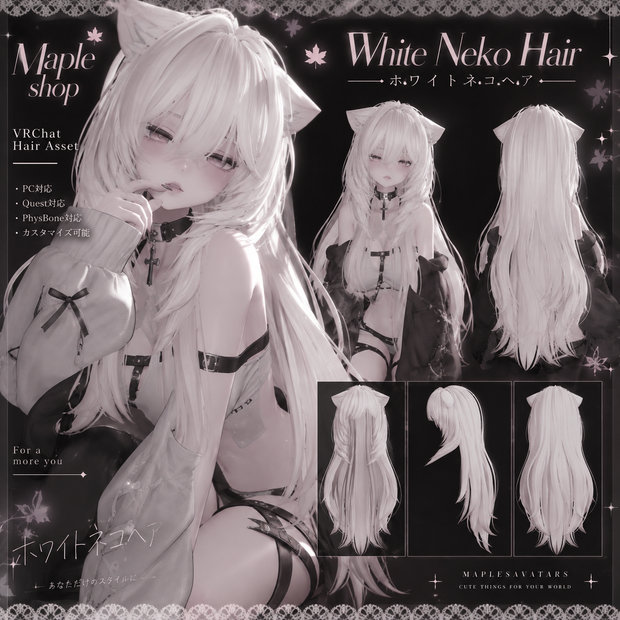
【White Neko Hair - ホワイトネコヘア】VRChat Hair Asset | MAPLESAVATARS
상품 설명
日本語
3Dヘアアセット『White Neko Hair』
※ 髪のみの商品です ※
こちらの商品にアバター本体は含まれません。
商品画像に登場するアバターは着用イメージです。ご購入いただけるのはヘアアセットのみとなります。
✦ 導入方法
VRChat Creator Companion(VCC)でアバタープロジェクトを開きます。
Unityにヘアアセットをインポートします。
髪のPrefabをアバターに追加します。
位置・回転・サイズを調整し、Headボーンに取り付けます。
マテリアルやPhysBonesを確認して、VRChatへアップロードしてください。
※アバターによっては追加の調整が必要です。
English
White Neko Hair – VRChat Hair Asset
HAIR ONLY — AVATAR NOT INCLUDED
You are purchasing the hair asset ONLY, not a complete VRChat avatar.
The avatar shown in the promotional images is for demonstration purposes and is NOT included with your purchase.
✦ Installation
Open your avatar project using VRChat Creator Companion (VCC).
Import the hair asset into Unity.
Add the hair prefab to your avatar.
Adjust its position, rotation, and scale, then attach it to the Head bone.
Check the materials and PhysBones before uploading to VRChat.
Additional adjustments may be required depending on your avatar.
모든 리뷰
더보기리뷰 등록
리뷰를 작성하려면 로그인이 필요합니다.
로그인하고 리뷰 쓰기