'%3e%3cg%20clip-path='url(%23roundHexB)'%3e%3cpath%20fill='%236D5DFC'%20d='M256%2040%20443%20148%20443%20364%20256%20472%2069%20364%2069%20148Z'/%3e%3cpath%20fill='%239C93FB'%20d='M69%20148%20256%2040%20443%20148%20256%20256Z'/%3e%3cpath%20fill='%234A3FD1'%20d='M256%20256%20443%20148%20443%20364%20256%20472Z'/%3e%3c/g%3e%3c!--%20top%20face:%20filled%20round%20magnifier%20--%3e%3cg%20transform='matrix(0.8660254,-0.5,0.8660254,0.5,69,148)'%3e%3cg%20transform='matrix(0.935,0,0,0.935,7.02,7.02)'%3e%3ccircle%20cx='88'%20cy='88'%20r='52'%20fill='%23FFFFFF'/%3e%3ccircle%20cx='88'%20cy='88'%20r='28'%20fill='%239C93FB'/%3e%3cpath%20d='M124%20124%20164%20164'%20stroke='%23FFFFFF'%20stroke-width='26'%20stroke-linecap='round'/%3e%3c/g%3e%3c/g%3e%3cg%20transform='matrix(0.8660254,0.5,0,1,69,148)'%3e%3cpath%20d='M96.1,61.08%20L45.9,128.92%20Q34,145%2054,145%20L162,145%20Q182,145%20170.1,128.92%20L119.9,61.08%20Q108,45%2096.1,61.08%20Z'%20fill='%23FFFFFF'/%3e%3c/g%3e%3c!--%20right%20face:%20filled%20bubble%20--%3e%3cg%20transform='matrix(0.8660254,-0.5,0,1,256,256)'%3e%3cg%20transform='matrix(0.855,0,0,0.855,15.66,15.66)'%3e%3cpath%20d='M60%2042H156a28%2028%200%200%201%2028%2028V158Q184%20168%20174.47%20164.96L124.53%20149.04Q115%20146%20105%20146H60a28%2028%200%200%201-28-28V70a28%2028%200%200%201%2028-28Z'%20fill='%23FFFFFF'/%3e%3c/g%3e%3c/g%3e%3c/g%3e%3c/svg%3e)
 awchicks
 AW_Color - Color Grading Plugin for After Effects
상품 설명
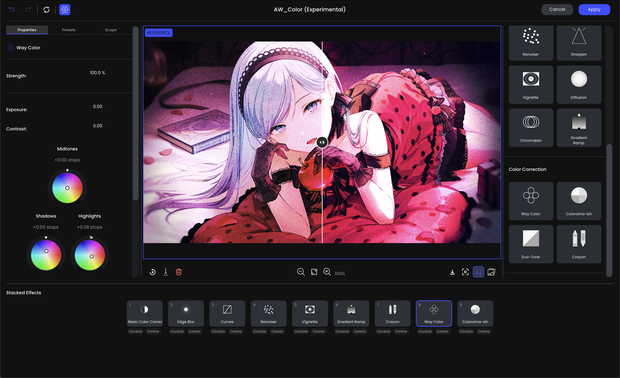
AW_Color brings a dedicated, color grading suite directly inside Adobe After Effects. Capture a frame, dial in your look with zero timeline lag, and bake the entire look stack into a single native effect.
Key Feature
1. Non-Destructive Look Stack
Layer-Based Grading: Stack, reorder, duplicate, hide, or delete individual grading layers just like in Photoshop or dedicated grading suites.
Per-Layer Opacity: Dial in the exact intensity of any individual tool or preset.
All-in-One Native Effect: Entire grade is stored inside one single effect parameter in one layer.
2. Creative Toolset
- Basic Color Correction: Exposure, Contrast, Highlights, Shadows, Whites, Blacks, Temperature, Tint, and Saturation.
- Tone Curves & S-Curves: 4-point tone curves with RGB Master plus independent Red, Green, and Blue channels.
- 3D LUT Support: Load any standard .cube look-up table with smooth trilinear interpolation.
- Way Color (4-Way Wheels): Precise color balance wheels for Shadows, Midtones, Highlights, and Master.
- Crayon Color: Custom measured filmic & stylized color tables (Embo, Sorrow, Tint, Evening, Hunger) with per-hue adjustment and shadow/highlight neutral ramps.
- Diffusion: Highlight bloom that scatters light.
- Spot Exposure: Soft elliptical digital spotlight for directing viewer focus.
- Ramp Exposure: Linear gradient exposure falloff (graduated ND filter style).
- Gradient Ramp: 2-point gradient overlays with blend modes (ideal for MMV, stylized washes, and fake lighting).
- Chromatic Aberration: Subtle or dramatic lens edge fringing.
- Renoiser: Organic film grain with per-channel size and intensity control.
- Edge Blur & Up/Down Blur: Tilt-shift and focus-directing blur effects.
- Sharpen & Vignette: Unsharp mask sharpening and customizable vignettes.
- Duo-Tone & Colorama: Stylized dual-color toning and color remapping.
Requirements
After Effects CC 2023 or Above
Windows / MacOS Support!
모든 리뷰
더보기리뷰 등록
리뷰를 작성하려면 로그인이 필요합니다.
로그인하고 리뷰 쓰기