'%3e%3cg%20clip-path='url(%23roundHexB)'%3e%3cpath%20fill='%236D5DFC'%20d='M256%2040%20443%20148%20443%20364%20256%20472%2069%20364%2069%20148Z'/%3e%3cpath%20fill='%239C93FB'%20d='M69%20148%20256%2040%20443%20148%20256%20256Z'/%3e%3cpath%20fill='%234A3FD1'%20d='M256%20256%20443%20148%20443%20364%20256%20472Z'/%3e%3c/g%3e%3c!--%20top%20face:%20filled%20round%20magnifier%20--%3e%3cg%20transform='matrix(0.8660254,-0.5,0.8660254,0.5,69,148)'%3e%3cg%20transform='matrix(0.935,0,0,0.935,7.02,7.02)'%3e%3ccircle%20cx='88'%20cy='88'%20r='52'%20fill='%23FFFFFF'/%3e%3ccircle%20cx='88'%20cy='88'%20r='28'%20fill='%239C93FB'/%3e%3cpath%20d='M124%20124%20164%20164'%20stroke='%23FFFFFF'%20stroke-width='26'%20stroke-linecap='round'/%3e%3c/g%3e%3c/g%3e%3cg%20transform='matrix(0.8660254,0.5,0,1,69,148)'%3e%3cpath%20d='M96.1,61.08%20L45.9,128.92%20Q34,145%2054,145%20L162,145%20Q182,145%20170.1,128.92%20L119.9,61.08%20Q108,45%2096.1,61.08%20Z'%20fill='%23FFFFFF'/%3e%3c/g%3e%3c!--%20right%20face:%20filled%20bubble%20--%3e%3cg%20transform='matrix(0.8660254,-0.5,0,1,256,256)'%3e%3cg%20transform='matrix(0.855,0,0,0.855,15.66,15.66)'%3e%3cpath%20d='M60%2042H156a28%2028%200%200%201%2028%2028V158Q184%20168%20174.47%20164.96L124.53%20149.04Q115%20146%20105%20146H60a28%2028%200%200%201-28-28V70a28%2028%200%200%201%2028-28Z'%20fill='%23FFFFFF'/%3e%3c/g%3e%3c/g%3e%3c/g%3e%3c/svg%3e)
 猫町雑貨店
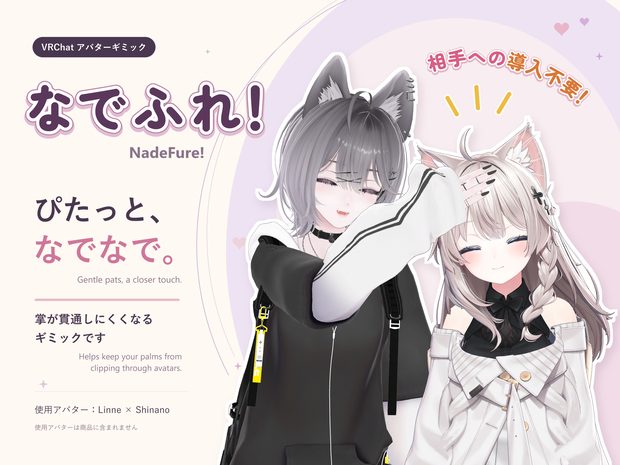
猫町雑貨店 【発売開始セール】なでふれ!-NadeFure- 相手のメッシュを貫通しにくい掌ギミック
상품 설명
<<<< 発売開始記念セール実施 ~10/4(日) >>>>
まるごとセット 通常価格 ¥1800 → セール価格 ¥1500
なでふれ!〈本体〉 通常価格 ¥1500 → セール価格 ¥1200
【これはどんなもの?】
「なでふれ!」は、相手(基本的にはフレンド)のアバターにふれたときの、掌や足裏のめり込みを軽減するギミックです。
相手がフレンドである、もしくは相手に「Show Avatar」を有効にしてもらった場合は、相手からも補正された手足の動きが見えます。
なでる、手を添える、足裏をふれさせる。
そんなときの手足の見た目を補正して、『ちゃんとふれている』表現をサポートします。
お試し用アバター設置ワールド:
https://vrch.at/wrld_0666e2ea-83da-405e-ac40-56b4f5d82212
【注意事項|ご購入前に】
・相手側でのギミック導入は不要ですが、相手側で動作するには、フレンド関係にあるか、相手に「Show Avatar」を有効にしてもらう必要があります。相手側のアバター表示・Safety設定などによって動作が制限される場合や、自分とは見え方が異なる場合があります。
・掌は右手・左手のどちらか一方に対応しています。足は片足・両足を選べます。
・「足ぷらす〈追加パック〉」だけでの使用はできません。別途「なでふれ!〈本体〉」が必要です。「まるごとセット」には両方を含みます。
・接触するメッシュの形状が複雑な場所や、複数のメッシュが重なっている場所では、期待どおりに動作しない場合があります。
・相手側での動作は、自分(ギミック使用者)を中心とした2m四方の範囲にいるプレイヤーが対象です。(同時使用時の負荷対策です)
・ギミックが有効になった相手側にもパフォーマンス負荷がかかります。使用する場面や周囲のプレイヤーの環境にご配慮ください。
・各種拡張機能や特殊シェーダーとの相性については確認しきれていません!不具合が出たら申し訳ありませんがぜひ教えてください!!できるだけ対応します。
・そのほか、以下の対応環境・制限事項をご確認ください。
━━━━━━━━━━━━━━━━━━━━
商品エディション
━━━━━━━━━━━━━━━━━━━━
◆ まるごとセット
「なでふれ!〈本体〉」と「足ぷらす〈追加パック〉」をまとめたセットです。
片手と片足・両足を組み合わせて使用できます。手だけ、足だけの構成も選べます。
本体をお持ちでなく、足の機能を使いたい方もこちらをお選びください。
◆ なでふれ!〈本体〉
掌のめり込み軽減に必要な本体パッケージです。
右手・左手のどちらか一方を選んで導入できます。手を添えたり、なでたりするときに使えます。
足の機能は不要な方におすすめです!
必要になれば、あとから「足ぷらす〈追加パック〉」を追加することもできます。
◆ 足ぷらす〈追加パック〉
本体に足の機能を追加する拡張パッケージです。
このパッケージ単体での使用はできません。
すでに「なでふれ!〈本体〉」をお持ちの方向けです。
右足・左足・両足から選べます。手と併用するほか、手の機能を導入せず、足だけで使うこともできます。
※足だけで使う場合も、本体の導入が必要です。
※本体とアドオンは、同じバージョンを使用してください。
━━━━━━━━━━━━━━━━━━━━
できること
━━━━━━━━━━━━━━━━━━━━
◆ 掌・足裏のめり込みを軽減
相手のアバター表面との位置関係に応じて、手足の見た目を押し戻します。
広くなだらかな面へ、掌や足裏を向けてゆっくり近づける使い方に適しています。
◆ 手の弱い吸い付き
掌が面のすぐ近くにあるとき、弱く引き寄せる「手の吸着」を搭載しています。
メニューから切り替えられ、OFFにすると押し返しだけになります。
※足には吸着機能はありません。
◆ 軽量版・高精度版を切り替え
手足の位置を補正する「軽量版」と、肘・膝を含む腕や脚の曲がり方も調整する「高精度版」を選べます。
使わないときはメニューからOFFにできます。
◆ 押し返しの滑らかさを調整
補正の変化や、接触がなくなったあとの戻り方を調整できます。
手足を併用する場合は共通の設定になります。
◆ アバターに合わせた位置調整
専用のプレビュー画面で掌の位置、足裏の位置・角度を調整できます。
靴や足裏の厚みに合わせた調整も可能です。
━━━━━━━━━━━━━━━━━━━━
必要な環境
━━━━━━━━━━━━━━━━━━━━
・PC版VRChatへアップロードできる、Humanoid設定済みのアバター
・Windows用Unity 2022.3系
・VRChat SDK - Avatars
・Modular Avatar 1.18.1以上
・NDMF 1.14.3以上
・対応シェーダーを使用したマテリアル
〈対応シェーダー〉
・lilToon 安定版2.3.4以上
・Poiyomi Free 10.0.20
(Thry Editor 2.74.0)
・UTS2 legacy 2.0.9
・Unity Standard
対応する描画モードやシェーダーの種類には制限があります。Standardは不透明のみ対応しています。
記載以外のバージョン・派生シェーダーや、すべての改変構成での動作を保証するものではありません。
━━━━━━━━━━━━━━━━━━━━
導入の流れ
━━━━━━━━━━━━━━━━━━━━
① バックアップを作成
アバターのUnityプロジェクトをバックアップします。
② パッケージをインポート
必要なツール(Modular Avatar、lilToon)と本体をインポートします。
足を使う場合は、続けて足アドオンをインポートします。
③ アバターと部位を選択
Unityのメニューから
「Tools > なでふれ! > インストーラ」
を開き、アバターと使用する部位を選んで導入します。
④ 位置を調整してアップロード
掌・足裏の位置を合わせ、Sceneを保存してアバターをアップロードします。
⑤ VRChatで機能をON
VRChat内のメニューで「軽量版」または「高精度版」をONにして使用します。
詳しい手順は、同梱のユーザーガイドをご覧ください。
━━━━━━━━━━━━━━━━━━━━
動作上の制限
━━━━━━━━━━━━━━━━━━━━
◆ 補正するのはアバターの見た目です
実際のコントローラーを押し返したり、指を1本ずつ接触面に沿って曲げたりする機能はありません。
◆ 接触する場所によって反応が変わります
狭い場所、角、隙間、透明な部分、メッシュが複雑に重なる部分などでは、反応しにくい場合があります。
めり込みや浮きを完全になくすものではありません。
◆ 腕や脚の補正の届く範囲には限界があります
深く押し込んだ場合など、十分に補正できないことがあります。
◆ 足裏の判定は足首に追従します
つま先だけを曲げても判定位置は動きません。
◆ 自分と相手で見え方が異なる場合があります
自分と相手では、接触位置や見え方が異なる場合があります。相手側のアバター表示・Safety設定などの影響も受けます。
◆ 動作には追加の描画処理が発生します
使用部位や設定、環境によって負荷が変わります。
負荷軽減のため、ギミック使用者の周囲2m四方にいるプレイヤーにだけギミックが動作する設計になっています。
━━━━━━━━━━━━━━━━━━━━
同梱物について
━━━━━━━━━━━━━━━━━━━━
選択したエディションに応じたUnityパッケージを収録しています。
本体にはユーザーガイド、変更履歴、利用規約を同梱しています。
※商品画像に使用しているアバター・衣装は付属しません。
※VRChat SDK、Modular Avatar、NDMF、使用するシェーダーも別途ご用意ください。
ご購入・ご利用前に、利用規約をご確認ください。
利用規約
商品選択の「利用規約」から別途ダウンロードください。
更新履歴
2026/09/2X:v1.0.0 初回リリース
English!
<<<< Launch Sale Now On! ~10/4 (Sun.) >>>>
Complete Set
Regular price ¥1,800 → Sale price ¥1,500
NadeFure!〈Core〉
Regular price ¥1,500 → Sale price ¥1,200
【What is NadeFure?】
NadeFure! is an avatar tool that reduces clipping when your palm or the sole of your foot touches another ("Friend" rank) player’s avatar.
If the other player is your "Friend", or they enable “Show Avatar” for your avatar, they can also see the adjusted hand and foot movements.
Patting, resting a hand on someone, or touching them with the sole of your foot—
NadeFure! visually adjusts your hands and feet to help make those moments look like real contact.
You can find an avatar for testing here:
https://vrch.at/wrld_0666e2ea-83da-405e-ac40-56b4f5d82212
【Important Information|Before You Buy】
・For the PC version of VRChat. Standalone Quest is not supported.
・Supports one hand at a time: either the right or left hand. For feet, you can choose one or both.
・Foot Plus〈Add-on Pack〉cannot be used on its own. NadeFure!〈Core〉is required separately. The Complete Set includes both.
・The tool may not behave as expected when touching complex mesh shapes or areas where multiple meshes overlap.
・For the feature to work on another player’s side, they must be your friend or enable “Show Avatar” for your avatar. Their avatar visibility and Safety settings may restrict its operation, and the results may look different from what you see.
・On other players’ side, the feature activates for players within a 2 m × 2 m area centered on you, the person using the tool.
・The feature also adds a performance load on those players’ systems when active. Please be considerate of where you use it and the performance of nearby players’ systems.
・Please also read the requirements and limitations below.
━━━━━━━━━━━━━━━━━━━━
Product Editions
━━━━━━━━━━━━━━━━━━━━
◆ Complete Set
A bundle containing NadeFure!〈Core〉and Foot Plus〈Add-on Pack〉.
Use one hand together with one or both feet. You can also choose a hand-only or feet-only setup.
If you do not already own the Core and want to use the foot features, choose this set.
◆ NadeFure!〈Core〉
The base package for reducing palm clipping.
Choose either the right or left hand during setup. Use it when patting someone or resting your hand on their avatar.
Recommended if you do not need the foot features!
You can always add Foot Plus〈Add-on Pack〉later.
◆ Foot Plus〈Add-on Pack〉
An expansion that adds foot features to the Core.
This package cannot be used on its own.
For users who already own NadeFure!〈Core〉.
Choose the right foot, left foot, or both. You can use the foot features alongside the hand features, or set up feet only without enabling the hand features.
※The Core must be installed even for a feet-only setup.
※Use matching versions of the Core and add-on.
━━━━━━━━━━━━━━━━━━━━
Features
━━━━━━━━━━━━━━━━━━━━
◆ Reduce Palm and Sole Clipping
Visually moves your hands and feet back based on their position relative to the other avatar’s surface.
Works best when you slowly approach a broad, gently curved or flat surface with your palm or sole facing it.
◆ Gentle Hand Attraction
The “Hand Adhesion” option gently draws your palm toward a surface when it is very close.
You can toggle it in the menu. When OFF, only the pushback adjustment is applied.
※Feet do not have an adhesion feature.
◆ Switch Between Lightweight and High-Precision Modes
Choose “Lightweight” mode to adjust hand and foot positions, or “High Precision” mode to also adjust how the arms and legs bend, including the elbows and knees.
You can turn the feature OFF from the menu when not in use.
◆ Adjustable Pushback Smoothing
Adjust how smoothly the correction changes and how your hands and feet return to their original positions after contact ends.
When using hands and feet together, they share the same smoothing setting.
◆ Position Adjustment for Your Avatar
Use the dedicated preview window to adjust the palm position and the position and angle of each sole.
You can also account for shoes and the thickness of the soles.
━━━━━━━━━━━━━━━━━━━━
Requirements
━━━━━━━━━━━━━━━━━━━━
・A Humanoid-configured avatar that can be uploaded to the PC version of VRChat
・Unity 2022.3.x for Windows
・VRChat SDK - Avatars
・Modular Avatar 1.18.1 or later
・NDMF 1.14.3 or later
・Materials using supported shaders
〈Supported Shaders〉
・lilToon stable version 2.3.4 or later
・Poiyomi Free 10.0.20
(Thry Editor 2.74.0)
・UTS2 legacy 2.0.9
・Unity Standard
There are restrictions on supported rendering modes and shader variants. Standard is supported in Opaque mode only.
Compatibility is not guaranteed with versions or shader derivatives not listed here, or with every avatar customization setup.
━━━━━━━━━━━━━━━━━━━━
Setup Overview
━━━━━━━━━━━━━━━━━━━━
① Create a Backup
Back up your avatar’s Unity project.
② Import the Packages
Import the required tools(Modular Avatar and lilToon)and the Core.
If you want to use the foot features, import the foot add-on afterward.
③ Select Your Avatar and Body Parts
Open the following menu in Unity:
“Tools > なでふれ! > インストーラ”
(NadeFure! > Installer)
Select your avatar and the hand or feet you want to use, then apply the setup.
④ Adjust Positions and Upload
Align the palm and sole positions, save the scene, and upload your avatar.
⑤ Enable the Feature in VRChat
In the VRChat menu, turn on “軽量版”(Lightweight)or “高精度版”(High Precision)to use the feature.
For detailed instructions, please refer to the included user guide.
━━━━━━━━━━━━━━━━━━━━
Limitations
━━━━━━━━━━━━━━━━━━━━
◆ Adjustments Are Visual Only
The tool does not physically push back your controllers or bend individual fingers to follow the contact surface.
◆ Results Depend on the Contact Area
Contact may be harder to detect in narrow areas, at corners, in gaps, on transparent parts, or where meshes overlap in complex ways.
The tool does not completely eliminate clipping or gaps between surfaces.
◆ Arm and Leg Adjustments Have a Limited Range
The correction may be insufficient if, for example, you push your hand or foot too deeply into a surface.
◆ Sole Detection Follows the Ankle
Bending only the toes does not move the sole’s detection area.
◆ Other Players May See Different Results
Contact positions and appearance may differ between your view and another player’s view. Their avatar visibility and Safety settings can also affect the result.
◆ The Feature Adds Rendering Workload
The performance impact varies depending on the body parts used, settings, and environment.
To reduce the workload, the feature is designed to run only for players within a 2 m × 2 m area around the person using it.
━━━━━━━━━━━━━━━━━━━━
Package Contents
━━━━━━━━━━━━━━━━━━━━
Includes the Unity package or packages for your selected edition.
The Core includes a user guide, changelog, and terms of use.
※Avatars and outfits shown in the product images are not included.
※VRChat SDK, Modular Avatar, NDMF, and the shaders you use must be obtained separately.
Please read the terms of use before purchasing or using this product.
모든 리뷰
더보기리뷰 등록
리뷰를 작성하려면 로그인이 필요합니다.
로그인하고 리뷰 쓰기