'%3e%3cg%20clip-path='url(%23roundHexB)'%3e%3cpath%20fill='%236D5DFC'%20d='M256%2040%20443%20148%20443%20364%20256%20472%2069%20364%2069%20148Z'/%3e%3cpath%20fill='%239C93FB'%20d='M69%20148%20256%2040%20443%20148%20256%20256Z'/%3e%3cpath%20fill='%234A3FD1'%20d='M256%20256%20443%20148%20443%20364%20256%20472Z'/%3e%3c/g%3e%3c!--%20top%20face:%20filled%20round%20magnifier%20--%3e%3cg%20transform='matrix(0.8660254,-0.5,0.8660254,0.5,69,148)'%3e%3cg%20transform='matrix(0.935,0,0,0.935,7.02,7.02)'%3e%3ccircle%20cx='88'%20cy='88'%20r='52'%20fill='%23FFFFFF'/%3e%3ccircle%20cx='88'%20cy='88'%20r='28'%20fill='%239C93FB'/%3e%3cpath%20d='M124%20124%20164%20164'%20stroke='%23FFFFFF'%20stroke-width='26'%20stroke-linecap='round'/%3e%3c/g%3e%3c/g%3e%3cg%20transform='matrix(0.8660254,0.5,0,1,69,148)'%3e%3cpath%20d='M96.1,61.08%20L45.9,128.92%20Q34,145%2054,145%20L162,145%20Q182,145%20170.1,128.92%20L119.9,61.08%20Q108,45%2096.1,61.08%20Z'%20fill='%23FFFFFF'/%3e%3c/g%3e%3c!--%20right%20face:%20filled%20bubble%20--%3e%3cg%20transform='matrix(0.8660254,-0.5,0,1,256,256)'%3e%3cg%20transform='matrix(0.855,0,0,0.855,15.66,15.66)'%3e%3cpath%20d='M60%2042H156a28%2028%200%200%201%2028%2028V158Q184%20168%20174.47%20164.96L124.53%20149.04Q115%20146%20105%20146H60a28%2028%200%200%201-28-28V70a28%2028%200%200%201%2028-28Z'%20fill='%23FFFFFF'/%3e%3c/g%3e%3c/g%3e%3c/g%3e%3c/svg%3e)
 ののの屋
ののの屋상품 설명
Spiraは、VRChatのUser CameraをOSCで操作できるWindowsアプリです。カメラ位置を基準に、周回半径や高さ、回転方向、撮影間隔などを設定し、アバターやワールドを自動撮影できます。
Spira is a Windows application that allows you to operate VRChat’s User Camera via OSC. By setting the camera position as a reference point, you can configure the orbit radius, height, rotation direction, shooting interval, and more to automatically take pictures of avatars and worlds.
詳細
Spira (すぴラ) は、VRChat内のUser CameraをOSC経由で操作し、アバターやワールドをさまざまな角度から撮影するためのClickPipシリーズのWindowsアプリです。VRChat側でOSCを有効にし、User Cameraを使用できる状態にしたら、Spiraを起動してブラウザの操作画面を開くだけで使い始められます。難しいコマンド入力は必要なく、画面上の項目を選びながらカメラの動きを組み立てられます。
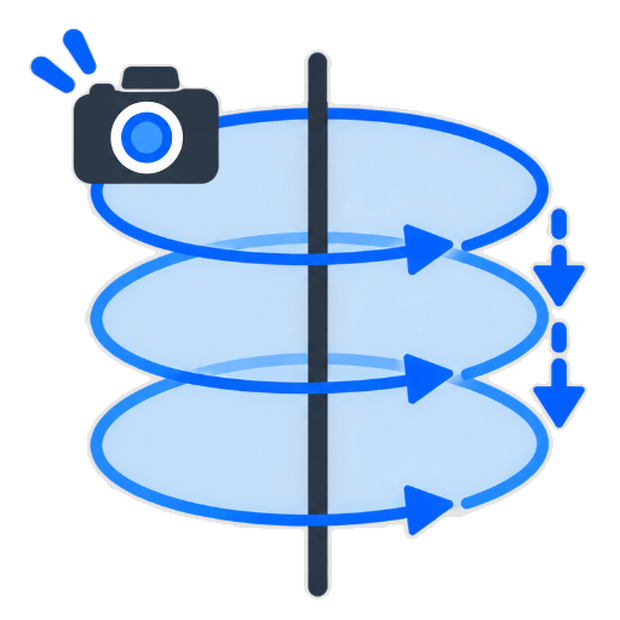
まずVRChat内でカメラを撮影したい場所へ移動し、Spiraに表示される現在のカメラ姿勢を確認します。構図が決まったら、その位置を基準点として登録。周回撮影では、基準点を中心にしたカメラの周回半径、撮影時の高さ、1周ごとの高さの移動量、回転方向、1枚ごとの回転角、カメラの傾き、撮影間隔を細かく設定できます。たとえば、アバターの正面を基準に一定の半径で一周させる、少しずつ上昇または下降しながら撮影する、縦方向の変化を加えて立体感のあるカットを集める、といった動きを簡単に指定できます。
設定が完了したら「周回撮影を開始」を押します。SpiraはVRChatへカメラ位置を順番に送り、設定したタイミングでUser Cameraの撮影指示を出します。正面から背面までを一定のリズムで撮影するターンテーブル風の記録、アバター紹介用の連番写真、ワールドの景色を巡るカメラワークなどに活用できます。撮影中は現在のカメラ姿勢や進行状態を確認でき、必要なときは「いますぐ中止」で停止可能です。
自動周回だけでなく、手動でカメラ位置を調整してから撮影する使い方にも対応しています。決まった構図を繰り返し撮りたい人、撮影操作の手間を減らしたい人、VRChat内の魅力を一定の動きで記録したい人におすすめのカメラコントローラーです。
explain in detail
Spira (Supira) is a Windows application of the ClickPip series for operating the User Camera in VRChat through OSC and shooting avatars and worlds from various angles. After enabling OSC on the VRChat side and making the User Camera ready to use, you can start using Spira simply by launching it and opening the operation screen in your browser. No difficult command input is necessary. You can create the camera movement by selecting the items on the screen.
First, move the camera to the place where you want to shoot in VRChat, and check the current camera pose displayed in Spira. When you decide the composition, you can register that position as the reference point. In orbit shooting, you can set the camera orbit radius around the reference point, shooting height, height movement for each round, rotation direction, rotation angle for each picture, camera tilt, shooting interval, and more in detail. For example, you can make the camera go around the avatar with a fixed radius based on the front view, shoot while gradually moving upward or downward, or add vertical movement to collect cuts with a three-dimensional feeling.
After completing the settings, press “Start Orbit Shooting.” Spira sends the camera positions to VRChat in order and gives shooting instructions to the User Camera at the set timing. It can be used for turntable-style recording by shooting from the front to the back with a regular rhythm, sequential pictures for introducing an avatar, or camera work that moves around the scenery of a world. During shooting, you can check the current camera pose and the progress status. When necessary, you can stop it by pressing “Stop Now.”
Spira also supports manual use, where you adjust the camera position first and then take a picture, in addition to automatic orbit shooting. It is recommended for people who want to shoot the same composition repeatedly, reduce the effort of camera operation, or record the charm of VRChat with a fixed camera movement.
動作環境
- Windows 11
- .Net framework 10 ランタイム版
アップデート履歴
[2026-09-15: v0.1.2] バグ修正
- OSC受信ポートを自動選択可能に
- 撮影枚数1000枚超や終了予測5分超を警告表示(実行は可能)
- 体験版ライセンスの自動延長前に確認を表示
- ライセンス取得結果にかかわらずライセンス状態画面を開けるように
[2026-09-14: v0.1.1] 初版リリース
모든 리뷰
더보기리뷰 등록
리뷰를 작성하려면 로그인이 필요합니다.
로그인하고 리뷰 쓰기