'%3e%3cg%20clip-path='url(%23roundHexB)'%3e%3cpath%20fill='%236D5DFC'%20d='M256%2040%20443%20148%20443%20364%20256%20472%2069%20364%2069%20148Z'/%3e%3cpath%20fill='%239C93FB'%20d='M69%20148%20256%2040%20443%20148%20256%20256Z'/%3e%3cpath%20fill='%234A3FD1'%20d='M256%20256%20443%20148%20443%20364%20256%20472Z'/%3e%3c/g%3e%3c!--%20top%20face:%20filled%20round%20magnifier%20--%3e%3cg%20transform='matrix(0.8660254,-0.5,0.8660254,0.5,69,148)'%3e%3cg%20transform='matrix(0.935,0,0,0.935,7.02,7.02)'%3e%3ccircle%20cx='88'%20cy='88'%20r='52'%20fill='%23FFFFFF'/%3e%3ccircle%20cx='88'%20cy='88'%20r='28'%20fill='%239C93FB'/%3e%3cpath%20d='M124%20124%20164%20164'%20stroke='%23FFFFFF'%20stroke-width='26'%20stroke-linecap='round'/%3e%3c/g%3e%3c/g%3e%3cg%20transform='matrix(0.8660254,0.5,0,1,69,148)'%3e%3cpath%20d='M96.1,61.08%20L45.9,128.92%20Q34,145%2054,145%20L162,145%20Q182,145%20170.1,128.92%20L119.9,61.08%20Q108,45%2096.1,61.08%20Z'%20fill='%23FFFFFF'/%3e%3c/g%3e%3c!--%20right%20face:%20filled%20bubble%20--%3e%3cg%20transform='matrix(0.8660254,-0.5,0,1,256,256)'%3e%3cg%20transform='matrix(0.855,0,0,0.855,15.66,15.66)'%3e%3cpath%20d='M60%2042H156a28%2028%200%200%201%2028%2028V158Q184%20168%20174.47%20164.96L124.53%20149.04Q115%20146%20105%20146H60a28%2028%200%200%201-28-28V70a28%2028%200%200%201%2028-28Z'%20fill='%23FFFFFF'/%3e%3c/g%3e%3c/g%3e%3c/g%3e%3c/svg%3e)
 フテイケイ
フテイケイ상품 설명
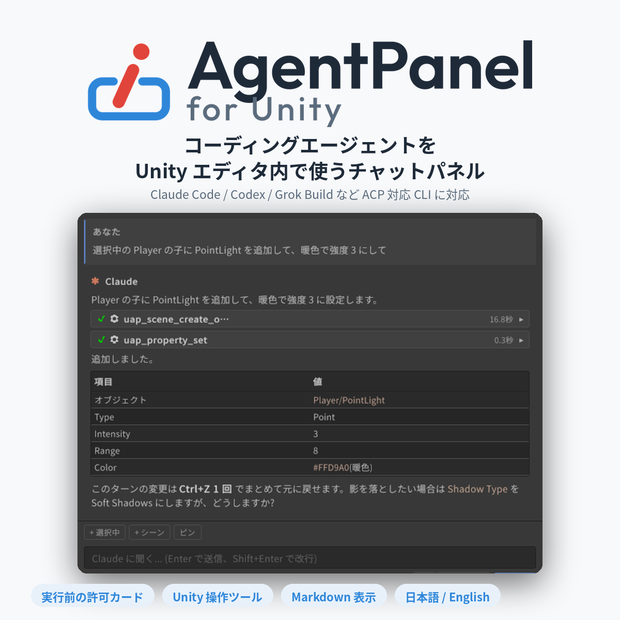
コーディングエージェントを Unity エディタの中で使うためのチャットパネルです。
Claude Code を中心に、Codex・Grok Build などの ACP 対応 CLI にも切り替えられます。
エディタにドッキングしたパネルから、コードを書く・ファイルを直す・シーンを操作するといった作業をエージェントに頼めます。
ツールを実行する前には許可カードが出て、スクリプトの再コンパイルをまたいでも会話は続きます。
公式サイト
GitHub(Core版)
https://github.com/c-colloid/AgentPanelForUnity
VPM
https://c-colloid.github.io/vpm/
詳細
・チャット — 応答はストリーミング表示。スラッシュコマンドの補完、思考の要約、サブエージェントの進捗カード、質問カード(選択肢で回答)に対応。
・許可カード — ファイル編集やコマンド実行の前に「許可 / このセッション中は許可 / 拒否」を選べます。自動承認の範囲は設定で段階的に広げられます。
・Unity の文脈を渡す — Hierarchy / Project の選択、Console のエラー、ドラッグしたアセット、画像をワンクリックで添付。
・Unity 操作ツール — エージェントが C# を書かずにシーン・コンポーネント・アセットを操作し、検索やスクリーンショットも行えます。1 ターン分は Undo 1 回で戻せます。
・スクリプト検証ゲート — エージェントが書いた C# はコンパイルが通ってから Assets に入ります(Windows)。
・ドメインリロード耐性 — 再コンパイルやエディタ再起動の後も同じセッションに自動で再接続します。
・履歴・モデル切替・パネル内ログイン — 過去のセッションの復元、モデルの切替、CLI へのログインをパネル内で完結。
・エージェントの切替 — ClaudeCode、Codex、Grok Build など ACP 対応の CLI に切り替えられます。
・日本語 / English切替 — UI は OS 言語に追従し、設定で切り替えられます。
Pro専用機能
・プレハブのオーバーライド操作
・アニメーション / マテリアル編集
・パーティクル編集
・メッシュ作成/編集
・アバター計測
・ライトマップベイク(Bakery 対応)
・エディタ UI の自動操作
・一括実行
・テスト実行
・拡張プロファイル/スキル作成
・同梱プロファイル(pro-v0.12.1 時点、17 件)
[詳細]
https://github.com/c-colloid/AgentPanelForUnity/blob/main/docs/PRO-FEATURES.md
同梱プロファイル詳細
対応 SDK がプロジェクトに入っていると自動で検出され、その SDK の要点(コンポーネントの正式名、ビルド時にしか反映されない仕組み、やってはいけない操作、確認の手順)がエージェントへの指示に追加されます。承認操作は不要です。
【VRChat】
・VRChat SDK3(共通 / com.vrchat.base): PhysBone・Contact・VRC Constraint の所在、3 つある VRCStation の区別、アップロード時のコンポーネント除去
・VRChat SDK3(アバター / com.vrchat.avatars): VRCAvatarDescriptor とエキスプレッションアセット、ParameterDriver などの StateMachineBehaviour、FX レイヤーの組み方
・VRChat SDK3(ワールド / com.vrchat.worlds): VRCSceneDescriptor と標準ワールドコンポーネント、レイヤー予約、Build & Test / Publish の扱い
・Udon: UdonBehaviour とプログラムアセットの関係、同期(UdonSynced / 所有権 / ネットワークイベント)、VRCUrl、Play モードでしか動かない前提
・UdonSharp(U#): 使えない C# 機能、プロキシと UdonBehaviour の関係、フィールドをどちらに書くか、GetComponent の落とし穴
・NDMF: ビルド時にクローンを変換する仕組み、手動ベイクでの確認、フェーズ順、NDMF Console
・Modular Avatar: Merge Armature / Bone Proxy / Menu Installer / Parameters、リアクティブコンポーネント、別コントローラを Merge Animator で合流させる手順
・AAO: Avatar Optimizer: Trace And Optimize を起点にする、各コンポーネントの置き場所、触ってはいけない設定
・VRCFury: 1 コンポーネントに全機能が入る構造と自動適用のタイミング、パネルから設定できる範囲とできない範囲
・lilycalInventory: ビルド時にメニューとアニメーションを生成する仕組み、パラメータ型ごとのコンポーネント選択
・lilToon: _Use* ゲートを先に立てる規則、レンダリングモードはシェーダー差し替えである点、lilToonSetting による機能削除
【アバター / 物理 / IK】
・UniVRM(VRM 0.x / 1.0): VRMMeta / Vrm10Instance / VRMSpringBone、ウィザードは手動
・MagicaCloth2: MagicaCloth / MagicaBoneCloth / MagicaBoneSpring、プリコンピュートは手動
・Final IK: FullBodyBipedIK / CCDIK / AimIK、ボーンチェーンの確認
【ライティング / メッシュ】
・Bakery GPU Lightmapper: Bakery のライトコンポーネント、uap_bakery_bake での非同期ベイクと設定、オブジェクト単位の制御、Contribute GI の確認
・ProBuilder: ProBuilderMesh が正、メニューでは形状を作れない理由、既存メッシュへの操作と Editor スクリプトでの生成手順
【ゲーム制作】
・RPG Maker Unite: データは Storage の JSON とマップ prefab、CoreSystem サービスでの生成手順、イベントコマンド・自律移動・タイマーの実測済みの落とし穴、Unity 6 での移行点
[詳細]
https://github.com/c-colloid/AgentPanelForUnity/blob/main/docs/PRO-PROFILES.md
動作環境
Unity:2022.3 LTS 以降(Unity 6 系を含む)
OS:Windows で検証しています。macOS / Linux は動く想定ですが未検証です。
CLI:最新版を推奨。未導入ならパネルの案内から導入できます。
アカウント:サブスクリプション or API キー
アップデート履歴
[0.51.0~0.54.3] - 2026-09-16
・uGUI の RectTransform対応
・World Space Canvas対応
・初回のコードEditで「ステージング無視」が発生するバグを修正
・ProBuilderプロファイルを追加(Pro)
・「メッシュ生成」MCPモジュール追加(Pro)
・「コンパイル後に自動継続する」の上限を撤廃
・AskUserQuestion カードの表示バグを修正
[0.48.0~0.50.0] - 2026-09-15
・コンポーネント検出がstateMachineBehaviourに対応
・AAOプロファイル追加(Pro)
・実害のないエラー表示が頻繁に出るバグを修正
・「プロファイル作成」「アバター計測」「一括実行」MCPモジュールを追加(Pro)
[0.47.0] - 2026-09-13
・追加 ACP エージェント向けの History。Gemini CLI / Codex / Grok Build / カスタム ACP のセッションをパネル側で保存し、Claude Code のトランスクリプトと並べて一覧・session/load で再開する(再開できないエージェントには、それまでの会話内容を渡す)。
・追加 Codex と Grok Build のパネル内サインイン。
・追加 サブエージェントのモデル設定を、新規セッション開始時の指示として ACP エージェントへ送るようにした(ACP には CLAUDE_CODE_SUBAGENT_MODEL に相当する仕組みがないため)。
・修正 ACP エージェントで、本文のあとに流れてきた thinking が本文より前に畳まれてしまう順序崩れ。
[0.46.0] - 2026-09-13
・追加 Write / Edit / MultiEdit のツールカードが、生の入力 JSON ではなく差分としてファイル変更を表示するようになった。Write カードには元の内容をコピーするボタンを追加。
・修正 入力が大きいツールカードの詳細が空白で描画される問題。長文はチャンク分割し、20 万文字を超える場合は末尾に省略表示を出す。
[0.45.0] 以前 — 2026-07-29 〜 2026-09-13
0.45.0 までは一般公開前の開発期間にあたるため、この 1 項目にまとめています。 バージョンごとの詳細は git のタグと docs/design-notes/ 以下の設計ノートに残っています。 この期間に出来上がったものが、現在このパッケージが提供している内容です。
・パネル本体 — Claude Code CLI と stream-json でやり取りするエディタウィンドウ。ストリーミング表示とマークダウン描画、コードブロック、クリックできるアセットリンク、折りたためるツール実行カード、入れ子のサブエージェントカード、許可カード(allow / always / deny)、検索・グルーピング・ピン・アーカイブ・リネームに対応したセッション履歴、パネル内ログイン。UI は英語/日本語に完全対応。
・Unity 操作(UapOps) — エディタ内 MCP サーバー(ループバック限定、セッション単位の Bearer トークン)が、使い捨てスクリプトの代わりに型付きツールを提供する。シーンとコンポーネントの編集、Transform、プロパティ、アセット、prefab オーバーライド、アニメーションとマテリアル、インポーター設定、ライトマップと Bakery のベイク、UI Toolkit 自動操作、シーンビューのマーカー、Unity Search。1 ターンの操作は 1 つの Undo グループにまとまり、スクリプト検証ゲートがエージェントの書いた C# をステージングでコンパイルするため、壊れたコードが Assets/ に入らない。
・コンテキストと入力 — 選択内容・シーン・ドロップしたオブジェクトのコンテキストチップ、ワンクリック修正と恒久無視リストを持つコンソールエラーチップ、画像添付(ファイル・ドロップ・クリップボード・シーン/ゲームビューのキャプチャ)、ユーザーが置くシーンピン、スラッシュコマンド。
・エージェントバックエンド — Claude Code に加え、Agent Client Protocol ブリッジ経由で Gemini CLI / Codex / Grok Build / カスタムエージェントに対応。パネル内インストールとサインイン、どの認証方法で接続しているかの明示、API キーの素通し。
・堅牢性 — ドメインリロード耐性(セッション再開、任意有効の自動継続、実機リロードテスト)、原子的書き込みの JSON セッションキャッシュ、クラッシュループの抑止。
・パッケージング — 2 つのプロバイダ接点による Core / Pro 分割、「Agent Panel for Unity」への製品名変更、Package Manager と VCC / ALCOM の両方から届く Pro の更新。
ライセンス
[Core]
MIT License
[Pro]
Agent Panel Pro -- License
Agent Panel Pro (`jp.colloid.agent-panel-pro`) is licensed under the **PolyForm Internal Use License 1.0.0**, reproduced in full below. The English license text is the binding one; the notes in this section are the licensor's additional permissions and practical guidance, not a substitute for reading it.
Required Notice: Copyright (c) 2026 colloid (https://github.com/c-colloid)
【Additional permissions from the licensor】
The licensor grants the following permissions in addition to the license below. They only widen what the license allows and never narrow it.
1. **Personal use.** Use of the software by an individual for their own projects, whether or not those projects are a business, is a permitted purpose. (The license text speaks of "internal business operations";
this permission makes clear that hobby and personal projects qualify.)
2. **Modifications.** You may change the software for your own permitted use, as the license already allows. Modified copies stay under these terms; the licensor supports only unmodified copies.
3. **Collaborators.** You may include the software in a Unity project you share with contractors or collaborators working on that project with you, provided each of them holds their own license. This is not a license to distribute the software to them for their own separate use.
【Embedding into other products】
The license does not allow distributing the software, changed or not, on its own or inside another product. If you want to build a product on top of Agent Panel Pro and ship it to others, ask first: open an issue at
https://github.com/c-colloid/AgentPanelForUnity/issues or send a message through the store you bought from. Embedding is granted case by case in writing; collaborators may also be invited to the private source repository so that their product can follow upstream changes.
【Product key and update channel】
The product key you receive at purchase unlocks the update registry (the panel's Settings > Agent Panel Pro updates card, or VCC / ALCOM). It is a service credential, separate from this license: keep it to yourself and your own team, and a key found shared publicly may be revoked. Revoking a key never revokes the license below for copies you already have.
【日本語の要約】(参考。効力を持つのは下の英文です)
- 本パッケージのライセンスは PolyForm Internal Use License 1.0.0 です
(原文は `LICENSE.md`)。
- できること: 自分(自組織)の内部での利用、自分のプロジェクトのための改変。
個人の趣味用途も含みます(上記「Additional permissions」1)。
- できないこと: 第三者への配布。改変の有無、単体か組み込みかを問いません。
- 外注先や共同制作者と 1 つの Unity プロジェクトを共有する場合は、各自が自分のライセンスを持っていれば、そのプロジェクトに本パッケージを含めたまま渡せます(上記「Additional permissions」3)。相手が別の仕事で使うために本パッケージを渡すことはできません。
- 組み込んだ製品を配布したい場合は、上記「Embedding」の窓口から事前にご相談ください。個別に許諾します。
- 製品キーは更新配信の利用資格で、ライセンスとは別のものです。共有が確認されたキーは無効化することがあります。
---
PolyForm Internal Use License 1.0.0
<https://polyformproject.org/licenses/internal-use/1.0.0>
## Acceptance
In order to get any license under these terms, you must agree
to them as both strict obligations and conditions to all
your licenses.
## Copyright License
The licensor grants you a copyright license for the software
to do everything you might do with the software that would
otherwise infringe the licensor's copyright in it for any
permitted purpose. However, you may only make changes or
new works based on the software according to [Changes and New
Works License](#changes-and-new-works-license), and you may
not distribute the software.
## Changes and New Works License
The licensor grants you an additional copyright license to
make changes and new works based on the software for any
permitted purpose.
## Patent License
The licensor grants you a patent license for the software that
covers patent claims the licensor can license, or becomes able
to license, that you would infringe by using the software.
## Fair Use
You may have "fair use" rights for the software under the
law. These terms do not limit them.
## Internal Business Use
Use of the software for the internal business operations of
you and your company is use for a permitted purpose.
## No Other Rights
These terms do not allow you to sublicense or transfer any of
your licenses to anyone else, or prevent the licensor from
granting licenses to anyone else. These terms do not imply
any other licenses.
## Patent Defense
If you make any written claim that the software infringes or
contributes to infringement of any patent, your patent license
for the software granted under these terms ends immediately. If
your company makes such a claim, your patent license ends
immediately for work on behalf of your company.
## Violations
The first time you are notified in writing that you have
violated any of these terms, or done anything with the software
not covered by your licenses, your licenses can nonetheless
continue if you come into full compliance with these terms,
and take practical steps to correct past violations, within
32 days of receiving notice. Otherwise, all your licenses
end immediately.
## No Liability
***As far as the law allows, the software comes as is, without
any warranty or condition, and the licensor will not be liable
to you for any damages arising out of these terms or the use
or nature of the software, under any kind of legal claim.***
## Definitions
The **licensor** is the individual or entity offering these
terms, and the **software** is the software the licensor makes
available under these terms.
**You** refers to the individual or entity agreeing to these
terms.
**Your company** is any legal entity, sole proprietorship,
or other kind of organization that you work for, plus all
organizations that have control over, are under the control of,
or are under common control with that organization. **Control**
means ownership of substantially all the assets of an entity,
or the power to direct its management and policies by vote,
contract, or otherwise. Control can be direct or indirect.
**Your licenses** are all the licenses granted to you for the
software under these terms.
**Use** means anything you do with the software requiring one
of your licenses.
모든 리뷰
더보기리뷰 등록
리뷰를 작성하려면 로그인이 필요합니다.
로그인하고 리뷰 쓰기