'%3e%3cg%20clip-path='url(%23roundHexB)'%3e%3cpath%20fill='%236D5DFC'%20d='M256%2040%20443%20148%20443%20364%20256%20472%2069%20364%2069%20148Z'/%3e%3cpath%20fill='%239C93FB'%20d='M69%20148%20256%2040%20443%20148%20256%20256Z'/%3e%3cpath%20fill='%234A3FD1'%20d='M256%20256%20443%20148%20443%20364%20256%20472Z'/%3e%3c/g%3e%3c!--%20top%20face:%20filled%20round%20magnifier%20--%3e%3cg%20transform='matrix(0.8660254,-0.5,0.8660254,0.5,69,148)'%3e%3cg%20transform='matrix(0.935,0,0,0.935,7.02,7.02)'%3e%3ccircle%20cx='88'%20cy='88'%20r='52'%20fill='%23FFFFFF'/%3e%3ccircle%20cx='88'%20cy='88'%20r='28'%20fill='%239C93FB'/%3e%3cpath%20d='M124%20124%20164%20164'%20stroke='%23FFFFFF'%20stroke-width='26'%20stroke-linecap='round'/%3e%3c/g%3e%3c/g%3e%3cg%20transform='matrix(0.8660254,0.5,0,1,69,148)'%3e%3cpath%20d='M96.1,61.08%20L45.9,128.92%20Q34,145%2054,145%20L162,145%20Q182,145%20170.1,128.92%20L119.9,61.08%20Q108,45%2096.1,61.08%20Z'%20fill='%23FFFFFF'/%3e%3c/g%3e%3c!--%20right%20face:%20filled%20bubble%20--%3e%3cg%20transform='matrix(0.8660254,-0.5,0,1,256,256)'%3e%3cg%20transform='matrix(0.855,0,0,0.855,15.66,15.66)'%3e%3cpath%20d='M60%2042H156a28%2028%200%200%201%2028%2028V158Q184%20168%20174.47%20164.96L124.53%20149.04Q115%20146%20105%20146H60a28%2028%200%200%201-28-28V70a28%2028%200%200%201%2028-28Z'%20fill='%23FFFFFF'/%3e%3c/g%3e%3c/g%3e%3c/g%3e%3c/svg%3e)
 Milpix™ Omiseyasan
상품 설명
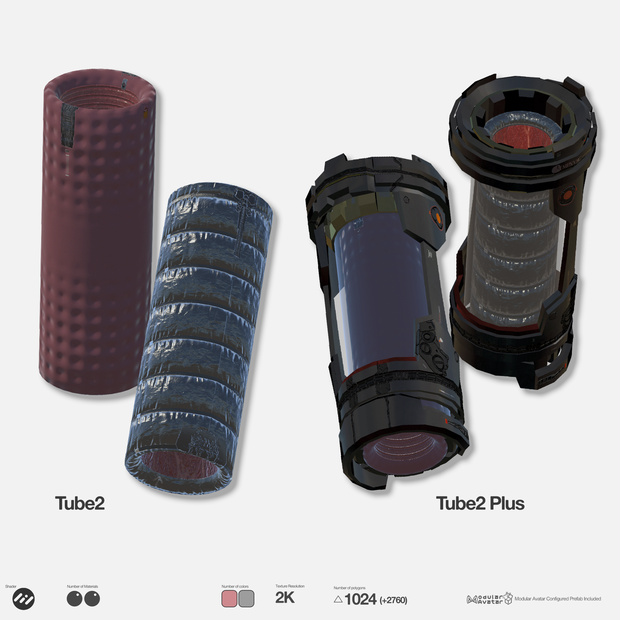
アニメーションで小刻みに伸縮するチューブ部品です。Standardシェーダーを使用したテクスチャ/マテリアル2種と、それらを割り当てたPrefab2種が同梱されています。また、本品と別売品のAnimated Cylinder3を組み合わせたPlus版もご用意しました。それぞれを個々に買うより100円お得です。こちらはliltoon用マテリアルも併用します。キットバッシング用パーツとして製作しましたが、同梱PrefabはModularAvatar設定済みで、MA Bone ProxyのターゲットはHipsに設定されています。
This is a tube component that animates with a subtle expanding and contracting motion. The package includes two types of textures/materials (using the Standard shader) and two corresponding Prefabs.
A "Plus" version is also available, combining this item with the separately sold "Animated Cylinder 3"; this bundle offers a 100-yen saving compared to purchasing the items individually. The Plus version also includes materials compatible with liltoon.
While designed as a kitbashing component, the included Prefabs come pre-configured for Modular Avatar, with the MA Bone Proxy target set to the Hips.
----------------------------------------------------------------------------------
ポリゴン数 Number of polygons: △1024(Plus: +△2760)
テクスチャ解像度 Texture resolution: 2K
使用マテリアルスロット数 Number of material slots used: 1(Plus: +1)
プレファブ Perfab: x1(Plus: +2)
Unity2022.3.22f1
----------------------------------------------------------------------------------
Boothのシステム上、ダウンロード商品の返品/返金はできません。あらかじめご了承ください。
Due to Booth's system limitations, returns and refunds for downloadable products are not possible. Please understand this in advance.
----------------------------------------------------------------------------------
Plus版はシェーダーにLiltoonを使用しています。事前に導入しておいてください。
The Plus version uses the Liltoon shader. Please install it beforehand.
https://booth.pm/ja/items/3087170
----------------------------------------------------------------------------------
Modular Avatarを使用しています。事前に導入しておいてください。
Uses Modular Avatar. Please install it in advance.
https://modular-avatar.nadena.dev/ja
----------------------------------------------------------------------------------
導入方法:
1. Unitypackageをインポートします
2. Unitypackage内のPrefabフォルダ内にあるPrefabを、Hierarchyのアバター下に配置してください。
3. お好みの位置に調整してください
Installation Instructions:
1. Import the Unity package.
2. Place the prefab found in the "Prefab" folder of the package under your avatar in the Hierarchy.
3. Adjust the position to your liking.
----------------------------------------------------------------------------------
ライセンス License:
本製品は、VN3ライセンス(https://www.vn3.org/)を採用しております。
本製品をご購入前に下記リンクから内容をご確認ください。
本製品を購入された時点で本利用規約に同意したものとさせて頂きます。
本規約は、あしやまひろこ(@hiroko_TB)氏が作成したVN3ライセンス( https://www.vn3.org/ )のテンプレートを使用しています。
This product uses the VN3 License (https://www.vn3.org/).
Please check the details at the link below before purchasing this product.
By purchasing this product, you agree to these terms of use.
These terms use the VN3 License (https://www.vn3.org/) template created by Ashiyama Hiroko (@hiroko_TB).
JP
https://drive.google.com/file/d/1q5V1DylqKehQrI6FbMY1pq9JWyqh-Du5/view?usp=drive_link
EN
https://drive.google.com/file/d/1j3Rij7Gob9Vdg79fbVhEMGwaxDE9fyjN/view?usp=drive_link
ZH
https://drive.google.com/file/d/13696cyOQTqAgOaFalRG6Af5jaC7JBqco/view?usp=drive_link
KR
https://drive.google.com/file/d/18hA3Z3gHwCctvUE1lgRm-cuVnO5vDMek/view?usp=drive_link
모든 리뷰
더보기리뷰 등록
리뷰를 작성하려면 로그인이 필요합니다.
로그인하고 리뷰 쓰기