'%3e%3cg%20clip-path='url(%23roundHexB)'%3e%3cpath%20fill='%236D5DFC'%20d='M256%2040%20443%20148%20443%20364%20256%20472%2069%20364%2069%20148Z'/%3e%3cpath%20fill='%239C93FB'%20d='M69%20148%20256%2040%20443%20148%20256%20256Z'/%3e%3cpath%20fill='%234A3FD1'%20d='M256%20256%20443%20148%20443%20364%20256%20472Z'/%3e%3c/g%3e%3c!--%20top%20face:%20filled%20round%20magnifier%20--%3e%3cg%20transform='matrix(0.8660254,-0.5,0.8660254,0.5,69,148)'%3e%3cg%20transform='matrix(0.935,0,0,0.935,7.02,7.02)'%3e%3ccircle%20cx='88'%20cy='88'%20r='52'%20fill='%23FFFFFF'/%3e%3ccircle%20cx='88'%20cy='88'%20r='28'%20fill='%239C93FB'/%3e%3cpath%20d='M124%20124%20164%20164'%20stroke='%23FFFFFF'%20stroke-width='26'%20stroke-linecap='round'/%3e%3c/g%3e%3c/g%3e%3cg%20transform='matrix(0.8660254,0.5,0,1,69,148)'%3e%3cpath%20d='M96.1,61.08%20L45.9,128.92%20Q34,145%2054,145%20L162,145%20Q182,145%20170.1,128.92%20L119.9,61.08%20Q108,45%2096.1,61.08%20Z'%20fill='%23FFFFFF'/%3e%3c/g%3e%3c!--%20right%20face:%20filled%20bubble%20--%3e%3cg%20transform='matrix(0.8660254,-0.5,0,1,256,256)'%3e%3cg%20transform='matrix(0.855,0,0,0.855,15.66,15.66)'%3e%3cpath%20d='M60%2042H156a28%2028%200%200%201%2028%2028V158Q184%20168%20174.47%20164.96L124.53%20149.04Q115%20146%20105%20146H60a28%2028%200%200%201-28-28V70a28%2028%200%200%201%2028-28Z'%20fill='%23FFFFFF'/%3e%3c/g%3e%3c/g%3e%3c/g%3e%3c/svg%3e)
 ひあひあパーク
상품 설명
商品ページ整備中です。実質アーリーアクセスです、ご了承ください!
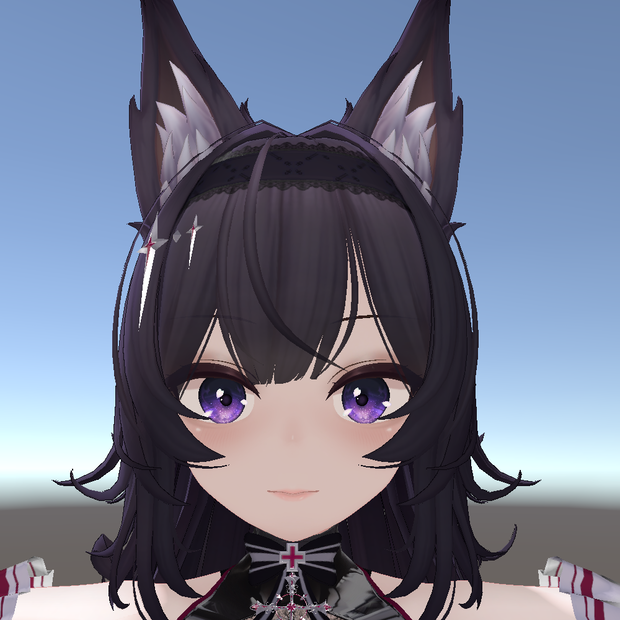
デフォルトはお姉さんなKurokiさんを、自分好みのLilyな見た目にしました。
元気なつり目っ娘のイメージです。
lili Prefabをベースに制作しております。
【対応アバター】
Kuroki
https://yaoklisub.booth.pm/items/8822547
※liliのPrefabに対応しています。
アバター本体は含まれておりません。
内容物(Product)
・デフォルト向け表情アニメーション
00None.anim
・目閉じアニメーション
Metozi.anim
・6種の表情アニメーション(anim)
unitypackage形式で頒布しております。
- Default facial animation
00None.anim
- Closed eyes animation
Metozi.anim
- 6 facial animations (anim)
Distributed in unity package format.
利用規約(Team of use)
以下のページに記載されております。
ご確認よろしくお願いします。
https://hiahiapark.booth.pm/items/7519807
Please check the terms of use at the following URL.
https://hiahiapark.booth.pm/items/7519807
请在以下网址查看使用条款。
https://hiahiapark.booth.pm/items/7519807
前提ツール
FaceEmo想定です。
FaceEmo
https://suzuryg.github.io/face-emo/ja/
(バージョン1.0の制作環境)
Kuroki Ver1.0
FaceEmo1.7.0
導入方法(FaceEmo)
①公式マニュアルを参考にしてFaceEmoを導入する
https://suzuryg.github.io/face-emo/ja/docs/tutorials/
⓶本商品をインポートする
③KurokiのLili Prefabをヒエラルキーに置く
③FaceEmoを開く
④フォルダアイコンから表情を導入する
⑤まばたきとリップシンク機能はOFFにすることをオススメします。
① Install FaceEmo by referring to the official manual:
https://suzuryg.github.io/face-emo/ja/docs/tutorials/
② Import this product.
③ Place Kuroki's Lili Prefab in the Hierarchy.
③ Open FaceEmo.
④ Import facial expressions using the folder icon.
⑤ It is recommended to turn off the blinking and lip-sync functions.
注意(Attension)
・UnityとVRChatのデスクトップモードのみ動作確認しております
・Unityの基本的な操作に関するお問い合わせにはお答えできません。
・VRChatを想定した3Dモデル用表情アニメーションファイルです
・著作権は放棄しておりません
・当アセットを使用した際に発生したトラブルや損失に対して、一切の責任を負いません
- Only Unity and VRChat desktop modes have been confirmed to work.
・We cannot answer questions about the basic operation of Unity.
・This is a Face Emote for 3D models intended for VRChat.
・Copyright is not waived.
・We are not responsible for any trouble or loss that occurs when using this Asset.
更新履歴
2026/09/10 商品公開
모든 리뷰
더보기리뷰 등록
리뷰를 작성하려면 로그인이 필요합니다.
로그인하고 리뷰 쓰기