'%3e%3cg%20clip-path='url(%23roundHexB)'%3e%3cpath%20fill='%236D5DFC'%20d='M256%2040%20443%20148%20443%20364%20256%20472%2069%20364%2069%20148Z'/%3e%3cpath%20fill='%239C93FB'%20d='M69%20148%20256%2040%20443%20148%20256%20256Z'/%3e%3cpath%20fill='%234A3FD1'%20d='M256%20256%20443%20148%20443%20364%20256%20472Z'/%3e%3c/g%3e%3c!--%20top%20face:%20filled%20round%20magnifier%20--%3e%3cg%20transform='matrix(0.8660254,-0.5,0.8660254,0.5,69,148)'%3e%3cg%20transform='matrix(0.935,0,0,0.935,7.02,7.02)'%3e%3ccircle%20cx='88'%20cy='88'%20r='52'%20fill='%23FFFFFF'/%3e%3ccircle%20cx='88'%20cy='88'%20r='28'%20fill='%239C93FB'/%3e%3cpath%20d='M124%20124%20164%20164'%20stroke='%23FFFFFF'%20stroke-width='26'%20stroke-linecap='round'/%3e%3c/g%3e%3c/g%3e%3cg%20transform='matrix(0.8660254,0.5,0,1,69,148)'%3e%3cpath%20d='M96.1,61.08%20L45.9,128.92%20Q34,145%2054,145%20L162,145%20Q182,145%20170.1,128.92%20L119.9,61.08%20Q108,45%2096.1,61.08%20Z'%20fill='%23FFFFFF'/%3e%3c/g%3e%3c!--%20right%20face:%20filled%20bubble%20--%3e%3cg%20transform='matrix(0.8660254,-0.5,0,1,256,256)'%3e%3cg%20transform='matrix(0.855,0,0,0.855,15.66,15.66)'%3e%3cpath%20d='M60%2042H156a28%2028%200%200%201%2028%2028V158Q184%20168%20174.47%20164.96L124.53%20149.04Q115%20146%20105%20146H60a28%2028%200%200%201-28-28V70a28%2028%200%200%201%2028-28Z'%20fill='%23FFFFFF'/%3e%3c/g%3e%3c/g%3e%3c/g%3e%3c/svg%3e)
 織部呉服
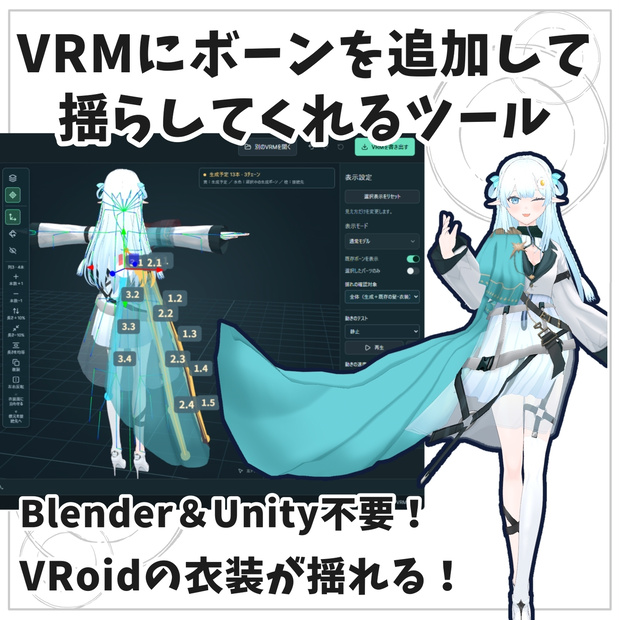
織部呉服 【VRM改変ツール】VRMBoneEditor~VRMにボーンを追加して揺らしてくれるツール~
상품 설명
【商品紹介|VRMBoneEditor】
衣装・髪・小物にボーンを追加し、揺れや変形を調整できるVRM編集ツールです。「簡単/カスタム」を選び、配置からウェイト・揺れの調整まで行えます。
VRM 0.0/1.0に対応。日本語/English、ライト/ダークを切り替えできます。
■ 主な機能
・並列/台形/円形でのまとめて配置、1本ずつのボーン追加
・ボーン配置データ(.vbe)の保存・読み込み
・ボーンの接続先変更、髪・アクセサリーの取り付け、GLBの読み込み・出力
・取り付けやボーン削除の適用前プレビュー(1画面/2画面)
・揺れ・衝突範囲の調整、腰・太腿・すねの衝突範囲の追加
・生成ボーン/既存ボーンのウェイト編集、手塗り・ぼかし・左右ミラー・なめらか調整・コピー&ペースト
・CoatSkirt/skirt/生成ボーンなどの削除、全ボーンを除いた造形のGLB保存
・IKやVRMAのループ再生による動作確認
・生成ボーンの揺らす範囲「全体/一部」の比較プレビュー
・VRM 0.0/1.0からPMX 2.0への変換、VMDによる動作確認
・移動減衰/回転減衰/回転ばねの調整、物理設定のJSON保存
■ 動作環境・ご購入前に
Windows 10/11(64bit)。WebView2 RuntimeとWebGL2が動く環境が必要です。初回インストール時にインターネット接続が必要になる場合があります。
動作の快適さはPCの性能やモデルの複雑さによって異なります。ご購入前に、無料試供版でお使いのPC・モデルの表示と操作をご確認ください。
試供版はChrome/Edgeで開くブラウザ版で、VRM・PMXを書き出せません(PMX変換プレビューは利用できます)。モデルは別途ご用意ください。
■ 出力後の動作確認済アプリ・コンテンツ
VRoid Hub/VRChat/cluster/VRM Posing Desktop/VRM Live Viewer
※すべてのモデル・環境での互換性を保証するものではありません。使用先でも動作をご確認ください。
■ 内容物(Windows版 1.10.0)
Setup.exe/はじめに.txt/取扱説明書.txt/UserGuide-English.txt/CHANGELOG.md/LICENSE/third-party-notices.txt
■ 起動・更新
ZIPを展開し、Setup.exeを実行してください。インストール後はスタートメニューから起動できます。更新時はアプリを終了し、最新版のSetup.exeを実行してください。
■ 保存データについて
.vbeには配置と自動ウェイト計算用の設定を保存します。VRM本体や手塗りした頂点ウェイトは含みません。
全ボーンを除いた造形はGLBで保存します。MToon保持/標準マテリアルへの変換を選択できます。読み込んだVRMAは動作確認用で、VRMへは保存されません。
元のモデルを保管し、編集・書き出し後の動作をご確認ください。PMXはテクスチャを含むZIPで保存します。展開後にMMDで読み込んでください。
VRMの見た目・物理の完全再現は保証しません。モデルやモーションによってスカートの細かな振動、透過部分や輪郭の差が残る場合があります。PMX出力後はMMDでもご確認ください。読み込んだVMDは動作確認用で、PMXには含まれません。
■ サポート
不具合・ご質問はBOOTHメッセージへお願いします。使用バージョン、操作手順、エラー文や画像を添えていただけると助かります。個別のモデル・衣装そのもののサポートは対象外です。
VRMBoneEditor 1.10.0
Add bones and bring movement to your outfits.
Edit clothing, hair and accessories in VRM 0.0/1.0 models. Choose Simple mode for a guided workflow or Custom mode for detailed editing. Japanese/English and Light/Dark themes are available.
■ Main Features
• Parallel, trapezoid and circular bone layouts, plus individual placement
• Save and load bone-placement files (.vbe)
• Change bone parents, attach hair/accessories, and import/export GLB parts
• Preview attachment and deletion methods in one view or two synchronized views
• Adjust spring motion and collisions, including hip, thigh and shin colliders
• Edit generated or existing bone weights: painting, blur, mirroring, smoothing and copy/paste
• Remove CoatSkirt, skirt and generated bones, or export a static GLB without bones
• Test motion with IK and looping VRMA playback
• Compare whole/partial generated-bone ranges before applying
• Convert VRM 0.0/1.0 to PMX 2.0, with VMD motion preview
• Tune linear damping, angular damping and rotational spring; export physics settings as JSON
■ Version 1.10.0
Adds PMX conversion, retained VMD previews, 30/60 fps preview modes, live physics tuning, whole/partial comparison and updated guides.
■ Requirements & Trial
Windows 10/11 (64-bit), WebView2 Runtime and a WebGL2-capable environment. Initial installation may require internet access. Performance depends on your device and model. Please try the free trial with your PC and models before purchasing. The trial opens in Chrome/Edge and cannot export VRM or PMX files (PMX conversion preview is available). Models are not included.
■ Installation & Updates
Extract the ZIP and run Setup.exe, then launch from the Start menu. Close the app before running the latest installer to update. Japanese and English guides, a changelog and license notices are included.
■ Saved Data
.vbe files store bone placement and automatic weight settings, not the model or painted vertex weights. Static GLB export offers MToon preservation or conversion to standard materials. Imported VRMA motions are for preview only and are not saved into the VRM. Keep the original model and test exported files in your target application. PMX export saves a ZIP containing the model and textures. Extract it before loading the PMX in MMD. Conversion does not guarantee an exact reproduction of VRM appearance or physics. Fine skirt vibration, transparency or outline differences may remain depending on the model and motion. Check the result in MMD. Imported VMD motions are preview-only and are not included in the PMX.
■ Support
Contact us through BOOTH messages with the app version, steps to reproduce, and error text or screenshots. Support for individual models or clothing assets themselves is not included.
【更新状況】
2026/9/19 1.10.0
・VRM 0.0/1.0からPMX 2.0への変換と、テクスチャ同梱ZIP出力を追加
・VMD読み込み、再生/停止、開始フレーム、モーションリセット、30/60fps切り替えに対応
・移動減衰/回転減衰/回転ばねをプレビューしながら調整。数値入力、初期値リセット、JSON設定保存を追加
・生成ボーンの「全体/一部」の比較プレビューを追加
・ファイル選択のフォルダー記憶、画面サイズに応じた表示、英語表示と取扱説明書を更新
・深緑の角丸アイコンへ変更
・試供版はVRM・PMX書き出し不可。PMXプレビューは利用可能
※PMX変換は見た目・物理の完全再現を保証しません。スカートの細かな振動や透過・輪郭の差が残る場合があります。
過去の主な更新
1.9.0〜1.9.1:ウェイト編集(手塗り・ぼかし・ミラー・コピー&ペースト等)、取り付け/削除の比較、造形GLB保存、腰の衝突範囲、VRMA再生、狭い画面の表示改善と配置全体の90度回転。
1.8.0〜1.8.1:GLB小物の取り付けとWindowsの表示不具合を改善。
1.7.0:簡単/カスタム、配置ファイル(.vbe)、ウェイト編集、IK確認。
1.6.0:Windowsインストーラーに対応。
※元モデルを保管し、書き出し後は使用先でも動作をご確認ください。
【利用規約・Terms of Use】
■ 作成したデータ
本ツールで編集したVRMや、自作のボーン配置データ(.vbe)は、個人・商用利用、配布・販売に利用できます。
ただし、元のモデル・衣装・素材・他者の配置データの利用規約を守ってください。
本ツールの利用により、第三者の素材を再配布する権利が得られるわけではありません。
作品への本ツールのクレジット表記は任意です。
■ ツール本体
本バージョンには、同梱のMIT Licenseが適用されます。
利用・改変・再配布・販売等は、その条件に従って行えます。再配布時は所定の著作権表示とライセンス文を保持してください。
本案内はMIT Licenseによる許可を制限するものではありません。
■ 第三者製のプログラム等
第三者製ライブラリ等には、それぞれのライセンスが適用されます。
同梱のthird-party-notices.txtおよび各ライセンスをご確認ください。
■ 動作・免責
すべてのモデル・環境での動作や、他アプリとの互換性を保証するものではありません。
元データを保管し、書き出したVRMは使用先でも動作を確認してください。
法令で認められる範囲で、本ツールの使用による損害について作者は責任を負いません。詳細は同梱のLICENSEをご確認ください。
──────────
■ Created Data
VRMs edited with this tool and original bone-placement files (.vbe) may be used, distributed or sold for personal or commercial purposes. You must comply with the terms of the original models, outfits, assets and any third-party placement data. Using this tool does not grant permission to redistribute third-party assets. Credit to this tool in your creations is optional.
■ Software
This version is provided under the included MIT License. Use, modification, redistribution and sale are permitted subject to its conditions. Retain the required copyright and license notices when redistributing. This notice does not restrict permissions granted by the MIT License.
■ Third-Party Components
Third-party libraries and other components remain subject to their respective licenses. Please refer to third-party-notices.txt and the included license documents.
■ Compatibility & Disclaimer
Operation with every model or environment, and compatibility with other applications, are not guaranteed. Keep backups and test exported VRMs in the applications where you intend to use them. To the extent permitted by law, the author is not liable for damages arising from use of this tool. See the included LICENSE for details.
모든 리뷰
더보기리뷰 등록
리뷰를 작성하려면 로그인이 필요합니다.
로그인하고 리뷰 쓰기