'%3e%3cg%20clip-path='url(%23roundHexB)'%3e%3cpath%20fill='%236D5DFC'%20d='M256%2040%20443%20148%20443%20364%20256%20472%2069%20364%2069%20148Z'/%3e%3cpath%20fill='%239C93FB'%20d='M69%20148%20256%2040%20443%20148%20256%20256Z'/%3e%3cpath%20fill='%234A3FD1'%20d='M256%20256%20443%20148%20443%20364%20256%20472Z'/%3e%3c/g%3e%3c!--%20top%20face:%20filled%20round%20magnifier%20--%3e%3cg%20transform='matrix(0.8660254,-0.5,0.8660254,0.5,69,148)'%3e%3cg%20transform='matrix(0.935,0,0,0.935,7.02,7.02)'%3e%3ccircle%20cx='88'%20cy='88'%20r='52'%20fill='%23FFFFFF'/%3e%3ccircle%20cx='88'%20cy='88'%20r='28'%20fill='%239C93FB'/%3e%3cpath%20d='M124%20124%20164%20164'%20stroke='%23FFFFFF'%20stroke-width='26'%20stroke-linecap='round'/%3e%3c/g%3e%3c/g%3e%3cg%20transform='matrix(0.8660254,0.5,0,1,69,148)'%3e%3cpath%20d='M96.1,61.08%20L45.9,128.92%20Q34,145%2054,145%20L162,145%20Q182,145%20170.1,128.92%20L119.9,61.08%20Q108,45%2096.1,61.08%20Z'%20fill='%23FFFFFF'/%3e%3c/g%3e%3c!--%20right%20face:%20filled%20bubble%20--%3e%3cg%20transform='matrix(0.8660254,-0.5,0,1,256,256)'%3e%3cg%20transform='matrix(0.855,0,0,0.855,15.66,15.66)'%3e%3cpath%20d='M60%2042H156a28%2028%200%200%201%2028%2028V158Q184%20168%20174.47%20164.96L124.53%20149.04Q115%20146%20105%20146H60a28%2028%200%200%201-28-28V70a28%2028%200%200%201%2028-28Z'%20fill='%23FFFFFF'/%3e%3c/g%3e%3c/g%3e%3c/g%3e%3c/svg%3e)
 カールのキーマップ
상품 설명
仕事はWindows、個人開発はMacBook。
両方で使いながら半年間育てた、roBaのキーマップです。
現役ソフトウェアエンジニアとして、実務ではWindows、プライベートや個人開発ではMacBookを使っています。日々調整を重ね、半年ほどこの配列を使っています。
■配列の特徴
・Macの英数/かな切替は右親指の短押しで操作。入力切替用の追加アプリは不要
・MacBook向けとWindows向け、それぞれの記号レイヤー
・短押しと長押しを使い分ける、8レイヤーの構成
・数字・カーソル・マウス・スクロール・Bluetoothの操作も手元に
・Windows標準の音声入力とAqua Voiceのショートカット設定例
・右半分の右下にあるEscapeキーの長押しで、カーソル用のARROWレイヤーを固定。YouTubeやNetflixの視聴時専用として毎日重宝しています。
使っているうちに配置の意図がわかってくると思います。このままでも十分実用的な配置になっていますが、ご自身の好みに合わせてカスタマイズしてもよいかもしれません。
■収録物
・キーマップのソース(roBa.keymap)
・配列画像9枚(8レイヤー+一覧)
・日本語PDFガイド3ページ(レイヤー一覧・ツール設定・導入の相談文)
ZIP形式のデータ商品です。アプリ・キーボード本体・ビルド済みファームウェアは付属しません。
■対象・導入
・分割キーボードに慣れていて、roBaのキーマップを導入・復元できる方向けです。
・手順がわからない場合は、PDF・ソース・配列図をAIに渡して、自分の環境に合わせた導入手順や設定を相談できます。相談文も収録しています。
・AIによる自動反映や導入成功を保証するものではありません。
■入力切替・音声入力
・Macの英数/かな切替:通常レイヤーで右親指の英数キー(#40)を短押しすると英語入力、かなキー(#41)を短押しすると日本語入力になります。長押しはそれぞれOption・Commandとして使えます。
・入力切替はキーマップに割り当て済みです。Mac側に日本語入力ソースを追加して使ってください。
・音声入力(任意):Windows標準の音声入力/Aqua Voice
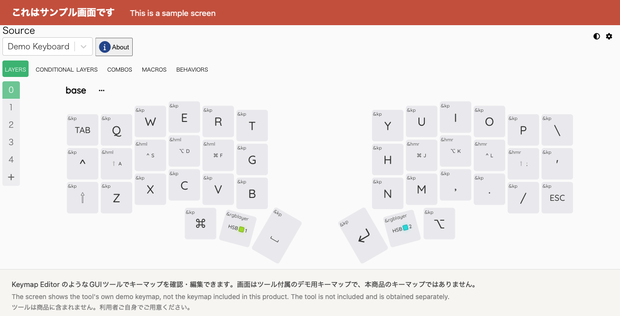
・キーマップの確認・編集(任意):Keymap Editor等のGUIツール。商品ページに掲載しているエディター画面は、ツール付属のデモ用キーマップを表示したサンプルで、本商品のキーマップではありません。
操作と音声入力の設定例はPDFに記載しています。Aqua Voiceは音声入力を使う場合の任意ツールです。アプリは付属しません。
■対応・サポート
・roBa向け。moNa2と新規環境への導入は未検証です。右親指の英数/かな切替はMac向けの設定です。Windowsでの同じキーによる入力切替は未検証です。
・記号はOS側の配列設定にも影響されます。トラックボールの感度など、基板側の別ファイルで決まる設定は同梱していません。
・買い切り4,980円。個別導入・カスタマイズ・継続保守・将来更新の保証は含みません。
・第三者ツールの将来の安全性・互換性・継続提供は保証しません。私に責めに帰すべき事由のない第三者ツール等による損害には責任を負いません。ただし、故意・重過失など法令上免除・制限できない責任を除きます。
キーボード・ソフトウェア提供元の公式商品ではありません。
──────────────────────────
English
Windows at work, MacBook for personal development. A roBa keymap refined over six months of daily use on both.
■ What the layout does
・Japanese/English input switching on macOS is a short press of the right thumb keys. No extra input-switching app is needed.
・Separate symbol layers for macOS and for Windows
・Eight layers built around tap and hold on the same key
・Numbers, cursor, mouse, scroll and Bluetooth switching stay under your fingers
・Example shortcut settings for Windows built-in dictation and for Aqua Voice
・Holding the Escape key at the bottom right of the right half locks the ARROW cursor layer
■ What you get
・The keymap source (roBa.keymap)
・9 layout images (8 layers plus an overview)
・A 3-page PDF guide
The PDF guide and the text in the layout images are in Japanese. This listing is translated; the bundled documents are not. The keymap source and the layout images are readable without Japanese, but plan to use a translation tool for the PDF if you do not read Japanese.
A ZIP data product. No application, no keyboard hardware, and no pre-built firmware are included.
■ Who this is for
・People already comfortable with split keyboards who can flash and restore a roBa keymap themselves.
・If the procedure is unclear, hand the PDF, the source and the layout images to an AI assistant and ask it to work out the steps for your environment. A prompt for this is included.
・Successful setup through an AI assistant is not guaranteed.
■ Input switching and dictation
・macOS Japanese/English switching: on the base layer, a short press of the right thumb Eisu key (#40) gives English input and the Kana key (#41) gives Japanese input. Holding them gives Option and Command.
・The switching is assigned inside the keymap itself. Add a Japanese input source on the macOS side and it works.
・Dictation (optional): Windows built-in dictation, or Aqua Voice on macOS.
・Viewing and editing the keymap (optional): a GUI tool such as Keymap Editor. The editor screen on this listing is the tool's own demo keymap, not the keymap in this product.
The PDF describes the key operations and the dictation settings. No applications are included.
■ Scope and support
・Built for roBa. Use on moNa2 and setup in a fresh environment are untested. The right-thumb Eisu/Kana switching is a macOS-oriented setting; the same keys switching input on Windows is untested.
・Symbol output also depends on your operating system's keyboard layout setting. Settings in separate firmware files, such as trackball sensitivity, are not included.
・One-time purchase, 4,980 JPY. Individual setup, customisation, ongoing maintenance and guaranteed future updates are not included.
・No guarantee is made as to the future safety, compatibility or continued availability of third-party tools. I am not liable for damage caused by third-party tools where the cause is not attributable to me, except for liability that cannot be excluded or limited by law, such as wilful misconduct or gross negligence.
Not an official product of the keyboard or software vendors.
──────────────────────────
中文(简体)
日语版本为正式文本。本译文仅供参考,如有差异,以日语版本为准。
工作用 Windows,个人开发用 MacBook。这是在两种环境下每天使用、历时半年调整而成的 roBa 键位配置。macOS 的英数/假名切换通过右拇指短按完成,无需额外的输入切换应用。
■ 收录内容
・键位配置源文件(roBa.keymap)
・配列图片 9 张(8 层 + 总览)
・3 页 PDF 指南
PDF 指南与配列图中的文字均为日语。本页面为翻译版本,随附文件本身并未翻译。如果不懂日语,请以使用翻译工具阅读 PDF 为前提。
ZIP 格式的数据商品。不含应用程序、键盘本体与已编译的固件。
商品页面上刊载的编辑器画面为 Keymap Editor 等工具自带的演示用键位配置,并非本商品的键位配置。工具不包含在商品内。
■ 适用对象
面向已熟悉分体键盘、能够自行导入与还原 roBa 键位配置的用户。
■ 对应范围
・面向 roBa。moNa2 与全新环境下的导入均未经验证。右拇指的英数/假名切换是面向 macOS 的设置,在 Windows 上使用相同按键进行输入切换未经验证。
・一次性买断 4,980 日元。不含个别导入、定制、持续维护与未来更新的保证。
・不保证第三方工具未来的安全性、兼容性与持续提供。对于并非因本人应负责的事由、由第三方工具等造成的损害,本人不承担责任。但故意、重大过失等法令上无法免除或限制的责任除外。
并非键盘、软件提供方的官方商品。
──────────────────────────
한국어
일본어판이 정본입니다. 번역문과 차이가 있을 경우 일본어판이 우선합니다.
업무는 Windows, 개인 개발은 MacBook. 양쪽에서 사용하며 반년간 다듬어 온 roBa 키맵입니다. macOS의 영문/かな 전환은 오른쪽 엄지 짧게 누르기로 조작하며, 별도의 입력 전환 앱이 필요 없습니다.
수록 내용은 키맵 소스(roBa.keymap), 배열 이미지 9장(8레이어+전체 보기), PDF 가이드 3페이지입니다. 문서와 이미지 속 문자는 모두 일본어이며, 번역된 것은 이 페이지뿐입니다. ZIP 형식의 데이터 상품으로 애플리케이션·키보드 본체·빌드된 펌웨어는 포함되지 않습니다.
분할 키보드에 익숙하시고 roBa 키맵을 직접 도입·복원하실 수 있는 분을 대상으로 합니다. moNa2와 신규 환경으로의 도입, Windows에서 같은 키로 입력을 전환하는 것은 검증되지 않았습니다. 매절 4,980엔이며 개별 도입·커스터마이즈·지속적인 유지보수·향후 업데이트 보장은 포함되지 않습니다. 제3자 도구로 인한 손해에 대해서는 책임을 지지 않습니다(고의·중과실 등 법령상 면제할 수 없는 책임은 제외).
키보드·소프트웨어 제공사의 공식 상품이 아닙니다.
모든 리뷰
더보기리뷰 등록
리뷰를 작성하려면 로그인이 필요합니다.
로그인하고 리뷰 쓰기