'%3e%3cg%20clip-path='url(%23roundHexB)'%3e%3cpath%20fill='%236D5DFC'%20d='M256%2040%20443%20148%20443%20364%20256%20472%2069%20364%2069%20148Z'/%3e%3cpath%20fill='%239C93FB'%20d='M69%20148%20256%2040%20443%20148%20256%20256Z'/%3e%3cpath%20fill='%234A3FD1'%20d='M256%20256%20443%20148%20443%20364%20256%20472Z'/%3e%3c/g%3e%3c!--%20top%20face:%20filled%20round%20magnifier%20--%3e%3cg%20transform='matrix(0.8660254,-0.5,0.8660254,0.5,69,148)'%3e%3cg%20transform='matrix(0.935,0,0,0.935,7.02,7.02)'%3e%3ccircle%20cx='88'%20cy='88'%20r='52'%20fill='%23FFFFFF'/%3e%3ccircle%20cx='88'%20cy='88'%20r='28'%20fill='%239C93FB'/%3e%3cpath%20d='M124%20124%20164%20164'%20stroke='%23FFFFFF'%20stroke-width='26'%20stroke-linecap='round'/%3e%3c/g%3e%3c/g%3e%3cg%20transform='matrix(0.8660254,0.5,0,1,69,148)'%3e%3cpath%20d='M96.1,61.08%20L45.9,128.92%20Q34,145%2054,145%20L162,145%20Q182,145%20170.1,128.92%20L119.9,61.08%20Q108,45%2096.1,61.08%20Z'%20fill='%23FFFFFF'/%3e%3c/g%3e%3c!--%20right%20face:%20filled%20bubble%20--%3e%3cg%20transform='matrix(0.8660254,-0.5,0,1,256,256)'%3e%3cg%20transform='matrix(0.855,0,0,0.855,15.66,15.66)'%3e%3cpath%20d='M60%2042H156a28%2028%200%200%201%2028%2028V158Q184%20168%20174.47%20164.96L124.53%20149.04Q115%20146%20105%20146H60a28%2028%200%200%201-28-28V70a28%2028%200%200%201%2028-28Z'%20fill='%23FFFFFF'/%3e%3c/g%3e%3c/g%3e%3c/g%3e%3c/svg%3e)
 Ever_Shop
상품 설명
Ever's Parent Constraint Converter v1.1.0
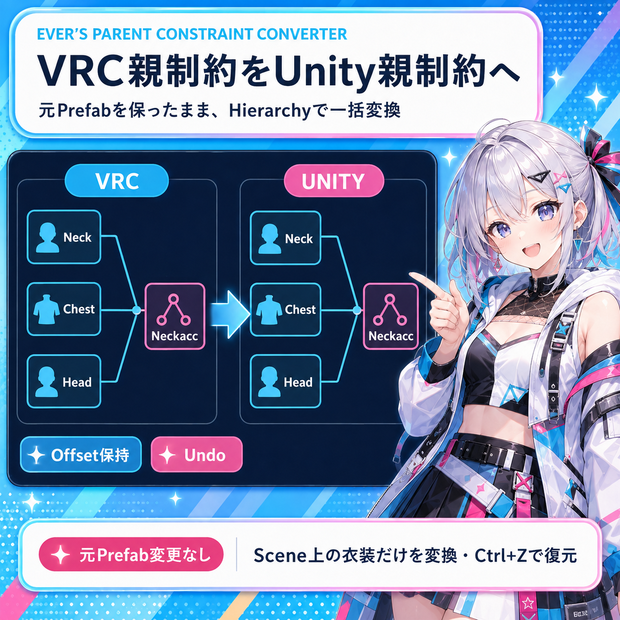
Hierarchy에 배치한 의상의 VRC Parent Constraint를 Unity 기본 Parent Constraint로 변환하는 무료 Unity Editor 툴입니다.
한국어 / English / 日本語
〖日本語〗
Hierarchyの衣装ルートを指定すると、非アクティブな子を含む全階層を確認し、変換できる項目と元のまま維持する項目を表示します。
主な機能
・VRC Parent ConstraintをUnity標準Parent Constraintへ一括変換
・補助GameObject上のVRC制約は、指定された実際のTargetボーンへ作成し、VRCコンポーネントだけを削除
・ソース順序、参照、ウェイト、オフセット、Rest値、適用軸、Active/Lock、有効状態を保持
・別の補助GameObjectにあるVRC PhysBoneが実際のサポートボーンをRoot Transformとして使う構造を、位置のみのParent Constraintで任意に補助
・新しいGameObjectを作らず、実際のボーンの既存の親ボーンをSourceに使用して現在位置をPosition Offsetとして保持
・SceneビューでVRC制約を黄色、Unity制約を水色で表示し、それぞれ個別にON/OFF
・元Prefabアセットを変更せず、Hierarchyのシーンインスタンスだけを変更
・処理全体を1回のUndo/Redoで操作
PhysBone補助は物理・揺れ・衝突を置き換えません。PhysBoneと元の補助GameObjectを残し、実ボーンの位置追従だけを補助します。接続済みの親・祖先Scale Animationは対象外です。変換後、ランタイムスクリプトやビルド生成Bindingで親・祖先Scaleが変わると、Position Offsetは子ボーンのlocalPositionのように伸縮せず位置差が出ます。評価順序による一時的な回転差もあり得ます。変換後は動作を確認してください。
安全に表現できないVRC専用設定、ルート外Target、既存制約との競合、同じTargetの重複、循環依存、参照やAnimation Bindingがある項目は理由を表示して元の状態を維持します。読み込み済みシーン内の制約も競合と循環の確認に含めます。AnimationClipとControllerは書き換えません。
使い方
ZIP内のunitypackageをインポートし、Tools → Ever's Parent Constraint Converterを開きます。Hierarchyの衣装を「衣装ルート」へ指定し、一覧を確認して変換後にシーンを保存してください。
〖한국어〗
Hierarchy의 의상 루트를 지정하면 비활성 자식을 포함한 전체 계층을 검사하고, 변환할 항목과 원래 상태로 유지할 항목을 보여 줍니다.
주요 기능
・VRC Parent Constraint를 Unity 기본 Parent Constraint로 일괄 변환
・보조 게임오브젝트의 VRC 제약은 지정된 실제 Target 본에 생성하고 VRC 컴포넌트만 삭제
・소스 순서·참조·가중치, 오프셋, Rest 값, 적용 축, Active/Lock, 활성 상태 유지
・별도 보조 게임오브젝트의 VRC PhysBone이 실제 지원 본을 Root Transform으로 사용하는 구조를 위치 전용 Parent Constraint로 선택적 보조
・새 게임오브젝트를 만들지 않고 실제 본의 기존 부모 본을 Source로 사용해 현재 위치를 Position Offset으로 유지
・Scene 뷰에서 VRC 제약은 노란색, Unity 제약은 하늘색으로 표시하고 각각 켜기/끄기
・원본 프리팹 에셋을 변경하지 않고 Hierarchy의 씬 인스턴스만 변경
・전체 작업을 Ctrl+Z 한 번으로 되돌리고 Redo 지원
PhysBone 보조는 물리·흔들림·충돌을 바꾸지 않습니다. PhysBone과 원래 보조 게임오브젝트를 남기고 실제 본의 위치 추종만 보조합니다. 연결된 부모·조상 Scale Animation은 제외합니다. 변환 후 런타임 스크립트나 빌드 생성 Binding으로 부모·조상 Scale이 바뀌면 Position Offset이 자식 본의 localPosition처럼 늘어나지 않아 위치 차이가 납니다. 평가 순서에 따른 일시적인 회전 차이도 생길 수 있습니다. 변환 후 동작을 확인하세요.
안전하게 표현할 수 없는 VRC 전용 설정, 루트 밖 Target, 기존 제약 충돌, 같은 Target 중복, 순환 의존성, 참조 또는 Animation Binding이 있는 항목은 이유를 표시하고 원래 상태로 유지합니다. 불러온 씬의 다른 제약도 충돌과 순환 검사에 포함합니다. AnimationClip과 Controller는 수정하지 않습니다.
사용 방법
ZIP의 unitypackage를 임포트하고 Tools → Ever's Parent Constraint Converter를 여세요. Hierarchy 의상을 「의상 루트」에 넣고 목록을 확인한 뒤 변환하고 씬을 저장하세요.
〖English〗
Assign an outfit root from the Hierarchy to scan its full hierarchy, including inactive descendants, and review which items will be converted or preserved.
Features
・Batch conversion from VRC Parent Constraint to Unity Parent Constraint
・For a VRC constraint on a helper GameObject, create the Unity constraint on its actual Target bone and remove only the VRC component
・Preserve ordered sources, references, weights, offsets, rest values, affected axes, active/locked flags and component enabled state
・Optionally aid a separate VRC PhysBone helper that uses an actual support bone as its Root Transform with a position-only Parent Constraint
・Use the actual bone's existing parent as the Source and preserve its current position as an offset without creating a new GameObject
・Show VRC constraints in yellow and Unity constraints in cyan in the Scene view, with separate switches
・Change only Hierarchy scene instances while leaving source prefab assets unchanged
・Undo or Redo the complete operation in one step
The PhysBone aid does not replace physics, sway or collisions. It keeps the PhysBone and original helper GameObject, aiding only position following on the actual bone. Connected parent or ancestor Scale Animation is excluded. If runtime scripts or build-generated bindings change parent or ancestor Scale later, the Position Offset does not scale like a child bone's localPosition and can shift position. Evaluation order can also cause transient rotation differences. Check the motion after conversion.
VRC-only settings that cannot be represented safely, outside-root targets, native conflicts, duplicate targets, dependency cycles, detected references and Animation Bindings are preserved with a reason. Constraints in other loaded scenes also participate in conflict and cycle checks. AnimationClips and Controllers are not rewritten.
Usage
Import the unitypackage from the ZIP, open Tools → Ever's Parent Constraint Converter, assign the Hierarchy outfit to Outfit root, review the list, convert, then save the scene.
〖対応環境 / 호환 환경 / Compatibility〗
・Unity 2022.3.22f1 / 6000.3.18f1 + VRC SDK 3.10.5 environment checked
・Unity 2019.4.31f1 Editor API compile compatibility checked; available VRC SDK support depends on the SDK package used by the project
・The included validation notes describe the checked scope. Final avatar and VRChat client visual checks are still recommended.
〖ご利用前に / 사용 전 / Before use〗
・通常のシーンにあるHierarchyオブジェクトが対象です。Projectアセット、Prefab Mode、Play Modeでは実行できません。
・일반 씬의 Hierarchy 오브젝트가 대상입니다. Project 에셋, Prefab Mode, Play Mode에서는 실행할 수 없습니다.
・Use Hierarchy objects in a regular scene. Project assets, Prefab Mode and Play Mode cannot be converted.
・変換にはVRC Parent Constraintを読み込めるSDKが必要です。モデルとSDKは付属しません。
・변환에는 VRC Parent Constraint를 읽을 수 있는 SDK가 필요합니다. 모델과 SDK는 포함되지 않습니다.
・Conversion requires an SDK that can load VRC Parent Constraint. Models and the SDK are not included.
内容 / 구성 / Contents
EversParentConstraintConverter_v1.1.0.zip
Included: EversParentConstraintConverter_v1.1.0.unitypackage + README.md + VALIDATION.md
Editor-only tool and Korean/English/Japanese guides.
Creator: Ever
〖AI使用について / AI 사용 안내 / AI usage〗
本ツールの開発と商品紹介資料の作成にはAIを活用しています。
이 툴의 개발과 상품 소개 자료 작성에 AI를 사용했습니다.
AI assisted the development of this tool and the preparation of its product information.
모든 리뷰
더보기리뷰 등록
리뷰를 작성하려면 로그인이 필요합니다.
로그인하고 리뷰 쓰기