'%3e%3cg%20clip-path='url(%23roundHexB)'%3e%3cpath%20fill='%236D5DFC'%20d='M256%2040%20443%20148%20443%20364%20256%20472%2069%20364%2069%20148Z'/%3e%3cpath%20fill='%239C93FB'%20d='M69%20148%20256%2040%20443%20148%20256%20256Z'/%3e%3cpath%20fill='%234A3FD1'%20d='M256%20256%20443%20148%20443%20364%20256%20472Z'/%3e%3c/g%3e%3c!--%20top%20face:%20filled%20round%20magnifier%20--%3e%3cg%20transform='matrix(0.8660254,-0.5,0.8660254,0.5,69,148)'%3e%3cg%20transform='matrix(0.935,0,0,0.935,7.02,7.02)'%3e%3ccircle%20cx='88'%20cy='88'%20r='52'%20fill='%23FFFFFF'/%3e%3ccircle%20cx='88'%20cy='88'%20r='28'%20fill='%239C93FB'/%3e%3cpath%20d='M124%20124%20164%20164'%20stroke='%23FFFFFF'%20stroke-width='26'%20stroke-linecap='round'/%3e%3c/g%3e%3c/g%3e%3cg%20transform='matrix(0.8660254,0.5,0,1,69,148)'%3e%3cpath%20d='M96.1,61.08%20L45.9,128.92%20Q34,145%2054,145%20L162,145%20Q182,145%20170.1,128.92%20L119.9,61.08%20Q108,45%2096.1,61.08%20Z'%20fill='%23FFFFFF'/%3e%3c/g%3e%3c!--%20right%20face:%20filled%20bubble%20--%3e%3cg%20transform='matrix(0.8660254,-0.5,0,1,256,256)'%3e%3cg%20transform='matrix(0.855,0,0,0.855,15.66,15.66)'%3e%3cpath%20d='M60%2042H156a28%2028%200%200%201%2028%2028V158Q184%20168%20174.47%20164.96L124.53%20149.04Q115%20146%20105%20146H60a28%2028%200%200%201-28-28V70a28%2028%200%200%201%2028-28Z'%20fill='%23FFFFFF'/%3e%3c/g%3e%3c/g%3e%3c/g%3e%3c/svg%3e)
 ZZ Creative
상품 설명
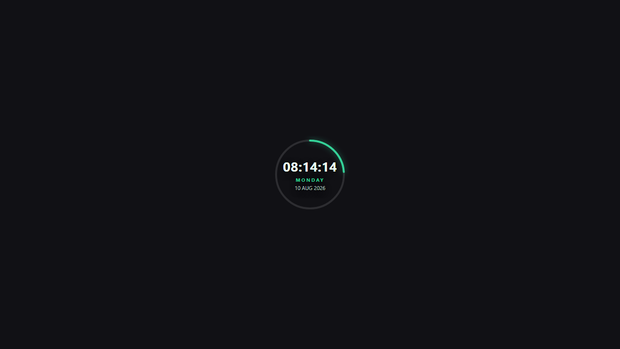
Time inside a circle with a progress ring that fills smoothly every second — a sleek, modern look.
It shows the current time (synced to your PC clock), the day of the week, and the date — day, month, and year — all in English.
Key features:
- Fully transparent background — blends into any scene
- Live clock synced to your computer
- Day, date, month, and year in English
- Works offline — no internet or external fonts required
- Single HTML file — no dependencies, no installation
- Customizable: colors, 12/24-hour format, seconds on/off
- Compact design — fits neatly in any corner of the canvas
Quick install (OBS Studio):
1. In OBS, click "+" in the Sources panel -> choose Browser.
2. Tick "Local file" -> Browse -> select the HTML file.
3. Set a size (e.g. 360 x 200) -> click OK.
4. Drag the source to any corner of your stream. Done!
=== JAPANESE ===
円の中に時刻を表示し、1秒ごとにリングが滑らかに満ちていくプログレスリング付き。スタイリッシュなモダンデザイン。
PCの時計に同期した現在時刻、曜日、日付(日・月・年)を英語表記で表示します。
主な特徴:
- 完全透過の背景 — どのシーンにも自然に馴染みます
- PC時計に同期したライブ表示
- 英語表記の曜日・日付(日・月・年)
- オフラインで動作 — インターネットや外部フォント不要
- 単一HTMLファイル — 依存関係なし・インストール不要
- カスタマイズ可能: 色、24時間/12時間表示、秒表示のON/OFF
- コンパクト設計 — 画面の角にぴったり収まります
インストール方法(OBS Studio):
1. OBSのSourcesパネルで「+」をクリック -> Browser を選択。
2. 「Local file」にチェック -> Browse でHTMLファイルを選択。
3. サイズを設定(例: 360 x 200)-> OK をクリック。
4. ソースを配信画面の好きな隅にドラッグ。完了!
모든 리뷰
더보기리뷰 등록
리뷰를 작성하려면 로그인이 필요합니다.
로그인하고 리뷰 쓰기