'%3e%3cg%20clip-path='url(%23roundHexB)'%3e%3cpath%20fill='%236D5DFC'%20d='M256%2040%20443%20148%20443%20364%20256%20472%2069%20364%2069%20148Z'/%3e%3cpath%20fill='%239C93FB'%20d='M69%20148%20256%2040%20443%20148%20256%20256Z'/%3e%3cpath%20fill='%234A3FD1'%20d='M256%20256%20443%20148%20443%20364%20256%20472Z'/%3e%3c/g%3e%3c!--%20top%20face:%20filled%20round%20magnifier%20--%3e%3cg%20transform='matrix(0.8660254,-0.5,0.8660254,0.5,69,148)'%3e%3cg%20transform='matrix(0.935,0,0,0.935,7.02,7.02)'%3e%3ccircle%20cx='88'%20cy='88'%20r='52'%20fill='%23FFFFFF'/%3e%3ccircle%20cx='88'%20cy='88'%20r='28'%20fill='%239C93FB'/%3e%3cpath%20d='M124%20124%20164%20164'%20stroke='%23FFFFFF'%20stroke-width='26'%20stroke-linecap='round'/%3e%3c/g%3e%3c/g%3e%3cg%20transform='matrix(0.8660254,0.5,0,1,69,148)'%3e%3cpath%20d='M96.1,61.08%20L45.9,128.92%20Q34,145%2054,145%20L162,145%20Q182,145%20170.1,128.92%20L119.9,61.08%20Q108,45%2096.1,61.08%20Z'%20fill='%23FFFFFF'/%3e%3c/g%3e%3c!--%20right%20face:%20filled%20bubble%20--%3e%3cg%20transform='matrix(0.8660254,-0.5,0,1,256,256)'%3e%3cg%20transform='matrix(0.855,0,0,0.855,15.66,15.66)'%3e%3cpath%20d='M60%2042H156a28%2028%200%200%201%2028%2028V158Q184%20168%20174.47%20164.96L124.53%20149.04Q115%20146%20105%20146H60a28%2028%200%200%201-28-28V70a28%2028%200%200%201%2028-28Z'%20fill='%23FFFFFF'/%3e%3c/g%3e%3c/g%3e%3c/g%3e%3c/svg%3e)
 LumiCast
상품 설명
【LUMiCast Trial Version Ver.0.21】
■ Ver.0.21 主なアップデート
LUMiCastをVer.0.21へアップデートしました。
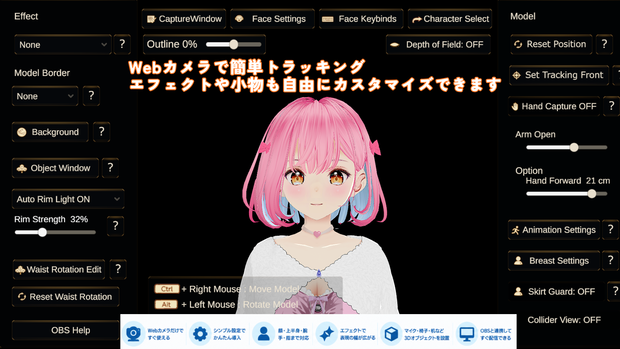
今回のアップデートでは、Webカメラによるトラッキングの安定性を中心に、表情・物理挙動・背景・エフェクト・UIなどを改善しています。
・腕・手・指のモーション安定性を改善
・手の誤認識や認識開始時の不自然な動きを軽減
・手首・前腕の回転をより自然に調整
・デフォルメモデルへの対応を改善
・表情登録を正面・左右・上下のガイド方式へ変更
・瞬きの認識と感度設定を改善
・瞳の動きを自然に調整
・Spring Boneの姿勢復帰を改善
・背景動画のループ再生に対応
・同封3Dオブジェクトとカラー変更機能を追加
・新エフェクト「Dream Glow」を追加
・リムライトの表示を改善
・UI・操作説明を調整
実際に使用してみて、
「ここが使いにくい」
「この動きが気になる」
「こんな機能が欲しい」
など、ご意見・ご要望がありましたらぜひお聞かせください。
今後の開発・改善の参考にさせていただきます。
■ LUMiCastとは
WebカメラひとつでVRMモデルを自然に動かせるWindows向け配信アプリです。
LUMiCastは動きを完全に再現することよりも、
「配信画面で自然に、きれいに見えること」
を重視しています。
顔・上半身・腕・手・指をWebカメラから取得し、細かな揺れや不自然な姿勢を抑えながら滑らかな動きを目指します。
専門的なモーションキャプチャー機材は必要ありません。
WebカメラとVRMモデルがあればお試しいただけます。
■ トライアル版について
こちらは無料トライアル版です。
すべての機能をご利用いただけますが、画面に「LUMiCast」のロゴ透かしが表示されます。
VRMモデルやWebカメラとの相性、トラッキング、エフェクト、PC負荷などをご確認ください。
透かしなしで使用できる製品版は今後リリース予定です。
■ 主な機能
・VRM 0.x/VRM 1.0対応
・顔/上半身/腕/手/指トラッキング
・瞬き/口/表情キャプチャー
・姿勢補正
・肩の呼吸モーション
・表情設定/キーバインド
・VRMAアニメーション再生
・歩き/走り/座りモーション
・バストモーション
・Skirt Guard
・腰角度調整
・Auto Rim Light/Model Border
・各種画面エフェクト
・背景透過/クロマキー
・背景画像/動画
・GLB形式3Dオブジェクト配置
・OBS取り込み対応
・日本語/英語表示
■ 対応環境
・Windows 11 64bit
・VRM 0.x/VRM 1.0
・Webカメラ
・OBS Studioなど
※macOSには対応していません。
※顔から肘付近まで映る位置へのカメラ設置を推奨します。
※カメラ映像を配信画面に表示する必要はありません。
■ OBSでの使用方法
LUMiCastでモデルを表示後、EscキーでUIを非表示にします。
OBS Studioで「ゲームキャプチャ」を追加し、LUMiCastのウィンドウを選択してください。
※トライアル版ではOBS映像にもロゴ透かしが表示されます。
■ 動作確認環境
・Windows 11 64bit
・Intel Core i5-1235U
・Intel Iris Xe Graphics
・メモリ16GB
・720p Webカメラ
上記環境で上半身・表情・ハンドトラッキングおよび各種エフェクトの動作を確認しています。
ゲーム配信やOBSとの同時使用では、メモリ16GB以上・専用GPU搭載PCを推奨します。
※モデル、揺れ物、背景、エフェクトなどにより負荷は変動します。
↓ English ↓
【LUMiCast Trial Version Ver.0.21】
■ Ver.0.21 Update
LUMiCast has been updated to Ver.0.21.
This update focuses on improving webcam tracking stability, along with facial tracking, physics, backgrounds, effects, and UI improvements.
・Improved arm, hand, and finger tracking stability
・Reduced hand misdetection and unnatural movement when tracking starts
・More natural wrist and forearm rotation
・Improved support for stylized/chibi models
・New front/left/right/up/down facial setup guides
・Improved blink detection and sensitivity
・More natural eye movement
・Improved Spring Bone pose recovery
・Background video looping
・Included 3D objects and color customization
・New "Dream Glow" effect
・Improved rim light rendering
・Improved UI and operation guides
If you find something difficult to use, notice unnatural movement, or have a feature request, please let us know.
Your feedback will help us improve future versions.
■ About LUMiCast
LUMiCast is a Windows application that lets you naturally animate your VRM model using just a webcam.
Rather than perfectly reproducing every movement, LUMiCast focuses on making your character look natural and polished on stream.
It tracks your face, upper body, arms, hands, and fingers while reducing small jitters and unnatural poses.
No specialized motion capture equipment is required.
All you need is a webcam and a VRM model.
■ Trial Version
This is the free trial version.
All features are available, but a "LUMiCast" logo watermark will be displayed.
You can test your VRM model, webcam compatibility, tracking, effects, and PC performance.
A full version without the watermark is planned for a future release.
■ Main Features
・VRM 0.x / VRM 1.0
・Face / upper-body / arm / hand / finger tracking
・Blink / mouth / facial expression tracking
・Pose correction
・Shoulder breathing animation
・Expression settings / key bindings
・VRMA animation playback
・Walking / running / sitting motions
・Bust motion
・Skirt Guard
・Waist angle adjustment
・Auto Rim Light / Model Border
・Various visual effects
・Transparent / chroma key backgrounds
・Background images / videos
・GLB 3D object placement
・OBS capture support
・Japanese / English interface
■ System Requirements
・Windows 11 64-bit
・VRM 0.x / VRM 1.0
・Webcam
・OBS Studio or similar software
※ macOS is not supported.
※ We recommend positioning the webcam so your body is visible from your face to around your elbows.
※ Your webcam feed does not need to appear on stream.
■ Using with OBS
Display your model in LUMiCast and press Esc to hide the UI.
In OBS Studio, add a Game Capture source and select the LUMiCast window.
※ The trial watermark will also appear in OBS footage.
■ Tested Environment
・Windows 11 64-bit
・Intel Core i5-1235U
・Intel Iris Xe Graphics
・16 GB RAM
・720p webcam
LUMiCast has been tested with upper-body, facial, hand tracking, and various effects enabled.
For game streaming or simultaneous use with OBS, we recommend 16 GB or more RAM and a dedicated GPU.
※ Performance varies depending on model complexity, physics, backgrounds, and effects.
모든 리뷰
더보기리뷰 등록
리뷰를 작성하려면 로그인이 필요합니다.
로그인하고 리뷰 쓰기