'%3e%3cg%20clip-path='url(%23roundHexB)'%3e%3cpath%20fill='%236D5DFC'%20d='M256%2040%20443%20148%20443%20364%20256%20472%2069%20364%2069%20148Z'/%3e%3cpath%20fill='%239C93FB'%20d='M69%20148%20256%2040%20443%20148%20256%20256Z'/%3e%3cpath%20fill='%234A3FD1'%20d='M256%20256%20443%20148%20443%20364%20256%20472Z'/%3e%3c/g%3e%3c!--%20top%20face:%20filled%20round%20magnifier%20--%3e%3cg%20transform='matrix(0.8660254,-0.5,0.8660254,0.5,69,148)'%3e%3cg%20transform='matrix(0.935,0,0,0.935,7.02,7.02)'%3e%3ccircle%20cx='88'%20cy='88'%20r='52'%20fill='%23FFFFFF'/%3e%3ccircle%20cx='88'%20cy='88'%20r='28'%20fill='%239C93FB'/%3e%3cpath%20d='M124%20124%20164%20164'%20stroke='%23FFFFFF'%20stroke-width='26'%20stroke-linecap='round'/%3e%3c/g%3e%3c/g%3e%3cg%20transform='matrix(0.8660254,0.5,0,1,69,148)'%3e%3cpath%20d='M96.1,61.08%20L45.9,128.92%20Q34,145%2054,145%20L162,145%20Q182,145%20170.1,128.92%20L119.9,61.08%20Q108,45%2096.1,61.08%20Z'%20fill='%23FFFFFF'/%3e%3c/g%3e%3c!--%20right%20face:%20filled%20bubble%20--%3e%3cg%20transform='matrix(0.8660254,-0.5,0,1,256,256)'%3e%3cg%20transform='matrix(0.855,0,0,0.855,15.66,15.66)'%3e%3cpath%20d='M60%2042H156a28%2028%200%200%201%2028%2028V158Q184%20168%20174.47%20164.96L124.53%20149.04Q115%20146%20105%20146H60a28%2028%200%200%201-28-28V70a28%2028%200%200%201%2028-28Z'%20fill='%23FFFFFF'/%3e%3c/g%3e%3c/g%3e%3c/g%3e%3c/svg%3e)
 Hellblaze
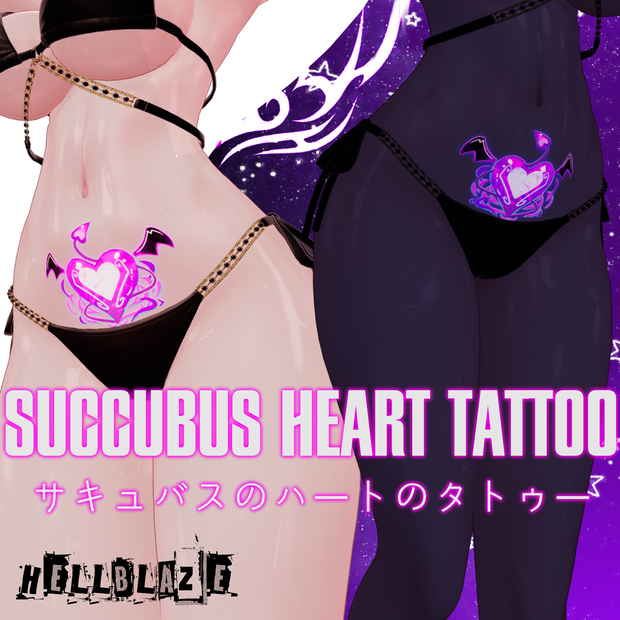
 Succubus Heart Tattoo サキュバスのハートタトゥー ♡ 【12 アバター対応】♡
상품 설명
Tattoo png texture for 12 avatars:
12人分のアバター用タトゥーPNGテクスチャ:
オリジナル3Dモデル「桔梗」 Kikyo
https://booth.pm/en/items/3681787
オリジナル3Dアバター『ルミナ - LUMINA』
https://booth.pm/en/items/7502898
オリジナル3Dモデル「マヌカ」 Manuka
https://booth.pm/en/items/5058077
オリジナル3Dモデル「舞夜」 Maya
https://booth.pm/en/items/3390957
オリジナル3Dモデル『ミルティナ』 Milltina
https://booth.pm/en/items/6538026
オリジナル3Dモデル「萌」 Moe
https://booth.pm/en/items/4667400
オリジナル3Dモデル「竜胆」 Rindo
https://booth.pm/en/items/3443188
サメっ子オリジナル3Dモデル「rurune」
https://booth.pm/en/items/5957830
オリジナル3Dモデル「セレスティア」 Selestia
https://booth.pm/en/items/4035411
オリジナル3Dモデル「しなの」 Shinano
https://booth.pm/en/items/6106863
Shinra
https://boothplorer.com/avatar/4707634
オリジナル3Dモデル「ヴェール・Velle」
https://booth.pm/en/items/4951792
Uses liltoon shader
liltoonシェーダーで動作します
If you have any other questions, please contact the following account:
ほかにご質問がございましたら、下記のアカウントまでお問い合わせください。 https://bsky.app/profile/h3llblazer.bsky.social
How to use/使い方:
1- Import the tattoo to a layer on top of your avatar base png on whichever editing app you choose.
2- Export it to Unity.
3- Set your created image as the Main Color on your avatar's body material.
4- Go to 'Emissions' and apply the emission mask of the correspondent tattoo.
5- Verify the quality of the texture, if it looks blurry change your newly created png's max size to 4k and compression to 'high quality', do the same for the emission (no need to change the emission size to 4k as well, just changing the compression to high will do)
6- If the emission is not shining on the tattoo, make sure to change the HDR to white (or whatever color you choose)
7- Export your avatar to VRChat and enjoy!
- If you want to change the location of the tattoo you will need to do it manually on your editing app, along with the emission.
For that, use the PSD file to freely manipulate the layers and change the location, size, color of the tattoos.
1- お使いの任意の編集アプリで、タトゥーをアバターのベースPNGの上にあるレイヤーにインポートします。
2- Unityにエクスポートします。
3- 作成した画像を、アバターのボディマテリアルの「Main Color」に設定します。
4- 「Emissions」に移動し、対応するタトゥーのエミッションマスクを適用します。
5- テクスチャの品質を確認してください。ぼやけて見える場合は、作成した新しいPNGの最大サイズを4kにし、圧縮を「high quality」に変更します。エミッションについても同様に行ってください(エミッションサイズを4kに変更する必要はなく、圧縮をhigh qualityにするだけで大丈夫です)。
6- エミッションがタトゥーに発光していない場合は、HDRを白(またはお好みの色)に変更してください。
7- アバターをVRChatにエクスポートして、楽しんでください!
- タトゥーの位置を変更したい場合は、編集アプリ上でエミッションと一緒に手動で行う必要があります。そのために、PSDファイルを使ってレイヤーを自由に操作し、タトゥーの位置、サイズ、色を変更してください。
Terms of Use/利用規約:
-The author HellBlaze has all copyrights of the product.
-By purchasing this product, you are deemed to have agreed to these Terms of Use.
-You are free to modify this product.
-Please inquire for commercial use.
-All data included in this product may not be redistributed or sold.
-Use that violates public order and morals or related to political, religious statements and defamatory expressions against others are prohibited.
-It is prohibited to falsely represent the author of this product.
-The author, our participants, and the groups they belong to does not take any responsibility for any troubles or losses by using the model data or modified model.
-These terms may be revised in the future, in case of change in the Terms of Use, the latest version will always apply.
-著者のHellBlazeは、その製品のすべての著作権を有しています。-本製品を購入することにより、これらの利用規約に同意したものとみなされます- 本製品は改変していただいて構いません。 - 商用利用をご希望の場合はお問い合わせください。 - 本製品に含まれるすべてのデータは、再配布または販売してはなりません。 - 公序良俗に反する行為、または政治・宗教に関する声明や、他者に対する中傷表現に関連する行為は禁止されています。 - 本製品の著者であることを虚偽に表示してはなりません。 - 著者、当社の参加者、およびそれらが所属する各団体は、モデルデータまたは改変したモデルを使用したことにより生じたあらゆるトラブルや損失について、いかなる責任も負いません。 - 本規約は将来改定される場合があります。利用規約に変更があった場合は、常に最新の版が適用されます。
모든 리뷰
더보기리뷰 등록
리뷰를 작성하려면 로그인이 필요합니다.
로그인하고 리뷰 쓰기