'%3e%3cg%20clip-path='url(%23roundHexB)'%3e%3cpath%20fill='%236D5DFC'%20d='M256%2040%20443%20148%20443%20364%20256%20472%2069%20364%2069%20148Z'/%3e%3cpath%20fill='%239C93FB'%20d='M69%20148%20256%2040%20443%20148%20256%20256Z'/%3e%3cpath%20fill='%234A3FD1'%20d='M256%20256%20443%20148%20443%20364%20256%20472Z'/%3e%3c/g%3e%3c!--%20top%20face:%20filled%20round%20magnifier%20--%3e%3cg%20transform='matrix(0.8660254,-0.5,0.8660254,0.5,69,148)'%3e%3cg%20transform='matrix(0.935,0,0,0.935,7.02,7.02)'%3e%3ccircle%20cx='88'%20cy='88'%20r='52'%20fill='%23FFFFFF'/%3e%3ccircle%20cx='88'%20cy='88'%20r='28'%20fill='%239C93FB'/%3e%3cpath%20d='M124%20124%20164%20164'%20stroke='%23FFFFFF'%20stroke-width='26'%20stroke-linecap='round'/%3e%3c/g%3e%3c/g%3e%3cg%20transform='matrix(0.8660254,0.5,0,1,69,148)'%3e%3cpath%20d='M96.1,61.08%20L45.9,128.92%20Q34,145%2054,145%20L162,145%20Q182,145%20170.1,128.92%20L119.9,61.08%20Q108,45%2096.1,61.08%20Z'%20fill='%23FFFFFF'/%3e%3c/g%3e%3c!--%20right%20face:%20filled%20bubble%20--%3e%3cg%20transform='matrix(0.8660254,-0.5,0,1,256,256)'%3e%3cg%20transform='matrix(0.855,0,0,0.855,15.66,15.66)'%3e%3cpath%20d='M60%2042H156a28%2028%200%200%201%2028%2028V158Q184%20168%20174.47%20164.96L124.53%20149.04Q115%20146%20105%20146H60a28%2028%200%200%201-28-28V70a28%2028%200%200%201%2028-28Z'%20fill='%23FFFFFF'/%3e%3c/g%3e%3c/g%3e%3c/g%3e%3c/svg%3e)
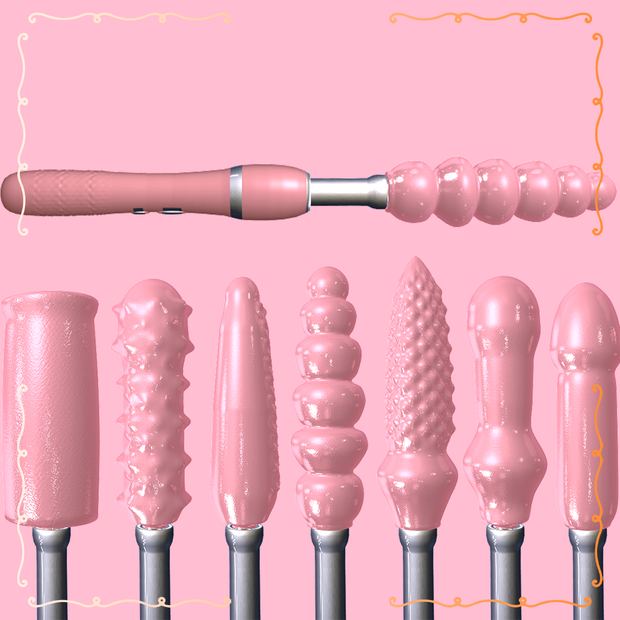
 XOXO
XOXO Handheld Thruster Vibrator + Onahole Set / ハンディ ピストンバイブ + オナホール (SPS2 DPS SPS)
상품 설명
日本語説明 (Japanese Description)
🔞 インタラクティブ・ハンディピストンマシン (SPS/DPS対応)
VRChat対応のギミック付きハンディ型ピストンマシンです。VRCFury対応で簡単に導入できます!
✨ 特徴
ピストン&位置調整: 前後運動のスピード調整スライダー、およびお好みの位置でストロークを停止・固定するカスタムポジション機能を搭載。
8種類の先端チップ: Bubbly、Dragon、Knot、Smooth、Stroker、Studded、Tentacle、VacSleeveの8つを自由に切替可能。
内部アニメーション: Stroker、VacSleeve、Studdedの内部がリアルタイムに動き、波打つイボの動きなどを Parts Speed で個別に速度調整可能。
Knot(結び目)連動ギミック: 奥まで到達すると内部が膨らみ、抜けると瞬時に収縮する専用ブレンドシェイプを搭載。
充実のカスタマイズ: グリップとチップの色分け変更、ツヤ(Gloss)調整、全体サイズおよびチップ単体サイズの変更スライダーを完備。
手持ち&ワールド固定: 左右の手の切り替えおよびワールド固定(Freeze)に対応。
互換性: SPS, SPS 2, DPS 完全対応(Poiyomi / lilToon プリセット同梱)。
⚠️ 必須アセット
VRCFury
Poiyomi または lilToon シェーダー
🛠️ 導入方法
プレハブをアバターのルート直下にドラッグ&ドロップします。
プレハブ内の「left hand」「right hand」オブジェクトの位置のみを動かして、アバターの手の位置に合わせます。
※オブジェクトをアバターの手のボーン内に直接入れないでください。VRCFuryが自動で手に追従させます。
🔞 Interactive Handheld Thruster Machine (SPS / DPS)
An interactive handheld thrusting machine asset ready for VRChat! Feature-packed with dynamic movement, interchangeable tips, and custom motion options. Setup is seamless using VRCFury.
✨ Features
Motorized Thrusting Control: Fully adjustable back-and-forth linear thrust speed slider or fixed custom shaft position control.
8 Interchangeable Tips: Includes Bubbly, Dragon, Knot, Smooth, Stroker, Studded, Tentacle, and VacSleeve options.
Dynamic Inner Animations: Stroker, VacSleeve, and Studded tips feature animated inner textures and wave-motion studs controlled via the Parts Speed slider.
Reactive Knot Inflation: Custom blendshapes make the Knot tip inflate as depth reaches the limit and instantly deflate upon retracting.
Full Visual Customization: Tweak Tip and Grip colors separately, adjust glossiness, and rescale the overall toy or just the tip.
World Drop & Hand Switching: Swap instantly between Left and Right hands or freeze the toy in world space.
Compatibility: Pre-configured for SPS, SPS 2, and DPS (Poiyomi / lilToon shaders supported).
⚠️ Requirements
VRCFury (Required for menu toggles and animations)
Poiyomi or lilToon Shader
🛠️ Setup Instructions
Drag and drop the main prefab onto your avatar's root level.
Locate the "left hand" and "right hand" objects inside the prefab and adjust their positions to match your avatar's hands.
Do not move these objects into your avatar's hand bones! VRCFury will automatically attach them.Handheld Thruster Vibrator + Onahole
모든 리뷰
더보기리뷰 등록
리뷰를 작성하려면 로그인이 필요합니다.
로그인하고 리뷰 쓰기