'%3e%3cg%20clip-path='url(%23roundHexB)'%3e%3cpath%20fill='%236D5DFC'%20d='M256%2040%20443%20148%20443%20364%20256%20472%2069%20364%2069%20148Z'/%3e%3cpath%20fill='%239C93FB'%20d='M69%20148%20256%2040%20443%20148%20256%20256Z'/%3e%3cpath%20fill='%234A3FD1'%20d='M256%20256%20443%20148%20443%20364%20256%20472Z'/%3e%3c/g%3e%3c!--%20top%20face:%20filled%20round%20magnifier%20--%3e%3cg%20transform='matrix(0.8660254,-0.5,0.8660254,0.5,69,148)'%3e%3cg%20transform='matrix(0.935,0,0,0.935,7.02,7.02)'%3e%3ccircle%20cx='88'%20cy='88'%20r='52'%20fill='%23FFFFFF'/%3e%3ccircle%20cx='88'%20cy='88'%20r='28'%20fill='%239C93FB'/%3e%3cpath%20d='M124%20124%20164%20164'%20stroke='%23FFFFFF'%20stroke-width='26'%20stroke-linecap='round'/%3e%3c/g%3e%3c/g%3e%3cg%20transform='matrix(0.8660254,0.5,0,1,69,148)'%3e%3cpath%20d='M96.1,61.08%20L45.9,128.92%20Q34,145%2054,145%20L162,145%20Q182,145%20170.1,128.92%20L119.9,61.08%20Q108,45%2096.1,61.08%20Z'%20fill='%23FFFFFF'/%3e%3c/g%3e%3c!--%20right%20face:%20filled%20bubble%20--%3e%3cg%20transform='matrix(0.8660254,-0.5,0,1,256,256)'%3e%3cg%20transform='matrix(0.855,0,0,0.855,15.66,15.66)'%3e%3cpath%20d='M60%2042H156a28%2028%200%200%201%2028%2028V158Q184%20168%20174.47%20164.96L124.53%20149.04Q115%20146%20105%20146H60a28%2028%200%200%201-28-28V70a28%2028%200%200%201%2028-28Z'%20fill='%23FFFFFF'/%3e%3c/g%3e%3c/g%3e%3c/g%3e%3c/svg%3e)
 HARE_Studio
상품 설명
🧭 Hierarchy Path Tools
Copy Path for the Hierarchy
GitHub: https://github.com/HARE-14/Hierarchy-Path-Tools
━━━━━━━━━━━━━━━━━━━━━━━━━━━━━━━
■ 🇰🇷 한국어
Unity Project 창에는 Copy Path가 있는데 Hierarchy에는 없습니다. 그 자리를 채우는 에디터 확장입니다.
Hierarchy에서 오브젝트를 우클릭하면 경로가 바로 복사되고, 창을 띄워두면 클릭하는 대로 경로가 갱신됩니다.
의상을 옮기거나 이름을 바꾼 뒤 애니메이션이 안 먹힐 때, 지금 올바른 경로가 무엇인지 바로 확인할 수 있습니다.
【 📋 세 가지 경로 】
・ 절대 경로 : 아바타 루트 기준 (애니메이션 클립이 쓰는 형태)
・ 상대 경로 : MA Merge Animator 또는 중첩 Animator 기준
・ 씬 경로 : 씬 루트부터의 전체 경로
【 ⚠️ 중복 이름 경고 】
같은 부모 아래에 이름이 같은 오브젝트가 있으면 Unity 경로로는 구분되지 않아 애니메이션이 조용히 깨집니다. 복사 시점과 창에서 미리 알려줍니다.
【 ✨ 특징 】
・ 📑 여러 개 한 번에 — 여러 오브젝트를 선택하고 우클릭하면 한 줄에 하나씩 복사됩니다.
・ 🌐 3개 국어 지원 — 한국어 / English / 日本語 (창에서 바로 전환 가능)
・ ⌨️ 단축키 직접 지정 — 기본값이 비어 있어 다른 툴과 충돌하지 않습니다.
・ 🧩 의존성 없음 — VRChat SDK와 모듈러 아바타(Modular Avatar) 모두 선택 사항입니다.
【 📦 설치 방법 】
아래 페이지에서 VCC / ALCOM에 추가하세요.
🔗 https://hare-14.github.io/vpm-repos/
【 🛠️ 요구 사항 】
Unity 2022.3 이상
・ VRChat SDK 있음 → VRCAvatarDescriptor를 아바타 루트로 사용
・ VRChat SDK 없음 → 가장 가까운 Animator를 루트로 사용
・ 모듈러 아바타 없음 → 상대 경로는 중첩 Animator 기준으로만 동작
【 🖱️ 사용법 】
・ Hierarchy 우클릭 → Hierarchy Path : 절대 / 상대 / 씬 경로 복사
・ 상단 메뉴 Tools → Hierarchy Path : 창 열기
・ 상단 메뉴 Edit → Shortcuts → Hierarchy Path : 단축키 지정
━━━━━━━━━━━━━━━━━━━━━━━━━━━━━━━
■ 🇺🇸 English
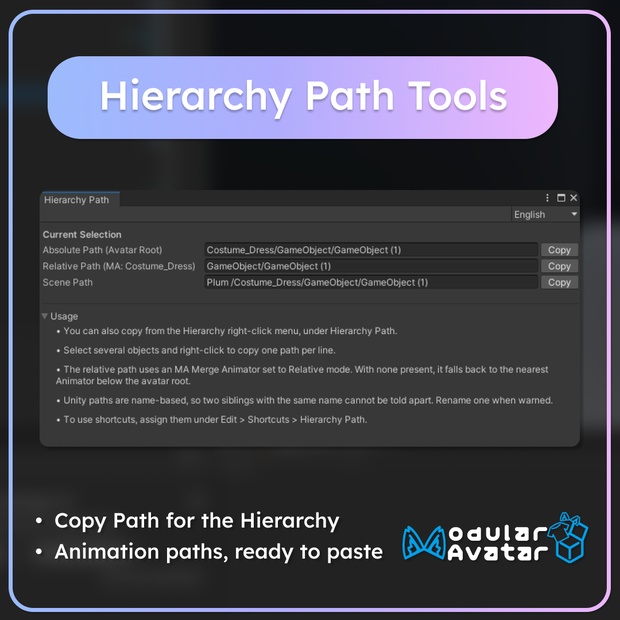
Unity gives you Copy Path in the Project window but nothing like it in the Hierarchy. This editor extension fills that gap.
Right-click any object in the Hierarchy to copy its path, or keep the window open and watch the paths update as you click around.
When an animation stops working after you move or rename something, it tells you what the correct path is right now.
【 📋 Three path forms 】
・ Absolute Path : Anchored to the avatar root (the form animation clips use)
・ Relative Path : Relative to an MA Merge Animator or a nested Animator
・ Scene Path : Full path from the scene root
【 ⚠️ Duplicate name warning 】
When two objects under the same parent share a name, Unity paths cannot tell them apart and animations break silently. You get warned when copying and in the window.
【 ✨ Features 】
・ 📑 Multi-select — Select several objects and right-click to copy one path per line.
・ 🌐 Three languages — English / 日本語 / 한국어 (switchable in the window)
・ ⌨️ Bring your own shortcuts — None are bound by default, so nothing collides.
・ 🧩 No dependencies — Both the VRChat SDK and Modular Avatar are optional.
【 📦 Install 】
Add the listing to VCC / ALCOM from this page:
🔗 https://hare-14.github.io/vpm-repos/
【 🛠️ Requirements 】
Unity 2022.3 or newer
・ With VRChat SDK → VRCAvatarDescriptor is used as the avatar root
・ Without VRChat SDK → The nearest Animator is used instead
・ Without Modular Avatar → Relative path falls back to nested Animators only
【 🖱️ Usage 】
・ Hierarchy Right-click → Hierarchy Path : Copy absolute / relative / scene path
・ Top Menu Tools → Hierarchy Path : Open the window
・ Top Menu Edit → Shortcuts → Hierarchy Path : Assign shortcuts
━━━━━━━━━━━━━━━━━━━━━━━━━━━━━━━
■ 🇯🇵 日本語
Unity の Project ウィンドウには Copy Path があるのに、Hierarchy にはありません。それを補うエディタ拡張です。
Hierarchy でオブジェクトを右クリックするとパスをコピーでき、ウィンドウを開いておけばクリックするたびにパスが更新されます。
衣装を移動・リネームした後にアニメーションが効かなくなったとき、今の正しいパスが何かをすぐに確認できます。
【 📋 3 種類のパス 】
・ 絶対パス : アバタールート基準(アニメーションクリップが使う形式)
・ 相対パス : MA Merge Animator または入れ子の Animator 基準
・ シーンパス : シーンルートからの完全なパス
【 ⚠️ 同名オブジェクトの警告 】
同じ親の下に同名のオブジェクトがあると、Unity のパスでは区別できずアニメーションが静かに壊れます。コピー時とウィンドウで事前に知らせます。
【 ✨ 特徴 】
・ 📑 複数まとめて — 複数選択して右クリックすると 1 行に 1 つずつコピーされます。
・ 🌐 3 言語対応 — 日本語 / English / 한국어(ウィンドウ内で切り替え可能)
・ ⌨️ ショートカットは自分で設定 — 初期値が空なので他のツールと衝突しません。
・ 🧩 依存なし — VRChat SDK も Modular Avatar も任意です。
【 📦 導入方法 】
下記ページから VCC / ALCOM に追加してください。
🔗 https://hare-14.github.io/vpm-repos/
【 🛠️ 動作環境 】
Unity 2022.3 以上
・ VRChat SDK あり → VRCAvatarDescriptor をアバタールートとして使用
・ VRChat SDK なし → 最も近い Animator をルートとして使用
・ Modular Avatar なし → 相対パスは入れ子の Animator 基準のみ
【 🖱️ 使い方 】
・ Hierarchy 右クリック → Hierarchy Path : 絶対 / 相対 / シーンパスをコピー
・ 上部メニュー Tools → Hierarchy Path : ウィンドウを開く
・ 上部メニュー Edit → Shortcuts → Hierarchy Path : ショートカットを設定
━━━━━━━━━━━━━━━━━━━━━━━━━━━━━━━
■ 📄 License
MIT License
https://github.com/HARE-14/Hierarchy-Path-Tools/blob/main/LICENSE
모든 리뷰
더보기리뷰 등록
리뷰를 작성하려면 로그인이 필요합니다.
로그인하고 리뷰 쓰기