'%3e%3cg%20clip-path='url(%23roundHexB)'%3e%3cpath%20fill='%236D5DFC'%20d='M256%2040%20443%20148%20443%20364%20256%20472%2069%20364%2069%20148Z'/%3e%3cpath%20fill='%239C93FB'%20d='M69%20148%20256%2040%20443%20148%20256%20256Z'/%3e%3cpath%20fill='%234A3FD1'%20d='M256%20256%20443%20148%20443%20364%20256%20472Z'/%3e%3c/g%3e%3c!--%20top%20face:%20filled%20round%20magnifier%20--%3e%3cg%20transform='matrix(0.8660254,-0.5,0.8660254,0.5,69,148)'%3e%3cg%20transform='matrix(0.935,0,0,0.935,7.02,7.02)'%3e%3ccircle%20cx='88'%20cy='88'%20r='52'%20fill='%23FFFFFF'/%3e%3ccircle%20cx='88'%20cy='88'%20r='28'%20fill='%239C93FB'/%3e%3cpath%20d='M124%20124%20164%20164'%20stroke='%23FFFFFF'%20stroke-width='26'%20stroke-linecap='round'/%3e%3c/g%3e%3c/g%3e%3cg%20transform='matrix(0.8660254,0.5,0,1,69,148)'%3e%3cpath%20d='M96.1,61.08%20L45.9,128.92%20Q34,145%2054,145%20L162,145%20Q182,145%20170.1,128.92%20L119.9,61.08%20Q108,45%2096.1,61.08%20Z'%20fill='%23FFFFFF'/%3e%3c/g%3e%3c!--%20right%20face:%20filled%20bubble%20--%3e%3cg%20transform='matrix(0.8660254,-0.5,0,1,256,256)'%3e%3cg%20transform='matrix(0.855,0,0,0.855,15.66,15.66)'%3e%3cpath%20d='M60%2042H156a28%2028%200%200%201%2028%2028V158Q184%20168%20174.47%20164.96L124.53%20149.04Q115%20146%20105%20146H60a28%2028%200%200%201-28-28V70a28%2028%200%200%201%2028-28Z'%20fill='%23FFFFFF'/%3e%3c/g%3e%3c/g%3e%3c/g%3e%3c/svg%3e)
 にぼし乾物店
상품 설명
🐟2026/08/16 販売開始しました (August 16, 2026: Now on sale)
ポリゴン 13032△
ーーーーーーーーーーーーーーーーーーーーーーーーーーーーーーーー
🐟概要
🐟概要
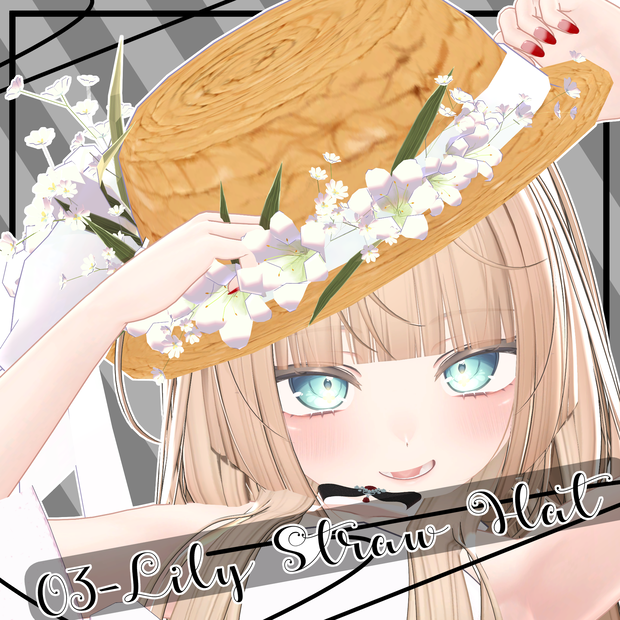
・ModularAvatar対応版Prefabを同梱しています。アバターに追加するだけでつけられます。
・This package includes prefabs compatible with ModularAvatar. You can equip them simply by adding them to your avatar.
이 패키지에는 ModularAvatar와 호환되는 프리팹이 포함되어 있습니다. 아바타에 추가하기만 하면 간단히 장착할 수 있습니다.
ーーーーーーーーーーーーーーーーーーーーーーーーーーーーーーーー
🐟対応アバター
マヌカにあわせてますが、どなたでもお使いいただけます。
It's formulated with Manuka, but anyone can use it.
마누카에 맞춰 제작되었지만, 누구나 사용하실 수 있습니다.
ーーーーーーーーーーーーーーーーーーーーーーーーーーーーーーーー
🐟導入方法
・使用shader
lilToon
https://booth.pm/ja/items/3087170
・Unity2022.3.22f1
・Modular Avatar使用
①Unityプロジェクトを立ち上げ、アバター・lilToon・Modular Avatarをインポートし、本データをインポートする
Launch a Unity project, import the Avatar, lilToon, and Modular Avatar, and then import this data.
Unity 프로젝트를 생성하고, 아바타·lilToon·Modular Avatar를 임포트한 뒤, 본 데이터를 임포트한다
②フォルダ内にある.prefabデータをヒエラルキーのアバター直下にドラッグ&ドロップする
Drag and drop the .prefab files in the folder directly under the Avatar in the Hierarchy.
폴더 내에 있는 .prefab 파일을 계층 구조의 아바타 바로 아래로 드래그 앤 드롭한다
ーーーーーーーーーーーーーーーーーーーーーーーーーーーーーーーー
🐟LICENSE
本規約は、あしやまひろこ(@hiorko_TB)氏が作成したVN3ライセンス( https://www.vn3.org/ )を用いて作成しております。
These Terms of Use were created using the VN3 License (https://www.vn3.org/) created by Hiroko Ashiyama (@hiorko_TB).
본 약관은 아시야마 히로코(@hiorko_TB) 씨가 작성한 VN3 라이선스( https://www.vn3.org/ )를 사용하여 작성되었습니다.
【EN/JP/ZH/KO対応】
https://drive.google.com/drive/folders/1E74Ong3ednOy1x18n6ZFZxs3TV5bGQHF?usp=sharing
ーーーーーーーーーーーーーーーーーーーーーーーーーーーーーーーー
모든 리뷰
더보기리뷰 등록
리뷰를 작성하려면 로그인이 필요합니다.
로그인하고 리뷰 쓰기