'%3e%3cg%20clip-path='url(%23roundHexB)'%3e%3cpath%20fill='%236D5DFC'%20d='M256%2040%20443%20148%20443%20364%20256%20472%2069%20364%2069%20148Z'/%3e%3cpath%20fill='%239C93FB'%20d='M69%20148%20256%2040%20443%20148%20256%20256Z'/%3e%3cpath%20fill='%234A3FD1'%20d='M256%20256%20443%20148%20443%20364%20256%20472Z'/%3e%3c/g%3e%3c!--%20top%20face:%20filled%20round%20magnifier%20--%3e%3cg%20transform='matrix(0.8660254,-0.5,0.8660254,0.5,69,148)'%3e%3cg%20transform='matrix(0.935,0,0,0.935,7.02,7.02)'%3e%3ccircle%20cx='88'%20cy='88'%20r='52'%20fill='%23FFFFFF'/%3e%3ccircle%20cx='88'%20cy='88'%20r='28'%20fill='%239C93FB'/%3e%3cpath%20d='M124%20124%20164%20164'%20stroke='%23FFFFFF'%20stroke-width='26'%20stroke-linecap='round'/%3e%3c/g%3e%3c/g%3e%3cg%20transform='matrix(0.8660254,0.5,0,1,69,148)'%3e%3cpath%20d='M96.1,61.08%20L45.9,128.92%20Q34,145%2054,145%20L162,145%20Q182,145%20170.1,128.92%20L119.9,61.08%20Q108,45%2096.1,61.08%20Z'%20fill='%23FFFFFF'/%3e%3c/g%3e%3c!--%20right%20face:%20filled%20bubble%20--%3e%3cg%20transform='matrix(0.8660254,-0.5,0,1,256,256)'%3e%3cg%20transform='matrix(0.855,0,0,0.855,15.66,15.66)'%3e%3cpath%20d='M60%2042H156a28%2028%200%200%201%2028%2028V158Q184%20168%20174.47%20164.96L124.53%20149.04Q115%20146%20105%20146H60a28%2028%200%200%201-28-28V70a28%2028%200%200%201%2028-28Z'%20fill='%23FFFFFF'/%3e%3c/g%3e%3c/g%3e%3c/g%3e%3c/svg%3e)
 nosatou
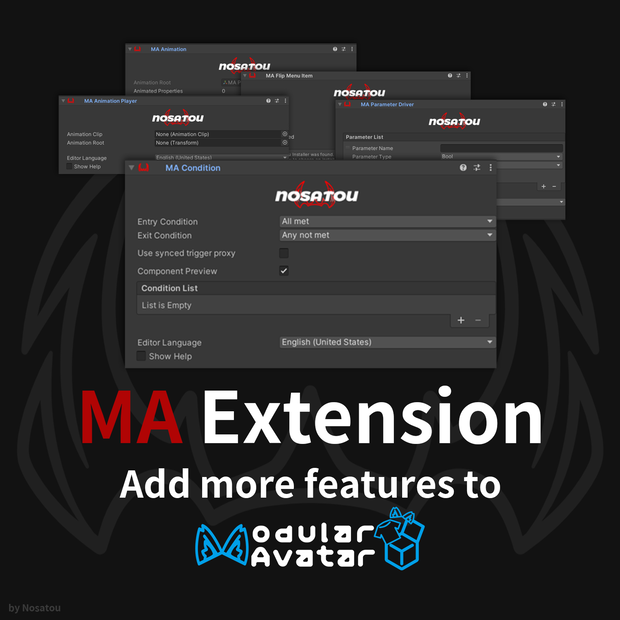
 【無料】 MA Extension - 条件制御・内蔵アニメーション・Parameter Driver・Radial Menu
상품 설명
【日本語】
MA Extension は、VRChat Avatar 向けの Modular Avatar 拡張コンポーネント集です。条件制御、コンポーネント内アニメーション録画、パラメーター操作、Radial Puppet による項目切り替えを Inspector から設定できます。必要な Animator・パラメーター・メニューは NDMF ビルド時に生成されます。
【English】
MA Extension is a collection of Modular Avatar components for VRChat avatars. It provides conditional behavior, component-based animation recording, parameter driving, animation playback, and Radial Puppet item selection. Required animator layers, parameters, and menu controls are generated during the NDMF build.
追加されるコンポーネント / Included Components
- **MA Condition**
Animator パラメーター条件による制御。
Controls avatar behavior using Animator parameter conditions.
- **MA Animation**
Animation Clip ファイルを作成せず、アニメーションをコンポーネント内に保存。
Stores animation data inside the component without creating a permanent Animation Clip file.
- **MA Animation Player**
既存の Animation Clip を MA と組み合わせて再生。
Plays an existing Animation Clip through Modular Avatar.
- **MA Parameter Driver**
Bool、Int、Float パラメーターを「一時保存」または「1 回書き込み」で変更。
Changes Bool, Int, and Float parameters using Store & Restore or Write Once mode.
- **MA Flip Menu Item**
子オブジェクトの MA / MA Extension 項目を検出し、Radial Puppet メニューを生成。
Detects child MA / MA Extension items and generates a Radial Puppet menu.
導入方法 / Installation
1. VRChat SDK - Avatars を導入します。
Install VRChat SDK - Avatars.
2. Modular Avatar を導入します。
Install Modular Avatar.
3. MA Extension をインポートします。
Import MA Extension.
4. `Add Component > MA Extension` から使用するコンポーネントを追加します。
Add components from `Add Component > MA Extension`.
5. 通常通り Avatar をビルドまたはアップロードします。
Build or upload the avatar normally.
Modular Avatar:
https://modular-avatar.nadena.dev/
NDMF:
動作環境 / Requirements
- Unity 2022.3
- VRChat SDK - Avatars
- Modular Avatar
- NDMF
注意事項 / Notes
- 導入前に Unity プロジェクトをバックアップしてください。
Back up your Unity project before installation.
- 同じ Animator パラメーターやレイヤーを操作する他のツールと競合する場合があります。
Conflicts may occur with other tools that modify the same Animator parameters or layers.
- MA Parameter Driver のパラメーター型は、Avatar 側の型と一致させてください。
MA Parameter Driver parameter types must match the parameter types used by the avatar.
- すべての Avatar、Shader、Animator、第三者ツールとの完全な互換性は保証されません。
Compatibility with every avatar, shader, animator, or third-party tool is not guaranteed.
- デジタル商品のため、購入後の返金については BOOTH の規約をご確認ください。
Please review BOOTH's policy regarding refunds for digital products.
모든 리뷰
더보기리뷰 등록
리뷰를 작성하려면 로그인이 필요합니다.
로그인하고 리뷰 쓰기