'%3e%3cg%20clip-path='url(%23roundHexB)'%3e%3cpath%20fill='%236D5DFC'%20d='M256%2040%20443%20148%20443%20364%20256%20472%2069%20364%2069%20148Z'/%3e%3cpath%20fill='%239C93FB'%20d='M69%20148%20256%2040%20443%20148%20256%20256Z'/%3e%3cpath%20fill='%234A3FD1'%20d='M256%20256%20443%20148%20443%20364%20256%20472Z'/%3e%3c/g%3e%3c!--%20top%20face:%20filled%20round%20magnifier%20--%3e%3cg%20transform='matrix(0.8660254,-0.5,0.8660254,0.5,69,148)'%3e%3cg%20transform='matrix(0.935,0,0,0.935,7.02,7.02)'%3e%3ccircle%20cx='88'%20cy='88'%20r='52'%20fill='%23FFFFFF'/%3e%3ccircle%20cx='88'%20cy='88'%20r='28'%20fill='%239C93FB'/%3e%3cpath%20d='M124%20124%20164%20164'%20stroke='%23FFFFFF'%20stroke-width='26'%20stroke-linecap='round'/%3e%3c/g%3e%3c/g%3e%3cg%20transform='matrix(0.8660254,0.5,0,1,69,148)'%3e%3cpath%20d='M96.1,61.08%20L45.9,128.92%20Q34,145%2054,145%20L162,145%20Q182,145%20170.1,128.92%20L119.9,61.08%20Q108,45%2096.1,61.08%20Z'%20fill='%23FFFFFF'/%3e%3c/g%3e%3c!--%20right%20face:%20filled%20bubble%20--%3e%3cg%20transform='matrix(0.8660254,-0.5,0,1,256,256)'%3e%3cg%20transform='matrix(0.855,0,0,0.855,15.66,15.66)'%3e%3cpath%20d='M60%2042H156a28%2028%200%200%201%2028%2028V158Q184%20168%20174.47%20164.96L124.53%20149.04Q115%20146%20105%20146H60a28%2028%200%200%201-28-28V70a28%2028%200%200%201%2028-28Z'%20fill='%23FFFFFF'/%3e%3c/g%3e%3c/g%3e%3c/g%3e%3c/svg%3e)
 sora-shiro
 【ワールド用・アバター用】腹痛便器パニック/Bowel Bowl Panic
상품 설명
あのトイレシーンをVRChatで再現!
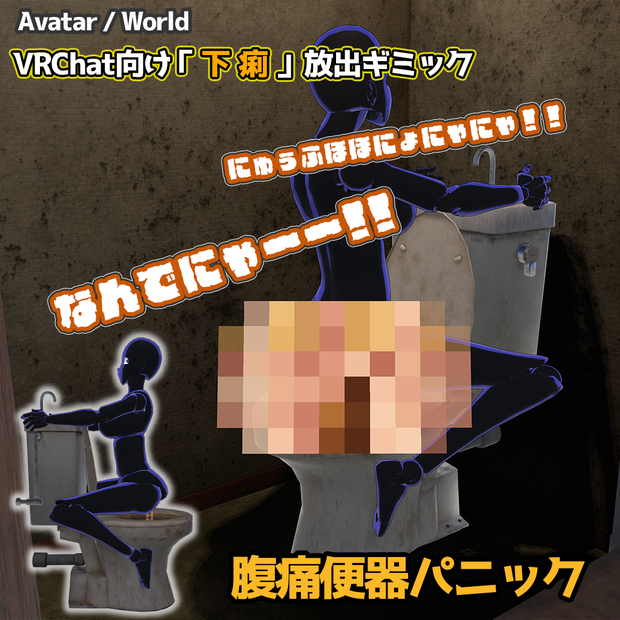
便器のタンクにしがみつき、下痢を放出しながら移動できる、VRChat向けジョークギミック「腹痛便器パニック」です。
下痢パーティクル、モザイク、水面の汚れ、水洗演出、効果音などを搭載。
ワールドへ設置して複数人で使用できる「ワールド版」と、アバターへ装着して自分やほかのユーザーが使用できる「アバター版」をご用意しています。
【購入前に必ずご確認ください】
本商品には、以下の3種類があります。
・ワールド版
VRChatのワールドへ設置して使用するワールド用ギミックです。
・アバター版
VRChatアバターへ装着して使用するアバター用ギミックです。
・セット版
ワールド版とアバター版の両方を収録しています。
購入する種類をお間違えのないよう、必ずご確認ください。
【動作確認環境・サポート範囲】
本商品はPC版VRChat専用です。
以下の環境で動作確認を行っています。
・Desktopモード
・PC VRモード(3点トラッキング)
〖非対応・サポート対象外〗
・Quest単体版:非対応
・フルボディトラッキング:動作未確認・サポート対象外
※制作環境と異なる環境での動作を保証するものではありません。
---
Recreate that unforgettable toilet scene in VRChat!
“Bowel Bowl Panic” is a joke toilet gimmick for VRChat that lets avatars cling to a toilet tank and unleash diarrhea effects—even while moving around.
It includes diarrhea particles, mosaic effects, dirty water, flushing animations, and sound effects.
Choose from the World Edition, which can be placed in a VRChat world for multiple users, the Avatar Edition, which can be installed on an avatar, or the Bundle Edition containing both versions.
[Please Check Before Purchasing]
This product is available in three editions:
- World Edition
A world gimmick designed to be placed in a VRChat world.
- Avatar Edition
An avatar gimmick designed to be installed on a VRChat avatar.
- Bundle Edition
Includes both the World Edition and Avatar Edition.
Please make sure that you select the correct edition before purchasing.
[TESTED ENVIRONMENTS AND SUPPORT SCOPE]
This product is designed for the PC version of VRChat.
It has been tested in the following environments:
- Desktop Mode
- PC VR Mode with 3-point tracking
[NOT SUPPORTED / OUTSIDE SUPPORT SCOPE]
- Standalone Quest: Not supported
- Full-body tracking: Not tested and outside the support scope
Operation in environments other than those listed above is not guaranteed.
【商品紹介(Product Introduction)】
「腹痛便器パニック」は、便器のタンクにしがみつく着座姿勢と、下痢の排泄演出を楽しめるVRChat向けジョークギミックです。
下痢パーティクル、水面の揺れと汚れ、水洗、蛇口からの給水、効果音、モザイクなど、一連のトイレ演出を搭載しています。
■ 3種類の排泄表現
以下の3種類から排泄表現を選択できます。
・モザイク無し
・下痢のみモザイク
・下半身モザイク
ワールド版ではアップロード前に設定し、アバター版ではExpressions Menuから変更できます。
■ 2種類の外観
便器の外観は、以下の2種類から選択できます。
・Dirty
・Clean
ワールド版では、Dirty版またはClean版のPrefabを選んでシーンへ配置します。
アバター版では、Expressions Menuからいつでも変更できます。
■ 排泄から水洗までの演出
着座後に下痢パーティクルと効果音が再生され、水面が揺れて汚水へ変化します。
水洗時には、水面の排水と復帰、汚水から清水への変化、タンク上部の蛇口からの給水、レバー操作、効果音などが再生されます。
〖ワールド版の機能〗
■ インタラクト操作
蓋の開閉、着座、水洗は、すべてインタラクトで操作できます。
DesktopモードとVRモードの両方に対応しています。
■ VRCStationによる着座
VRCStationを使用して便器へ着座し、タンクにしがみつく専用姿勢を取ります。
着座後は、一定時間を経て排泄演出が自動的に始まります。
■ 複数人で使用可能
使用者が退席したあとも、別のユーザーが続けて使用できます。
途中退席や切断時には、排泄演出を停止し、便器の占有状態を自動的に解除します。
■ 他ユーザーへの同期
以下の操作・演出を他ユーザーへ同期します。
・蓋の開閉
・着座と退席
・排泄演出
・モザイク
・水面の揺れと汚れ
・水洗
・効果音
・占有状態
〖アバター版の機能〗
■ My Toilet
自分用の便器をExpressions Menuから表示できます。
便器の蓋が開いたあと、アバターがタンクにしがみつく専用姿勢へ移行し、排泄演出が始まります。
使用中も移動、旋回、ジャンプが可能です。
My ToiletをOFFにすると、立ち上がり、水洗、蓋を閉じる演出を行ってから便器を収納します。
■ Guest Toilet
ほかのユーザーが使用できるVRCStation付きの便器を表示できます。
ユーザーが便器へ近づくと蓋が自動的に開き、インタラクトで着座できます。
退席後は自動的に水洗を行い、周囲にユーザーがいなければ蓋が閉じます。
■ ゲスト用便器の位置変更
ゲスト用便器は、所有者に追従して移動します。
以下の位置から配置を選択できます。
・Setup(調整位置)
・Face Owner(向かい合い)
・Left Side(左隣)
・Right Side(右隣)
・Left Rear(左後ろ)
・Right Rear(右後ろ)
・Front(前方)
・Behind(後方)
所有者の横や後ろを追従させたり、正面へ配置して向かい合った状態で会話や撮影をしたりできます。
■ 体格に合わせた調整
Guest Toiletは、Expressions Menuから以下を調整できます。
・便器サイズ
・着座位置の高さ
・着座位置の前後
・設定のリセット
便器サイズは0.3倍から1.7倍まで調整できます。
■ 演出設定
Expressions Menuから以下を変更できます。
・Poop FXのON / OFF
・モザイクの種類
・音量
・ミュート
・Dirty / Cleanの外観
効果音は初期状態でミュートされています。
■ 他ユーザーへの同期
便器の表示、配置、サイズ、排泄演出、モザイク、効果音、水洗などを他ユーザーへ同期します。
---
“Bowel Bowl Panic” is a joke gimmick for VRChat featuring a special pose in which an avatar clings to the toilet tank while diarrhea effects are played.
It includes diarrhea particles, water movement, dirty water, flushing, faucet water, sound effects, and mosaic options.
■ 3 Discharge Styles
Choose from the following styles:
- No Mosaic
- Poop Mosaic
- Lower Body Mosaic
In the World Edition, the style is selected before uploading the world.
In the Avatar Edition, it can be changed from the Expressions Menu.
■ 2 Appearance Styles
Choose from:
- Dirty
- Clean
In the World Edition, select either the Dirty or Clean Prefab and place it in the scene.
In the Avatar Edition, the appearance can be changed at any time from the Expressions Menu.
■ Full Toilet Sequence
After the user sits down, the diarrhea particles and sound effects begin, the water surface moves, and the water becomes dirty.
Flushing includes water drainage and refill animations, dirty-to-clean water transitions, faucet particles, lever operation, and sound effects.
[World Edition Features]
■ Interact Controls
Opening and closing the lid, sitting down, and flushing are all controlled through VRChat interactions.
Both Desktop Mode and VR Mode are supported.
■ VRCStation Seating
The user sits on the toilet using a VRCStation and plays a special animation that clings to the toilet tank.
The discharge sequence begins automatically after a short delay.
■ Reusable by Multiple Users
After one user leaves, another user can use the toilet.
If the user leaves midway or disconnects, the effects stop and the occupied state is automatically released.
■ Network Synchronization
The following operations and effects are synchronized with other users:
- Lid operation
- Entering and leaving the station
- Discharge effects
- Mosaic effects
- Water movement and dirty water
- Flushing
- Sound effects
- Occupied state
[Avatar Edition Features]
■ My Toilet
Display your personal toilet from the Expressions Menu.
After the lid opens, the avatar transitions into the special tank-clinging pose and begins the discharge sequence.
You can move, turn, and jump while using the toilet.
When My Toilet is turned OFF, the avatar stands up and the toilet flushes, closes its lid, and disappears.
■ Guest Toilet
Display a toilet with a VRCStation that other users can sit on.
The lid opens automatically when a user approaches, and the user can sit through an Interact prompt.
After the user leaves, the toilet flushes automatically. The lid closes when nobody remains nearby.
■ Guest Toilet Position Presets
The Guest Toilet follows the owner.
The following position presets are available:
- Setup
- Face Owner
- Left Side
- Right Side
- Left Rear
- Right Rear
- Front
- Behind
The toilet can follow beside or behind the owner, or it can be placed in front of the owner for face-to-face conversations and photos.
■ Avatar Fit Adjustment
The following Guest Toilet settings can be adjusted from the Expressions Menu:
- Toilet size
- Seat height
- Seat depth
- Reset Fit
The toilet scale can be adjusted from 0.3x to 1.7x.
■ Effect Settings
The following settings can be changed from the Expressions Menu:
- Poop FX ON / OFF
- Mosaic type
- Volume
- Mute
- Dirty / Clean appearance
Sound effects are muted by default.
■ Network Synchronization
Toilet visibility, position, size, discharge effects, mosaic settings, sound effects, and flushing are synchronized with other users.
【使用上のご注意(Usage Notice)】
■ Guest Toiletの移動について
アバター版のGuest Toiletは、所有者の移動、旋回、ジャンプに追従します。
着座者は、所有者の移動に合わせて強制的に移動します。
特にVRモードでは、予期しない移動によってVR酔いが発生する可能性があります。
Guest Toiletにユーザーが着座している状態で移動する場合は、必ず着座者へ確認してください。
■ 視点の高さについて
VRモードでは、トイレの使用中も視点の高さが立っているときの位置に維持される場合があります。
必要に応じて、VRChatの「座る/立つ」設定を切り替えると、視点の高さが合う場合があります。
見え方はアバターやトラッキング環境によって異なります。
■ 周囲への配慮
本商品は、下痢パーティクル、モザイク、効果音を含む非常に下品なジョークギミックです。
人の多いワールド、イベント会場、配信中などで使用する場合は、周囲のユーザーやワールドのルールに配慮してください。
アバター版の効果音は初期状態でミュートされています。
使用する場合は、周囲の状況に合わせて音量を調整してください。
---
[Guest Toilet Movement]
The Guest Toilet follows the owner’s movement, rotation, and jumps.
A seated user will be moved together with the owner. In VR Mode, unexpected movement may cause motion sickness.
Always ask the seated user before moving while they are using the Guest Toilet.
[Viewpoint Height]
In VR Mode, your viewpoint may remain at standing height while using the toilet.
If necessary, try toggling VRChat’s Sit/Stand setting. This may help align the viewpoint height.
The result may vary depending on the avatar and tracking setup.
[Consideration for Other Users]
This product is an intentionally vulgar joke gimmick featuring diarrhea particles, mosaic effects, and sound effects.
When using it in crowded worlds, event venues, or livestreams, please respect other users and follow the rules of the world or event.
Sound effects in the Avatar Edition are muted by default. Adjust the volume according to your surroundings before enabling them.
【導入方法(How to Install)】
■ ワールド版
unitypackageをVRChat Worlds SDKプロジェクトへインポートし、同梱のPrefabをシーンへ配置してください。
外観、モザイク、各種設定を調整したあと、ワールドをアップロードします。
詳しい設定方法については、同梱のQuick Guideをご確認ください。
■ アバター版
unitypackageをインポートし、Prefab「SS_BBP_Toilet」をアバター直下へ配置してください。
Gesture Managerで動作をプレビューしながら、SelfMountRootのスケールと前後位置、および排泄エフェクトの発生位置をアバターに合わせて調整します。
詳しい導入方法と調整手順については、同梱のQuick Guideをご確認ください。
UnityやVRChatのワールド制作・アバター改変に不慣れな場合は、事前にUnity、VRChat SDK、Modular Avatarの基本的な使い方をご確認ください。
---
[World Edition]
Import the unitypackage into a VRChat Worlds SDK project, then place the included Prefab in the scene.
Select the appearance and mosaic settings, adjust the required options, and upload the world.
See the included Quick Guide for detailed setup instructions.
[Avatar Edition]
Import the unitypackage and place the “SS_BBP_Toilet” Prefab directly under the avatar root.
While previewing the gimmick with Gesture Manager, adjust the scale and forward/back position of SelfMountRoot and the discharge effect origin to fit the avatar.
See the included Quick Guide for detailed installation and adjustment instructions.
If you are not familiar with Unity, VRChat world creation, or avatar modification, please review the basic usage of Unity, the VRChat SDK, and Modular Avatar before installation.
【導入時の注意点(Installation Notes)】
導入するエディションに応じて、以下のアセットを事前に導入してください。
■ ワールド版
・VRChat Worlds SDK
・lilToon
https://lilxyzw.booth.pm/items/3087170
■ アバター版
・VRChat Avatars SDK
・Modular Avatar
https://modular-avatar.nadena.dev/ja/
・lilToon
https://lilxyzw.booth.pm/items/3087170
・Gesture Manager
https://github.com/BlackStartx/VRC-Gesture-Manager
必要なアセットが導入されていない場合、正常に表示・動作しません。
Gesture Managerは、アバター版の導入時にMy Toiletの動作をプレビューし、便器のサイズ、前後位置、排泄エフェクトの発生位置を調整するために使用します。
アバター版を導入する場合は、事前にGesture Managerを導入してください。
アップロード後のアバター上でGesture Managerが動作するわけではありませんが、本商品のセットアップ手順では必要です。
画像に使用しているアバターおよびワールドは、本商品に含まれていません。
---
Please install the following assets before importing the product.
[World Edition]
- VRChat Worlds SDK
- lilToon
https://lilxyzw.booth.pm/items/3087170
[Avatar Edition]
- VRChat Avatars SDK
- Modular Avatar
https://modular-avatar.nadena.dev/
- lilToon
https://lilxyzw.booth.pm/items/3087170
- Gesture Manager
https://github.com/BlackStartx/VRC-Gesture-Manager
The product may not display or function correctly if the required assets are not installed beforehand.
Gesture Manager is used during installation of the Avatar Edition to preview My Toilet and adjust the toilet scale, forward/back position, and discharge effect origin.
Please install Gesture Manager before setting up the Avatar Edition.
Gesture Manager is not used by the uploaded avatar at runtime, but it is required for the setup procedure described in the included Quick Guide.
The avatars and worlds shown in the product images are not included.
【制作環境およびバージョン対応(Creation Environment & Version Support)】
本商品は、以下の環境で作成・動作確認を行っています。
■ ワールド版
・Unity:2022.3.22f1
・VRChat SDK - Base:3.10.4
・VRChat SDK - Worlds:3.10.4
・lilToon:2.3.4
■ アバター版
・Unity:2022.3.22f1
・VRChat SDK - Base:3.10.4
・VRChat SDK - Avatars:3.10.4
・Modular Avatar:1.17.1
・lilToon:2.3.4
■ アップデートに関する方針
本製品は、上記環境における動作を前提として販売しております。
SDK、Unity、Modular Avatar、lilToonなどのアップデートに伴う不具合や仕様変更については、原則として対応いたしかねます。
アップデート版の配布を確約するものではございませんので、あらかじめご了承の上ご購入ください。
※制作環境と異なるバージョンを使用した場合、正常に動作しない可能性があります。
---
This product was created and tested in the following environments:
[World Edition]
- Unity: 2022.3.22f1
- VRChat SDK - Base: 3.10.4
- VRChat SDK - Worlds: 3.10.4
- lilToon: 2.3.4
[Avatar Edition]
- Unity: 2022.3.22f1
- VRChat SDK - Base: 3.10.4
- VRChat SDK - Avatars: 3.10.4
- Modular Avatar: 1.17.1
- lilToon: 2.3.4
[Update Policy]
This product is sold based on the environment listed above.
We are generally unable to address issues or specification changes caused by updates to Unity, the VRChat SDK, Modular Avatar, lilToon, or other dependencies.
Distribution of future updates is not guaranteed.
The product may not function correctly when installed in an environment using different versions.
【モデル仕様(Model Specifications)】
・便器モデル:4,162 tris / 1基
・ワールド版:配置1基につき4,162 tris
・アバター版:My Toilet用とGuest Toilet用の2基を収録
・アバター版の便器モデル合計:8,324 tris
※上記は便器モデルの三角面数です。パーティクルやその他の構成要素は含みません。
※アバター版の最終的なPerformance Rankは、導入先アバターの状態と合算されます。すべての環境で特定のランクになることを保証するものではありません。
---
- Toilet model: 4,162 tris per unit
- World Edition: 4,162 tris per placed toilet
- Avatar Edition: Includes separate toilet models for My Toilet and Guest Toilet
- Total toilet model count for the Avatar Edition: 8,324 tris
The values above represent the triangle count of the toilet models and do not include particles or other components.
The final Performance Rank of the Avatar Edition is calculated together with the avatar it is installed on. A specific rank is not guaranteed.
【内容物(Package Contents)】
■ ワールド版
・unitypackage
・簡易説明書 / Quick Guide(PDF)
・利用規約 / License
■ アバター版
・unitypackage
・簡易説明書 / Quick Guide(PDF)
・利用規約 / License
■ セット版
・ワールド版一式
・アバター版一式
※セット版では、ワールド版ZIPとアバター版ZIPの2ファイルを個別にダウンロードできます。両方のファイルをダウンロードしてください。
---
[World Edition]
- unitypackage
- Quick Guide (PDF)
- License
[Avatar Edition]
- unitypackage
- Quick Guide (PDF)
- License
[Bundle Edition]
- Complete World Edition package
- Complete Avatar Edition package
*The Bundle Edition provides the World Edition ZIP and Avatar Edition ZIP as separate downloads. Please download both files.
【注意事項(Caution)】
以下の注意事項および無料ダウンロードで入手できる利用規約を必ずご確認の上、同意いただける場合のみご購入ください。
利用規約は、本ページの「無料ダウンロード」ボタンからダウンロードしてご確認ください。
購入手続きを完了された時点で、本規約に同意いただいたものとみなします。
・本商品に同梱されているすべてのデータは、再配布および第三者への譲渡を禁止しております。
・デジタルデータの特性上、購入後の返品や返金には対応いたしかねます。
・利用規約について、言語間で差異や矛盾が生じた場合は、日本語版の内容が優先されます。
・本商品はPC版VRChat専用です。Quest単体版には対応していません。
・DesktopモードおよびPC VRモード(3点トラッキング)で動作確認を行っています。
・アバター版のフルボディトラッキングは動作未確認・サポート対象外です。
・Guest Toiletの着座者は所有者の移動に追従します。VRモードではVR酔いが発生する可能性があります。
・本商品の導入および改変には、VRChatおよびUnityの基本的な操作知識が必要です。
・導入や改変作業に関する個別サポートは行っておりません。
・ギフト機能を利用して受け取った方にも、購入者と同一の利用規約が適用されます。
---
Please read and agree to the following cautions and the Terms of Use available from the “Free Download” button before purchasing.
By completing the purchase, you are deemed to have agreed to the Terms of Use.
- Redistribution or transfer of any data included in this product to third parties is prohibited.
- Due to the nature of digital products, returns and refunds are not available after purchase.
- If there are discrepancies between different language versions of the Terms of Use, the Japanese version shall take precedence.
- This product is designed for the PC version of VRChat. Standalone Quest is not supported.
- This product has been tested in Desktop Mode and PC VR Mode with 3-point tracking.
- Full-body tracking has not been tested with the Avatar Edition and is outside the support scope.
- Users seated on the Guest Toilet will move together with the owner. This movement may cause motion sickness in VR Mode.
- Basic knowledge of Unity and VRChat is required for installation and modification.
- Individual support for installation or modification is not provided.
- The same Terms of Use apply to users who receive this product through the gifting feature.
【更新履歴(Update History)】
2026/08/04 v1.0.0
・初版公開 / Initial release
모든 리뷰
더보기리뷰 등록
리뷰를 작성하려면 로그인이 필요합니다.
로그인하고 리뷰 쓰기