'%3e%3cg%20clip-path='url(%23roundHexB)'%3e%3cpath%20fill='%236D5DFC'%20d='M256%2040%20443%20148%20443%20364%20256%20472%2069%20364%2069%20148Z'/%3e%3cpath%20fill='%239C93FB'%20d='M69%20148%20256%2040%20443%20148%20256%20256Z'/%3e%3cpath%20fill='%234A3FD1'%20d='M256%20256%20443%20148%20443%20364%20256%20472Z'/%3e%3c/g%3e%3c!--%20top%20face:%20filled%20round%20magnifier%20--%3e%3cg%20transform='matrix(0.8660254,-0.5,0.8660254,0.5,69,148)'%3e%3cg%20transform='matrix(0.935,0,0,0.935,7.02,7.02)'%3e%3ccircle%20cx='88'%20cy='88'%20r='52'%20fill='%23FFFFFF'/%3e%3ccircle%20cx='88'%20cy='88'%20r='28'%20fill='%239C93FB'/%3e%3cpath%20d='M124%20124%20164%20164'%20stroke='%23FFFFFF'%20stroke-width='26'%20stroke-linecap='round'/%3e%3c/g%3e%3c/g%3e%3cg%20transform='matrix(0.8660254,0.5,0,1,69,148)'%3e%3cpath%20d='M96.1,61.08%20L45.9,128.92%20Q34,145%2054,145%20L162,145%20Q182,145%20170.1,128.92%20L119.9,61.08%20Q108,45%2096.1,61.08%20Z'%20fill='%23FFFFFF'/%3e%3c/g%3e%3c!--%20right%20face:%20filled%20bubble%20--%3e%3cg%20transform='matrix(0.8660254,-0.5,0,1,256,256)'%3e%3cg%20transform='matrix(0.855,0,0,0.855,15.66,15.66)'%3e%3cpath%20d='M60%2042H156a28%2028%200%200%201%2028%2028V158Q184%20168%20174.47%20164.96L124.53%20149.04Q115%20146%20105%20146H60a28%2028%200%200%201-28-28V70a28%2028%200%200%201%2028-28Z'%20fill='%23FFFFFF'/%3e%3c/g%3e%3c/g%3e%3c/g%3e%3c/svg%3e)
 RomForge
 【リリースセール 15%OFF🔥】【VRChat想定】MK20 System【ギミック付き】
상품 설명
🔥 リリースセール開催中! / RELEASE SALE NOW ON! 🔥
MK20 System リリース記念セールとして、期間限定で 15%OFF にて販売中です!
さらに、LMG「SAR 556 System」とのセット購入なら、
セット価格 20%OFF のお得なバンドルもご用意しています!
📅 セール期間:10月11日まで
この機会にぜひお試しください!
--------------------------------------------------------------------------------------
To celebrate the release of the MK20 System, it is now available at 15% OFF for a limited time!
You can also get an even better deal by purchasing it together with the SAR 556 System:
the bundle is available at 20% OFF!
📅 Sale ends: October 11
Don’t miss the release sale!
構える、撃つ、マガジンを交換する。
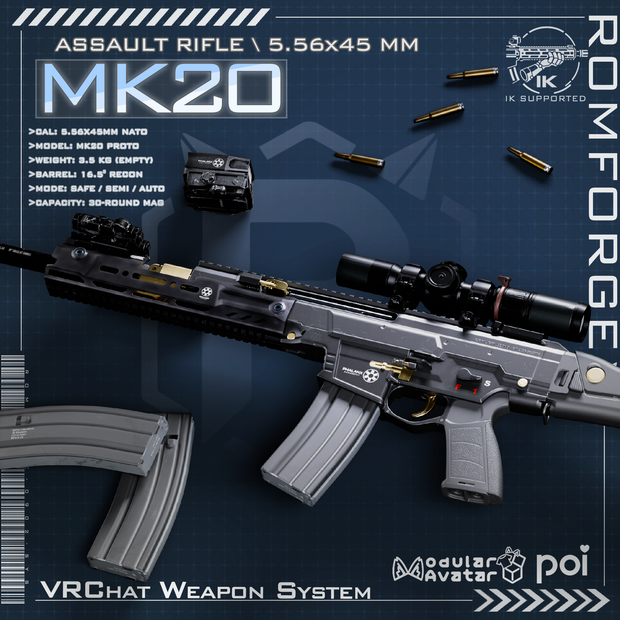
MK20は、武器の操作をアバターの動きとともに楽しめる、VRChat向けウェポンギミックです。射撃・リロードのアニメーションに加え、腕のIK連携、発砲エフェクト、操作音を収録。アタッチメントを切り替えて、お好みのスタイルでお使いいただけます。
■ 主な機能
・武器の表示/非表示、ホルスターからの取り出し切り替え
・セミオート/フルオート切り替え
・射撃、マガジン交換、タクティカルリロード、ボルト操作のアニメーション
・RomForge Weapon Systemによる腕のIK連携
・18インチバレル、SPRサプレッサー、スコープの切り替え
・レーザー、ライト、発砲・排莢エフェクト、各種サウンドを収録
・ローカル画面エフェクトのON/OFF
・専用インストーラーによる導入と、サイズ・構え位置の調整
【手の操作 / Gesture Controls】
まずメニューのToggleをONにしてください。PeaceはVictory、OpenはHandOpen、GunはHandGunに相当します。
■ 装備 / Equip
右手を胸元の感知エリアに近づけ、左手Peace+右手Gun。
■ 収納 / Holster
右手を胸元の感知エリアに近づけ、左手Peace+右手Open。
※装備・収納はメニューのUnholsterでも切り替えられます。
■ 射撃 / Fire
右手で武器を保持し、装填された状態で右手Fist。
セミオートでは一度ジェスチャーを解除して次の射撃を行います。フルオートではFistを維持すると連射します。
■ 両手で構える / Two-Hand Grip
左手でフォアグリップのPhysBoneをつかみ、左手Fist。左手Openで構えを解除します。
■ 左手保持へ切り替え / Left-Hand Carry
両手で構えた状態から、左手Fist+右手Open。右手でメイングリップのPhysBoneをつかむと両手の構えに戻ります。
■ マガジン交換 / Reload
右手保持・構え解除の状態で、右手Rock&Rollでマガジンを解放し、左手Rock&Rollで新しいマガジンを取り出します。
手に持ったマガジンをマガジン挿入口へ近づけると装着します。左手Openで、手に持ったマガジンを放す/操作を解除できます。
■ マガジンを保持した交換 / Retained-Magazine Reload
取り外すマガジンのPhysBoneをつかんでから右手Rock&Rollで解放すると、マガジンを手に保持します。
先に左手Rock&Rollで新しいマガジンを取り出し、装着中のマガジンをつかんで右手Rock&Rollを行う、タクティカルリロード用の操作も用意されています。
■ 右手でマガジンを扱う / Right-Hand Magazine Handling
左手保持の状態では、右手でマガジンのPhysBoneをつかんで取り外します。マガジンが外れた状態で右手Rock&Rollを行うと、右手で装着する操作へ移ります。
■ ボルト操作 / Bolt Controls
右手保持・構え解除の状態でチャージングハンドルのPhysBoneをつかんで引き、離します。
ボルトが後退位置で止まっているときは、右手Gunまたはボルトリリースの接触操作で解除できます。
■ ライト・レーザー・射撃モード
対応するPhysBoneをつかんで離すと切り替わります。
※マガジンやボルトの操作は、保持姿勢・装填状態・接触判定によって分岐します。ジェスチャーだけで全工程が自動完了する方式ではありません。
【メニュー操作 / Menu Controls】
Expressionsメニューの「MK20 Navy」から各機能を切り替えます。
■ 表示/非表示:Toggle
■ 装備/収納:Unholster
■ セミオート/フルオート:Semi/Auto
■ バレル切り替え:18インチバレル項目
■ サプレッサー切り替え:OPS Inc. SPR Suppressor
■ スコープ切り替え:PHALANX 1.5–6x
■ ローカル画面エフェクト:Scree Effect(local)
※画面エフェクトはローカル表示です。
【パラメータ使用量】
・31 bits(同期Bool 23個+Float 1個、計24パラメータ)
・ローカル専用の2パラメータは、上記の同期メモリ消費に含まれません。
※各スキンのプレハブを1体分導入する場合の、同梱MA設定から算出した値です。アバター本体や他のギミックの消費は別途加算されます。最終値はビルド後のExpression Parametersでご確認ください。
■ パッケージ
【Standard Pack】
ChampagneスキンのMK20プレハブと、モデル、テクスチャ、マテリアル、アニメーション、メニュー、エフェクト、サウンドを収録。
【SupportPack(4 skin)】
Champagne / BlackGold / Guard / Steelの計4スキンを収録。
基本リソースも含まれるため、Standard Packを先にインポートする必要はありません。
※「標準スキン+追加4種」ではなく、Champagneを含む計4種です。
【共通セットアップ】
別ファイルの「Romforge Weapon setup system V1.31.unitypackage」を併せてインポートしてください。武器パッケージとは別の共通導入ツールです。
■ 必要な環境・外部パッケージ
VRChat Avatars用Unityプロジェクトをご用意ください。VRC Constraintsに対応するVRChat SDK - Avatarsが必要です。
Write Defaults:同梱のFX/GestureコントローラーはONで構成されています。この設定を維持して使用してください。
・Poiyomi Toon
同梱のロック済みシェーダーには9.3.64の表記があります。マテリアルの編集・ロック解除に必要なPoiyomi本体は別途導入してください。
入手先:https://www.poiyomi.com/download
・Final IK Stub(VRLabs)
腕のLimbIKコンポーネント用です。
入手先:https://github.com/VRLabs/Final-IK-Stub/releases
※StubはUnity Editor内でIKを実行しません。IKの動作はVRChat内で確認してください。
・Modular Avatar(MA)
アニメーター、メニュー、パラメーター等の組み込みに使用します。
入手先:https://modular-avatar.nadena.dev/ja/docs/intro
・Non-Destructive Modular Framework(NDMF)
RomForgeのビルド処理に必要です。MAの依存パッケージとして導入されますので、プロジェクト内に存在することをご確認ください。
■ 導入の流れ
1. VRChat Avatars用プロジェクトに、上記の外部パッケージを導入します。
2. 「Romforge Weapon setup system V1.4.unitypackage」をインポートします。
3. Standard PackまたはSupportPackをインポートします。
4. Unityメニュー「RomForge > RomForge Weapon Installer」を開き、対象アバターを選択します。
5. 「Install RomForge Weapon System」で共通システムを導入し、使用するMK20モジュールを選んでインストールします。
6. 「Module Scale」と「Adjustment Preset」でサイズや構え位置を調整します。
7. アバターをアップロードし、VRChat内でIK・射撃・リロードを確認します。
■ ご購入・導入前に
・両腕・両手・両肩のHumanoidボーンを持つアバターが必要です。体格に合わせて位置調整が必要になる場合があります。
・PC向けのカスタムシェーダーを使用しています。Quest/Android向けの対応パッケージは含まれていません。
・Unity/SDK/MA/NDMFの具体的な動作確認バージョン、および対応アバター一覧は、この配布ファイルには記載されていません。
導入方法などご質問がある場合は、BOOTHメッセージでお気軽にお問い合わせください。
----------------------------------------------------------------------------------
English Version
Aim, fire, and swap magazines.
MK20 brings weapon handling to your VRChat avatar with firing and reload animations, arm IK integration, visual effects, and handling sounds. Switch attachments to suit your preferred look and setup.
■ Features
・Weapon visibility and unholster toggles
・Semi-automatic / automatic fire selection
・Firing, magazine changes, tactical reloads, and bolt-operation animations
・Arm IK integration through the RomForge Weapon System
・Toggleable 18-inch barrel, SPR suppressor, and scope
・Included laser, light, muzzle and shell-ejection effects, and sounds
・Optional local screen effects
・Dedicated installer with weapon scale and pose-position adjustments
[Gesture Controls]
Enable Toggle in the menu first. Peace means Victory, Open means HandOpen, and Gun means HandGun.
■ Equip
Bring your right hand into the chest contact area, then use Left Peace + Right Gun.
■ Holster
Bring your right hand into the chest contact area, then use Left Peace + Right Open.
You can also equip or holster through the Unholster menu toggle.
■ Fire
With the weapon held in your right hand and a round chambered, use Right Fist.
In semi-auto mode, release the gesture before firing again. In auto mode, hold Fist to keep firing.
■ Two-Hand Grip
Grab the foregrip PhysBone with your left hand and use Left Fist. Use Left Open to release the support grip.
■ Left-Hand Carry
From the two-hand grip, use Left Fist + Right Open. Grab the main grip PhysBone with your right hand to return to the two-hand grip.
■ Reload
Hold the weapon in your right hand with the support grip released. Use Right Rock&Roll to release the magazine, then Left Rock&Roll to take out a fresh one.
Bring the held magazine to the magazine well to insert it. Left Open releases the held magazine or exits the corresponding handling state.
■ Retained-Magazine Reload
Grab the installed magazine's PhysBone before using Right Rock&Roll to release it into your hand.
A tactical reload sequence is also included: take out a fresh magazine with Left Rock&Roll first, grab the installed magazine, then use Right Rock&Roll.
■ Right-Hand Magazine Handling
While carrying the weapon in your left hand, grab the magazine PhysBone with your right hand to remove it. With the magazine removed, Right Rock&Roll enters the right-hand magazine insertion sequence.
■ Bolt Controls
With the weapon held in your right hand and the support grip released, grab and pull the charging-handle PhysBone, then let go.
When the bolt is locked back, use Right Gun or the bolt-release contact interaction to release it.
■ Light, Laser, and Fire Selector
Grab and release the corresponding PhysBone to toggle it.
Note: Magazine and bolt handling depend on the current grip, loading state, and contact detection. Gestures alone do not automatically complete every step.
[Menu Controls]
Open “MK20 Navy” in the Expressions menu to access these toggles.
■ Show / Hide: Toggle
■ Equip / Holster: Unholster
■ Semi-automatic / Automatic: Semi/Auto
■ Barrel: the 18-inch barrel option
■ Suppressor: OPS Inc. SPR Suppressor
■ Scope: PHALANX 1.5–6x
■ Local screen effects: Scree Effect(local)
Note: Screen effects are displayed locally.
[Parameter Memory]
・31 bits — 23 synced Bools + 1 Float, 24 synced parameters total.
・Two local-only parameters do not contribute to the synced memory cost above.
These figures are calculated from the included MA configuration for one skin prefab. Your avatar and other gimmicks have their own costs. Check the final Expression Parameters after building.
■ Packages
【Standard Pack】
Includes the Champagne MK20 prefab, models, textures, materials, animations, menus, effects, and sounds.
【SupportPack (4 skin)】
Includes four skins in total: Champagne / BlackGold / Guard / Steel.
The base resources are included, so importing Standard Pack first is not required.
Note: This is four skins total, including Champagne—not four additional skins.
【Shared setup package】
Also import the separate “Romforge Weapon setup system V1.31.unitypackage”. This provides the shared setup tools used by the weapon packages.
■ Requirements
Use a Unity project configured for VRChat Avatars, with a VRChat SDK - Avatars version that supports VRC Constraints.
Write Defaults: The included FX and Gesture controllers use ON. Keep this setting when using them.
・Poiyomi Toon
The included locked shaders are labeled 9.3.64. Install Poiyomi separately for material editing and unlocking.
Download: https://www.poiyomi.com/download
・Final IK Stub by VRLabs
Required for the arm LimbIK components.
Download: https://github.com/VRLabs/Final-IK-Stub/releases
Note: The stub does not run IK inside the Unity Editor. Check IK behavior in VRChat.
・Modular Avatar (MA)
Used to integrate animators, menus, parameters, and other avatar components.
Installation: https://modular-avatar.nadena.dev/docs/intro
・Non-Destructive Modular Framework (NDMF)
Required by the RomForge build process. It is installed as a dependency of MA; ensure it is present in your project.
■ Setup
1. Install the external requirements above in your VRChat Avatars project.
2. Import “Romforge Weapon setup system V1.4.unitypackage”.
3. Import either Standard Pack or SupportPack.
4. Open “RomForge > RomForge Weapon Installer” from the Unity menu and select your avatar.
5. Click “Install RomForge Weapon System”, then select and install your MK20 module.
6. Use “Module Scale” and “Adjustment Preset” to adjust the weapon size and pose positions.
7. Upload the avatar and check IK, firing, and reloading in VRChat.
■ Before purchase and setup
・Your avatar needs Humanoid bones for both shoulders, arms, and hands. Position adjustments may be needed to fit its proportions.
・The included custom shaders target PC use. A Quest / Android package is not included.
・These distribution files do not specify tested Unity, SDK, MA, or NDMF versions, or a list of verified compatible avatars.
For setup questions, feel free to contact via BOOTH message.
모든 리뷰
더보기리뷰 등록
리뷰를 작성하려면 로그인이 필요합니다.
로그인하고 리뷰 쓰기