'%3e%3cg%20clip-path='url(%23roundHexB)'%3e%3cpath%20fill='%236D5DFC'%20d='M256%2040%20443%20148%20443%20364%20256%20472%2069%20364%2069%20148Z'/%3e%3cpath%20fill='%239C93FB'%20d='M69%20148%20256%2040%20443%20148%20256%20256Z'/%3e%3cpath%20fill='%234A3FD1'%20d='M256%20256%20443%20148%20443%20364%20256%20472Z'/%3e%3c/g%3e%3c!--%20top%20face:%20filled%20round%20magnifier%20--%3e%3cg%20transform='matrix(0.8660254,-0.5,0.8660254,0.5,69,148)'%3e%3cg%20transform='matrix(0.935,0,0,0.935,7.02,7.02)'%3e%3ccircle%20cx='88'%20cy='88'%20r='52'%20fill='%23FFFFFF'/%3e%3ccircle%20cx='88'%20cy='88'%20r='28'%20fill='%239C93FB'/%3e%3cpath%20d='M124%20124%20164%20164'%20stroke='%23FFFFFF'%20stroke-width='26'%20stroke-linecap='round'/%3e%3c/g%3e%3c/g%3e%3cg%20transform='matrix(0.8660254,0.5,0,1,69,148)'%3e%3cpath%20d='M96.1,61.08%20L45.9,128.92%20Q34,145%2054,145%20L162,145%20Q182,145%20170.1,128.92%20L119.9,61.08%20Q108,45%2096.1,61.08%20Z'%20fill='%23FFFFFF'/%3e%3c/g%3e%3c!--%20right%20face:%20filled%20bubble%20--%3e%3cg%20transform='matrix(0.8660254,-0.5,0,1,256,256)'%3e%3cg%20transform='matrix(0.855,0,0,0.855,15.66,15.66)'%3e%3cpath%20d='M60%2042H156a28%2028%200%200%201%2028%2028V158Q184%20168%20174.47%20164.96L124.53%20149.04Q115%20146%20105%20146H60a28%2028%200%200%201-28-28V70a28%2028%200%200%201%2028-28Z'%20fill='%23FFFFFF'/%3e%3c/g%3e%3c/g%3e%3c/g%3e%3c/svg%3e)
 SoraField
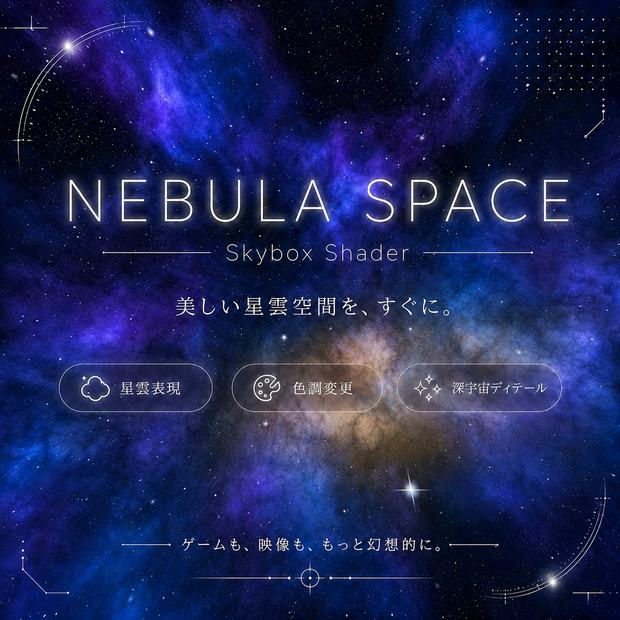
 Nebula Space Sky|プロシージャル星雲スカイボックス(Unity / VRChat対応)
상품 설명
Nebula Space Sky|プロシージャル星雲スカイボックス(Unity / VRChat対応)
傾いた天の川バンドと輝くコア、二色相のドメインワープ星雲、暗黒星雲のダストレーンを描く、テクスチャ不要のディープスペーススカイボックスです。星は3レイヤーの手続き生成で、一つひとつが独立した周期で瞬き(シンチレーション)、まばゆい巨星が空にアクセントを添えます。SFやファンタジーの宇宙シーンにそのまま使えます。
収録物
・05_Nebula_Space.shader(星雲スカイ本体)
・SkyCommonQuest.cginc(共有math。シェーダーと同じ場所に置いてください)
・プリセット マテリアル 6種:Galactic Core / Emerald Nebula / Crimson Deep / Blue Void / Starfield Minimal / Violet Expanse
・プレビュー用デモシーン
主なパラメータ
・Nebula Hue A / Hue B:星雲の2色相(グラデーションの両端)
・Nebula Amount / Scale / Swirl:星雲の量・大きさ・渦の強さ
・Band Tilt / Core Glow / Dust Lanes:天の川の傾き・コアの輝き・ダストレーン
・Star Density / Star Brightness:星の密度と明るさ
・Star Twinkle:星の瞬きの強さ(0で完全に静止)
・Giant Stars / Giant Glow:回折スパイク付きの巨星
特長
・星が一つずつ独立して瞬くシンチレーション内蔵(同期して点滅しない)
・二色相の星雲をスライダーだけで自由に配色
・テクスチャ不要の完全プロシージャル。継ぎ目なし(天頂も破綻しない)
・ACESトーンマップ内蔵(ポストでトーンマップする場合はOFF)
動作環境
・Unity 2022.3 以降 / Built-in レンダーパイプライン(URP・HDRPは非対応)
・Linear カラースペース推奨
・VRChat:World SDK3でそのまま使用可(Lighting > Skybox Material に割り当て)
使い方
1. Window > Rendering > Lighting > Environment の Skybox Material に Materials/ のマテリアルをドラッグ
2. マテリアルのスライダーで調整(編集前に Ctrl+D で複製推奨)
注意
・Built-in RP 専用(CGPROGRAM)。URP/HDRPでは動きません
・正しいトーンマップのため Linear カラースペースを推奨します
■ English
A texture-free deep-space skybox with a tilted Milky-Way band and glowing core, two-hue domain-warped nebula clouds and dark dust lanes. Stars come in three procedural layers, each twinkling on its own independent clock (scintillation), with blooming giant stars as accents. Drop-in ready for sci-fi and fantasy space scenes.
Included
- 05_Nebula_Space.shader (nebula space sky)
- SkyCommonQuest.cginc (shared math, keep next to the shader)
- 6 preset materials: Galactic Core / Emerald Nebula / Crimson Deep / Blue Void / Starfield Minimal / Violet Expanse
- A demo scene
Key parameters
- Nebula Hue A / Hue B: the two nebula hues (gradient endpoints)
- Nebula Amount / Scale / Swirl: nebula density, size and swirl
- Band Tilt / Core Glow / Dust Lanes: Milky-Way band orientation, core and dust
- Star Density / Star Brightness: starfield density and intensity
- Star Twinkle: scintillation strength (0 = fully static)
- Giant Stars / Giant Glow: blooming giants with diffraction spikes
Features
- Built-in per-star scintillation — every star twinkles on its own clock
- Two-hue nebula freely recolored with sliders only
- Fully procedural, no textures — seamless (no zenith artifacts)
- Built-in ACES tonemap (toggle off if you tonemap in post)
Requirements
- Unity 2022.3+ / Built-in Render Pipeline (URP/HDRP not supported)
- Linear color space recommended
- VRChat: works as-is in World SDK3 (assign in Lighting > Skybox Material)
【一言で】あなたの制作物には自由に使えます(商用OK)。ただし、このアセット自体を(改変の有無を問わず)転売・再配布するのは禁止です。
■ 許可(個別の許諾は不要)
・商用・非商用を問わず使用可
・ゲーム / VRChatワールド / 動画 / 配信 / 画像 / 広告 など、あらゆる制作物に使用可
・有料で頒布されるゲーム・ワールド・制作物への組み込み可(本数制限なし)
・自身のプロジェクト向けにシェーダー・マテリアルを改変して使用可
・完成物(ビルド済みゲーム、ワールド、書き出した動画・画像)の頒布・販売は自由
■ 禁止
・本アセット(シェーダー / .cginc / マテリアル等)を、原本・改変版を問わず、それ単体(またはアセット集・テンプレート・ツール等の形)で転売・再配布・無償公開すること
・ソースファイルを公開・共有し、第三者が再利用できる形で提供すること
・自分が原作者であるかのように表示すること
※禁止されるのは「アセットそのもの/改変版」を他者へ渡す行為のみで、「完成した制作物」は対象外です。
■ 免責
本アセットは現状有姿で提供され、いかなる保証もありません。使用により生じた損害について作者は責任を負いません。
[EN] In one line: use it freely in anything you make (commercial OK); you just may not resell the asset itself, modified or not.
Allowed: any project commercial or not; games / VRChat worlds / videos / streams / images / ads; include in paid content (no unit limit); modify for your own projects; freely distribute and sell your final output.
Not allowed: reselling, redistributing, or freely sharing the assets themselves (original or modified) on their own or in a pack/template/tool; publicly sharing the source files; claiming you are the original author.
The assets are provided "as is", without warranty of any kind.
모든 리뷰
더보기리뷰 등록
리뷰를 작성하려면 로그인이 필요합니다.
로그인하고 리뷰 쓰기