'%3e%3cg%20clip-path='url(%23roundHexB)'%3e%3cpath%20fill='%236D5DFC'%20d='M256%2040%20443%20148%20443%20364%20256%20472%2069%20364%2069%20148Z'/%3e%3cpath%20fill='%239C93FB'%20d='M69%20148%20256%2040%20443%20148%20256%20256Z'/%3e%3cpath%20fill='%234A3FD1'%20d='M256%20256%20443%20148%20443%20364%20256%20472Z'/%3e%3c/g%3e%3c!--%20top%20face:%20filled%20round%20magnifier%20--%3e%3cg%20transform='matrix(0.8660254,-0.5,0.8660254,0.5,69,148)'%3e%3cg%20transform='matrix(0.935,0,0,0.935,7.02,7.02)'%3e%3ccircle%20cx='88'%20cy='88'%20r='52'%20fill='%23FFFFFF'/%3e%3ccircle%20cx='88'%20cy='88'%20r='28'%20fill='%239C93FB'/%3e%3cpath%20d='M124%20124%20164%20164'%20stroke='%23FFFFFF'%20stroke-width='26'%20stroke-linecap='round'/%3e%3c/g%3e%3c/g%3e%3cg%20transform='matrix(0.8660254,0.5,0,1,69,148)'%3e%3cpath%20d='M96.1,61.08%20L45.9,128.92%20Q34,145%2054,145%20L162,145%20Q182,145%20170.1,128.92%20L119.9,61.08%20Q108,45%2096.1,61.08%20Z'%20fill='%23FFFFFF'/%3e%3c/g%3e%3c!--%20right%20face:%20filled%20bubble%20--%3e%3cg%20transform='matrix(0.8660254,-0.5,0,1,256,256)'%3e%3cg%20transform='matrix(0.855,0,0,0.855,15.66,15.66)'%3e%3cpath%20d='M60%2042H156a28%2028%200%200%201%2028%2028V158Q184%20168%20174.47%20164.96L124.53%20149.04Q115%20146%20105%20146H60a28%2028%200%200%201-28-28V70a28%2028%200%200%201%2028-28Z'%20fill='%23FFFFFF'/%3e%3c/g%3e%3c/g%3e%3c/g%3e%3c/svg%3e)
 datawing
상품 설명
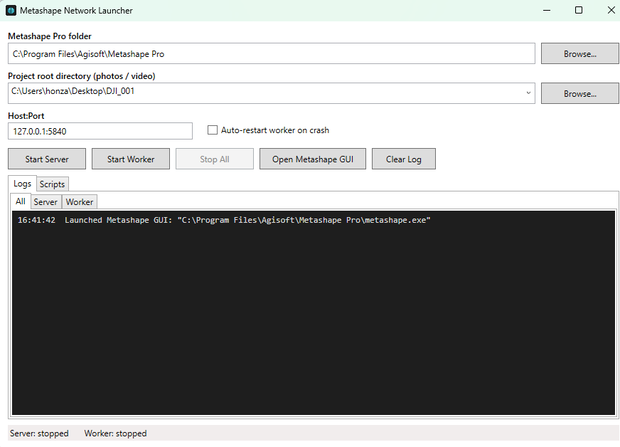
Metashape Network Launcher is a lightweight Windows utility for Agisoft Metashape Pro users who work with network processing. It replaces manual editing of server and worker batch files with a simple graphical interface.
Choose your project folder, set the Metashape installation path and host/port, then start the Metashape server and worker with the correct parameters. The app also keeps a history of recent project folders, shows live process logs, and can restart the worker automatically after a crash.
Also includes a small built-in Python script library for Metashape workflows — select or delete bad tie points, hide sky and background points, restore hidden points, and clear selections. Scripts can be previewed, launched, or copied directly from the app.
Ideal for users who regularly process photogrammetry projects in Metashape Pro and want a faster, cleaner way to launch local or network processing sessions.
Requirements: Windows 10/11 and Agisoft Metashape Pro.
Note: Network processing requires Agisoft Metashape Professional. Metashape Standard is not supported for server/worker processing.
Metashape Network Launcherは、Agisoft Metashape Proのネットワーク処理を使用するユーザー向けの軽量Windowsユーティリティです。サーバーおよびワーカーのバッチファイルを手動で編集する作業を、シンプルなグラフィカルインターフェースに置き換えます。
プロジェクトフォルダーを選択し、Metashapeのインストールパスとホスト/ポートを設定するだけで、正しいパラメーターでMetashapeサーバーとワーカーを起動できます。また、最近使用したプロジェクトフォルダーの履歴保存、リアルタイムのプロセスログ表示、クラッシュ後のワーカー自動再起動にも対応しています。
Metashapeワークフロー向けの小さなPythonスクリプトライブラリも内蔵しています。不良タイポイントの選択・削除、空や背景ポイントの非表示、非表示ポイントの復元、選択のクリアなどが可能です。スクリプトはアプリ内からプレビュー、起動、またはコピーできます。
Metashape Proでフォトグラメトリープロジェクトを定期的に処理するユーザーが、ローカルまたはネットワーク処理セッションをより速く、よりスムーズに起動したい場合に最適です。
動作環境:Windows 10/11およびAgisoft Metashape Pro
注意:ネットワーク処理にはAgisoft Metashape Professionalが必要です。Metashape Standardはサーバー/ワーカー処理に対応していません。
모든 리뷰
더보기리뷰 등록
리뷰를 작성하려면 로그인이 필요합니다.
로그인하고 리뷰 쓰기