'%3e%3cg%20clip-path='url(%23roundHexB)'%3e%3cpath%20fill='%236D5DFC'%20d='M256%2040%20443%20148%20443%20364%20256%20472%2069%20364%2069%20148Z'/%3e%3cpath%20fill='%239C93FB'%20d='M69%20148%20256%2040%20443%20148%20256%20256Z'/%3e%3cpath%20fill='%234A3FD1'%20d='M256%20256%20443%20148%20443%20364%20256%20472Z'/%3e%3c/g%3e%3c!--%20top%20face:%20filled%20round%20magnifier%20--%3e%3cg%20transform='matrix(0.8660254,-0.5,0.8660254,0.5,69,148)'%3e%3cg%20transform='matrix(0.935,0,0,0.935,7.02,7.02)'%3e%3ccircle%20cx='88'%20cy='88'%20r='52'%20fill='%23FFFFFF'/%3e%3ccircle%20cx='88'%20cy='88'%20r='28'%20fill='%239C93FB'/%3e%3cpath%20d='M124%20124%20164%20164'%20stroke='%23FFFFFF'%20stroke-width='26'%20stroke-linecap='round'/%3e%3c/g%3e%3c/g%3e%3cg%20transform='matrix(0.8660254,0.5,0,1,69,148)'%3e%3cpath%20d='M96.1,61.08%20L45.9,128.92%20Q34,145%2054,145%20L162,145%20Q182,145%20170.1,128.92%20L119.9,61.08%20Q108,45%2096.1,61.08%20Z'%20fill='%23FFFFFF'/%3e%3c/g%3e%3c!--%20right%20face:%20filled%20bubble%20--%3e%3cg%20transform='matrix(0.8660254,-0.5,0,1,256,256)'%3e%3cg%20transform='matrix(0.855,0,0,0.855,15.66,15.66)'%3e%3cpath%20d='M60%2042H156a28%2028%200%200%201%2028%2028V158Q184%20168%20174.47%20164.96L124.53%20149.04Q115%20146%20105%20146H60a28%2028%200%200%201-28-28V70a28%2028%200%200%201%2028-28Z'%20fill='%23FFFFFF'/%3e%3c/g%3e%3c/g%3e%3c/g%3e%3c/svg%3e)
 sustain
상품 설명
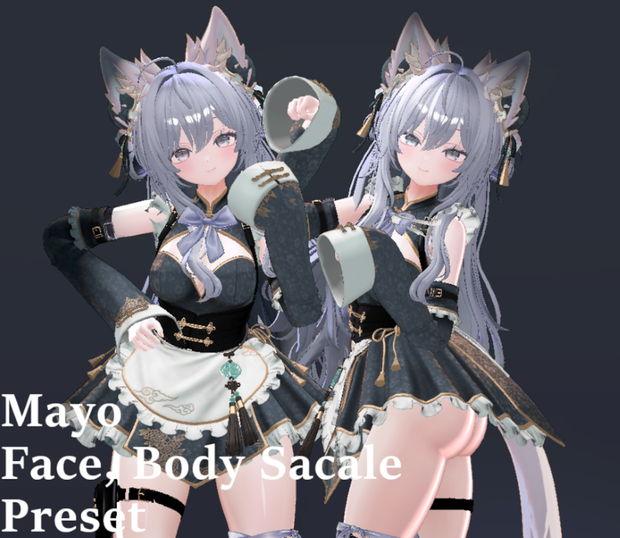
MAYO フェイス・ボディ用プレハブ
**本商品をご利用いただくには、MAYOアバターが必要です。**
ご購入前に、必ず下記のMAYOアバターをご購入ください。
https://booth.pm/ko/items/8122803
ーーーーーーーーーーーーーーーーーーーーーーーーーーーーーー
## ■ 更新情報
**Version 1.00**
* MAYO_neko.prefab
* MAYO_otori.prefab
* MAYO_sexy_neko.prefab
* MAYO_sexy_otori.prefab
ーーーーーーーーーーーーーーーーーーーーーーーーーーーーーー
## ■ 内容
* MAYO_neko.prefab
* MAYO_otori.prefab
* MAYO_sexy_neko.prefab
* MAYO_sexy_otori.prefab
* BlendShapeMover.cs
* BlendShapePreset.cs
* ScaleMatch.cs
ーーーーーーーーーーーーーーーーーーーーーーーーーーーーーー
## ■ 使用シェーダー
liltoon
https://booth.pm/ko/items/3087170
ーーーーーーーーーーーーーーーーーーーーーーーーーーーーーー
## ■ 必要商品
本商品をご利用いただくには、下記のMAYOアバターが必要です。
https://booth.pm/ko/items/8122803
ーーーーーーーーーーーーーーーーーーーーーーーーーーーーーー
## ■ 利用規約
・本商品の再配布は禁止されています。
・本商品を使用したアバターをPublic設定でアップロード・共有することは禁止されています。
・本商品はMAYOアバター所有者向けの製品です。
ーーーーーーーーーーーーーーーーーーーーーーーーーーーーーー
## ■ 使用方法
### ScaleMatcher
ScaleMatcherは、**アバターのScaleを衣装のScaleへコピーするツール**です。
**使い方**
1. Hierarchy内のアバターを**Copy From**へドラッグ&ドロップします。
2. 衣装オブジェクトを**Target Avatar**へドラッグ&ドロップします。
3. Applyボタン(または実行機能)を押すと、アバターのScaleが衣装へ適用されます。
---
### BlendShape Tool
BlendShape Toolは、プリセットのBlendShapeをアバターへ適用するツールです。
**使い方**
1. Hierarchy内のアバターの**Body**または**Face**を**Target to Apply**へドラッグ&ドロップします。
2. 使用したい**Preset**を選択します。
3. プリセットを適用します。
---
## ■ 同梱スクリプト
* BlendShapeMover.cs
* BlendShapePreset.cs
* ScaleMatch.cs
ーーーーーーーーーーーーーーーーーーーーーーーーーーーーーー
MAYO Face & Body Prefabs
**Please purchase the MAYO avatar before buying this product.**
Required Avatar:
https://booth.pm/ko/items/8122803
---
### Update
**Version 1.00**
* MAYO_neko.prefab
* MAYO_otori.prefab
* MAYO_sexy_neko.prefab
* MAYO_sexy_otori.prefab
---
## Contents
* MAYO_neko.prefab
* MAYO_otori.prefab
* MAYO_sexy_neko.prefab
* MAYO_sexy_otori.prefab
* BlendShapeMover.cs
* BlendShapePreset.cs
* ScaleMatch.cs
---
## Required Shader
liltoon
https://booth.pm/ko/items/3087170
---
## Requirements
Please make sure you own the **MAYO Avatar** before using this product.
Required Avatar:
https://booth.pm/ko/items/8122803
---
## Terms of Use
* Redistribution of this product is prohibited.
* Uploading or sharing public avatars using this product is prohibited.
* This product is intended only for users who own the MAYO avatar.
## Usage
### ScaleMatcher
ScaleMatcher automatically copies the avatar's scale to the clothing.
**How to use**
1. Drag your avatar from the **Hierarchy** into **Copy From**.
2. Drag the clothing object into **Target Avatar**.
3. Click **Apply** to copy the avatar's scale to the clothing.
ーーーーーーーーーーーーーーーーーーーーーーーーーーーーーー
### BlendShape Tool
The BlendShape Tool allows you to save and apply BlendShape presets.
#### Saving a Preset
1. Drag the face mesh you want to save into **Target to Save**.
2. Enter a preset name if necessary.
3. Click **Save Preset** to create a BlendShape preset.
#### Applying a Preset
1. Drag the **Body** mesh and **Face** mesh of the target avatar from the **Hierarchy** into **Target to Apply**.
2. Select one of the saved **Presets**.
3. Click **Apply** to apply the BlendShape preset to the avatar.
---
## Included Scripts
* BlendShapeMover.cs
* BlendShapePreset.cs
* ScaleMatch.cs
모든 리뷰
더보기리뷰 등록
리뷰를 작성하려면 로그인이 필요합니다.
로그인하고 리뷰 쓰기