'%3e%3cg%20clip-path='url(%23roundHexB)'%3e%3cpath%20fill='%236D5DFC'%20d='M256%2040%20443%20148%20443%20364%20256%20472%2069%20364%2069%20148Z'/%3e%3cpath%20fill='%239C93FB'%20d='M69%20148%20256%2040%20443%20148%20256%20256Z'/%3e%3cpath%20fill='%234A3FD1'%20d='M256%20256%20443%20148%20443%20364%20256%20472Z'/%3e%3c/g%3e%3c!--%20top%20face:%20filled%20round%20magnifier%20--%3e%3cg%20transform='matrix(0.8660254,-0.5,0.8660254,0.5,69,148)'%3e%3cg%20transform='matrix(0.935,0,0,0.935,7.02,7.02)'%3e%3ccircle%20cx='88'%20cy='88'%20r='52'%20fill='%23FFFFFF'/%3e%3ccircle%20cx='88'%20cy='88'%20r='28'%20fill='%239C93FB'/%3e%3cpath%20d='M124%20124%20164%20164'%20stroke='%23FFFFFF'%20stroke-width='26'%20stroke-linecap='round'/%3e%3c/g%3e%3c/g%3e%3cg%20transform='matrix(0.8660254,0.5,0,1,69,148)'%3e%3cpath%20d='M96.1,61.08%20L45.9,128.92%20Q34,145%2054,145%20L162,145%20Q182,145%20170.1,128.92%20L119.9,61.08%20Q108,45%2096.1,61.08%20Z'%20fill='%23FFFFFF'/%3e%3c/g%3e%3c!--%20right%20face:%20filled%20bubble%20--%3e%3cg%20transform='matrix(0.8660254,-0.5,0,1,256,256)'%3e%3cg%20transform='matrix(0.855,0,0,0.855,15.66,15.66)'%3e%3cpath%20d='M60%2042H156a28%2028%200%200%201%2028%2028V158Q184%20168%20174.47%20164.96L124.53%20149.04Q115%20146%20105%20146H60a28%2028%200%200%201-28-28V70a28%2028%200%200%201%2028-28Z'%20fill='%23FFFFFF'/%3e%3c/g%3e%3c/g%3e%3c/g%3e%3c/svg%3e)
 danilgoe
 Anime Shader Studio | Anime, Manga & Toon Shader Toolkit | Blender Add-on | アニメシェーダー
상품 설명
Anime Shader Studio
Create anime, manga, visual novel, manhwa and toon-style character renders directly inside Blender.
https://youtu.be/SIE-_zyg2tY?si=omdVJMj41ObcCU1H
Anime Shader Studio
Create anime, manga, visual novel, manhwa and toon-style character renders directly inside Blender.
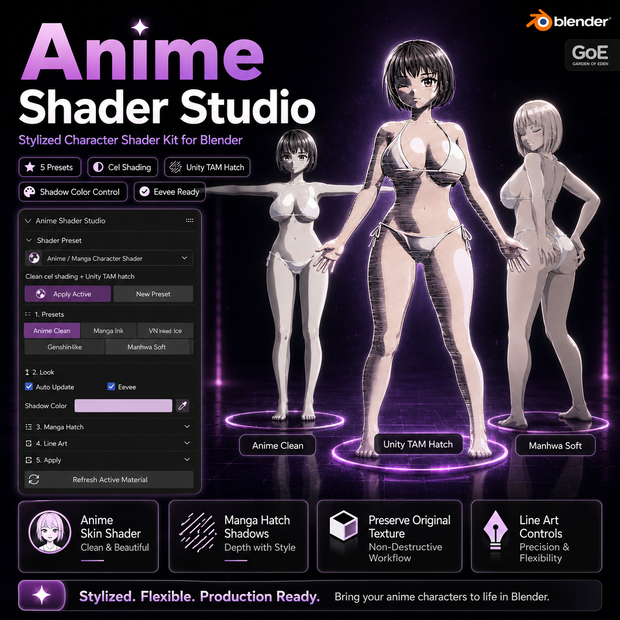
Anime Shader Studio is a stylized character shader toolkit for Blender. It helps you build cleaner anime-style materials, speed up look development and control the final presentation of your characters without manually building a complex node setup.
The add-on can reuse an existing base-color texture where possible, making it useful for both textured marketplace characters and simple untextured models.
Main Features
• Non-destructive original texture preservation
• Anime skin shader with soft or sharp cel shading
• Cel Steps, Shadow Depth, Threshold and Softness controls
• Custom shadow color and shadow-strength controls
• Manga-style hatch shadows with included TAM-style textures
• Hatch scale, strength, black level and white level controls
• Screen-space / Window hatch mode
• Anime, manga, visual novel, manhwa and toon-style presets
• Create or apply an Anime Shader material from the Blender N-panel
• Eevee-ready workflow
• No external tools required
Typical Workflow
1. Select a character or mesh.
2. Choose a look preset.
3. Apply the Anime Shader material.
4. Adjust cel shading and shadow color.
5. Select a hatch texture and tune its strength.
6. Optionally enable Freestyle lines for stronger line art.
Best For
• Anime character renders
• Manga-style previews
• Visual novel and webtoon characters
• Stylized game characters
• Marketplace product images
• Character portfolio renders
• Fast material look development
Compatibility
• Blender 3.5–5.1+
• Recommended renderer: Eevee
• Material Preview supported
• Windows, macOS and Linux
• Blender N-panel interface
Included
• Anime Shader Studio Blender add-on
• Anime skin and cel-shading workflow
• TAM-style manga hatch textures
• Shader presets and controls
• Workflow instructions
────────────────────
Anime Shader Studio
Blender内でアニメ、マンガ、ビジュアルノベル、マンファ、トゥーン調のキャラクターレンダーを作成できるスタイライズドシェーダーツールキットです。
複雑なノード構成を手作業で作らずに、アニメ風マテリアルを素早く作成し、キャラクターの最終的な見た目を調整できます。
既存マテリアルにBase Colorテクスチャが接続されている場合、可能な限りそのテクスチャを保持してシェーダー設定に再利用します。テクスチャ付きのマーケットプレイス用キャラクターにも、シンプルなモデルにも便利です。
■ 主な機能
・既存テクスチャを可能な限り保持する非破壊ワークフロー
・ソフト / シャープなセルシェーディング対応アニメスキンシェーダー
・Cel Steps、Shadow Depth、Threshold、Softness調整
・影色と影の強さ調整
・付属TAM風ハッチテクスチャによるマンガ風影
・ハッチスケール、強さ、黒レベル、白レベル調整
・スクリーンスペース / Windowハッチモード
・アニメ、マンガ、ビジュアルノベル、マンファ、トゥーン調プリセット
・Blender Nパネルからシェーダーマテリアルを作成・適用
・Eevee向けワークフロー
・外部ツール不要
■ 基本ワークフロー
1. キャラクターまたはメッシュを選択
2. ルック用プリセットを選択
3. Anime Shaderマテリアルを適用
4. セルシェーディングと影色を調整
5. ハッチテクスチャと強さを調整
6. より強い線画が必要な場合はFreestyleを有効化
■ おすすめ用途
・アニメ風キャラクターレンダー
・マンガ風プレビュー
・ビジュアルノベル、ウェブトゥーン向けキャラクター
・スタイライズドゲームキャラクター
・マーケットプレイス用商品画像
・ポートフォリオ用レンダー
・高速なマテリアルルック開発
■ 対応環境
・Blender 3.5–5.1+
・推奨レンダラー:Eevee
・Material Preview対応
・Windows / macOS / Linux
・Blender Nパネル操作
■ 収録内容
・Anime Shader Studio Blenderアドオン
・アニメスキン / セルシェーディング用ワークフロー
・TAM風マンガハッチテクスチャ
・シェーダープリセットと調整コントロール
・ワークフロー説明
모든 리뷰
더보기리뷰 등록
리뷰를 작성하려면 로그인이 필요합니다.
로그인하고 리뷰 쓰기