'%3e%3cg%20clip-path='url(%23roundHexB)'%3e%3cpath%20fill='%236D5DFC'%20d='M256%2040%20443%20148%20443%20364%20256%20472%2069%20364%2069%20148Z'/%3e%3cpath%20fill='%239C93FB'%20d='M69%20148%20256%2040%20443%20148%20256%20256Z'/%3e%3cpath%20fill='%234A3FD1'%20d='M256%20256%20443%20148%20443%20364%20256%20472Z'/%3e%3c/g%3e%3c!--%20top%20face:%20filled%20round%20magnifier%20--%3e%3cg%20transform='matrix(0.8660254,-0.5,0.8660254,0.5,69,148)'%3e%3cg%20transform='matrix(0.935,0,0,0.935,7.02,7.02)'%3e%3ccircle%20cx='88'%20cy='88'%20r='52'%20fill='%23FFFFFF'/%3e%3ccircle%20cx='88'%20cy='88'%20r='28'%20fill='%239C93FB'/%3e%3cpath%20d='M124%20124%20164%20164'%20stroke='%23FFFFFF'%20stroke-width='26'%20stroke-linecap='round'/%3e%3c/g%3e%3c/g%3e%3cg%20transform='matrix(0.8660254,0.5,0,1,69,148)'%3e%3cpath%20d='M96.1,61.08%20L45.9,128.92%20Q34,145%2054,145%20L162,145%20Q182,145%20170.1,128.92%20L119.9,61.08%20Q108,45%2096.1,61.08%20Z'%20fill='%23FFFFFF'/%3e%3c/g%3e%3c!--%20right%20face:%20filled%20bubble%20--%3e%3cg%20transform='matrix(0.8660254,-0.5,0,1,256,256)'%3e%3cg%20transform='matrix(0.855,0,0,0.855,15.66,15.66)'%3e%3cpath%20d='M60%2042H156a28%2028%200%200%201%2028%2028V158Q184%20168%20174.47%20164.96L124.53%20149.04Q115%20146%20105%20146H60a28%2028%200%200%201-28-28V70a28%2028%200%200%201%2028-28Z'%20fill='%23FFFFFF'/%3e%3c/g%3e%3c/g%3e%3c/g%3e%3c/svg%3e)
 Paleblue
상품 설명
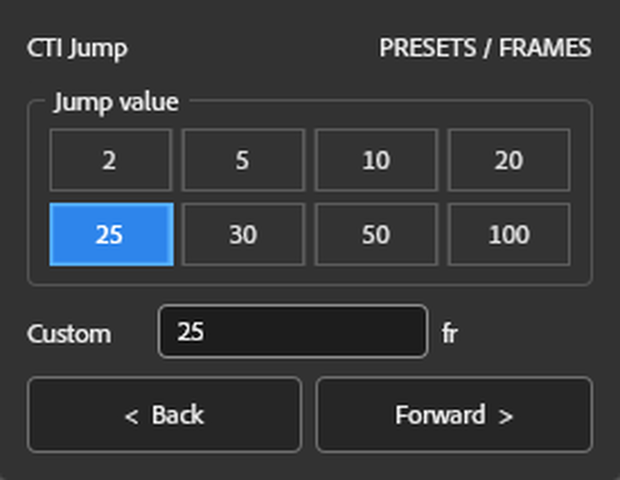
Quickly move the Current Time Indicator (CTI) by preset frame values.
Features
Preset jump values (2 / 5 / 10 / 20 / 25 / 30 / 50 / 100)
Custom jump value
Jump backward or forward with one click
Ideal for frame-by-frame editing and animation workflows
Installation
Installation
Copy the .jsx file to:
Windows: ...\Adobe After Effects\Support Files\Scripts\ScriptUI Panels\
macOS: /Applications/Adobe After Effects/Scripts/ScriptUI Panels/
Restart After Effects.
기능
프리셋 프레임 점프 값 지원 (2 / 5 / 10 / 20 / 25 / 30 / 50 / 100)
사용자 지정 프레임 값 지원
한 번의 클릭으로 앞으로 / 뒤로 이동
프레임 단위 편집 및 애니메이션 작업을 더욱 빠르고 효율적으로
설치 방법
.jsx 파일을 아래 폴더에 복사하세요.
Windows: ...\Adobe After Effects\Support Files\Scripts\ScriptUI Panels\
macOS: /Applications/Adobe After Effects/Scripts/ScriptUI Panels/
After Effects를 다시 실행하세요.
機能
プリセットジャンプ値(2 / 5 / 10 / 20 / 25 / 30 / 50 / 100)
カスタムジャンプ値に対応
ワンクリックで前後にジャンプ
フレーム単位の編集やアニメーション制作を効率化
インストール方法
.jsx ファイルを以下のフォルダーへコピーしてください。
Windows: ...\Adobe After Effects\Support Files\Scripts\ScriptUI Panels\
macOS: /Applications/Adobe After Effects/Scripts/ScriptUI Panels/
After Effectsを再起動してください。
모든 리뷰
더보기리뷰 등록
리뷰를 작성하려면 로그인이 필요합니다.
로그인하고 리뷰 쓰기