'%3e%3cg%20clip-path='url(%23roundHexB)'%3e%3cpath%20fill='%236D5DFC'%20d='M256%2040%20443%20148%20443%20364%20256%20472%2069%20364%2069%20148Z'/%3e%3cpath%20fill='%239C93FB'%20d='M69%20148%20256%2040%20443%20148%20256%20256Z'/%3e%3cpath%20fill='%234A3FD1'%20d='M256%20256%20443%20148%20443%20364%20256%20472Z'/%3e%3c/g%3e%3c!--%20top%20face:%20filled%20round%20magnifier%20--%3e%3cg%20transform='matrix(0.8660254,-0.5,0.8660254,0.5,69,148)'%3e%3cg%20transform='matrix(0.935,0,0,0.935,7.02,7.02)'%3e%3ccircle%20cx='88'%20cy='88'%20r='52'%20fill='%23FFFFFF'/%3e%3ccircle%20cx='88'%20cy='88'%20r='28'%20fill='%239C93FB'/%3e%3cpath%20d='M124%20124%20164%20164'%20stroke='%23FFFFFF'%20stroke-width='26'%20stroke-linecap='round'/%3e%3c/g%3e%3c/g%3e%3cg%20transform='matrix(0.8660254,0.5,0,1,69,148)'%3e%3cpath%20d='M96.1,61.08%20L45.9,128.92%20Q34,145%2054,145%20L162,145%20Q182,145%20170.1,128.92%20L119.9,61.08%20Q108,45%2096.1,61.08%20Z'%20fill='%23FFFFFF'/%3e%3c/g%3e%3c!--%20right%20face:%20filled%20bubble%20--%3e%3cg%20transform='matrix(0.8660254,-0.5,0,1,256,256)'%3e%3cg%20transform='matrix(0.855,0,0,0.855,15.66,15.66)'%3e%3cpath%20d='M60%2042H156a28%2028%200%200%201%2028%2028V158Q184%20168%20174.47%20164.96L124.53%20149.04Q115%20146%20105%20146H60a28%2028%200%200%201-28-28V70a28%2028%200%200%201%2028-28Z'%20fill='%23FFFFFF'/%3e%3c/g%3e%3c/g%3e%3c/g%3e%3c/svg%3e)
 blanksensei
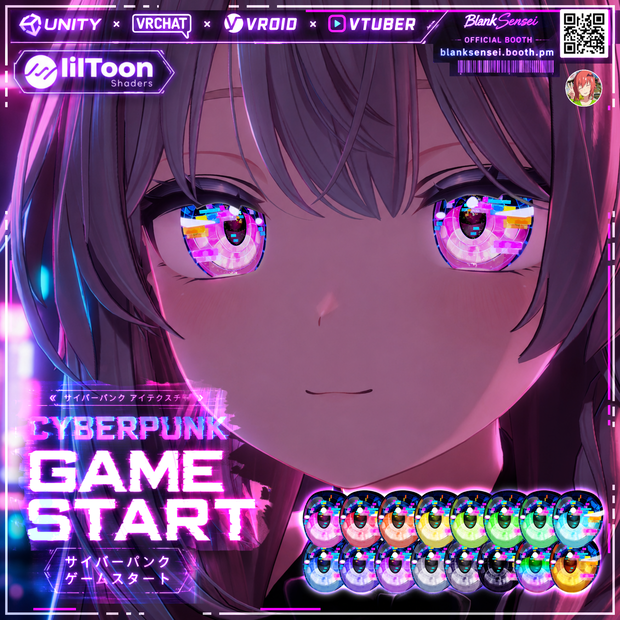
 【17+アバター対応】Cyberpunk Game Start Iris Texture【16Color】【VRoid/VRChat/VTuber対応】
상품 설명
Thank you for visiting my shop.
This is a high-quality iris texture pack designed for VRoid, VRChat, and VTuber use.
• Important Notice for VRoid Users
The VRoid version uses PNG iris textures only.
Unity materials, Emission settings, MatCap effects, and lilToon shader features are available only for Unity/VRChat avatar versions.
These effects are NOT included and cannot be used in VRoid Studio.
• Unity / VRChat Version
LilToon shader is required for the intended visual effects.
Emission settings have been adjusted for commonly used VRChat world lighting environments.
• Avatars are still being added
This package will include support for approximately 17 avatars, including:
VRoid Studio
オリジナル3Dモデル「しなの」
https://ponderogen.booth.pm/items/6106863
オリジナル3Dモデル「桔梗」
https://ponderogen.booth.pm/items/3681787
キプフェル Kipfel / オリジナル3Dモデル
https://mukumi.booth.pm/items/5813187
まめひなた Mamehinata / オリジナル3Dモデル
https://mukumi.booth.pm/items/4340548
オリジナル3Dモデル「マヌカ」ver1.02
https://jingo1016.booth.pm/items/5058077
オリジナル3Dモデル『ミルティナ』
https://dolosart.booth.pm/items/6538026
サメっ子オリジナル3Dモデル「rurune」-ルルネ-
https://paryi.booth.pm/items/5957830
オリジナル3Dモデル「セレスティア」ver1.02
https://jingo1016.booth.pm/items/4035411
ショコラ -Chocolat- / オリジナル3Dモデル
https://komado.booth.pm/items/6405390
【オリジナル3Dモデル】狛乃-Komano-
https://hyuuganatu.booth.pm/items/5260363
【オリジナル3Dモデル】碼希-まき-
https://hyuuganatu.booth.pm/items/3162696
"I-v(アイヴィ)"【VRChat向けオリジナルアバター】
https://atelier-alca.booth.pm/items/2023526
"I-s(アイズ) Ver.2.0"【VRChat向けオリジナルアバター】
https://atelier-alca.booth.pm/items/2460693
VRChat向け3Dモデル『レナ・カクテル-Lena Cocktail-』
https://stray-lamb.booth.pm/items/2097499
【オリジナル3Dモデル】Stier-シュティーア-
https://hyuuganatu.booth.pm/items/2135654
【オリジナル3Dモデル】ノイズ Ver.1.02
https://ramuneru0801.booth.pm/items/3481481
📦 Contents
• 虹彩 Texture (16 PNG)
• Highlight Texture (1 PNG)
• Iris + Highlight Merged (16 PNG)
• Masks
• Read Me
🔧 Installation
Basic Installation
For a quick setup:
• Place the 虹彩 Texture into Main Color 2nd
• Place the Highlight Texture into Emissions
This is sufficient for basic use and will achieve the core look of the texture.
Unity Full Installation :
(EN) Unity Installation Guide
https://docs.google.com/document/d/10Va8ILDN2HA5q8pBGGE2g752mS_KtOgxoyQgo_sSHzU/edit?usp=drivesdk
(JP) Unity 導入ガイド
https://docs.google.com/document/d/1EUdemb-qAuoCU7dNjuSsnRD4ApKYQ9vPS3-n6OXV6nA/edit?usp=drivesdk
✨ Emission / MatCap / Glitter
Emission, MatCap, and Glitter are optional.
The texture can be used without them, but enabling these features can create a brighter, more vibrant appearance similar to the preview images.
Emissions by default were adjusted to only the most played VRChat world lighting systems.
🎮 Recommended Use
• VRChat
• VRoid Studio
• VTuber activities
• YouTube
• Twitch
• Kick
• Livestreaming
• Video creation
• Social media content
• Character customization
• Original character creation
Suitable for both personal and commercial projects within the Terms of Use.
⚠ Important Notes
• Avatar models shown in preview images are not included.
• This product contains eye textures only.
• Appearance may vary depending on avatar UVs, shaders, lighting, and rendering settings.
• Due to the nature of digital products, refunds are not available.
• Support is provided in English only.
📜 Terms of Use
• Editing and modification: Allowed
• Commercial use: Allowed
• Streaming and VTuber use: Allowed
• Redistribution: Prohibited
• Resale: Prohibited
• Claiming as your own work: Prohibited
Please review the full Terms of Use before purchasing.
Terms of Use ▶
모든 리뷰
더보기리뷰 등록
리뷰를 작성하려면 로그인이 필요합니다.
로그인하고 리뷰 쓰기