'%3e%3cg%20clip-path='url(%23roundHexB)'%3e%3cpath%20fill='%236D5DFC'%20d='M256%2040%20443%20148%20443%20364%20256%20472%2069%20364%2069%20148Z'/%3e%3cpath%20fill='%239C93FB'%20d='M69%20148%20256%2040%20443%20148%20256%20256Z'/%3e%3cpath%20fill='%234A3FD1'%20d='M256%20256%20443%20148%20443%20364%20256%20472Z'/%3e%3c/g%3e%3c!--%20top%20face:%20filled%20round%20magnifier%20--%3e%3cg%20transform='matrix(0.8660254,-0.5,0.8660254,0.5,69,148)'%3e%3cg%20transform='matrix(0.935,0,0,0.935,7.02,7.02)'%3e%3ccircle%20cx='88'%20cy='88'%20r='52'%20fill='%23FFFFFF'/%3e%3ccircle%20cx='88'%20cy='88'%20r='28'%20fill='%239C93FB'/%3e%3cpath%20d='M124%20124%20164%20164'%20stroke='%23FFFFFF'%20stroke-width='26'%20stroke-linecap='round'/%3e%3c/g%3e%3c/g%3e%3cg%20transform='matrix(0.8660254,0.5,0,1,69,148)'%3e%3cpath%20d='M96.1,61.08%20L45.9,128.92%20Q34,145%2054,145%20L162,145%20Q182,145%20170.1,128.92%20L119.9,61.08%20Q108,45%2096.1,61.08%20Z'%20fill='%23FFFFFF'/%3e%3c/g%3e%3c!--%20right%20face:%20filled%20bubble%20--%3e%3cg%20transform='matrix(0.8660254,-0.5,0,1,256,256)'%3e%3cg%20transform='matrix(0.855,0,0,0.855,15.66,15.66)'%3e%3cpath%20d='M60%2042H156a28%2028%200%200%201%2028%2028V158Q184%20168%20174.47%20164.96L124.53%20149.04Q115%20146%20105%20146H60a28%2028%200%200%201-28-28V70a28%2028%200%200%201%2028-28Z'%20fill='%23FFFFFF'/%3e%3c/g%3e%3c/g%3e%3c/g%3e%3c/svg%3e)
 Zoiudinho
상품 설명
**Live Demo World:**
https://vrchat.com/home/launch?worldId=wrld_dfdde4cd-3027-41bb-b62b-de9bdb59888a
- "Your world’s new favorite icebreaker — in 3D."
- "Bring more laughter and conversation to your world — one roll at a time."
- "The simplest way to spark big conversations."
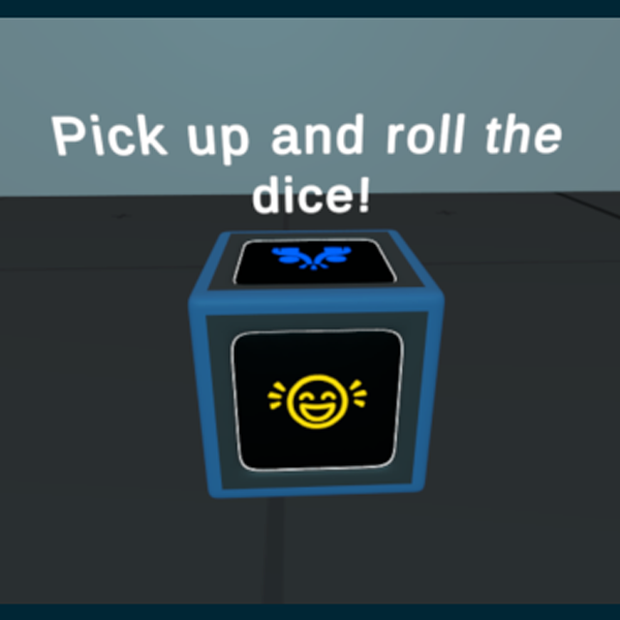
Turn any VRChat world into a social hangout with a fun, interactive quiz dice. Players pick up the dice, roll it, and when it stops a random question appears on a floating canvas above the dice.
Perfect for party worlds, lounge areas, dating/social spaces, game nights, and community events.
---
## ✨ Features
- **6 question themes** — one per face:
- Friendship
- Funny
- Love
- Wild Hypotheses
- Secrets
- Total Chaos
- **60 questions per language** (10 per theme), with cycling so repeats feel natural
- **6 language prefabs included:**
- English
- Portuguese (Brazil)
- Spanish
- Chinese (Simplified)
- Korean
- Japanese
- **VR & Desktop support**
- Works with VRC Pickup in VR and on desktop
- Desktop-only throw spin for more satisfying rolls
- **Smart gameplay**
- Question canvas hides while the dice is held or moving
- Question reveals automatically when the dice settles
- Face detection picks the correct theme from the top face
- **Fully customizable**
- Edit all questions in the Unity Inspector
- Change face textures and materials
- Adjust physics, settle time, canvas height, and more
- **Plug & play**
- Drag a prefab into your scene
- Compile UdonSharp
- Build and upload
---
## 📦 What's Included
- 6 ready-to-use language prefabs
- UdonSharp scripts (source + compiled assets)
- `QuizDiceController`
- `DesktopDiceThrowSpin`
- 3D dice model (FBX)
- 6 themed face materials + source textures
- TextMeshPro question canvas
- `ReadMe.txt` — setup & customization guide
- `License.txt` — usage terms
---
## 🛠 Requirements
- Unity project with **VRChat SDK (Worlds)**
- **UdonSharp**
- Basic familiarity with importing assets into a VRChat world
---
## 🎮 How It Works
1. Place one language prefab in your scene
2. Run **UdonSharp → Compile All UdonSharp Programs**
3. Build & test in VRChat
4. Players pick up the dice, roll it, and answer the question that appears!
---
## 📝 Customization
No coding required for basic edits:
- Change questions on the `QuizDiceController` component
- Edit the start message on the TMP text object
- Swap face images via the included materials
Full instructions included in `ReadMe.txt`.
---
## 📜 License
Personal & commercial use **inside VRChat worlds** is allowed.
**You may NOT** resell or redistribute this package as a standalone asset.
See `License.txt` for full terms.
---
## 💬 Support
Questions? Contact me through Gumroad after purchase.
---
## FAQ
Q: Do I need to know Udon?
A: No. Drag the prefab, compile UdonSharp, and you're done. Script knowledge is only needed for advanced changes.
Q: Can I use this in commercial / VRChat+ worlds?
A: Yes, inside VRChat worlds per the license.
Q: Can I change the questions?
A: Yes. All questions are editable in the Inspector.
Q: Which language should I use?
A: Pick one prefab per dice instance. Six languages are included.
Q: Does it work on Quest / Android?
A: Yes, as a world prop.
Q: Can I resell this asset?
A: No. World use only. See License.txt.
모든 리뷰
더보기리뷰 등록
리뷰를 작성하려면 로그인이 필요합니다.
로그인하고 리뷰 쓰기