'%3e%3cg%20clip-path='url(%23roundHexB)'%3e%3cpath%20fill='%236D5DFC'%20d='M256%2040%20443%20148%20443%20364%20256%20472%2069%20364%2069%20148Z'/%3e%3cpath%20fill='%239C93FB'%20d='M69%20148%20256%2040%20443%20148%20256%20256Z'/%3e%3cpath%20fill='%234A3FD1'%20d='M256%20256%20443%20148%20443%20364%20256%20472Z'/%3e%3c/g%3e%3c!--%20top%20face:%20filled%20round%20magnifier%20--%3e%3cg%20transform='matrix(0.8660254,-0.5,0.8660254,0.5,69,148)'%3e%3cg%20transform='matrix(0.935,0,0,0.935,7.02,7.02)'%3e%3ccircle%20cx='88'%20cy='88'%20r='52'%20fill='%23FFFFFF'/%3e%3ccircle%20cx='88'%20cy='88'%20r='28'%20fill='%239C93FB'/%3e%3cpath%20d='M124%20124%20164%20164'%20stroke='%23FFFFFF'%20stroke-width='26'%20stroke-linecap='round'/%3e%3c/g%3e%3c/g%3e%3cg%20transform='matrix(0.8660254,0.5,0,1,69,148)'%3e%3cpath%20d='M96.1,61.08%20L45.9,128.92%20Q34,145%2054,145%20L162,145%20Q182,145%20170.1,128.92%20L119.9,61.08%20Q108,45%2096.1,61.08%20Z'%20fill='%23FFFFFF'/%3e%3c/g%3e%3c!--%20right%20face:%20filled%20bubble%20--%3e%3cg%20transform='matrix(0.8660254,-0.5,0,1,256,256)'%3e%3cg%20transform='matrix(0.855,0,0,0.855,15.66,15.66)'%3e%3cpath%20d='M60%2042H156a28%2028%200%200%201%2028%2028V158Q184%20168%20174.47%20164.96L124.53%20149.04Q115%20146%20105%20146H60a28%2028%200%200%201-28-28V70a28%2028%200%200%201%2028-28Z'%20fill='%23FFFFFF'/%3e%3c/g%3e%3c/g%3e%3c/g%3e%3c/svg%3e)
 VRCtoolers
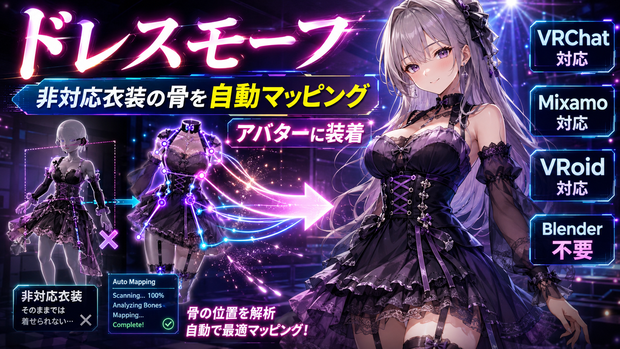
 ドレスモーフ - 非対応衣装の骨を自動マッピングしてアバターに装着【VRChat Mixamo VRoid Blender不要】
상품 설명
他のアバター用・海外製・Mixamo/VRoid由来の衣装は、ボーン名がアバターと違うため、Modular Avatarでは自動で着せられません(腕や脚が飛び出す/動かない)。ドレスモーフは、骨名の違いを吸収して自動でマッピングし、衣装をアバターの骨へ装着します。Blenderは要りません。
◆ 何をするツール?
・命名差(mixamorig: / J_Bip_ / Left・Right / 日本語)を吸収して、衣装の骨をアバターの骨へ自動マッピング
・スカート/胸/指/しっぽなど衣装固有の揺れ骨も、骨鎖ごとアバターへ移植して追従させる(置き去りにしない)
・身長に合わせて自動スケール
・衣装メッシュは複製して処理(元アセットは無変更=非破壊)
◆ こんな時に
・別アバター用の衣装を着せたら骨が合わず腕・脚が飛び出す
・Modular Avatarで着せたいのに、衣装の骨名が違って自動マージできない
・海外アバターやMixamo/VRoidの服を流用したい
◆ 使い方
1. アバターと衣装(SkinnedMeshRenderer)を入れる
2.「DryRun」で対応本数を確認
3.「衣装を装着する」を押す(骨マッピング+移植+自動スケール)
4. 位置・サイズを微調整
※ Humanoid系の骨構成を持つアバター/衣装向け。命名が極端に特殊なボーンは手動対応が必要な場合があります。装着後の細かな貫通は「ステルスボディ」「ウェアトレース」と併用すると綺麗です。Unity 2022.3 / VCC対応。衣装がPrefabの場合は装着時に自動で解凍します。
━━━━━━━━━━━━━━━━━━━━
English
━━━━━━━━━━━━━━━━━━━━
Outfits made for other avatars -- foreign-made, or from Mixamo/VRoid -- have different bone names, so Modular Avatar can't auto-fit them (arms/legs poke out or don't move). Dress Morph absorbs the bone-name differences, auto-maps them, and attaches the outfit to your avatar's skeleton. No Blender.
What it does
- Absorbs naming differences (mixamorig: / J_Bip_ / Left/Right / Japanese) and auto-maps outfit bones to the avatar's bones
- Migrates outfit-specific bones too (skirt/chest/fingers/tail) chain-and-all onto the avatar so they follow (nothing left behind)
- Auto-scales to height
- Works on a duplicated mesh (the source asset is untouched = non-destructive)
Why it's different: Modular Avatar (free) can only auto-merge "compatible outfits" with matching bone names. The core of Dress Morph is fitting non-compatible outfits with different bone names by remapping the names.
How to use: 1) Add the avatar and the outfit (SkinnedMeshRenderer). 2) Check the mapped count with "DryRun." 3) Press "Fit the outfit" (bone mapping + migration + auto-scale). 4) Tweak position/size. For Humanoid-style skeletons. Bones with very unusual names may need manual fixup. For fine clipping afterward, combine with Stealth Body / Wear Trace. Unity 2022.3 / VCC. If the outfit is a prefab, it is unpacked automatically on fit.
━━━━━━━━━━━━━━━━━━━━
한국어
━━━━━━━━━━━━━━━━━━━━
다른 아바타용·해외 제작·Mixamo/VRoid 유래 의상은 본 이름이 아바타와 달라 Modular Avatar로는 자동으로 입힐 수 없습니다(팔·다리가 삐져나오거나 움직이지 않음). 드레스 모프는 본 이름 차이를 흡수해 자동 매핑하고, 의상을 아바타의 본에 장착합니다. 블렌더는 필요 없습니다.
기능
- 명명 차이(mixamorig: / J_Bip_ / Left·Right / 일본어)를 흡수해 의상 본을 아바타 본에 자동 매핑
- 스커트/가슴/손가락/꼬리 등 의상 고유 흔들림 본도 본 체인째 아바타로 이식해 추종(방치하지 않음)
- 키에 맞춰 자동 스케일
- 의상 메쉬는 복제해 처리(원본 에셋은 변경 없음=비파괴)
무료 도구와의 차이: Modular Avatar(무료)는 "본 이름이 같은 대응 의상"만 자동 머지할 수 있습니다. 드레스 모프는 본 이름이 다른 비대응 의상을, 이름을 바꿔 읽어 장착하는 것이 핵심입니다.
사용법: 1) 아바타와 의상(SkinnedMeshRenderer)을 넣습니다. 2) "DryRun"으로 매핑 개수를 확인. 3) "의상 장착"을 누릅니다(본 매핑+이식+자동 스케일). 4) 위치·크기 미세 조정. Humanoid 계열 골격용. 명명이 극히 특수한 본은 수동 대응이 필요할 수 있습니다. 장착 후 세밀한 관통은 "스텔스 바디"·"웨어 트레이스"와 병용하면 깔끔합니다. Unity 2022.3 / VCC. 의상이 Prefab이면 장착 시 자동으로 언팩합니다.
모든 리뷰
더보기리뷰 등록
리뷰를 작성하려면 로그인이 필요합니다.
로그인하고 리뷰 쓰기