'%3e%3cg%20clip-path='url(%23roundHexB)'%3e%3cpath%20fill='%236D5DFC'%20d='M256%2040%20443%20148%20443%20364%20256%20472%2069%20364%2069%20148Z'/%3e%3cpath%20fill='%239C93FB'%20d='M69%20148%20256%2040%20443%20148%20256%20256Z'/%3e%3cpath%20fill='%234A3FD1'%20d='M256%20256%20443%20148%20443%20364%20256%20472Z'/%3e%3c/g%3e%3c!--%20top%20face:%20filled%20round%20magnifier%20--%3e%3cg%20transform='matrix(0.8660254,-0.5,0.8660254,0.5,69,148)'%3e%3cg%20transform='matrix(0.935,0,0,0.935,7.02,7.02)'%3e%3ccircle%20cx='88'%20cy='88'%20r='52'%20fill='%23FFFFFF'/%3e%3ccircle%20cx='88'%20cy='88'%20r='28'%20fill='%239C93FB'/%3e%3cpath%20d='M124%20124%20164%20164'%20stroke='%23FFFFFF'%20stroke-width='26'%20stroke-linecap='round'/%3e%3c/g%3e%3c/g%3e%3cg%20transform='matrix(0.8660254,0.5,0,1,69,148)'%3e%3cpath%20d='M96.1,61.08%20L45.9,128.92%20Q34,145%2054,145%20L162,145%20Q182,145%20170.1,128.92%20L119.9,61.08%20Q108,45%2096.1,61.08%20Z'%20fill='%23FFFFFF'/%3e%3c/g%3e%3c!--%20right%20face:%20filled%20bubble%20--%3e%3cg%20transform='matrix(0.8660254,-0.5,0,1,256,256)'%3e%3cg%20transform='matrix(0.855,0,0,0.855,15.66,15.66)'%3e%3cpath%20d='M60%2042H156a28%2028%200%200%201%2028%2028V158Q184%20168%20174.47%20164.96L124.53%20149.04Q115%20146%20105%20146H60a28%2028%200%200%201-28-28V70a28%2028%200%200%201%2028-28Z'%20fill='%23FFFFFF'/%3e%3c/g%3e%3c/g%3e%3c/g%3e%3c/svg%3e)
 MetaCreatorsTYO EN
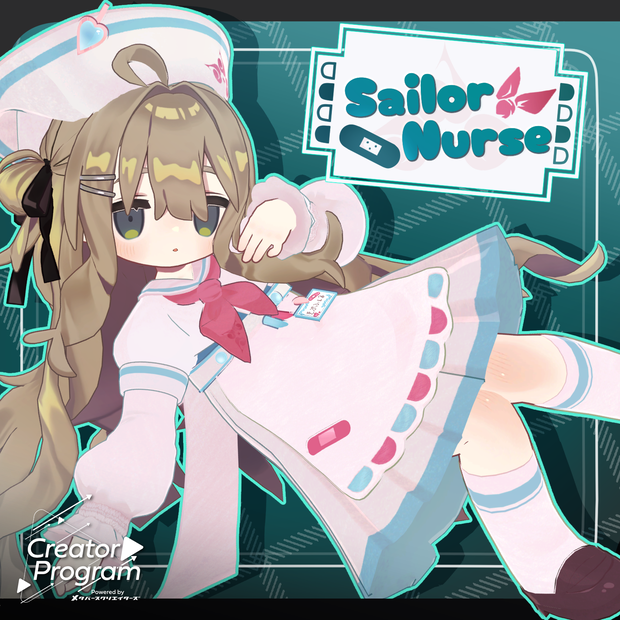
 Sailor Nurse - VRChat Women's Clothing / CP19
상품 설명
◆ Sailor Nurse ◆
Producer: Umorunba Studio
“Prepare the sash of learning within your heart.”
※ This product is a costume model for avatars. Avatar base data is not included.
※ Due to the nature of digital downloads, returns and refunds are not possible. Please read and agree to the product description and terms of use before purchasing.
◆ Item Overview
● Contents
SailorNurse.Unitypackage
PSD file for modifications
ReadMe.txt (main document)
Shaders used
lilToon
https://lilxyzw.booth.pm/items/3087170
Required assets
Modular Avatar
https://modular-avatar.nadena.dev/ja/docs/intro
● Model Data
Total polygon count: 34,922 polygons
Nurse cap: 3,610
Sailor: 20,470
Apron: 3,490
Sleeves: 5,504
Bandage: 592
Shoes: 1,256
Mesh count: 18,286
Material count: 4
PB components: 4
Import folder:
Assets > MetaverseCreators_CP > Atelier umorunba > SailorNurse
◆ Supported Avatars
Kipfel / Original 3D Model (Mame Friends)
https://booth.pm/ja/items/5813187
Usasaki / Original 3D Model
https://mukumi.booth.pm/items/3550881
Emo Lab Avatars
Original 3D Model “Azuki”
https://booth.pm/ja/items/6654988
Original 3D Model “Korone”
https://booth.pm/ja/items/5776079
Original 3D Model “Clara”
https://booth.pm/ja/items/5484178
“Hyakko” - by Niyami
https://booth.pm/ja/items/6328134
※ When wearing the outfit, body-hiding shape keys are used (the body becomes rod-like / simplified).
● Included Shape Keys
Nurse cap:
zengo_nobi
zengo_cidhimi
yoko_nobi
yoko_cidhimi
Heart_OFF
pin_OFF
Sailor:
cuffs_OFF
◆ Installation Steps
Set up the latest VRChat SDK in VCC
Install required assets in VCC (lilToon, Modular Avatar)
Import the latest packages of each avatar
Import this package
Drag and drop the avatar (or outfit prefab for customization) into the Scene Hierarchy
Hide or set unused clothing (default outfits, underwear, etc.) to Editor Only as needed
Drag and drop “OutfitName_AvatarName.Prefab” under the avatar
Upload the avatar via VRChat SDK
※ This outfit uses Modular Avatar’s “MA Shape Changer” feature.
When the outfit is placed under the avatar, body shape keys are automatically enabled to slim the body or hide parts of the mesh. This prevents clipping between the body and clothing.
If you do not want to use the included MA Shape Changer, you may remove it or adjust it as desired.
※ If parts of the avatar body become unintentionally deformed after setup, reset the relevant shape keys to 0 and check the visible body state.
◆ Color Customization
Six preset variations are included as prefabs.
You can change the name tag text via:
Apron material “SailorNurseAcc” → Main Color 2nd channel.
Replace the texture file located at:
Assets > MetaverseCreators_CP > Atelier umorunba > SailorNurse > Common > TEX > name
You can also modify colors freely using the included PSD file.
◆ Terms of Use
https://drive.google.com/drive/folders/1qRMXoIxM1ZgacBPfwOigQRtXP1vCbNMn?usp=sharing
※ Please ensure you comply with the original avatar’s terms of use.
◆ Production Environment
Modeling: Blender Ver. 4.3.1
Textures: CLIP STUDIO PAINT
Setup: Unity 2022.3.22f1
VRChat SDK - Avatars Ver. 3.10.3 (VCC)
lilToon 2.3.2
Modular Avatar 1.17.1
◆ Credits
Producer: Umorunba Studio
Support / Contact:
모든 리뷰
더보기리뷰 등록
리뷰를 작성하려면 로그인이 필요합니다.
로그인하고 리뷰 쓰기