'%3e%3cg%20clip-path='url(%23roundHexB)'%3e%3cpath%20fill='%236D5DFC'%20d='M256%2040%20443%20148%20443%20364%20256%20472%2069%20364%2069%20148Z'/%3e%3cpath%20fill='%239C93FB'%20d='M69%20148%20256%2040%20443%20148%20256%20256Z'/%3e%3cpath%20fill='%234A3FD1'%20d='M256%20256%20443%20148%20443%20364%20256%20472Z'/%3e%3c/g%3e%3c!--%20top%20face:%20filled%20round%20magnifier%20--%3e%3cg%20transform='matrix(0.8660254,-0.5,0.8660254,0.5,69,148)'%3e%3cg%20transform='matrix(0.935,0,0,0.935,7.02,7.02)'%3e%3ccircle%20cx='88'%20cy='88'%20r='52'%20fill='%23FFFFFF'/%3e%3ccircle%20cx='88'%20cy='88'%20r='28'%20fill='%239C93FB'/%3e%3cpath%20d='M124%20124%20164%20164'%20stroke='%23FFFFFF'%20stroke-width='26'%20stroke-linecap='round'/%3e%3c/g%3e%3c/g%3e%3cg%20transform='matrix(0.8660254,0.5,0,1,69,148)'%3e%3cpath%20d='M96.1,61.08%20L45.9,128.92%20Q34,145%2054,145%20L162,145%20Q182,145%20170.1,128.92%20L119.9,61.08%20Q108,45%2096.1,61.08%20Z'%20fill='%23FFFFFF'/%3e%3c/g%3e%3c!--%20right%20face:%20filled%20bubble%20--%3e%3cg%20transform='matrix(0.8660254,-0.5,0,1,256,256)'%3e%3cg%20transform='matrix(0.855,0,0,0.855,15.66,15.66)'%3e%3cpath%20d='M60%2042H156a28%2028%200%200%201%2028%2028V158Q184%20168%20174.47%20164.96L124.53%20149.04Q115%20146%20105%20146H60a28%2028%200%200%201-28-28V70a28%2028%200%200%201%2028-28Z'%20fill='%23FFFFFF'/%3e%3c/g%3e%3c/g%3e%3c/g%3e%3c/svg%3e)
 Royal・Fragment
상품 설명
--------------------------------------------------------------------
『High Quality Image Upscaler』 利用規約
--------------------------------------------------------------------
この度は、『High Quality Image Upscaler』をご覧頂き誠に有難うございます。
本ツールをご利用の際は以下にご注意ください。
--------------------------------------------------------------------
■ 動作環境について
推奨環境:
・OS: Windows 10 / Windows 11
・GPU: NVIDIA製GPU(VRAM 8GB以上推奨)※CUDA対応により高速処理が可能
・メモリ: 8GB以上推奨
※本ツールはWindows環境での動作を想定して作成されています。
--------------------------------------------------------------------
■ ツール仕様
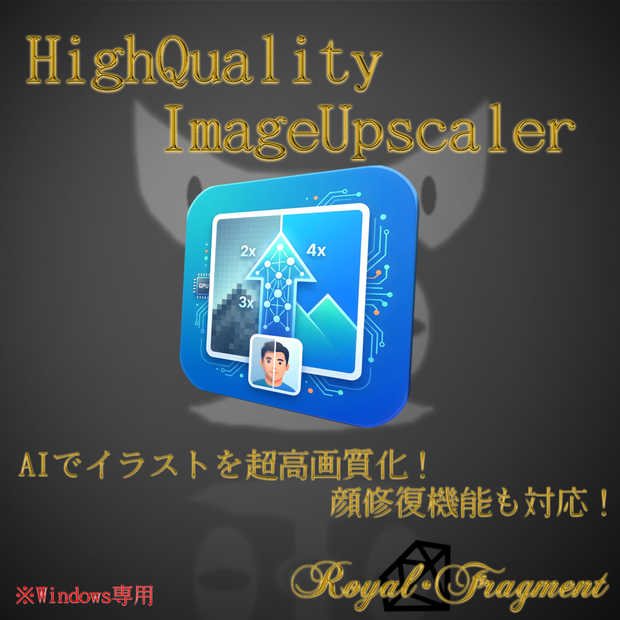
本ツールは、解像度の低い画像や荒れたイラストをAI技術(Real-ESRGAN / GFPGAN)を用いて高品質にアップスケーリング(高画質化)するクリエイター向けユーティリティです。
【主な機能】
・ドラッグ&ドロップによる直感的な画像読み込み対応!
・拡大倍率の選択(2x, 3x, 4x)
・顔修復機能(GFPGAN)搭載により、人物の顔も自然に綺麗に補正
・複数画像の一括処理(バッチ処理)対応
・Before / After が一目でわかるリアルタイムプレビュー機能
過去の粗い素材のリマスターや、AI生成イラストの高画質化、同人誌の印刷用データ作成などに幅広くご活用いただけます。
--------------------------------------------------------------------
【ダウンロードと解凍方法について(重要)】
本ツールはAIモデルを含みファイルサイズが大きいため、2つのRARファイル(.part1.rar, .part2.rar)に分割して配布しております。
ご利用の際は、以下の手順で解凍を行ってください。
1. 2つの分割ファイル(.part1.rar と .part2.rar)を両方ともダウンロードし、必ず同じフォルダに保存してください。
2. Windows標準の機能では解凍できないため、無料の解凍ソフト「7-Zip」などをご利用ください。
3. 2つのファイルが同じフォルダに揃った状態で、最初のファイル(.part1.rar)を右クリックし、「7-Zipで展開(解凍)」を選択してください。自動的にpart2も読み込まれ、ツール本体が展開されます。
※ファイルの一部が欠けていると解凍エラーになりますのでご注意ください。
--------------------------------------------------------------------
【注意事項】
・原則サポートなし(現状渡し)となります。個人制作ツールのため、バグ対応や機能追加要望などはベストエフォート(可能な範囲での対応)となりますので、あらかじめご了承ください。
・本ツールを使用したことによって生じた、データの破損、PCの不具合、その他いかなるトラブルや損害に関しても、当方は一切の責任を負いません(念のため元データのバックアップを取ってからご使用ください)。
・本ツールの二次配布、無断転載、自作発言、および本ツール自体を再販売する行為は固く禁止いたします。
・本ツールを用いて作成・変換した画像データの商用利用は全面的に可能です。ご自身のビジネスや同人活動等で自由にご活用ください。
・特定の個人や団体を誹謗中傷する目的でのツール利用、及び公序良俗に反する行為への利用を禁止します。
・今後のOSアップデート等により、予告なくツールが動作しなくなる場合があります。恒久的な動作を保証するものではありませんのでご了承ください。
--------------------------------------------------------------------
■ 制作者について
・MKT革命
Twitter: @68636538
メール: [email protected]
====================================================================
"High Quality Image Upscaler" - For Creators & Doujin Authors
--------------------------------------------------------------------
"High Quality Image Upscaler" Terms of Use
--------------------------------------------------------------------
Thank you for your interest in the "High Quality Image Upscaler".
Please read the following carefully before using this tool.
--------------------------------------------------------------------
- System Requirements
Recommended Environment:
- OS: Windows 10 / Windows 11
- GPU: NVIDIA GPU (VRAM 8GB or more recommended) *CUDA support enables high-speed processing
- Memory: 8GB or more recommended
* This tool is designed to run on Windows environments.
--------------------------------------------------------------------
- Tool Specifications
This tool is a utility for creators that uses AI technology (Real-ESRGAN / GFPGAN) to upscale (improve image quality) low-resolution images and rough illustrations to high quality.
[Key Features]
- Intuitive image loading via drag-and-drop!
- Selectable magnification ratio (2x, 3x, 4x)
- Equipped with face restoration function (GFPGAN) to naturally and beautifully correct human faces
- Batch processing support for multiple images
- Real-time preview function to see the Before/After at a glance
It can be widely used for remastering past rough materials, upscaling AI-generated illustrations, and creating data for printing doujinshi.
--------------------------------------------------------------------
- Download and Installation Instructions
This tool has a large file size, so it is distributed in two split RAR files (.part1.rar, .part2.rar).
1. Save both downloaded files (.part1.rar and .part2.rar) in the same folder.
2. Use a free extraction tool like "7-Zip", right-click the first file (.part1.rar), and select "Extract" (Both files will automatically combine and extract into a single folder).
3. Double-click the installer (.exe file) in the extracted folder to run it.
4. Follow the on-screen instructions to complete the installation.
5. After installation, you can launch the tool from the shortcut on your desktop or start menu.
* Security software like Windows Defender may show a warning. If this happens, click "More info" and then "Run anyway".
--------------------------------------------------------------------
[Notes]
- This tool is provided "as is" with no technical support in principle. As it is a personal project, bug fixes and feature requests will be handled on a best-effort basis.
- We assume no responsibility for any data corruption, PC malfunction, or other troubles or damages caused by using this tool. (Please back up your original data just in case.)
- Secondary distribution, unauthorized reproduction, claiming authorship, and reselling this tool itself are strictly prohibited.
- Commercial use of image data created/converted using this tool is fully permitted. Feel free to use it for your business or creative activities.
- Using the tool for the purpose of slandering specific individuals or groups, or for acts contrary to public order and morals, is prohibited.
- Please note that the tool may stop working without notice due to future OS updates. We do not guarantee permanent operation.
--------------------------------------------------------------------
- About the Creator
- MKT Kakumei
Twitter: @68636538
Email: [email protected]
====================================================================
모든 리뷰
더보기리뷰 등록
리뷰를 작성하려면 로그인이 필요합니다.
로그인하고 리뷰 쓰기