'%3e%3cg%20clip-path='url(%23roundHexB)'%3e%3cpath%20fill='%236D5DFC'%20d='M256%2040%20443%20148%20443%20364%20256%20472%2069%20364%2069%20148Z'/%3e%3cpath%20fill='%239C93FB'%20d='M69%20148%20256%2040%20443%20148%20256%20256Z'/%3e%3cpath%20fill='%234A3FD1'%20d='M256%20256%20443%20148%20443%20364%20256%20472Z'/%3e%3c/g%3e%3c!--%20top%20face:%20filled%20round%20magnifier%20--%3e%3cg%20transform='matrix(0.8660254,-0.5,0.8660254,0.5,69,148)'%3e%3cg%20transform='matrix(0.935,0,0,0.935,7.02,7.02)'%3e%3ccircle%20cx='88'%20cy='88'%20r='52'%20fill='%23FFFFFF'/%3e%3ccircle%20cx='88'%20cy='88'%20r='28'%20fill='%239C93FB'/%3e%3cpath%20d='M124%20124%20164%20164'%20stroke='%23FFFFFF'%20stroke-width='26'%20stroke-linecap='round'/%3e%3c/g%3e%3c/g%3e%3cg%20transform='matrix(0.8660254,0.5,0,1,69,148)'%3e%3cpath%20d='M96.1,61.08%20L45.9,128.92%20Q34,145%2054,145%20L162,145%20Q182,145%20170.1,128.92%20L119.9,61.08%20Q108,45%2096.1,61.08%20Z'%20fill='%23FFFFFF'/%3e%3c/g%3e%3c!--%20right%20face:%20filled%20bubble%20--%3e%3cg%20transform='matrix(0.8660254,-0.5,0,1,256,256)'%3e%3cg%20transform='matrix(0.855,0,0,0.855,15.66,15.66)'%3e%3cpath%20d='M60%2042H156a28%2028%200%200%201%2028%2028V158Q184%20168%20174.47%20164.96L124.53%20149.04Q115%20146%20105%20146H60a28%2028%200%200%201-28-28V70a28%2028%200%200%201%2028-28Z'%20fill='%23FFFFFF'/%3e%3c/g%3e%3c/g%3e%3c/g%3e%3c/svg%3e)
 VRCtoolers
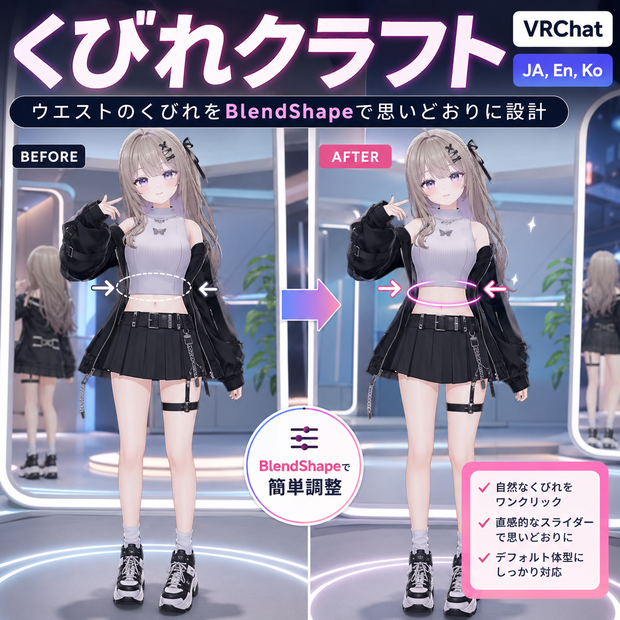
 くびれクラフト - ウエストのくびれをBlendShapeで思いどおりに設計【VRChat】【JA,En,Ko】
상품 설명
くびれは、スタイルの設計図。
ウエストがキュッと締まるだけで、立ち姿も衣装の見え方も、ぐっと洗練されます。くびれクラフトは、あなたがそのウエストラインを"設計"できるツールです。胴体に4つのBlendShape(くびれ/お腹引っ込め/横スリム/引き締め)を生成して、絞り具合をスライダーで自在にデザイン。Blenderはいりません。
◆ メリハリが出る理由
ウエスト周りを背骨ボーン軸からの距離で検出し、中央がいちばん絞れるように自然変形。くびれは全周を内へ、お腹引っ込めは前面、横スリムは側面——効かせる向きを分けて設計するから、上下は細くしすぎず、ウエストだけがしなやかにくびれます。
◆ できること
・4スライダー(くびれ/お腹引っ込め/横スリム/引き締め)+5プリセット(Subtle〜Hourglass〜Diet)
・設計したあとも、Inspectorのスライダーで何度でも微調整(0〜100%)
・非破壊。元メッシュは複製するので、いつでも元通り
・VRChat SDK不要。どのUnity環境でもそのまま動きます
◆ こんなときに
・タイトな衣装を、メリハリのある体型で着こなしたい
・自撮りやポートレートで、スタイルよく見せたい
・素体にウエストシェイプが無いアバターでも、ここから設計したい
◆ 使い方はシンプル
アバターを入れる → プリセットかスライダーで絞り具合を設計 → 「くびれを作る」を押す → アップロード。
※ 自動生成のため、手作りシェイプのような作り込みとは異なる"自然な範囲"の調整ツールです。胴体がSpine(背骨)ボーンにスキンされたHumanoidアバター向け。Unity 2022.3 / VCC。
━━━━━━━━━━━━━━━━━━━━
English
━━━━━━━━━━━━━━━━━━━━
A waistline is the blueprint of a silhouette. Cinch the waist and suddenly the whole stance -- and the way outfits sit -- looks more refined. Waist Craft lets you design that line yourself. It generates 4 BlendShapes (Cinch / Tummy Tuck / Side Slim / Tighten) so you can shape the curve precisely with sliders. No Blender.
Why it gets that defined curve
It detects the waist region (distance from the spine-bone axis) and cinches strongest at the center for a natural curve. Cinch pulls inward all around, Tummy Tuck works the front, Side Slim works the sides -- each direction designed separately, so the waist defines without over-thinning above and below.
What you get
- 4 sliders (Cinch / Tummy Tuck / Side Slim / Tighten) + 5 presets (Subtle to Hourglass to Diet)
- Re-tune anytime from the Inspector (0-100%) after designing
- Non-destructive -- the original mesh is duplicated, always reversible
- No VRChat SDK dependency; works in any Unity
Great for
- Wearing tight outfits with a more defined figure
- Selfies and portraits where the silhouette matters
- Avatars with no waist shape keys -- design one from scratch
How it works
Drop in your avatar -> pick a preset or set the sliders -> press "Cinch the waist" -> upload.
Procedural, natural-range shaping, so it differs from hand-crafted shapes. For Humanoid avatars whose torso is skinned to the Spine bone. Unity 2022.3 / VCC.
━━━━━━━━━━━━━━━━━━━━
한국어
━━━━━━━━━━━━━━━━━━━━
잘록함은 실루엣의 설계도. 허리가 살짝 들어가는 것만으로 서 있는 모습도, 의상이 입혀지는 느낌도 한층 세련되어집니다. 허리 크래프트는 당신이 그 허리 라인을 '설계'할 수 있는 툴입니다. 몸통에 4종 BlendShape(잘록/뱃살 넣기/옆 슬림/조이기)를 생성해 슬라이더로 자유롭게 디자인. Blender 불필요.
또렷한 곡선이 나오는 이유
허리 영역을 척추 본 축 거리로 검출해 중앙이 가장 잘록하게 자연 변형. 잘록은 전체 안쪽으로, 뱃살 넣기는 전면, 옆 슬림은 측면 -- 방향별로 따로 설계하므로 위아래는 과하게 가늘어지지 않고 허리만 또렷해집니다.
제공 기능
- 4슬라이더(잘록/뱃살 넣기/옆 슬림/조이기) + 5프리셋(Subtle~Hourglass~Diet)
- 설계 후 Inspector에서 언제든 재조정(0~100%)
- 비파괴 -- 원본 메시는 복제되어 언제든 되돌리기
- VRChat SDK 비의존, 어떤 Unity에서도 동작
이런 분께
- 타이트한 의상을 또렷한 몸매로 소화하고 싶을 때
- 셀카·포트레이트에서 스타일 좋게 보이고 싶을 때
- 허리 셰이프키가 없는 아바타에 새로 만들고 싶을 때
사용법
아바타 넣기 -> 프리셋/슬라이더로 설계 -> "허리 만들기" 누르기 -> 업로드.
프로시저럴 자연 범위 조정 툴이라 수작업 셰이프와는 다릅니다. 몸통이 Spine 본에 스킨된 Humanoid용. Unity 2022.3 / VCC.
모든 리뷰
더보기리뷰 등록
리뷰를 작성하려면 로그인이 필요합니다.
로그인하고 리뷰 쓰기