'%3e%3cg%20clip-path='url(%23roundHexB)'%3e%3cpath%20fill='%236D5DFC'%20d='M256%2040%20443%20148%20443%20364%20256%20472%2069%20364%2069%20148Z'/%3e%3cpath%20fill='%239C93FB'%20d='M69%20148%20256%2040%20443%20148%20256%20256Z'/%3e%3cpath%20fill='%234A3FD1'%20d='M256%20256%20443%20148%20443%20364%20256%20472Z'/%3e%3c/g%3e%3c!--%20top%20face:%20filled%20round%20magnifier%20--%3e%3cg%20transform='matrix(0.8660254,-0.5,0.8660254,0.5,69,148)'%3e%3cg%20transform='matrix(0.935,0,0,0.935,7.02,7.02)'%3e%3ccircle%20cx='88'%20cy='88'%20r='52'%20fill='%23FFFFFF'/%3e%3ccircle%20cx='88'%20cy='88'%20r='28'%20fill='%239C93FB'/%3e%3cpath%20d='M124%20124%20164%20164'%20stroke='%23FFFFFF'%20stroke-width='26'%20stroke-linecap='round'/%3e%3c/g%3e%3c/g%3e%3cg%20transform='matrix(0.8660254,0.5,0,1,69,148)'%3e%3cpath%20d='M96.1,61.08%20L45.9,128.92%20Q34,145%2054,145%20L162,145%20Q182,145%20170.1,128.92%20L119.9,61.08%20Q108,45%2096.1,61.08%20Z'%20fill='%23FFFFFF'/%3e%3c/g%3e%3c!--%20right%20face:%20filled%20bubble%20--%3e%3cg%20transform='matrix(0.8660254,-0.5,0,1,256,256)'%3e%3cg%20transform='matrix(0.855,0,0,0.855,15.66,15.66)'%3e%3cpath%20d='M60%2042H156a28%2028%200%200%201%2028%2028V158Q184%20168%20174.47%20164.96L124.53%20149.04Q115%20146%20105%20146H60a28%2028%200%200%201-28-28V70a28%2028%200%200%201%2028-28Z'%20fill='%23FFFFFF'/%3e%3c/g%3e%3c/g%3e%3c/g%3e%3c/svg%3e)
 うさぎの開発室
상품 설명
「パソコン内の動画が多すぎて、どこになにがあるか分からない…」
「標準エクスプローラーでは、動画の内容がパッと見で思い出せない…」
本ソフトは、そんな悩みを解決するために開発したローカル動画の管理と快適な視聴に特化した専用ビューワーです。
HDDやSSDに大量に溜まった動画ファイルを、高速かつ直感的に整理・再生できます。
3つの主な特徴
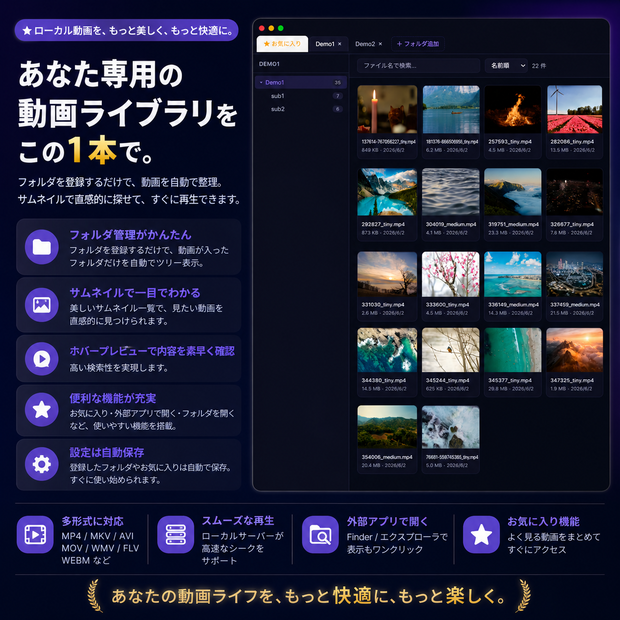
● 動画が入っているフォルダだけの「自動ツリー表示」
指定したフォルダを自動解析し、動画が含まれるフォルダだけをツリー状に抽出します。空のフォルダや画像のみのフォルダはスキップされるため、目的の動画へ迷わずアクセスできます。
● 大容量ファイルも一瞬でプレビュー
サムネイルにマウスカーソルを重ねると動画のプレビューを再生。目的の動画を素早く探せます。
● OSネイティブの高速サムネイル一覧
ファイル名だけでは分からない動画も、OSの機能を活用した軽量・高速なサムネイル生成によりひと目で把握できます。大量の動画を読み込んでもPCの動作を重くしません。
その他の便利機能
● お気に入り登録機能:よく見る動画をリストアップしてすぐにアクセス可能です。
● 外部連携:ボタン一つで「ファイルの保存場所(エクスプローラー/Finder)」を開いたり、「普段使っている動画プレイヤー」で開くことができます。
● 目に優しいUI:長時間の視聴にも適した、落ち着いたダークテーマを採用しています。
動作環境
Windows 11/10
macOS 11以降
●対応フォーマット:.mp4, .mkv, .avi, .mov, .wmv, .webm, .flv, .ts, .m2ts など
起動時のセキュリティ警告について(重要)
初回起動時にOSのセキュリティ機能によって警告が表示される場合があります。
* Macをご利用の場合: 「開発元を検証できません...」という警告が出た場合は、アプリアイコンを右クリック(またはControl+クリック)して「開く」を選択し、再度警告画面が出たらそのまま「開く」をクリックしてください。
アプリが壊れていると出た場合は、隔離属性が原因ですので解除(xattrコマンド)を実施して下さい。
* Windowsをご利用の場合: 「WindowsによってPCが保護されました」という青い画面が出た場合は、画面内の「詳細情報」をクリックし、表示される「実行」ボタンを押してください。
アップデート履歴
[2026-06-02: v1.0] Ver.1.0公開
[2026-06-04: v1.0.1] Windows版 Ver.1.0.1公開
English
## 1. OVERVIEW
Video Viewer is a desktop application for browsing and managing video files stored across multiple folders.
It features thumbnail grid display, hover preview playback, favorites management, and more — everything you need to organize your video library efficiently.
## 2. Key Features
* "Automatic Tree View" for Video Folders Only
It automatically analyzes the specified directory and extracts only the folders containing videos into a tree structure. Empty folders or folders containing only images are skipped, allowing you to access your target videos without getting lost.
* Preview large files instantly
Hover your mouse cursor over a thumbnail to play a video preview. Quickly find the video you're looking for.
* OS-Native High-Speed Thumbnail List
Even for videos you can't recognize by filename alone, the lightweight and high-speed thumbnail generation utilizing native OS functions helps you grasp the content at a glance. Loading a large number of videos won't slow down your PC's performance.
## 3. Other Convenient Features
* Favorites Feature: List your frequently watched videos for instant access.
* External Integration: With a single button, you can open the file's storage location (Explorer/Finder) or launch the file in your usual preferred video player.
* Eye-Friendly UI: Features a calm dark theme suitable for long hours of viewing.
## 4. System Requirements & Specifications
* Supported OS: Windows 10/11, macOS 11 or later
* Supported Formats: .mp4, .mkv, .avi, .mov, .wmv, .webm, .flv, .ts, .m2ts, etc.
## 5. Security Warnings at Startup (Important)
A warning may appear on the first launch due to your OS's security features.
* If you are using a Mac: If you see a warning that says "The developer cannot be verified...", right-click (or Control-click) the app icon and select "Open". If the warning screen reappears, click "Open" again.
If the app is corrupted, this is due to quarantine attributes; please remove them (using the xattr command).
* If you are using Windows: If you see a blue screen that says "Windows protected your PC", click "More information" on the screen and then click the "Run" button that appears.
모든 리뷰
더보기리뷰 등록
리뷰를 작성하려면 로그인이 필요합니다.
로그인하고 리뷰 쓰기