'%3e%3cg%20clip-path='url(%23roundHexB)'%3e%3cpath%20fill='%236D5DFC'%20d='M256%2040%20443%20148%20443%20364%20256%20472%2069%20364%2069%20148Z'/%3e%3cpath%20fill='%239C93FB'%20d='M69%20148%20256%2040%20443%20148%20256%20256Z'/%3e%3cpath%20fill='%234A3FD1'%20d='M256%20256%20443%20148%20443%20364%20256%20472Z'/%3e%3c/g%3e%3c!--%20top%20face:%20filled%20round%20magnifier%20--%3e%3cg%20transform='matrix(0.8660254,-0.5,0.8660254,0.5,69,148)'%3e%3cg%20transform='matrix(0.935,0,0,0.935,7.02,7.02)'%3e%3ccircle%20cx='88'%20cy='88'%20r='52'%20fill='%23FFFFFF'/%3e%3ccircle%20cx='88'%20cy='88'%20r='28'%20fill='%239C93FB'/%3e%3cpath%20d='M124%20124%20164%20164'%20stroke='%23FFFFFF'%20stroke-width='26'%20stroke-linecap='round'/%3e%3c/g%3e%3c/g%3e%3cg%20transform='matrix(0.8660254,0.5,0,1,69,148)'%3e%3cpath%20d='M96.1,61.08%20L45.9,128.92%20Q34,145%2054,145%20L162,145%20Q182,145%20170.1,128.92%20L119.9,61.08%20Q108,45%2096.1,61.08%20Z'%20fill='%23FFFFFF'/%3e%3c/g%3e%3c!--%20right%20face:%20filled%20bubble%20--%3e%3cg%20transform='matrix(0.8660254,-0.5,0,1,256,256)'%3e%3cg%20transform='matrix(0.855,0,0,0.855,15.66,15.66)'%3e%3cpath%20d='M60%2042H156a28%2028%200%200%201%2028%2028V158Q184%20168%20174.47%20164.96L124.53%20149.04Q115%20146%20105%20146H60a28%2028%200%200%201-28-28V70a28%2028%200%200%201%2028-28Z'%20fill='%23FFFFFF'/%3e%3c/g%3e%3c/g%3e%3c/g%3e%3c/svg%3e)
 砂の工房
砂の工房상품 설명
==================================================
Warudo Mod Manager v1.1.0
==================================================
[ 문의 / お問い合わせ / Contact ]
X (Twitter): @sablokato
Gmail: moraekato
설명서는 한국어 원문에 기반합니다. 이외의 언어는 번역된 문서입니다.
マニュアルは韓国語の原文に基づいています。その他の言語は翻訳版です。
The manual is based on the original Korean text. Other languages are translations.
==================================================
--- 한국어 (원문) ---
==================================================
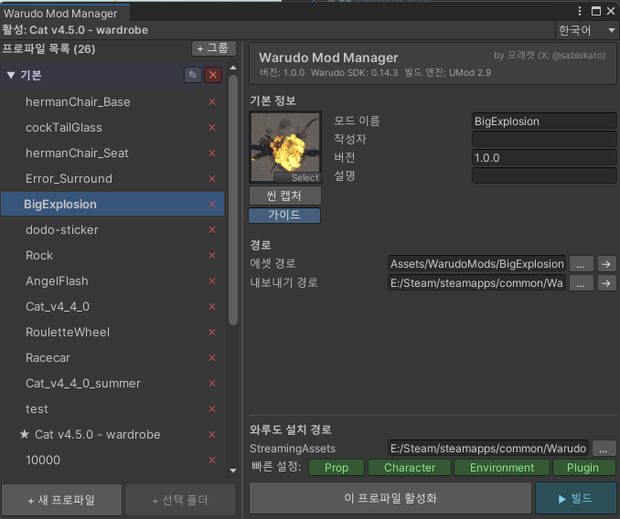
Warudo SDK(UMod)용 모드 익스포트 프로파일 관리 에디터 확장입니다.
한 프로젝트에서 여러 모드를 작업할 때 프로파일 관리와 빌드를 한 창에서 처리할 수 있습니다.
[ v1.1.0 변경 사항 ]
- 그룹 헤더를 드래그하여 그룹 순서를 변경할 수 있습니다. 클릭하면 접거나 펼치고, 5px 이상 드래그하면 이동합니다. 드래그 중 ESC로 취소할 수 있습니다.
- 새 프로파일 생성 창에 배치 그룹 선택 항목이 추가되었습니다. 기본값은 현재 선택된 프로파일의 그룹입니다.
- "+ 선택 폴더" 버튼도 새 프로파일 생성 창을 엽니다. 선택한 폴더와 이름이 미리 입력되므로 그룹을 선택한 뒤 생성할 수 있습니다.
- Warudo 빠른 경로에 Particle 버튼이 추가되었습니다. StreamingAssets의 Particles 폴더를 익스포트 경로로 설정합니다.
- 새 프로파일 생성 창의 높이를 늘려 하단 버튼이 잘리는 문제를 수정했습니다.
[ 기능 ]
- 프로파일 생성·그룹 분류·드래그 정렬·빌드
- 씬 뷰 캡처로 썸네일 생성
- Warudo StreamingAssets의 Prop / Character / Environment / Plugin / Particle 빠른 경로 설정
- 프로파일 JSON 자동 저장 및 복원
- 한국어 / English / 日本語 / 简体中文 / 繁體中文 UI
[ 요구 사항 ]
- Unity 2021.3.45f2 (Warudo SDK 프로젝트)
- Warudo Mod Tool (app.warudo.modtool)
※ Warudo SDK 프로젝트에 기본 포함되어 있습니다.
[ 설치 ]
동봉된 WarudoModManager_v1.1.0.unitypackage 파일을 Warudo SDK 프로젝트에 임포트하세요.
상세 사용법과 백업 안내는 동봉된 README_ko.txt를 확인하세요.
[ 이용 약관 ]
- 본 도구는 유니티 패키지 파일로 제공됩니다.
- 본 도구는 구매자 본인의 환경에서 자유롭게 사용할 수 있습니다.
- 본 도구의 무단 재배포/재판매 행위를 금지합니다.
==================================================
--- 日本語 ---
==================================================
Warudo SDK(UMod)向けのModエクスポートプロファイル管理エディタ拡張です。
1つのプロジェクトで複数のModを制作する際、プロファイルの管理とビルドを1つのウィンドウで行えます。
[ v1.1.0の変更点 ]
- グループの見出しをドラッグして、グループの順序を変更できます。クリックで折りたたみ/展開、5px以上のドラッグで移動します。ドラッグ中はESCキーでキャンセルできます。
- 新規プロファイル作成画面に配置先グループの選択項目を追加しました。初期値は現在選択中のプロファイルが属するグループです。
- 「+ フォルダ」ボタンからも新規プロファイル作成画面が開きます。選択したフォルダと名前が入力された状態で、配置先グループを選んでから作成できます。
- WarudoのクイックパスにParticleボタンを追加しました。StreamingAssets内のParticlesフォルダをエクスポート先に設定します。
- 新規プロファイル作成画面を高くし、下部のボタンが見切れる問題を修正しました。
[ 機能 ]
- プロファイルの作成・グループ分け・ドラッグによる並べ替え・ビルド
- シーンビューのキャプチャによるサムネイル作成
- Warudo StreamingAssets内のProp / Character / Environment / Plugin / Particleへのクイックパス設定
- プロファイルJSONの自動保存・復元
- 한국어 / English / 日本語 / 简体中文 / 繁體中文 UI
[ 動作要件 ]
- Unity 2021.3.45f2(Warudo SDKプロジェクト)
- Warudo Mod Tool(app.warudo.modtool)
※ Warudo SDKプロジェクトに標準で含まれています。
[ インストール ]
同梱のWarudoModManager_v1.1.0.unitypackageをWarudo SDKプロジェクトにインポートしてください。
詳しい使い方とバックアップについては、同梱のREADME_ja.txtをご覧ください。
[ 利用規約 ]
- 本ツールはUnityパッケージファイルとして提供されます。
- 本ツールは購入者ご自身の環境で自由に使用できます。
- 本ツールの無断再配布・再販売を禁止します。
==================================================
--- English ---
==================================================
An editor extension for managing mod export profiles in the Warudo SDK (UMod).
When working on multiple mods in one project, you can manage profiles and build them from a single window.
[ Changes in v1.1.0 ]
- Drag a group header to change the group order. Click to collapse or expand a group, drag it at least 5px to move it, or press ESC to cancel a drag.
- The new profile window now lets you choose a destination group. It defaults to the group of the currently selected profile.
- The "+ Folder" button now opens the new profile window with the selected folder and its name filled in, so you can choose a group before creating the profile.
- Added a Particle quick path button, which sets the export path to the Particles folder under StreamingAssets.
- Increased the height of the new profile window to fix its bottom buttons being cut off.
[ Features ]
- Create, group, reorder, and build profiles
- Capture the Scene View to create thumbnails
- Quick export paths under Warudo StreamingAssets for Prop / Character / Environment / Plugin / Particle
- Automatic profile JSON save and restore
- UI in 한국어 / English / 日本語 / 简体中文 / 繁體中文
[ Requirements ]
- Unity 2021.3.45f2 (Warudo SDK project)
- Warudo Mod Tool (app.warudo.modtool)
- Included in the Warudo SDK project by default.
[ Installation ]
Import the bundled WarudoModManager_v1.1.0.unitypackage into your Warudo SDK project.
See the included README_en.txt for full instructions and backup details.
[ Terms of Use ]
- This tool is provided as a Unity package file.
- This tool may be used freely in the purchaser's own environment.
- Unauthorized redistribution or resale of this tool is prohibited.
모든 리뷰
더보기리뷰 등록
리뷰를 작성하려면 로그인이 필요합니다.
로그인하고 리뷰 쓰기