'%3e%3cg%20clip-path='url(%23roundHexB)'%3e%3cpath%20fill='%236D5DFC'%20d='M256%2040%20443%20148%20443%20364%20256%20472%2069%20364%2069%20148Z'/%3e%3cpath%20fill='%239C93FB'%20d='M69%20148%20256%2040%20443%20148%20256%20256Z'/%3e%3cpath%20fill='%234A3FD1'%20d='M256%20256%20443%20148%20443%20364%20256%20472Z'/%3e%3c/g%3e%3c!--%20top%20face:%20filled%20round%20magnifier%20--%3e%3cg%20transform='matrix(0.8660254,-0.5,0.8660254,0.5,69,148)'%3e%3cg%20transform='matrix(0.935,0,0,0.935,7.02,7.02)'%3e%3ccircle%20cx='88'%20cy='88'%20r='52'%20fill='%23FFFFFF'/%3e%3ccircle%20cx='88'%20cy='88'%20r='28'%20fill='%239C93FB'/%3e%3cpath%20d='M124%20124%20164%20164'%20stroke='%23FFFFFF'%20stroke-width='26'%20stroke-linecap='round'/%3e%3c/g%3e%3c/g%3e%3cg%20transform='matrix(0.8660254,0.5,0,1,69,148)'%3e%3cpath%20d='M96.1,61.08%20L45.9,128.92%20Q34,145%2054,145%20L162,145%20Q182,145%20170.1,128.92%20L119.9,61.08%20Q108,45%2096.1,61.08%20Z'%20fill='%23FFFFFF'/%3e%3c/g%3e%3c!--%20right%20face:%20filled%20bubble%20--%3e%3cg%20transform='matrix(0.8660254,-0.5,0,1,256,256)'%3e%3cg%20transform='matrix(0.855,0,0,0.855,15.66,15.66)'%3e%3cpath%20d='M60%2042H156a28%2028%200%200%201%2028%2028V158Q184%20168%20174.47%20164.96L124.53%20149.04Q115%20146%20105%20146H60a28%2028%200%200%201-28-28V70a28%2028%200%200%201%2028-28Z'%20fill='%23FFFFFF'/%3e%3c/g%3e%3c/g%3e%3c/g%3e%3c/svg%3e)
 便利工房
便利工房상품 설명
🎯 LaserPin — デスクトップ アイコン検索
---
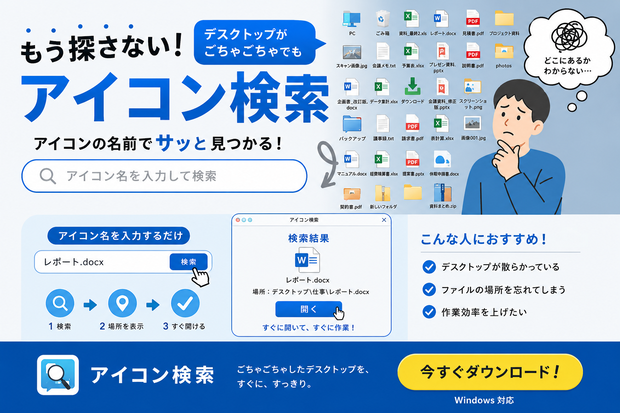
## 📌 こんな悩みありませんか?
> 「あのアイコン、どこに置いたっけ…」
> デスクトップがアイコンだらけで目当てのものが見つからない!
**LaserPin** はそんな悩みをレーザーポインターで一発解決するツールです。
---
## 🎬 使い方
1. アプリを起動
2. 探したいアイコン名を入力(例:「ゴミ箱」「メモ帳」)
3. **「🔍 探す」** を押すだけ!
赤いレーザーがデスクトップを飛び、**HERE ピンがバウンスしながら着地**して場所を教えてくれます。
画面をクリックすると消えます。
---
## ✨ 主な機能
| 機能 | 説明 |
|---|---|
| 🔴 レーザーアニメーション | アイコンに向かってレーザーがスムーズに飛ぶ |
| 📍 HERE ピン | 着地点にマップピンがバウンスして落下 |
| 🔍 リアルタイム検索 | 入力するたびに瞬時に絞り込み |
| 🚀 その場で起動 | 見つけたアイコンをそのまま開ける |
| 🪟 クリーン起動 | コマンドプロンプトが表示されない |
| ♻️ 再読み込み | デスクトップ更新後もすぐ反映 |
---
## 💻 動作環境
- **OS**: Windows 10 / 11(64bit)
- **Python**: 不要(スタンドアロン .exe)
- **インストール**: 不要(ダウンロードしてすぐ使える)
---
## 📦 同梱ファイル
```
デスクトップアイコン検索.exe
```
---
## ⚠️ ご注意
- 初回起動時に Windows Defender の警告が出る場合があります
→「詳細情報」→「実行」で起動できます
- アイコン座標の取得には**管理者権限での実行**を推奨します
- アイコンが「座標なし」と表示される場合は右クリック →「管理者として実行」をお試しください
---
---
🎯 LaserPin — Desktop Icon Finder
---
## 📌 Does this sound familiar?
> "Where did I put that icon again...?"
> Your desktop is a mess and you can't find anything!
**LaserPin** solves that instantly with a laser pointer animation.
---
## 🎬 How to Use
1. Launch the app
2. Type the icon name you're looking for (e.g. "Recycle Bin", "Notepad")
3. Press **"🔍 Search"** — that's it!
A red laser flies across your desktop and a **HERE pin bounces down** to mark the exact location.
Click anywhere on screen to dismiss it.
---
## ✨ Features
| Feature | Description |
|---|---|
| 🔴 Laser animation | Smooth laser flies straight to your icon |
| 📍 HERE pin | A map pin bounces onto the exact spot |
| 🔍 Real-time search | Filters instantly as you type |
| 🚀 One-click launch | Open the found icon directly from the app |
| 🪟 Clean launch | No command prompt window on startup |
| ♻️ Refresh support | Instantly reflects desktop changes |
---
## 💻 System Requirements
- **OS**: Windows 10 / 11 (64-bit)
- **Python**: Not required (standalone .exe)
- **Installation**: Not required (download and run immediately)
---
## 📦 Included Files
```
Desktop Icon Finder.exe
```
---
## ⚠️ Notes
- Windows Defender may show a warning on first launch
→ Click "More info" → "Run anyway"
- Running as **administrator** is recommended for best icon detection accuracy
- If an icon shows "no coordinates", right-click the app → "Run as administrator"
모든 리뷰
더보기리뷰 등록
리뷰를 작성하려면 로그인이 필요합니다.
로그인하고 리뷰 쓰기