'%3e%3cg%20clip-path='url(%23roundHexB)'%3e%3cpath%20fill='%236D5DFC'%20d='M256%2040%20443%20148%20443%20364%20256%20472%2069%20364%2069%20148Z'/%3e%3cpath%20fill='%239C93FB'%20d='M69%20148%20256%2040%20443%20148%20256%20256Z'/%3e%3cpath%20fill='%234A3FD1'%20d='M256%20256%20443%20148%20443%20364%20256%20472Z'/%3e%3c/g%3e%3c!--%20top%20face:%20filled%20round%20magnifier%20--%3e%3cg%20transform='matrix(0.8660254,-0.5,0.8660254,0.5,69,148)'%3e%3cg%20transform='matrix(0.935,0,0,0.935,7.02,7.02)'%3e%3ccircle%20cx='88'%20cy='88'%20r='52'%20fill='%23FFFFFF'/%3e%3ccircle%20cx='88'%20cy='88'%20r='28'%20fill='%239C93FB'/%3e%3cpath%20d='M124%20124%20164%20164'%20stroke='%23FFFFFF'%20stroke-width='26'%20stroke-linecap='round'/%3e%3c/g%3e%3c/g%3e%3cg%20transform='matrix(0.8660254,0.5,0,1,69,148)'%3e%3cpath%20d='M96.1,61.08%20L45.9,128.92%20Q34,145%2054,145%20L162,145%20Q182,145%20170.1,128.92%20L119.9,61.08%20Q108,45%2096.1,61.08%20Z'%20fill='%23FFFFFF'/%3e%3c/g%3e%3c!--%20right%20face:%20filled%20bubble%20--%3e%3cg%20transform='matrix(0.8660254,-0.5,0,1,256,256)'%3e%3cg%20transform='matrix(0.855,0,0,0.855,15.66,15.66)'%3e%3cpath%20d='M60%2042H156a28%2028%200%200%201%2028%2028V158Q184%20168%20174.47%20164.96L124.53%20149.04Q115%20146%20105%20146H60a28%2028%200%200%201-28-28V70a28%2028%200%200%201%2028-28Z'%20fill='%23FFFFFF'/%3e%3c/g%3e%3c/g%3e%3c/g%3e%3c/svg%3e)
 roma1050
 VRChat Avatar Capture Tool (Unity) – 1 Click Studio Photos + 4 Views / 【VRChat/Unity】アバターキャプチャーツール – ワンクリックで4方向スタジオ風スクショ!
상품 설명
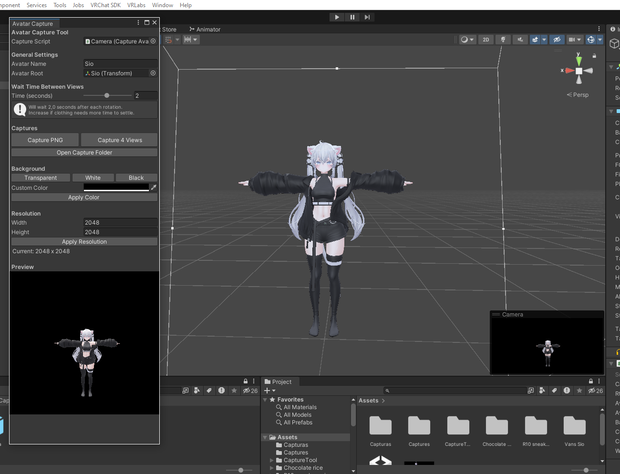
A simple and lightweight Unity tool designed to take clean studio-style screenshots of your VRChat avatar in just one click.
Perfect for creators who want fast, consistent, and high-quality avatar previews without manual setup or complex workflows.
Includes: .unitypackage + Prefab + Video tutorial
✔ ONE-CLICK INSTALL - Ready-to-use .unitypackage
✔ READY-TO-USE PREFAB - Camera + RenderTexture pre-configured
✔ VIDEO TUTORIAL INCLUDED - Step-by-step setup guide
✔ Capture 4 standard views automatically (Front, Right, Back, Left)
✔ Adjustable delay (0.1-4 sec) for cloth physics to settle
✔ Transparent background with alpha channel
✔ Solid color backgrounds (white, black, custom)
✔ Custom resolution support
✔ Live preview in editor window
✔ Runtime hotkeys: P (capture), V (4 views), 1 (transparent)
✔ Automatic folder and file naming
✔ Zero coding required
✔ Unity 2019.4+
含まれるもの: .unitypackage + プレハブ + ビデオチュートリアル
シンプルで軽量なUnityツールです。ワンクリックでVRChatアバターのスタジオ品質なスクリーンショットを撮影できます。
面倒な設定や複雑な作業は不要。速く、一貫性のある、高品質なアバタープレビューを求めるクリエイターに最適です。
✔ ワンクリックインストール - 即戦力の.unitypackage
✔ プレハブ完備 - カメラ+RenderTextureがあらかじめ設定済み
✔ ビデオチュートリアル付き - ステップバイステップの設定ガイド
✔ 4方向の自動撮影(正面 / 右 / 背面 / 左)
✔ 布物理が落ち着くまでの待機時間を調整可能(0.1〜4秒)
✔ 透明背景(アルファチャンネル対応)
✔ 単色背景(白 / 黒 / カスタムカラー)
✔ カスタム解像度対応
✔ エディタウィンドウでライブプレビュー
✔ ランタイムホットキー:P(撮影)/ V(4方向撮影)/ 1(透明背景)
✔ 自動フォルダ&ファイル名設定
✔ コーディング不要
✔ Unity 2019.4以上対応
모든 리뷰
더보기리뷰 등록
리뷰를 작성하려면 로그인이 필요합니다.
로그인하고 리뷰 쓰기