'%3e%3cg%20clip-path='url(%23roundHexB)'%3e%3cpath%20fill='%236D5DFC'%20d='M256%2040%20443%20148%20443%20364%20256%20472%2069%20364%2069%20148Z'/%3e%3cpath%20fill='%239C93FB'%20d='M69%20148%20256%2040%20443%20148%20256%20256Z'/%3e%3cpath%20fill='%234A3FD1'%20d='M256%20256%20443%20148%20443%20364%20256%20472Z'/%3e%3c/g%3e%3c!--%20top%20face:%20filled%20round%20magnifier%20--%3e%3cg%20transform='matrix(0.8660254,-0.5,0.8660254,0.5,69,148)'%3e%3cg%20transform='matrix(0.935,0,0,0.935,7.02,7.02)'%3e%3ccircle%20cx='88'%20cy='88'%20r='52'%20fill='%23FFFFFF'/%3e%3ccircle%20cx='88'%20cy='88'%20r='28'%20fill='%239C93FB'/%3e%3cpath%20d='M124%20124%20164%20164'%20stroke='%23FFFFFF'%20stroke-width='26'%20stroke-linecap='round'/%3e%3c/g%3e%3c/g%3e%3cg%20transform='matrix(0.8660254,0.5,0,1,69,148)'%3e%3cpath%20d='M96.1,61.08%20L45.9,128.92%20Q34,145%2054,145%20L162,145%20Q182,145%20170.1,128.92%20L119.9,61.08%20Q108,45%2096.1,61.08%20Z'%20fill='%23FFFFFF'/%3e%3c/g%3e%3c!--%20right%20face:%20filled%20bubble%20--%3e%3cg%20transform='matrix(0.8660254,-0.5,0,1,256,256)'%3e%3cg%20transform='matrix(0.855,0,0,0.855,15.66,15.66)'%3e%3cpath%20d='M60%2042H156a28%2028%200%200%201%2028%2028V158Q184%20168%20174.47%20164.96L124.53%20149.04Q115%20146%20105%20146H60a28%2028%200%200%201-28-28V70a28%2028%200%200%201%2028-28Z'%20fill='%23FFFFFF'/%3e%3c/g%3e%3c/g%3e%3c/g%3e%3c/svg%3e)
 rubynouille
상품 설명
A Unity Editor audit tool for VRChat persistence.
PersistKit Inspector helps you check what your world is saving before you upload it.
It is made for VRChat world creators using PlayerData, PlayerObjects, save slots, settings, inventories, leaderboards, player progress, unlocks, or any UdonSharp system where players expect their data to come back next time.
Persistence bugs are awkward because they often look fine while you are building. A key is a little too generic. A prefix is missing from one setting. A save slot uses a slightly different naming pattern. A PlayerObject prefab has synced fields, but the persistence setup is incomplete. ClientSim has local data that makes a test pass, but the uploaded world still needs its own check.
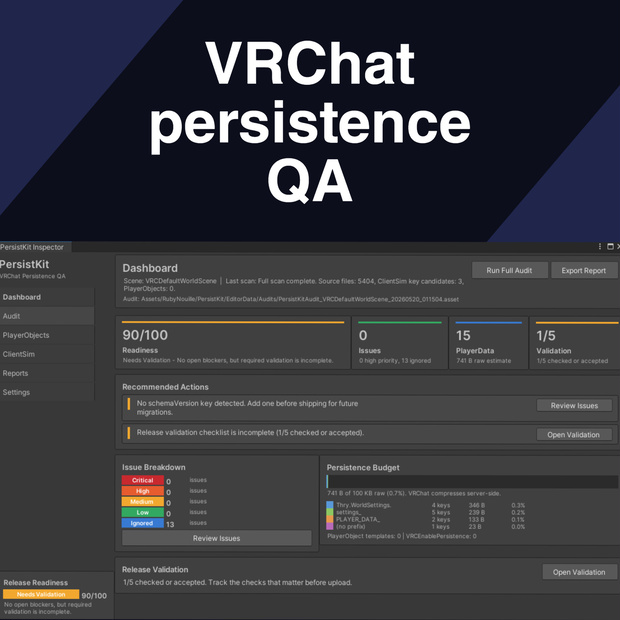
PersistKit gives you a proper review pass for that. Run a full audit and it scans your loaded scenes, C# source files, local ClientSim JSON, and any keys you add manually. The result is an audit asset you can reopen, edit, compare, export, and keep with your release notes.
The Dashboard gives you the quick read: release readiness, open issues, PlayerData storage estimates, validation status, PlayerObject counts, and the next things worth checking. The Audit tab shows the actual PlayerData findings, including source location, confidence, value type, prefix status, estimated raw size, and warnings for keys that look risky.
PlayerObject scanning checks loaded scenes for `VRCPlayerObject`, `VRCEnablePersistence`, UdonSharp behaviours, synced fields, and setup warnings. The ClientSim tab shows local PlayerData and PlayerObject JSON files, with tools to refresh, back up, import, export, or clear data when you need a cleaner local test.
Reports are built in. Export Markdown or JSON for a release record, compare two audit snapshots to see which keys were added or changed, and use the validation checklist to track the uploaded tests that still need a human pass.
There is also a save-slot key generator for creating consistent C# constants, useful when you are using prefixed keys like `rpg.A.level`, `rpg.B.level`, or `rpg.C.coins` instead of trying to manage slot names by hand.
No code changes are required to use the tool. Open `Tools > RubyNouille > PersistKit`, choose your namespace prefix, and run a full audit.
PersistKit is not a replacement for testing an uploaded VRChat build. It is the step before that: the part where you find the obvious naming mistakes, missing setup, suspicious storage growth, stale ClientSim data, and risky key changes while they are still easy to fix.
If your world uses persistence, PersistKit gives you a clearer answer to the question everyone eventually has to ask: what are we actually saving, and is it safe to ship?
모든 리뷰
더보기리뷰 등록
리뷰를 작성하려면 로그인이 필요합니다.
로그인하고 리뷰 쓰기