'%3e%3cg%20clip-path='url(%23roundHexB)'%3e%3cpath%20fill='%236D5DFC'%20d='M256%2040%20443%20148%20443%20364%20256%20472%2069%20364%2069%20148Z'/%3e%3cpath%20fill='%239C93FB'%20d='M69%20148%20256%2040%20443%20148%20256%20256Z'/%3e%3cpath%20fill='%234A3FD1'%20d='M256%20256%20443%20148%20443%20364%20256%20472Z'/%3e%3c/g%3e%3c!--%20top%20face:%20filled%20round%20magnifier%20--%3e%3cg%20transform='matrix(0.8660254,-0.5,0.8660254,0.5,69,148)'%3e%3cg%20transform='matrix(0.935,0,0,0.935,7.02,7.02)'%3e%3ccircle%20cx='88'%20cy='88'%20r='52'%20fill='%23FFFFFF'/%3e%3ccircle%20cx='88'%20cy='88'%20r='28'%20fill='%239C93FB'/%3e%3cpath%20d='M124%20124%20164%20164'%20stroke='%23FFFFFF'%20stroke-width='26'%20stroke-linecap='round'/%3e%3c/g%3e%3c/g%3e%3cg%20transform='matrix(0.8660254,0.5,0,1,69,148)'%3e%3cpath%20d='M96.1,61.08%20L45.9,128.92%20Q34,145%2054,145%20L162,145%20Q182,145%20170.1,128.92%20L119.9,61.08%20Q108,45%2096.1,61.08%20Z'%20fill='%23FFFFFF'/%3e%3c/g%3e%3c!--%20right%20face:%20filled%20bubble%20--%3e%3cg%20transform='matrix(0.8660254,-0.5,0,1,256,256)'%3e%3cg%20transform='matrix(0.855,0,0,0.855,15.66,15.66)'%3e%3cpath%20d='M60%2042H156a28%2028%200%200%201%2028%2028V158Q184%20168%20174.47%20164.96L124.53%20149.04Q115%20146%20105%20146H60a28%2028%200%200%201-28-28V70a28%2028%200%200%201%2028-28Z'%20fill='%23FFFFFF'/%3e%3c/g%3e%3c/g%3e%3c/g%3e%3c/svg%3e)
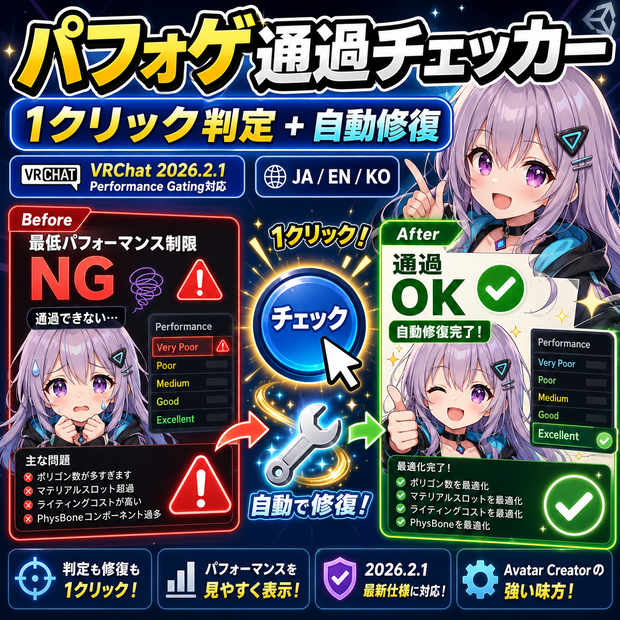
パフォゲ通過チェッカー - グループの最低パフォーマンス制限を通過できるか1クリック判定+自動修復【VRChat 2026.2.1 Performance Gating対応】【JA,En,Ko】
상품 설명
■■■ 日本語 ■■■
「グループに入ろうとしたら Fallback固定で誰にも見えない」
「Good必須のグループに入りたいけど、自分のアバターが通るか分からない」
「ランク改善したいけど、何を減らせばいいか具体的な数字が知りたい」
━━━ VRChat 2026.2.1 Performance Gating 正式対応 ━━━
パフォゲ通過チェッカーは、VRChat 2026.2.1で正式実装された
「グループインスタンスの最低パフォーマンス制限」 (Performance Gating)
に対応した1クリック判定+自動修復ツールです。
グループオーナーが「Medium以上必須」「Good以上必須」と設定した
インスタンスで、自分のアバターが通過できるかを瞬時に判定し、
通過できない場合は不足項目を具体的な数字で表示します。
━━━ 主な機能 ━━━
✅ 信号機UI判定 (Green/Yellow/Red 3段階)
緑: 現状で通過可能 / 黄: 15%以内超過、軽微調整で可 / 赤: 大幅軽量化必要
✅ 不足項目の数値レポート (10カテゴリ)
・「あと-3500頂点」「あと-15.7MB VRAM」等の具体数字、推奨修復ツール名も表示
・Polygons/Materials/PhysBones/VRAM/BlendShapes/Bones/SMR/MR/Particle/Download
✅ 自動修復実行 (HatoTools他商品連携)
アバター強制軽量化v1/ランククリア/パフォチューナー/おまかせPhysBone と連携、足りない部分だけ修復
✅ 3プロファイル切替
Good (Quest: ポリ70k/Mat8/PB8) / Medium (45k/4) / Poor (32k/4)
プロファイル別アバター複製、BlueprintID別管理
✅ グループ別記憶機能
「@HatoChan = Good必須」 を保存、参加時に「現状Poor → 切替推奨」 リマインダー
✅ 通過予測グラフ
8カテゴリ別カラーバー (緑/黄/赤)、現状値と各目標値を一覧
✅ アップロード前最終チェック (8カテゴリ)
FX Layer/Particle/PhysBone/Mesh/Material/Texture/BlendShape/Bone Pass/Caution/Fail判定
✅ PC/Quest 両プラットフォーム対応 (両基準しきい値内蔵)
━━━ こんな方におすすめ ━━━
✔ グループインスタンスでよく遊ぶ方
✔ Performance Gating対応で「フレと会えない」を防ぎたい方
✔ 軽量化したいけど何を削るか数字で知りたい方
✔ HatoTools ランククリア / パフォワッチ / アバター強制軽量化v1 利用者
━━━ 使い方 ━━━
1. メニュー: Tools → HatoTools → パフォゲ通過チェッカー
2. アバター + プラットフォーム (PC/Quest) + プロファイル (Good/Medium/Poor) 選択
3. 「事前分析 (1クリック)」 → 信号機判定+不足項目レポート → 必要なら「自動修復実行 (連携)」
━━━ 動作環境 ━━━
Unity 2022.3 以降 / VRChat SDK3 Avatar / VRChat 2026.2.1 以降 (Performance Gating) / Undo 完全対応
━━━━━━━━━━━━━━━━━━━━━━━━━━━━━━━━━
■■■ ENGLISH ■■■
"I tried joining a group, but I'm stuck on Fallback — nobody sees me."
"I want to join a Good-required group but don't know if my avatar passes."
"I want to improve my rank, but need exact numbers on what to cut."
━━━ VRChat 2026.2.1 Performance Gating support ━━━
PerfGate Pass Checker is a one-click judge + auto-repair tool for
"group instance minimum performance limit" (Performance Gating),
officially shipped in VRChat 2026.2.1.
When a group owner sets "Medium / Good or higher", this tool instantly
judges whether your avatar passes, and shows exactly what's over budget.
━━━ Main features ━━━
✅ Traffic-light verdict (Green / Yellow / Red)
Green: passes / Yellow: ≤15% over / Red: heavy cut needed
✅ Shortfall numeric report (10 categories)
Numbers like "-3,500 polys" / "-15.7 MB VRAM", recommended fix tool name shown
Polygons/Materials/PhysBones/VRAM/BlendShapes/Bones/SMR/MR/Particle/Download
✅ Auto-repair execution (HatoTools cross-product)
Links to AvatarForceLite v1 / RankClear / PerfTuner / AutoPhysBone, fixes only what's short
✅ 3 profile switching
Good (Quest: 70k poly / Mat 8 / PB 8) / Medium (45k / 4) / Poor (32k / 4)
Per-profile duplicates, separate BlueprintID
✅ Per-group memory
Saves "@HatoChan = Good required", reminds on join: "you are Poor → switch recommended"
✅ Pass-prediction graph
8 category color bars (green/yellow/red), current vs each target
✅ Pre-upload final check (8 categories)
FX Layer/Particle/PhysBone/Mesh/Material/Texture/BlendShape/Bone, Pass/Caution/Fail
✅ PC / Quest both supported (thresholds built in)
━━━ Who is it for ━━━
✔ Frequent group-instance players
✔ Anyone wanting to avoid "can't meet friend due to Gating"
✔ Anyone wanting numbers on what to cut
✔ HatoTools RankClear / PerfWatch / AvatarForceLite v1 users
━━━ How to use ━━━
1. Menu: Tools → HatoTools → パフォゲ通過チェッカー
2. Avatar + platform (PC/Quest) + profile (Good/Medium/Poor)
3. Click "Analyze" → verdict + shortfall report → if needed, "Auto-repair (linked)"
━━━ Environment ━━━
Unity 2022.3+ / VRChat SDK3 Avatar / VRChat 2026.2.1+ (Performance Gating) / Full Undo support
━━━━━━━━━━━━━━━━━━━━━━━━━━━━━━━━━
■■■ 한국어 ■■■
"그룹에 들어가려는데 Fallback 고정으로 아무도 못 본다"
"Good 필수 그룹에 들어가고 싶지만, 내 아바타가 통과할지 모르겠다"
"랭크 개선하고 싶은데, 무엇을 줄이면 좋을지 구체적인 숫자를 알고 싶다"
━━━ VRChat 2026.2.1 Performance Gating 정식 대응 ━━━
PerfGate 통과 체커는 VRChat 2026.2.1 에서 정식 구현된
「그룹 인스턴스 최저 퍼포먼스 제한」 (Performance Gating) 에 대응한
1클릭 판정 + 자동 복구 도구입니다.
「Medium / Good 이상 필수」 설정 인스턴스에서 아바타 통과 여부를 즉시 판정하고,
통과 불가 시 부족 항목을 구체적인 숫자로 표시합니다.
━━━ 주요 기능 ━━━
✅ 신호등 UI 판정 (Green/Yellow/Red 3 단계)
녹: 통과 가능 / 황: 15% 이내 초과 / 적: 대폭 경량화 필요
✅ 부족 항목 수치 리포트 (10 카테고리)
「-3,500 정점」 「-15.7MB VRAM」 등의 구체 숫자, 추천 복구 도구명도 표시
Polygons/Materials/PhysBones/VRAM/BlendShapes/Bones/SMR/MR/Particle/Download
✅ 자동 복구 실행 (HatoTools 타 제품 연계)
아바타 강제 경량화v1 / RankClear / PerfTuner / AutoPhysBone 연계, 부족분만 복구
✅ 3 프로파일 전환
Good (Quest: 폴리 70k / Mat 8 / PB 8) / Medium (45k / 4) / Poor (32k / 4)
프로파일별 아바타 복제, BlueprintID 별 관리
✅ 그룹별 기억 기능
「@HatoChan = Good 필수」 저장, 참가 시 「현재 Poor → 전환 추천」 리마인더
✅ 통과 예측 그래프
8 카테고리별 컬러바 (녹/황/적), 현재값과 각 목표값 일람
✅ 업로드 전 최종 체크 (8 카테고리)
FX Layer/Particle/PhysBone/Mesh/Material/Texture/BlendShape/Bone, Pass/Caution/Fail
✅ PC / Quest 양 플랫폼 대응 (양 기준 임계값 내장)
━━━ 이런 분께 추천 ━━━
✔ 그룹 인스턴스에서 자주 노는 분
✔ Performance Gating 대응으로 「친구와 못 만난다」 방지하고 싶은 분
✔ 경량화하고 싶지만 무엇을 줄일지 숫자로 알고 싶은 분
✔ HatoTools RankClear / PerfWatch / 아바타 강제 경량화v1 사용자
━━━ 사용 방법 ━━━
1. 메뉴: Tools → HatoTools → パフォゲ通過チェッカー
2. 아바타 + 플랫폼 (PC/Quest) + 프로파일 (Good/Medium/Poor) 선택
3. 「사전 분석」 → 신호등 판정 + 부족 항목 리포트 → 필요 시 「자동 복구 실행 (연계)」
━━━ 동작 환경 ━━━
Unity 2022.3 이상 / VRChat SDK3 Avatar / VRChat 2026.2.1 이상 (Performance Gating) / Undo 완전 지원
모든 리뷰
더보기리뷰 등록
리뷰를 작성하려면 로그인이 필요합니다.
로그인하고 리뷰 쓰기