'%3e%3cg%20clip-path='url(%23roundHexB)'%3e%3cpath%20fill='%236D5DFC'%20d='M256%2040%20443%20148%20443%20364%20256%20472%2069%20364%2069%20148Z'/%3e%3cpath%20fill='%239C93FB'%20d='M69%20148%20256%2040%20443%20148%20256%20256Z'/%3e%3cpath%20fill='%234A3FD1'%20d='M256%20256%20443%20148%20443%20364%20256%20472Z'/%3e%3c/g%3e%3c!--%20top%20face:%20filled%20round%20magnifier%20--%3e%3cg%20transform='matrix(0.8660254,-0.5,0.8660254,0.5,69,148)'%3e%3cg%20transform='matrix(0.935,0,0,0.935,7.02,7.02)'%3e%3ccircle%20cx='88'%20cy='88'%20r='52'%20fill='%23FFFFFF'/%3e%3ccircle%20cx='88'%20cy='88'%20r='28'%20fill='%239C93FB'/%3e%3cpath%20d='M124%20124%20164%20164'%20stroke='%23FFFFFF'%20stroke-width='26'%20stroke-linecap='round'/%3e%3c/g%3e%3c/g%3e%3cg%20transform='matrix(0.8660254,0.5,0,1,69,148)'%3e%3cpath%20d='M96.1,61.08%20L45.9,128.92%20Q34,145%2054,145%20L162,145%20Q182,145%20170.1,128.92%20L119.9,61.08%20Q108,45%2096.1,61.08%20Z'%20fill='%23FFFFFF'/%3e%3c/g%3e%3c!--%20right%20face:%20filled%20bubble%20--%3e%3cg%20transform='matrix(0.8660254,-0.5,0,1,256,256)'%3e%3cg%20transform='matrix(0.855,0,0,0.855,15.66,15.66)'%3e%3cpath%20d='M60%2042H156a28%2028%200%200%201%2028%2028V158Q184%20168%20174.47%20164.96L124.53%20149.04Q115%20146%20105%20146H60a28%2028%200%200%201-28-28V70a28%2028%200%200%201%2028-28Z'%20fill='%23FFFFFF'/%3e%3c/g%3e%3c/g%3e%3c/g%3e%3c/svg%3e)
 Parrot's Conch
상품 설명
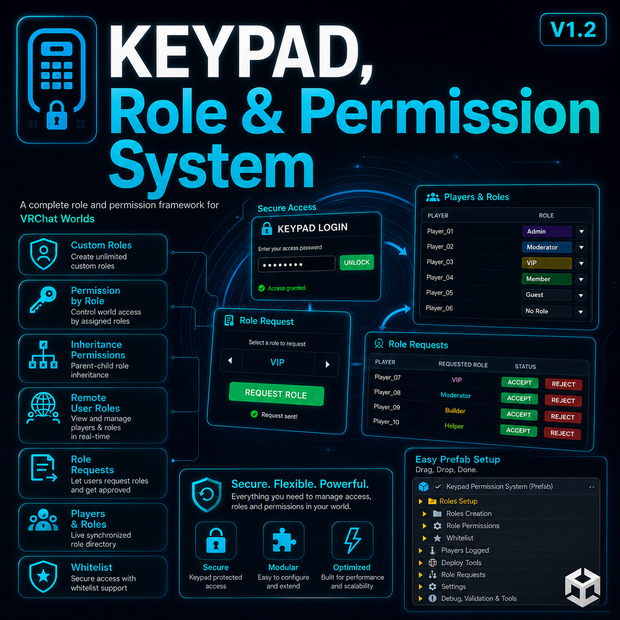
Keypad, Role & Permission System 🔐
Create role-based access for your VRChat world with an easy, flexible, and visual permission system!
Keypad Permission System lets you create custom roles, assign one or multiple passwords, unlock objects, control buttons, enable or disable colliders, trigger animator parameters, run local Udon events, and manage whitelist users from a clean custom inspector. 🦜✨
Perfect for clubs, VIP areas, staff rooms, private lounges, event rooms, admin panels, DJ booths, hidden features, and world systems that need controlled access.
✨ Main Features
🔑 Create Custom Roles
Create any role your world needs: VIP, Staff, Admin, Owner, DJ, Host, Event Guest, and more.
🎨 Role Colors
Each role has its own color, making logs, setup, and permissions easier to identify.
🔐 Single or Multiple Passwords Per Role
Use one password per role or assign multiple passwords to the same role.
🛡️ Runtime Hash Security
Passwords are written and managed in a readable way inside the Unity editor for easy setup.
When preparing the system for VRChat, the passwords are converted into runtime hashes, so the uploaded world uses the hashed version instead of storing the readable password directly.
This adds a stronger layer of protection and makes it much harder for users to casually extract or read the original passwords from the uploaded world data. 🔒
🧬 Role Permission Inheritance
Higher roles can inherit permissions from other roles.
Example: Owner can inherit Admin, Admin can inherit Staff, and Staff can inherit VIP.
✅ Whitelist Users
Automatically assign a role to specific users when they enter the world.
🖥️ TMP InputField Login
Players enter their password through a TMP InputField.
No numeric keypad needed.
📦 Permission Pools
Control permission states for:
GameObjects
Buttons
Colliders
Animators
Local Udon Events
🎞️ Animator Pool
Set Animator parameters depending on permission state.
Supports:
Bool
Int
Float
Trigger
⚡ Local Udon Events
Run local SendCustomEvent actions when a role is unlocked.
📜 Custom Logs with Role Colors
Display custom login messages using tokens like:
{username}
{role}
{role_desc}
Example:
Hello {username}, you now have {role} access. Enjoy your time at our club.
🔊 Audio Feedback
Includes preconfigured audio feedback options. You can also customize success, error, whitelist login, and other access result sounds if desired.
🧰 Debug, Validation and Tools
Includes editor tools to help detect missing references, duplicate roles, empty passwords, inheritance issues, missing events, and setup mistakes.
🎮 Example Uses
✨ VIP-only areas
🎧 DJ control panels
🚪 Staff-only doors
🛠️ Admin controls
👑 Owner-only tools
🎉 Event access codes
🔒 Private rooms
🎛️ Club management systems
🧪 Creator-only debug/test buttons
🌟 Hidden world features
🚀 Plug & Play Setup
This system is designed to be easy to use.
Simply go to:
Assets/ParrotsConch/Prefabs/KeypadPermission.prefab
Drag the prefab into your world, configure your roles, passwords, and permissions, optionally add whitelist users, and you are ready to go! ✅
The UI is already prepared by default, and the audio feedback is preconfigured but optional to customize.
📁 Includes
UdonSharp runtime script
Custom Unity editor script
Ready-to-use prefab
Role creation system
Single and multiple password support
Runtime hash system
Role inheritance system
Permission pools
Whitelist system
TMP InputField login support
Custom log system
Audio feedback options
Animator permission control
Local Udon event support
Debug and validation tools
Password clipboard helper
모든 리뷰
더보기리뷰 등록
리뷰를 작성하려면 로그인이 필요합니다.
로그인하고 리뷰 쓰기