'%3e%3cg%20clip-path='url(%23roundHexB)'%3e%3cpath%20fill='%236D5DFC'%20d='M256%2040%20443%20148%20443%20364%20256%20472%2069%20364%2069%20148Z'/%3e%3cpath%20fill='%239C93FB'%20d='M69%20148%20256%2040%20443%20148%20256%20256Z'/%3e%3cpath%20fill='%234A3FD1'%20d='M256%20256%20443%20148%20443%20364%20256%20472Z'/%3e%3c/g%3e%3c!--%20top%20face:%20filled%20round%20magnifier%20--%3e%3cg%20transform='matrix(0.8660254,-0.5,0.8660254,0.5,69,148)'%3e%3cg%20transform='matrix(0.935,0,0,0.935,7.02,7.02)'%3e%3ccircle%20cx='88'%20cy='88'%20r='52'%20fill='%23FFFFFF'/%3e%3ccircle%20cx='88'%20cy='88'%20r='28'%20fill='%239C93FB'/%3e%3cpath%20d='M124%20124%20164%20164'%20stroke='%23FFFFFF'%20stroke-width='26'%20stroke-linecap='round'/%3e%3c/g%3e%3c/g%3e%3cg%20transform='matrix(0.8660254,0.5,0,1,69,148)'%3e%3cpath%20d='M96.1,61.08%20L45.9,128.92%20Q34,145%2054,145%20L162,145%20Q182,145%20170.1,128.92%20L119.9,61.08%20Q108,45%2096.1,61.08%20Z'%20fill='%23FFFFFF'/%3e%3c/g%3e%3c!--%20right%20face:%20filled%20bubble%20--%3e%3cg%20transform='matrix(0.8660254,-0.5,0,1,256,256)'%3e%3cg%20transform='matrix(0.855,0,0,0.855,15.66,15.66)'%3e%3cpath%20d='M60%2042H156a28%2028%200%200%201%2028%2028V158Q184%20168%20174.47%20164.96L124.53%20149.04Q115%20146%20105%20146H60a28%2028%200%200%201-28-28V70a28%2028%200%200%201%2028-28Z'%20fill='%23FFFFFF'/%3e%3c/g%3e%3c/g%3e%3c/g%3e%3c/svg%3e)
 nexaverge
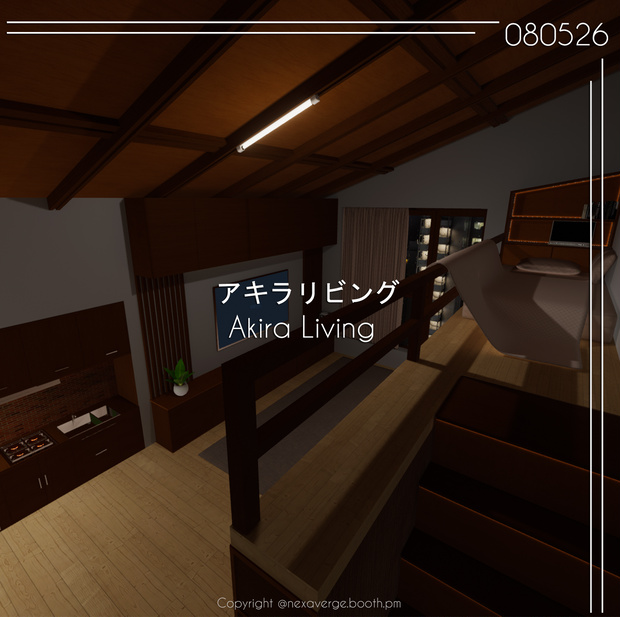
상품 설명
Sample :
https://vrchat.com/home/launch?worldId=wrld_ce6154ad-cb0e-44c2-a4fb-91aa7f0fec6a
JP
インストール方法
(以下の手順に従ってください)
1️⃣ VRChat Creator Companion を使用してください。
2️⃣ 新しい 2022 ワールドプロジェクトを作成してください。
3️⃣ このステップをスキップしてください
4️⃣ VizVid をインストールしてください: https://booth.pm/ja/items/5056077
5️⃣ Mochie Shader をインストールしてください: https://github.com/MochiesCode/Mochies-Unity-Shaders/releases/download/v1.64/Mochies.Unity.Shaders.v1.64.Free.unitypackage
6️⃣ ZIPファイルおよび Unity ワールドパッケージを解凍し、Unity シーンに追加してください。
7️⃣ 私たちのシーンを使用し、アップロードの準備をしてください。
📌 注意:
🔴 ガラスに問題が発生した場合は、次の手順に従ってください:
プロジェクト内の 「fake glass」 フォルダを削除してください。
次のリンクから再インストールしてください: https://booth.pm/en/items/2336731
🔴 インストール手順 1〜6 を順番通りに必ず実行してください。
手順を飛ばすと、進行状況に問題が発生する可能性があります。
🔴 正しくインストールすれば、ワールドは正常に動作することが確認されています。
⚠️ VRChatワールドのセットアップおよびUnityへのアップロードに関する基本的な知識も重要です!
KR
설치 방법
(아래 단계를 순서대로 따라주세요)
1️⃣ VRChat Creator Companion을 사용하세요.
2️⃣ 새로운 2022 월드 프로젝트를 생성하세요.
3️⃣ 이 단계를 건너뛰세요
4️⃣ VizVid를 설치하세요: https://booth.pm/ko/items/5056077
5️⃣ Mochie Shader를 설치하세요: https://github.com/MochiesCode/Mochies-Unity-Shaders/releases/download/v1.64/Mochies.Unity.Shaders.v1.64.Free.unitypackage
6️⃣ ZIP 파일과 Unity 월드 패키지를 압축 해제하여 Unity 씬에 추가하세요.
7️⃣ 저희의 씬을 사용하고 업로드를 준비하세요.
📌 주의:
🔴 유리에 문제가 발생할 경우, 아래 단계를 따라 주세요:
프로젝트에서 "fake glass" 폴더를 삭제하세요.
다음 링크에서 다시 설치하세요: https://booth.pm/en/items/2336731
🔴 설치 단계 1번부터 6번까지를 반드시 순서대로 진행하세요.
단계를 건너뛰면 진행 과정에 문제가 발생할 수 있습니다.
🔴 올바르게 설치하면, 월드는 정상적으로 작동함이 확인되었습니다.
⚠️ VRChat 월드 설정 및 Unity 업로드에 대한 기본 지식도 중요합니다!
EN
How to Install
(Please follow the steps below carefully)
1️⃣ Use VRChat Creator Companion.
2️⃣ Create a new 2022 world project.
3️⃣ skip this step
4️⃣ Install VizVid: https://booth.pm/en/items/5056077
5️⃣ Install Mochie Shader: https://github.com/MochiesCode/Mochies-Unity-Shaders/releases/download/v1.64/Mochies.Unity.Shaders.v1.64.Free.unitypackage
6️⃣ Extract the ZIP file and Unity world package, then add them to your Unity scene.
7️⃣ Use our scene and get ready to upload!
📌 Note:
🔴If you experience any issues with the glass, please follow these steps:
Delete the folder named "fake glass" from your project.
Reinstall it from this link: https://booth.pm/en/items/2336731
🔴 Make sure you follow the installation steps 1 through 6 in order.
If you skip any steps, it may cause issues with your progress.
🔴 The world has been tested and confirmed to work when installed correctly.
⚠️ Basic knowledge of how to set up a VRChat world and upload it to Unity is also important!
System Requirements
■ VCC Compatible
■ Unity 2022.3.22f1
■ VRCSDK3.8.2
Terms of use
- Can be modified
- Can be used for streaming
- Can be made public
- Redistribution or sale of product data is prohibited
利用ルール
>自由に改変OK
>公開しても大丈夫!
>データの再配布や販売は禁止だよ〜
Credits:
Mochie Shader
https://github.com/MochiesCode
Coquelicotz_Plants
https://coquelicotz.booth.pm/items/2634073
CQ_Books_5th
https://coquelicotz.booth.pm/items/6164819
含まれていないアイテムです。別途購入が可能です。
Skybox: https://booth.pm/en/items/7630162
Version Information
[2026.05.08: Ver1.0.0]
Initial Release
모든 리뷰
더보기리뷰 등록
리뷰를 작성하려면 로그인이 필요합니다.
로그인하고 리뷰 쓰기