'%3e%3cg%20clip-path='url(%23roundHexB)'%3e%3cpath%20fill='%236D5DFC'%20d='M256%2040%20443%20148%20443%20364%20256%20472%2069%20364%2069%20148Z'/%3e%3cpath%20fill='%239C93FB'%20d='M69%20148%20256%2040%20443%20148%20256%20256Z'/%3e%3cpath%20fill='%234A3FD1'%20d='M256%20256%20443%20148%20443%20364%20256%20472Z'/%3e%3c/g%3e%3c!--%20top%20face:%20filled%20round%20magnifier%20--%3e%3cg%20transform='matrix(0.8660254,-0.5,0.8660254,0.5,69,148)'%3e%3cg%20transform='matrix(0.935,0,0,0.935,7.02,7.02)'%3e%3ccircle%20cx='88'%20cy='88'%20r='52'%20fill='%23FFFFFF'/%3e%3ccircle%20cx='88'%20cy='88'%20r='28'%20fill='%239C93FB'/%3e%3cpath%20d='M124%20124%20164%20164'%20stroke='%23FFFFFF'%20stroke-width='26'%20stroke-linecap='round'/%3e%3c/g%3e%3c/g%3e%3cg%20transform='matrix(0.8660254,0.5,0,1,69,148)'%3e%3cpath%20d='M96.1,61.08%20L45.9,128.92%20Q34,145%2054,145%20L162,145%20Q182,145%20170.1,128.92%20L119.9,61.08%20Q108,45%2096.1,61.08%20Z'%20fill='%23FFFFFF'/%3e%3c/g%3e%3c!--%20right%20face:%20filled%20bubble%20--%3e%3cg%20transform='matrix(0.8660254,-0.5,0,1,256,256)'%3e%3cg%20transform='matrix(0.855,0,0,0.855,15.66,15.66)'%3e%3cpath%20d='M60%2042H156a28%2028%200%200%201%2028%2028V158Q184%20168%20174.47%20164.96L124.53%20149.04Q115%20146%20105%20146H60a28%2028%200%200%201-28-28V70a28%2028%200%200%201%2028-28Z'%20fill='%23FFFFFF'/%3e%3c/g%3e%3c/g%3e%3c/g%3e%3c/svg%3e)
 Sisters!
상품 설명
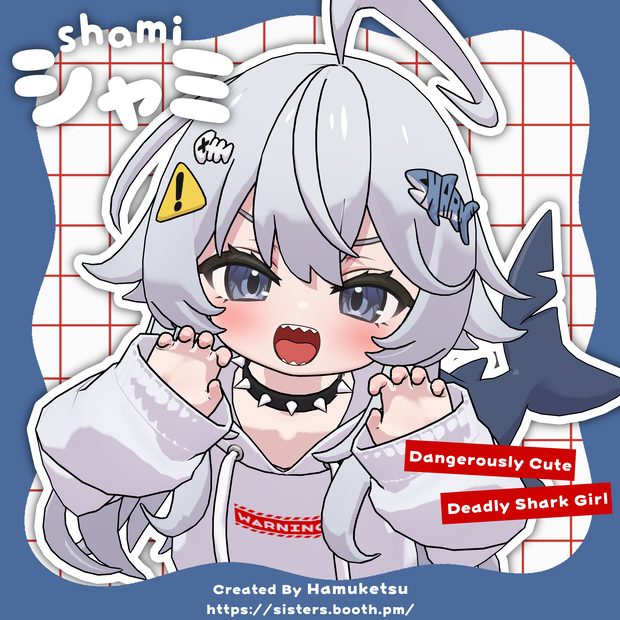
オリジナル3Dモデル「シャミ -shami-」
小さなサメの子です!
作者 -Creator- Hamuketsu/はむけつ
【公開記念価格】
価格:5000yen → 3500yen
期間:2026/05/15~2026/05/31
!試着アバターについて! FujiyamaやSuRroomなどに設置されているPolygon Loadingギミックから試着出来ます。詳細はこちら [ https://polylo.power-of-tech.com/worlds ]
✦注意事項 -Caution-
※キャンセル・返金 Cancel/Repayment
BOOTHではダウンロード商品の購入後の返品、返金は対応していません。
On BOOTH, it is not possible to cancel and repay downloaded data.
※お支払方法・購入方法等について -Payment-
お支払方法等BOOTHのシステムに関する質問は、本ショップではなくBOOTH事務局にお問い合わせください。
また、本ショップ以外での商品の取引(個別に金銭を受け取り、データを渡す等)には一切応じません。
Do NOT ask me about how to pay/purchase on BOOTH, please ask BOOTH directly.
Also it is not possible to pay directly to the creator to purchase model data.
※日本国外向けの代理購入サービスについて -Other shops-
代理販売は許可していません。
My models are only available from booth, reselling on other sites or shops is not allowed.
✦利用規約 -License Agreement-
+利用規約(jp)
https://drive.google.com/file/d/1Kf3SgsqVPEn-35OqaGHAL-Ygd9rtimKa/view?usp=sharing
+License Agreement(en)
https://drive.google.com/file/d/1ANKFAbHnFZv29PKPqFpLy2OAbaJ97gJl/view?usp=sharing
+이용규약(ko)
https://drive.google.com/file/d/1j8OeQIlekfbXOfghjE7HvSdPPsP5fx4r/view?usp=sharing
+3D虚拟形象用户协议(zh-CN)
https://drive.google.com/file/d/1n15czKYbU0kXeD6GKmecDVm8mcgjCSSQ/view?usp=sharing
✦Special Thanks!
・Ani-kunさん
Twitter(X)@Anikun_VRC
https://twitter.com/Anikun_VRC
Unityのセットアップをして頂きました。
・Levinさん
Twitter(X):@bunny_64479
AFKアニメーション制作の総括を担当いたしました。
・Nijeyさん
Twitter(X):@Nijey_06
AFKアニメーション制作におけるクオリティアップをご担当してくださいました。
・マキアートさん
Twitter(X):@VRC_Macchiato
AFK関連のアニメーション制作におけるセットアップおよび技術サポートを担当してくださいました。
・ぐーさん
Twitter(X)@@mochi_mofuchan
モデルの動作確認をして頂きました。
ありがとうございました!
✦内容物 -Contents-
-unitypackage
-fbx
-texture.png
-clip_psd
-もちふぃった~変換プロファイルデータ
✦モデル概要 -Model Profile-
+ポリゴン数-Polygon- △71,344
+リップシンク-Lip-sync- 15種対応
+表情用シェイプキー-ShapeKeys- 100種以上 (MMDあり)
+フルボディトラッキング-FullBodyTracking- 〇
+アイトラッキング-Eye-tracking- 〇
+設定済み表情アニメーション-FacialExpressions- 12
+マテリアル数-Material- 8
+PhysicsBone 〇
+使用シェーダー-Shader- lilToon
✦導入法 -How to Upload-
1.VRChat公式にアクセスし、ログイン。「Download」より「Creator Companion(VCC)」をダウンロードし、インストール。
2.VCCを起動し、新規プロジェクトを作成。
3.まず初めにlilToon Shaderをプロジェクトにインポート。
【 https://booth.pm/ja/items/3087170 】
4.さらに本データモデルのunitypackageをプロジェクトにインポートする。
5.HierarchyにPrefabをD&D。
6.VRChat SDK->Show Control Panel からVRChat SDKパネルを開き、BuildタブのBuild&Publishボタンを押す。
7.情報を入力し、Uploadボタンを押す。
※Sharingの項目は必ずPrivateにすること。
1.Access and log in to the Official VRChat website. Download "Creator Companion(VCC)" from "Download" and install it to your PC.
2.Turn on VCC, and create a new project.
3.First of all, import lil toon shader to the project.
【 https://booth.pm/ja/items/3087170 】
4.Second of all, import this model's unitypackage to the project.
5.Drag and Drop the prefab to Hierarchy.
6.Open the VRChat SDK panel from VRChat SDK->Show Control Panel, and press Build & Publish.
7.Fill the information of the avatar and press Upload.
※The category of Sharing has to be Private.
✦アップデート情報 -Update info-
2026/05/15 ver.0.0.0
公開
released
2026/05/16 ver.0.0.1
一部顔のメッシュのウェイトを調整しました。
Adjusting the weight painting on some parts of the face mesh.
모든 리뷰
더보기리뷰 등록
리뷰를 작성하려면 로그인이 필요합니다.
로그인하고 리뷰 쓰기