'%3e%3cg%20clip-path='url(%23roundHexB)'%3e%3cpath%20fill='%236D5DFC'%20d='M256%2040%20443%20148%20443%20364%20256%20472%2069%20364%2069%20148Z'/%3e%3cpath%20fill='%239C93FB'%20d='M69%20148%20256%2040%20443%20148%20256%20256Z'/%3e%3cpath%20fill='%234A3FD1'%20d='M256%20256%20443%20148%20443%20364%20256%20472Z'/%3e%3c/g%3e%3c!--%20top%20face:%20filled%20round%20magnifier%20--%3e%3cg%20transform='matrix(0.8660254,-0.5,0.8660254,0.5,69,148)'%3e%3cg%20transform='matrix(0.935,0,0,0.935,7.02,7.02)'%3e%3ccircle%20cx='88'%20cy='88'%20r='52'%20fill='%23FFFFFF'/%3e%3ccircle%20cx='88'%20cy='88'%20r='28'%20fill='%239C93FB'/%3e%3cpath%20d='M124%20124%20164%20164'%20stroke='%23FFFFFF'%20stroke-width='26'%20stroke-linecap='round'/%3e%3c/g%3e%3c/g%3e%3cg%20transform='matrix(0.8660254,0.5,0,1,69,148)'%3e%3cpath%20d='M96.1,61.08%20L45.9,128.92%20Q34,145%2054,145%20L162,145%20Q182,145%20170.1,128.92%20L119.9,61.08%20Q108,45%2096.1,61.08%20Z'%20fill='%23FFFFFF'/%3e%3c/g%3e%3c!--%20right%20face:%20filled%20bubble%20--%3e%3cg%20transform='matrix(0.8660254,-0.5,0,1,256,256)'%3e%3cg%20transform='matrix(0.855,0,0,0.855,15.66,15.66)'%3e%3cpath%20d='M60%2042H156a28%2028%200%200%201%2028%2028V158Q184%20168%20174.47%20164.96L124.53%20149.04Q115%20146%20105%20146H60a28%2028%200%200%201-28-28V70a28%2028%200%200%201%2028-28Z'%20fill='%23FFFFFF'/%3e%3c/g%3e%3c/g%3e%3c/g%3e%3c/svg%3e)
 Parrot's Conch
상품 설명
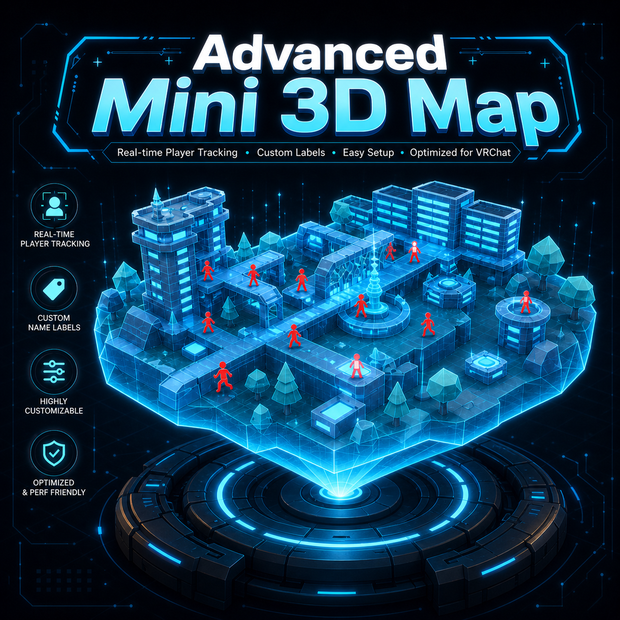
Advanced Mini 3D Map 🛰️✨
Real-time 3D hologram minimap system for VRChat worlds
Advanced Mini 3D Map is a plug-and-play Unity + UdonSharp system that lets you add a live 3D minimap to your VRChat world.
It detects players inside a selected 3D zone and mirrors them into a miniature map display, showing their position, direction, nickname, and movement animations in real time. Players can appear as small animated figures inside the minimap, walking, strafing, moving backward, rotating, and jumping just like they do in the real world area.
It also includes a built-in 3D Minimap Baker, so you can automatically generate a simplified low-poly version of your world area instead of modeling it manually.
What is this product? 🧊
Advanced Mini 3D Map creates a miniature 3D representation of a selected area of your world. The system uses a Box Collider to define the real zone. Any player inside that zone will appear inside the minimap with accurate 3D positioning. This means the minimap does not only show left and right movement. It can also reflect height, depth, floors, platforms, stairs, towers, arenas, rooms, and vertical spaces. Your users will appear as small animated “mini characters” inside the minimap, making the world feel more alive and easier to understand.
Who is this for? 🎮
This asset is made for VRChat world creators who want to add a polished, futuristic, and useful 3D minimap to their worlds. This is not just a flat 2D map. It is a real 3D miniature map with animated player indicators.
Main Features ✨
Real-time player mirroring 🧍♂️➡️🧊
Players inside the configured area are automatically detected and shown inside the minimap.
Each MiniPlayer can display:
Player position
Player viewing direction
Player nickname
Forward and backward movement
Side movement
Jump / in-air state
Smooth animated motion
This allows your MiniPlayers to visually react when players walk forward, walk backward, move sideways, or jump.
You can use the included setup, simple cube-style characters, custom low-poly models, icons, arrows, or your own mini characters.
3D Minimap Baker included 🛠️
Advanced Mini 3D Map includes a built-in 3D Minimap Baker.
This means you do not need to manually create a low-poly version of your world area.
The baker can scan the objects inside the selected Box Collider zone and generate a simplified 3D minimap mesh for you.
Supported generation modes include:
Voxel mode 🧱
Mesh Decimation 🔻
Point Cloud Surface Reconstruction ☁️
This makes it useful for different types of worlds, from blocky arenas and dungeons to more complex or organic environments.
Hologram shader included 🌌
The asset includes a custom hologram shader designed for the generated minimap.
The shader supports:
Custom hologram color
Transparent or opaque rendering
Front / Back / Both face rendering
Rim light
Scanlines
Grid effect
Grid mipmapping
Flicker toggle
Glitch toggle
Vertex pulse toggle
Heavy effects can be disabled to save performance, while still keeping a clean hologram look.
Custom editor tools ⚙️
The included editor helps you configure the minimap visually and quickly.
It includes:
MiniPlayer slot detection
Nickname label detection
Header object detection
Ragdoll Animator detection
Box Collider zone configuration
3D Minimap Baker
Gizmos for zone, display, MiniPlayers, and headers
Validation tools
Preview and mesh saving options
Everything is designed to make setup faster and easier.
Why should you buy this? 💎
Creating a good 3D minimap can take a lot of time.
Normally, you would need to manually build a miniature low-poly version of your world, create player indicators, handle movement mapping, create labels, add animations, make a hologram material, and organize the whole system.
Advanced Mini 3D Map gives you all of that in one package.
You get:
A ready-to-use 3D minimap system
Automatic low-poly minimap generation
Animated player indicators
Nickname display
Hologram shader
Editor tools
Local real-time player tracking
Customizable visual setup
A professional feature for your VRChat world
It helps your world feel more polished, interactive, and premium. ✨
How to use it 📘
Advanced Mini 3D Map is designed to be plug and play.
Just drag and drop the prefab into your scene:
Assets/ParrotsConch/Prefabs/AdvancedMini3DMap.prefab
Inside the prefab, you will find a GameObject called:
Mini3DMap
This GameObject already includes the main component:
AdvancedMini3DMap
From this component, you can edit and configure the entire minimap system.
The prefab also includes a Box Collider, which is used to choose the real area of your world that the minimap will track. Simply move, scale, and adjust the Box Collider to cover the zone you want to display.
Inside the same component, you will also find the 3D Minimap Baker, which helps you generate a simplified low-poly version of the selected area automatically. This saves you from having to manually remodel your world in miniature.
Once the prefab is placed and the zone is configured, the minimap is ready to use. 🛰️✨
Final note 🦜
Advanced Mini 3D Map is made to help VRChat world creators add a unique 3D hologram minimap without rebuilding everything by hand.
It is visual, flexible, customizable, and easy to use — perfect for making your world feel more alive, more advanced, and more professional.
모든 리뷰
더보기리뷰 등록
리뷰를 작성하려면 로그인이 필요합니다.
로그인하고 리뷰 쓰기