'%3e%3cg%20clip-path='url(%23roundHexB)'%3e%3cpath%20fill='%236D5DFC'%20d='M256%2040%20443%20148%20443%20364%20256%20472%2069%20364%2069%20148Z'/%3e%3cpath%20fill='%239C93FB'%20d='M69%20148%20256%2040%20443%20148%20256%20256Z'/%3e%3cpath%20fill='%234A3FD1'%20d='M256%20256%20443%20148%20443%20364%20256%20472Z'/%3e%3c/g%3e%3c!--%20top%20face:%20filled%20round%20magnifier%20--%3e%3cg%20transform='matrix(0.8660254,-0.5,0.8660254,0.5,69,148)'%3e%3cg%20transform='matrix(0.935,0,0,0.935,7.02,7.02)'%3e%3ccircle%20cx='88'%20cy='88'%20r='52'%20fill='%23FFFFFF'/%3e%3ccircle%20cx='88'%20cy='88'%20r='28'%20fill='%239C93FB'/%3e%3cpath%20d='M124%20124%20164%20164'%20stroke='%23FFFFFF'%20stroke-width='26'%20stroke-linecap='round'/%3e%3c/g%3e%3c/g%3e%3cg%20transform='matrix(0.8660254,0.5,0,1,69,148)'%3e%3cpath%20d='M96.1,61.08%20L45.9,128.92%20Q34,145%2054,145%20L162,145%20Q182,145%20170.1,128.92%20L119.9,61.08%20Q108,45%2096.1,61.08%20Z'%20fill='%23FFFFFF'/%3e%3c/g%3e%3c!--%20right%20face:%20filled%20bubble%20--%3e%3cg%20transform='matrix(0.8660254,-0.5,0,1,256,256)'%3e%3cg%20transform='matrix(0.855,0,0,0.855,15.66,15.66)'%3e%3cpath%20d='M60%2042H156a28%2028%200%200%201%2028%2028V158Q184%20168%20174.47%20164.96L124.53%20149.04Q115%20146%20105%20146H60a28%2028%200%200%201-28-28V70a28%2028%200%200%201%2028-28Z'%20fill='%23FFFFFF'/%3e%3c/g%3e%3c/g%3e%3c/g%3e%3c/svg%3e)
 Eric VFX Studio
상품 설명
■ 内容
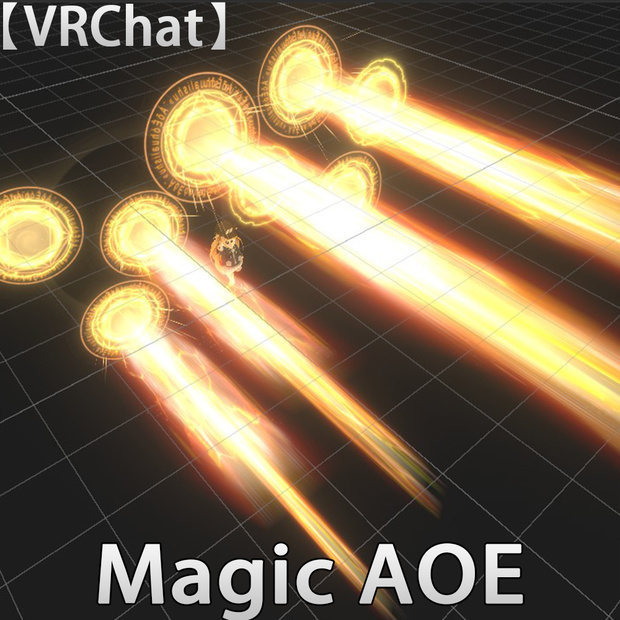
魔法範囲攻撃には、
単体攻撃と範囲攻撃に分類される8種類の魔法攻撃が含まれます。
モジュラーアバターに対応しています。キャラクターのアバターの直下に配置するだけです!
インストールはとても簡単です。
1. このUnityツールキットをインポートします。
2. 「Eric_VFXStudio/VRChatVFX_Magic AOE/Prefab」ディレクトリにある「VFX_Magic AOE」ファイルを、キャラクターのアバターの直下に配置します。
3. アップロード前に「Auto-Fix」オプションが表示された場合は選択してください。表示されない場合は、直接アップロードできます。
✅ 「コントロール」メニューで「VFX_Magic AOE」を選択することで、このエフェクトのオン/オフを切り替えることができます。
■システム要件
Unity バージョン: 2022.3.22f1
VRChat Creator Companion バージョン: 2.4.4
ModularAvatar
https://modular-avatar.nadena.dev/en/
■利用規約
複製および再販は禁止されています。
................................................................................................
■ Contents
Area-of-effect magic attacks include:
Eight types of magic attacks, categorized into single-target and area-of-effect attacks.
Compatible with modular avatars. Simply place them directly under your character's avatar!
Installation is very easy.
1. Import this Unity toolkit.
2. Place the "VFX_Magic AOE" file from the "Eric_VFXStudio/VRChatVFX_Magic AOE/Prefab" directory directly under your character's avatar.
3. If the "Auto-Fix" option appears before uploading, select it. If not, you can upload directly.
✅ You can turn this effect on/off by selecting "VFX_Magic AOE" in the "Controls" menu.
Compatible with PC.
■System Requirements
Unity Version: 2022.3.22f1
VRChat Creator Companion Version: 2.4.4
ModularAvatar
https://modular-avatar.nadena.dev/en/
■Terms of Use
Reproduction and resale are prohibited.
모든 리뷰
더보기리뷰 등록
리뷰를 작성하려면 로그인이 필요합니다.
로그인하고 리뷰 쓰기