'%3e%3cg%20clip-path='url(%23roundHexB)'%3e%3cpath%20fill='%236D5DFC'%20d='M256%2040%20443%20148%20443%20364%20256%20472%2069%20364%2069%20148Z'/%3e%3cpath%20fill='%239C93FB'%20d='M69%20148%20256%2040%20443%20148%20256%20256Z'/%3e%3cpath%20fill='%234A3FD1'%20d='M256%20256%20443%20148%20443%20364%20256%20472Z'/%3e%3c/g%3e%3c!--%20top%20face:%20filled%20round%20magnifier%20--%3e%3cg%20transform='matrix(0.8660254,-0.5,0.8660254,0.5,69,148)'%3e%3cg%20transform='matrix(0.935,0,0,0.935,7.02,7.02)'%3e%3ccircle%20cx='88'%20cy='88'%20r='52'%20fill='%23FFFFFF'/%3e%3ccircle%20cx='88'%20cy='88'%20r='28'%20fill='%239C93FB'/%3e%3cpath%20d='M124%20124%20164%20164'%20stroke='%23FFFFFF'%20stroke-width='26'%20stroke-linecap='round'/%3e%3c/g%3e%3c/g%3e%3cg%20transform='matrix(0.8660254,0.5,0,1,69,148)'%3e%3cpath%20d='M96.1,61.08%20L45.9,128.92%20Q34,145%2054,145%20L162,145%20Q182,145%20170.1,128.92%20L119.9,61.08%20Q108,45%2096.1,61.08%20Z'%20fill='%23FFFFFF'/%3e%3c/g%3e%3c!--%20right%20face:%20filled%20bubble%20--%3e%3cg%20transform='matrix(0.8660254,-0.5,0,1,256,256)'%3e%3cg%20transform='matrix(0.855,0,0,0.855,15.66,15.66)'%3e%3cpath%20d='M60%2042H156a28%2028%200%200%201%2028%2028V158Q184%20168%20174.47%20164.96L124.53%20149.04Q115%20146%20105%20146H60a28%2028%200%200%201-28-28V70a28%2028%200%200%201%2028-28Z'%20fill='%23FFFFFF'/%3e%3c/g%3e%3c/g%3e%3c/g%3e%3c/svg%3e)
 Litaruism ART
상품 설명
毎週腕素材をリリースしている腕素材屋さんです。
ぜひ配信のネタにしてください!
⭐︎Lita公式サイト⭐︎
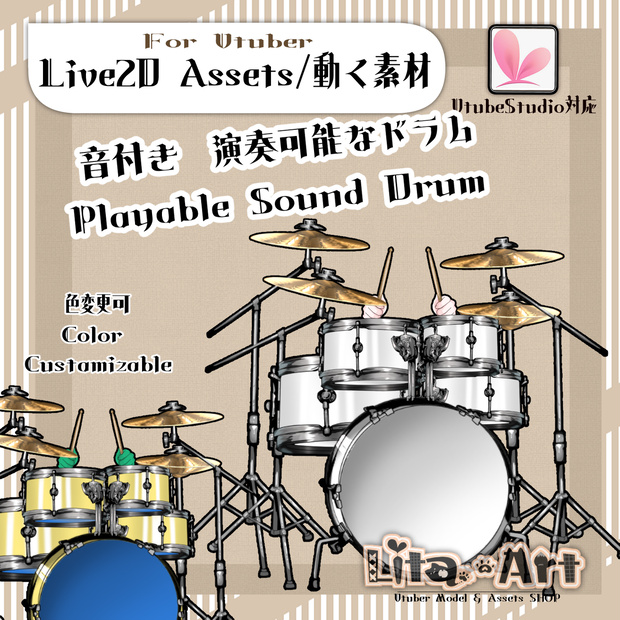
VtubeStudioで使える素材です。//Assets for VtubeStudio
効果音:魔王魂様(https://maou.audio/)の音を使用させていただいております。
音なしで使いたい場合は、VTube Studio上で音を消して使用できます。
設定方法はこちら↓
https://lita-art.net/2026/04/16/ja_how-to-sound-off/
If you prefer to use them without sound, you can mute them in VTube Studio.
For detailed instructions, please check here!
https://lita-art.net/2026/04/16/en_how-to-sound-off/
☆★☆★☆★☆★☆★☆★☆★☆★☆
キーバインド設定//Keybind setting
キーバインドはイラストを参照してください。
Please refer to the illustration for the keybinds.
☆★☆★☆★☆★☆★☆★☆★☆★☆★☆★☆★☆
表情パラメータで色変更可能箇所//Color options (adjustable via Expression Parameters)
腕色//Arm color(SkinColor)
ドラムサイド//Side(color)
ドラムヘッド//DrumHead(FrontColor)
✅ 商用利用・編集可能ですが、著作権は放棄していません。
✅ クレジット表記は任意です。
✅ ご利用の際は、下記URL記載の 利用規約 に同意したものとみなします。
🔗 https://lita-art.net/terms-and-condition/
⚠️ 成人向けコンテンツへの使用規制はしていません。
常識の範囲内でご使用ください。
ーーーーーーーーーーーー
Litaのアイテムは、表情ファイルエディター、またはアートメッシュでの色調整が可能です。(表情ファイルエディタからは一部できないものもあります。初期の作品のほとんどはアートメッシュからの色変更になります!)
説明書→ https://note.com/litaruismart/n/n120985de98c0
表情ファイルエディタから可能な場合は、colorと書いてあるパラメータが存在します。そのパラメータをいじって色変更して遊んでみてください!
色変更パラメータ:
Color1 – 乗算明暗
Color2 – 乗算カラー
Color3 – スクリーン明暗
Color4 – スクリーンカラー
設定方法の詳細はこちらをご覧ください!
🔗 https://lita-art.net/2026/01/26/how-to-change-color/
ーーーーーーーーーーーー
一部のアイテムには効果音が含まれています。
音なしで使いたい場合は、VTube Studio上で音を消して使用できます。
設定方法はこちら↓
https://lita-art.net/2026/04/16/ja_how-to-sound-off/
ーーーーーーーーーーーー
質問・ご相談はDMにて受付中!
お気軽にご連絡ください✨
🔹 LitaのX(Twitter): https://x.com/LitaVtuber
🔹 Litaのホームページ: https://lita-art.net/
ーーーーーーーーーーーー
✅ Commercial use and editing are permitted, but I do not waive my copyright.
✅ Credit notation is optional.
✅ By using this product, you are deemed to have agreed to the Terms of Sale listed at the URL below.
🔗https://lita-art.net/terms-and-condition/
⚠️ There are no restrictions on use in adult-oriented (NSFW) content. Please use within the bounds of common sense.
ーーーーーーーーーーーー
※Lita’s items can be color-adjusted either through the Expression File Editor or directly via ArtMesh.
Some items cannot be adjusted from the Expression File Editor. Most early works require color changes through ArtMesh.
→ https://note.com/litaruismart/n/n60f0aea213c7
If the item supports adjustment in the Expression File Editor, there will be a parameter labeled “Color.”
Try modifying that parameter to change the colors and have fun experimenting!
Color change parameters:
Color1 – Multiply Brightness
Color2 – Multiply Color
Color3 – Screen Brightness
Color4 – Screen Color
For more details on the setup method, please check here!
🔗 https://lita-art.net/2026/01/26/how-to-chage-color/
ーーーーーーーーーーーー
Some items include sound effects.
If you prefer to use them without sound, you can mute them in VTube Studio.
For detailed instructions, please check here!
https://lita-art.net/2026/04/16/en_how-to-sound-off/
ーーーーーーーーーーーー
Questions and consultations are accepted via DM!
Feel free to contact me ✨
🔹 Lita's X (Twitter): https://x.com/LitaVtuber
🔹 Lita's Website: https://lita-art.net/
모든 리뷰
더보기리뷰 등록
리뷰를 작성하려면 로그인이 필요합니다.
로그인하고 리뷰 쓰기